
[微软官网]windows server 内存限制
Memory Limits for Windows and Windows Server Releases
https://docs.microsoft.com/zh-cn/windows/desktop/Memory/memory-limits-for-windows-releases#memory-limits-for-windows-and-windows-server-releases
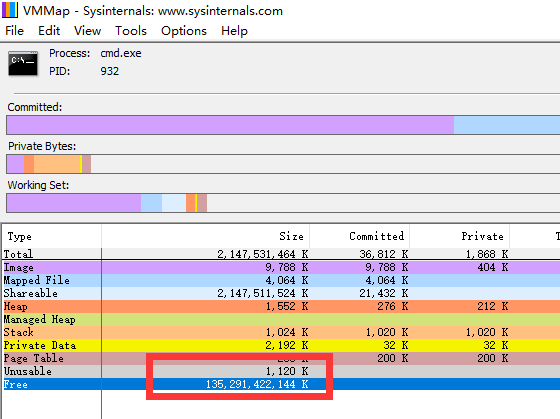
这个地方可以解释 128t的free 内存的来源了:
This topic describes the memory limits for supported Windows and Windows Server releases.
- Memory and Address Space Limits
- Physical Memory Limits: Windows 10
- Physical Memory Limits: Windows Server 2016
- Physical Memory Limits: Windows 8
- Physical Memory Limits: Windows Server 2012
- Physical Memory Limits: Windows 7
- Physical Memory Limits: Windows Server 2008 R2
- Physical Memory Limits: Windows Server 2008
- Physical Memory Limits: Windows Vista
- Physical Memory Limits: Windows Home Server
- Physical Memory Limits: Windows Server 2003 R2
- Physical Memory Limits: Windows Server 2003 with Service Pack 2 (SP2)
- Physical Memory Limits: Windows Server 2003 with Service Pack 1 (SP1)
- Physical Memory Limits: Windows Server 2003
- Physical Memory Limits: Windows XP
- Physical Memory Limits: Windows Embedded
- How graphics cards and other devices affect memory limits
- Related topics
Limits on memory and address space vary by platform, operating system, and by whether the IMAGE_FILE_LARGE_ADDRESS_AWARE value of the LOADED_IMAGE structure and 4-gigabyte tuning (4GT) are in use. IMAGE_FILE_LARGE_ADDRESS_AWARE is set or cleared by using the /LARGEADDRESSAWARE linker option.
4-gigabyte tuning (4GT), also known as application memory tuning, or the /3GB switch, is a technology (only applicable to 32 bit systems) that alters the amount of virtual address space available to user mode applications. Enabling this technology reduces the overall size of the system virtual address space and therefore system resource maximums. For more information, see What is 4GT.
Limits on physical memory for 32-bit platforms also depend on the Physical Address Extension (PAE), which allows 32-bit Windows systems to use more than 4 GB of physical memory.
Memory and Address Space Limits
The following table specifies the limits on memory and address space for supported releases of Windows. Unless otherwise noted, the limits in this table apply to all supported releases.
| Memory type | Limit on X86 | Limit in 64-bit Windows |
|---|---|---|
| User-mode virtual address space for each 32-bit process | 2 GB Up to 3 GB with IMAGE_FILE_LARGE_ADDRESS_AWARE and 4GT |
2 GB with IMAGE_FILE_LARGE_ADDRESS_AWAREcleared (default) 4 GB with IMAGE_FILE_LARGE_ADDRESS_AWARE set |
| User-mode virtual address space for each 64-bit process | Not applicable | With IMAGE_FILE_LARGE_ADDRESS_AWARE set (default): x64: 8 TB Intel Itanium-based systems: 7 TB Windows 8.1 and Windows Server 2012 R2: 128 TB 2 GB with IMAGE_FILE_LARGE_ADDRESS_AWAREcleared |
| Kernel-mode virtual address space | 2 GB From 1 GB to a maximum of 2 GB with 4GT |
8 TBWindows 8.1 and Windows Server 2012 R2: 128 TB |
| Paged pool | 384 GB or system commit limit, whichever is smaller. Windows 8.1 and Windows Server 2012 R2: 15.5 TB or system commit limit, whichever is smaller. Windows Server 2008 R2, Windows 7, Windows Server 2008 and Windows Vista: Limited by available kernel-mode virtual address space. Starting with Windows Vista with Service Pack 1 (SP1), the paged pool can also be limited by the PagedPoolLimit registry key value. Windows Home Server and Windows Server 2003: 530 MB Windows XP: 490 MB |
384 GB or system commit limit, whichever is smaller Windows 8.1 and Windows Server 2012 R2: 15.5 TB or system commit limit, whichever is smaller. Windows Server 2008 R2, Windows 7, Windows Server 2008 and Windows Vista:128 GB or system commit limit, whichever is smaller Windows Server 2003 and Windows XP: Up to 128 GB depending on configuration and RAM. |
| Nonpaged pool | 75% of RAM or 2 GB, whichever is smaller. Windows 8.1 and Windows Server 2012 R2: RAM or 16 TB, whichever is smaller (address space is limited to 2 x RAM). Windows Vista: Limited only by kernel mode virtual address space and physical memory. Starting with Windows Vista with SP1, the nonpaged pool can also be limited by the NonPagedPoolLimit registry key value. Windows Home Server, Windows Server 2003 and Windows XP: 256 MB, or 128 MB with 4GT. |
RAM or 128 GB, whichever is smaller (address space is limited to 2 x RAM) Windows 8.1 and Windows Server 2012 R2: RAM or 16 TB, whichever is smaller (address space is limited to 2 x RAM). Windows Server 2008 R2, Windows 7 and Windows Server 2008: 75% of RAM up to a maximum of 128 GB Windows Vista: 40% of RAM up to a maximum of 128 GB. Windows Server 2003 and Windows XP: Up to 128 GB depending on configuration and RAM. |
| System cache virtual address space (physical size limited only by physical memory) | Limited by available kernel-mode virtual address space or the SystemCacheLimit registry key value. Windows 8.1 and Windows Server 2012 R2: 16 TB. Windows Vista: Limited only by kernel mode virtual address space. Starting with Windows Vista with SP1, system cache virtual address space can also be limited by the SystemCacheLimit registry key value. Windows Home Server, Windows Server 2003 and Windows XP: 860 MB with LargeSystemCache registry key set and without 4GT; up to 448 MB with 4GT. |
Always 1 TB regardless of physical RAM Windows 8.1 and Windows Server 2012 R2: 16 TB. Windows Server 2003 and Windows XP: Up to 1 TB depending on configuration and RAM. |
Physical Memory Limits: Windows 10
The following table specifies the limits on physical memory for Windows 10.
| Version | Limit on X86 | Limit on X64 |
|---|---|---|
| Windows 10 Enterprise | 4 GB | 6 TB |
| Windows 10 Education | 4 GB | 2 TB |
| Windows 10 Pro for Workstations | 4 GB | 6 TB |
| Windows 10 Pro | 4 GB | 2 TB |
| Windows 10 Home | 4 GB | 128 GB |
Physical Memory Limits: Windows Server 2016
The following table specifies the limits on physical memory for Windows Server 2016.
| Version | Limit on X64 |
|---|---|
| Windows Server 2016 Datacenter | 24 TB |
| Windows Server 2016 Standard | 24 TB |
Physical Memory Limits: Windows 8
The following table specifies the limits on physical memory for Windows 8.
| Version | Limit on X86 | Limit on X64 |
|---|---|---|
| Windows 8 Enterprise | 4 GB | 512 GB |
| Windows 8 Professional | 4 GB | 512 GB |
| Windows 8 | 4 GB | 128 GB |
Physical Memory Limits: Windows Server 2012
The following table specifies the limits on physical memory for Windows Server 2012. Windows Server 2012 is available only in X64 editions.
| Version | Limit on X64 |
|---|---|
| Windows Server 2012 Datacenter | 4 TB |
| Windows Server 2012 Standard | 4 TB |
| Windows Server 2012 Essentials | 64 GB |
| Windows Server 2012 Foundation | 32 GB |
| Windows Storage Server 2012 Workgroup | 32 GB |
| Windows Storage Server 2012 Standard | 4 TB |
| Hyper-V Server 2012 | 4 TB |
Physical Memory Limits: Windows 7
The following table specifies the limits on physical memory for Windows 7.
| Version | Limit on X86 | Limit on X64 |
|---|---|---|
| Windows 7 Ultimate | 4 GB | 192 GB |
| Windows 7 Enterprise | 4 GB | 192 GB |
| Windows 7 Professional | 4 GB | 192 GB |
| Windows 7 Home Premium | 4 GB | 16 GB |
| Windows 7 Home Basic | 4 GB | 8 GB |
| Windows 7 Starter | 2 GB | N/A |
Physical Memory Limits: Windows Server 2008 R2
The following table specifies the limits on physical memory for Windows Server 2008 R2. Windows Server 2008 R2 is available only in 64-bit editions.
| Version | Limit on X64 | Limit on IA64 |
|---|---|---|
| Windows Server 2008 R2 Datacenter | 2 TB | |
| Windows Server 2008 R2 Enterprise | 2 TB | |
| Windows Server 2008 R2 for Itanium-Based Systems | 2 TB | |
| Windows Server 2008 R2 Foundation | 8 GB | |
| Windows Server 2008 R2 Standard | 32 GB | |
| Windows HPC Server 2008 R2 | 128 GB | |
| Windows Web Server 2008 R2 | 32 GB |
Physical Memory Limits: Windows Server 2008
The following table specifies the limits on physical memory for Windows Server 2008. Limits greater than 4 GB for 32-bit Windows assume that PAE is enabled.
| Version | Limit on X86 | Limit on X64 | Limit on IA64 |
|---|---|---|---|
| Windows Server 2008 Datacenter | 64 GB | 1 TB | |
| Windows Server 2008 Enterprise | 64 GB | 1 TB | |
| Windows Server 2008 HPC Edition | 128 GB | ||
| Windows Server 2008 Standard | 4 GB | 32 GB | |
| Windows Server 2008 for Itanium-Based Systems | 2 TB | ||
| Windows Small Business Server 2008 | 4 GB | 32 GB | |
| Windows Web Server 2008 | 4 GB | 32 GB |
Physical Memory Limits: Windows Vista
The following table specifies the limits on physical memory for Windows Vista.
| Version | Limit on X86 | Limit on X64 |
|---|---|---|
| Windows Vista Ultimate | 4 GB | 128 GB |
| Windows Vista Enterprise | 4 GB | 128 GB |
| Windows Vista Business | 4 GB | 128 GB |
| Windows Vista Home Premium | 4 GB | 16 GB |
| Windows Vista Home Basic | 4 GB | 8 GB |
| Windows Vista Starter | 1 GB |
Physical Memory Limits: Windows Home Server
Windows Home Server is available only in a 32-bit edition. The physical memory limit is 4 GB.
Physical Memory Limits: Windows Server 2003 R2
The following table specifies the limits on physical memory for Windows Server 2003 R2. Limits over 4 GB for 32-bit Windows assume that PAE is enabled.
| Version | Limit on X86 | Limit on X64 |
|---|---|---|
| Windows Server 2003 R2 Datacenter Edition | 64 GB (16 GB with 4GT) |
1 TB |
| Windows Server 2003 R2 Enterprise Edition | 64 GB (16 GB with 4GT) |
1 TB |
| Windows Server 2003 R2 Standard Edition | 4 GB | 32 GB |
Physical Memory Limits: Windows Server 2003 with Service Pack 2 (SP2)
The following table specifies the limits on physical memory for Windows Server 2003 with Service Pack 2 (SP2). Limits over 4 GB for 32-bit Windows assume that PAE is enabled.
| Version | Limit on X86 | Limit on X64 | Limit on IA64 |
|---|---|---|---|
| Windows Server 2003 with Service Pack 2 (SP2), Datacenter Edition | 64 GB (16 GB with 4GT) |
1 TB | 2 TB |
| Windows Server 2003 with Service Pack 2 (SP2), Enterprise Edition | 64 GB (16 GB with 4GT) |
1 TB | 2 TB |
| Windows Server 2003 with Service Pack 2 (SP2), Standard Edition | 4 GB | 32 GB |
Physical Memory Limits: Windows Server 2003 with Service Pack 1 (SP1)
The following table specifies the limits on physical memory for Windows Server 2003 with Service Pack 1 (SP1). Limits over 4 GB for 32-bit Windows assume that PAE is enabled.
| Version | Limit on X86 | Limit on X64 | Limit on IA64 |
|---|---|---|---|
| Windows Server 2003 with Service Pack 1 (SP1), Datacenter Edition | 64 GB (16 GB with 4GT) |
X64 1 TB | 1 TB |
| Windows Server 2003 with Service Pack 1 (SP1), Enterprise Edition | 64 GB (16 GB with 4GT) |
X64 1 TB | 1 TB |
| Windows Server 2003 with Service Pack 1 (SP1), Standard Edition | 4 GB | 32 GB |
Physical Memory Limits: Windows Server 2003
The following table specifies the limits on physical memory for Windows Server 2003. Limits over 4 GB for 32-bit Windows assume that PAE is enabled.
| Version | Limit on X86 | Limit on IA64 |
|---|---|---|
| Windows Server 2003, Datacenter Edition | 64 GB (16 GB with 4GT) |
512 GB |
| Windows Server 2003, Enterprise Edition | 64 GB (16 GB with 4GT) |
512 GB |
| Windows Server 2003, Standard Edition | 4 GB | |
| Windows Server 2003, Web Edition | 2 GB | |
| Windows Small Business Server 2003 | 4 GB | |
| Windows Compute Cluster Server 2003 | 32 GB | |
| Windows Storage Server 2003, Enterprise Edition | 8 GB | |
| Windows Storage Server 2003 | 4 GB |
Physical Memory Limits: Windows XP
The following table specifies the limits on physical memory for Windows XP.
| Version | Limit on X86 | Limit on X64 | Limit on IA64 |
|---|---|---|---|
| Windows XP | 4 GB | 128 GB | 128 GB (not supported) |
| Windows XP Starter Edition | 512 MB | N/A | N/A |
Physical Memory Limits: Windows Embedded
The following table specifies the limits on physical memory for Windows Embedded.
| Version | Limit on X86 | Limit on X64 |
|---|---|---|
| Windows XP Embedded | 4 GB | |
| Windows Embedded Standard 2009 | 4 GB | |
| Windows Embedded Standard 7 | 4 GB | 192 GB |
How graphics cards and other devices affect memory limits
Devices have to map their memory below 4 GB for compatibility with non-PAE-aware Windows releases. Therefore, if the system has 4GB of RAM, some of it is either disabled or is remapped above 4GB by the BIOS. If the memory is remapped, X64 Windows can use this memory. X86 client versions of Windows don’t support physical memory above the 4GB mark, so they can’t access these remapped regions. Any X64 Windows or X86 Server release can.
X86 client versions with PAE enabled do have a usable 37-bit (128 GB) physical address space. The limit that these versions impose is the highest permitted physical RAM address, not the size of the IO space. That means PAE-aware drivers can actually use physical space above 4 GB if they want. For example, drivers could map the "lost" memory regions located above 4 GB and expose this memory as a RAM disk.
Related topics
IMAGE_FILE_LARGE_ADDRESS_AWARE
[微软官网]windows server 内存限制的更多相关文章
- windows server 2008 各版本号下载地址(微软官网)
前言: 微软官网上下载系统的镜像文件要远比百度网盘下载起来得更快. Windows Server 2008 32-bit Standard(标准版)
- [微软官网]One Windows Kernel
One Windows Kernel https://techcommunity.microsoft.com/t5/Windows-Kernel-Internals/One-Windows-Kerne ...
- 微软MSDN原版Windows Server 2008 R2 With SP1下载
Windows Server 2008 R2是windows 服务器版本Windows Server 2008 R2继续提升了虚拟化.系统管理弹性.网络存取方式,以及信息安全等领域的应用,其中有不少功 ...
- 从微软官网下载VS离线安装包的方法
这里描述是包括所有版本,截图以下载VS2017社区版为例: ①登入VS官网下载页面,选择需要的版本点击下载,下载页点此进入. ②下载完成后,打开下载文件所在文件夹,Windows 8.1及以上版本用户 ...
- [官网]Windows modules
Windows modules https://docs.ansible.com/ansible/latest/modules/list_of_windows_modules.html win_acl ...
- 微软官网下载win10离线介质
1.打开google浏览器 2.搜索win10官网下载或者直接输入网址https://www.microsoft.com/zh-cn/software-download/windows10 3.按F1 ...
- 微软官网下载windows系统有点全
第一步:访问:https://www.microsoft.com/zh-cn/software-download/windows10ISO/ 默认就只能下载win10,这怎么行呢.巨硬程序员貌似没做服 ...
- [MS] 微软官网下载安装SQLSERVER2019的rpm
快速入门:安装 SQL Server 和 Red Hat 上创建数据库 https://docs.microsoft.com/zh-cn/sql/linux/quickstart-install-co ...
- [微软官网]SQLSERVER的版本信息
来源:https://docs.microsoft.com/zh-cn/sql/sql-server/editions-and-components-of-sql-server-2017?view=s ...
随机推荐
- pek (北大oj)3070
思路:矩阵快速幂, 二分加速 #include<cstdio> #include<cstring> #define ll long long #define mod 10000 ...
- Qt 编程指南 8 显示静态小图片和动态大图片
显示控件概览 图片浏览示例 第一行是一个标签控件,objectName 为 labelShow,文本内容清空,因为是用来显示图片用的. 主界面第二行的控件是四个普通按钮 第一个按钮文本是 " ...
- 简单的Map缓存机制实现
大致思路是用一个单例的Map实现,当然此Map得是线程安全的--ConcurrentHashMap 原本项目需求是缓存十条消息,所以打算用Map实现缓存机制.中途夭折下面具体尚未实现... 当然此代码 ...
- python 数据结构 队列(queue)
如需转发,请注明出处:小婷儿的python https://www.cnblogs.com/xxtalhr/p/10293817.html 欢迎关注小婷儿的博客: 有问题请在博客下留言或加作者微信:t ...
- centos 6 中恢复删除的文件
CentOS 6 安裝 extundelete:: ##############测试的时候需要2块硬盘############### yum install e2fsprogs-devel e2fsp ...
- linxu系统知识和简单命令
Linux目录基本知识 / 根目录 /bin 存放必要的命令 (binary) /boot 存放内核以及启动所需的文件(引导/自引/启动/开机程序) /dev 存放设备文件 (devices) /et ...
- Javascript数组Array的forEach方法
Javascript数组Array的forEach扩展方法 forEach是最常用到的数组扩展方法之一,相当于参数化循环数组,它简单的在数组的每一个元素上应用传入的函数,这也意味着只有存在的元素会被访 ...
- Java:内省(Introspector)
内省(Introspector) 是Java 语言对 JavaBean 类属性.事件的一种缺省处理方法. JavaBean是一种特殊的类,主要用于传递数据信息,这种类中的方法主要用于访问私有的字段,且 ...
- UOJ219 NOI2016 优秀的拆分 二分、字符串哈希
传送门 题目可以转化为求\(AA\)的数量,设\(cnt1_x\)表示左端点为\(x\)的\(AA\)的数量,\(cnt2_x\)表示右端点为\(x\)的\(AA\)的数量,那么答案就是\(\sum ...
- 如何构造树状 JSON 数据 JSON-Tree
十年河东,十年河西,莫欺骚年穷...打错一个字哈.~_~ 接着上一篇博客,上一篇博客是=使用数据库结合LINQ构造的,为了方便理解,本篇采用泛型分组进行构造. 有兴趣的小虎斑可以参考上一篇博客:如何构 ...