
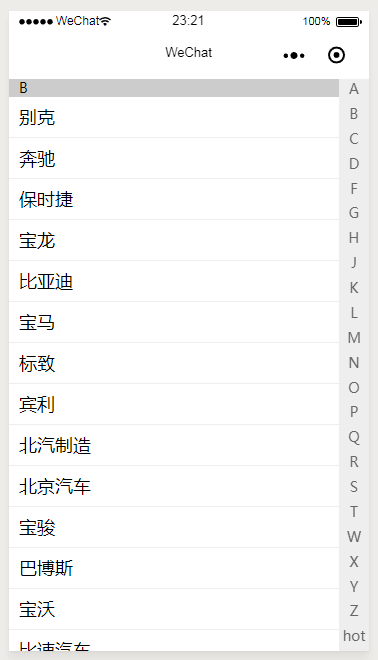
微信小程序通讯录首字母索引效果,车辆品牌选择列表
效果图:
wxml代码:
  <block wx:for="{{list}}">

  <view class='letter' id="letter{{index}}">{{index}}</view>

  <view class='item' wx:for="{{item}}" wx:for-item="idx">

  {{idx.name}}

  </view>

  </block>

<view class='letters'>

  <text wx:for="{{list}}" bindtap='chooseLetter' data-letter="{{index}}">{{index}}</text>

</view>
WCSS代码:
.letter{ background: #ccc; font-size: 14px; padding-left: 10px;}

.item{ line-height: 40px; padding: 0 10px; border-bottom: 1px solid #eee;}

page{ width: 100%; height: 100%;}

scroll-view{ width: 100%; height: 100%;}

.letters{ position: fixed; top: 0px; right:; width: 30px; height: 100%; background: #eee;

  display: flex; flex-flow: column;}

.letters text{ display: block; font-size: 14px; color: #666; text-align: center; flex:;}
js代码
onLoad: function (options) {

    var that = this;

    wx.request({

      url: 'http://api.besttool.cn/?c=Car&a=brandlist',

      method:'post',

      header:{

        'content-type': 'application/x-www-form-urlencoded'

      },

      data:{

        appid:1,

        secret:'d90824a5a8224fd7bb4fdffd331c62aa'

      },

      success(res){

        console.log(res);

        that.setData({ list: res.data.brandlist});

      }

    })

  },

  chooseLetter(e){

    this.setData({

      curLetter: null

    });

    var letter = e.currentTarget.dataset.letter;

    console.log(letter);

    // 查找对应的id

    var id = "#letter" + letter;

    const query = wx.createSelectorQuery()

    query.select(id).boundingClientRect()

    query.selectViewport().scrollOffset()

    query.exec(function (res) {

      wx.pageScrollTo({

        scrollTop: res[0].top + res[1].scrollTop,

        duration: 300

      })

    })

  },
点击右侧的字母会自动滚动到对应的位置。
微信小程序通讯录首字母索引效果,车辆品牌选择列表的更多相关文章
- 微信小程序通讯录字母排序
微信小程序通讯录 字母排序效果: demo地址:https://github.com/PeachCoder/wechat-contacts
- 微信小程序实现标签页滑块效果
微信小程序实现标签页滑块效果 小程序完整代码: wxml: <view class="swiper-tab"> <view class="swiper- ...
- 微信小程序里实现跑马灯效果
在微信小程序 里实现跑马灯效果,类似滚动字幕或者滚动广告之类的,使用简单的CSS样式控制,没用到JS wxml: <!-- 复制的跑马灯效果 --> <view class=&quo ...
- 微信小程序实现“鲜肉APP”首页效果
项目地址http://git.oschina.net/djcx/WeiXinXiaoChengXu/tree/master 如果您觉得不错,记得给一个star 由于微信小程序目前是当下趋势,正好昨天弄 ...
- 【微信小程序】手写索引选择器(城市列表,汽车品牌选择列表)
摘要: 小程序索引选择器,点击跳转相应条目,索引可滑动,滑动也可跳转 场景:城市选择列表, 汽车品牌选择列表 所用组件: scroll-view(小程序原生) https://developers.w ...
- 微信小程序实现左滑删除效果(原生/uni-app)
实现效果 列表中侧滑删除 删除不同时存在 scrollview上下滑动与侧滑删除不影响 uni-app实现 html部分 <template> <scroll-view :scrol ...
- 微信小程序——通讯录
WXML: <view class="flex box box-lr"> <scroll-view class="flex groups box box ...
- 微信小程序播放视频发送弹幕效果
首先.先来看一下效果图 然后.再看一下官方文档API对video的说明 相关属性解析: danmu-list:弹幕列表 enable-danmu:是否显示弹幕 danmu-btn:弹幕按钮 contr ...
- 微信小程序全选多选效果
效果图: 代码: wxml <view class='hei_top'> <view class='hei_p'>共 <text>4</text> 场& ...
随机推荐
- 使用catch做单元测试简介
开始使用catch呢! catch的好处是,它只有一个头文件, 坏处是,它需要C++11,不过不是很坏. catch有两种测试用例的书写方式: Normal unsigned int Factoria ...
- ZetCode PyQt4 tutorial widgets I
#!/usr/bin/python # -*- coding: utf-8 -*- """ ZetCode PyQt4 tutorial In this example, ...
- jqGrid使用json实现的范例一
qGrid 是一个用来显示网格数据的jQuery插件,通过使用jqGrid可以轻松实现前端页面与后台数据的ajax异步通信.文档比较全面,其官方网址为:http://www.trirand.com. ...
- Window平台下React Native 开发环境搭建
1. 安装Node.js 2. 安装react-native-cli 命令行工具 npm install -g react-nativew-cli 3. 创建项目 $ react-native ini ...
- 转-oracle中比较两表表结构差异和数据差异的方法
oracle中比较两表表结构差异和数据差异的方法 原作者:li2008xue2008ling 出处:http://blog.csdn.net 在工作中需要完成这么一个需求:比较两个表的表 ...
- bzoj 4885: [Lydsy2017年5月月赛]长方体
Description 给定一个a*b*c的长方体,定义其表面上两个点的距离为沿着长方体的表面走的最短路径的长度,请找到距离最远的点对,你需要保证找到的两个点里至少有一个是长方体顶点. Input 第 ...
- Bootstrap-CSS
ylbtech-Bootstrap-Plugin: 1.返回顶部 1. 2. 2.返回顶部 3.返回顶部 4.返回顶部 5.返回顶部 1. 2. 11.返回顶部 作者:yl ...
- Ubuntu12.10下Python(pyodbc)访问SQL Server解决方案
一.基本原理 请查看这个网址,讲得灰常详细:http://www.jeffkit.info/2010/01/476/ 二.实现步骤 1.安装linux下SQL Server的驱动程序 安装Free ...
- php利用curl实现多进程下载文件类
批量下载文件一般使用循环的方式,逐一执行下载.但在带宽与服务器性能允许的情况下,使用多进程进行下载可以大大提高下载的效率.本文介绍PHP利用curl的多进程请求方法,实现多进程同时下载文件. 原理: ...
- 网络通信和TCP详解
交换机.路由器.服务器组网 1. 通信过程(pc+switch+router+server) 较为复杂的通信过程如:访问 www.baidu.com 注意:一定要配置 PC:IP.NETMASK.DF ...