
SSM 框架集成
1.SSM是什么?
SSM是指目前最主流的项目架构的三大框架:
SpringMVC : spring的 Web层框架,是spring的一个模块
Spring :容器框架
MyBatis :持久层框架
2.spring与mybatis集成示例
我们集成mybatis和spring,主要是为了让mybatis用spring的事务管理
2.1 相关导入jar包
Spring依赖包:

mybatis依赖包:

MyBatis和Spring框架集成的桥梁包:
Spring自己并没有集成MyBatis框架,而是有MyBatis自己来集成,所以还需要Spring框架集成的桥梁包

数据库驱动包和连接池:


Mybatis支持的日志包log4j:

2.2 项目整体结构

2.3 Mapper层
package com.gjs.ssm.mapper;

import java.util.List;

import com.gjs.ssm.pojo.User;

public interface UserMapper {

    public    int insert(User user);

    public User selectByPrimaryKey(Integer id);

    public List<User> selectList();

    public int delteByPrimaryKey(Integer id);

}
Mapper.xml文件
<?xml version="1.0" encoding="UTF-8" ?>

<!DOCTYPE mapper

  PUBLIC "-//mybatis.org//DTD Mapper 3.0//EN"

  "http://mybatis.org/dtd/mybatis-3-mapper.dtd">

<mapper namespace="com.gjs.ssm.mapper.UserMapper">

    <insert id="insert" parameterType="com.gjs.ssm.pojo.User">

        insert into user (name,password,age)values(#{name},#{password},#{age})

    </insert>

    <select id="selectByPrimaryKey" parameterType="Integer" resultType="com.gjs.ssm.pojo.User">

        select * from user where id = #{id}

    </select>

    <select id="selectList"  resultType="com.gjs.ssm.pojo.User">

        select * from user

    </select>

      <delete id="delteByPrimaryKey" parameterType="int">

          delete from user where id = #{id}

      </delete>

</mapper>
2.4 Service层
package com.gjs.ssm.service.impl;

import java.util.List;

import org.springframework.beans.factory.annotation.Autowired;

import org.springframework.stereotype.Service;

import com.gjs.ssm.mapper.UserMapper;

import com.gjs.ssm.pojo.User;

import com.gjs.ssm.service.UserService;

@Service

public class UserSerivceImpl implements UserService{

    @Autowired

    UserMapper userMapper;

    @Override

    public int inset(User user) {

        return userMapper.insert(user);

    }

    @Override

    public User selectByPrimaryKey(Integer id) {

        return userMapper.selectByPrimaryKey(id);

    }

    @Override

    public List<User> selectList() {

        return userMapper.selectList();

    }

    @Override

    public int delteByPrimaryKey(Integer id) {

        return userMapper.delteByPrimaryKey(id);

    }

}
2.5层与层之间(Mapper和Service)spring对象的创建和依赖关系的维护(A)
之前我们Mapper对象的创建是通过sqlSession对象创建的,sqlSession对象又是SqlSessionFactory对象创建出来的,而SqlSessionFactory对象是通过读取配置文件中的相关配置创建的。
所谓的spring与mybatis集成,说白了就是把这些对象的创建都交给spring来处理。那怎么让spring自己创建这些对象呢?
spring-mybatis桥梁包中提供的org.mybatis.spring.SqlSessionFactoryBean类可以创建SqlSessionFactory对象,org.mybatis.spring.mapper.MapperScannerConfigurer类可以用来创建 Mapper接口的代理对象。所以只要在spring中配置这两个对象并注入依赖即可。具体配置如下:
spring.xml:
<?xml version="1.0" encoding="UTF-8"?>

<beans xmlns="http://www.springframework.org/schema/beans"

    xmlns:p="http://www.springframework.org/schema/p"

    xmlns:context="http://www.springframework.org/schema/context"

    xmlns:aop="http://www.springframework.org/schema/aop"

    xmlns:tx="http://www.springframework.org/schema/tx"

    xmlns:xsi="http://www.w3.org/2001/XMLSchema-instance"

    xsi:schemaLocation="

        http://www.springframework.org/schema/beans

        http://www.springframework.org/schema/beans/spring-beans.xsd

        http://www.springframework.org/schema/context

        http://www.springframework.org/schema/context/spring-context.xsd

        http://www.springframework.org/schema/aop

        http://www.springframework.org/schema/aop/spring-aop.xsd

        http://www.springframework.org/schema/tx

        http://www.springframework.org/schema/tx/spring-tx.xsd

        ">

    <!-- 开启注解包扫描 -->

    <context:component-scan base-package="com.gjs.ssm"/>

    <!-- 读取db.properties 配置文件 -->

    <context:property-placeholder location="classpath:db.properties"/>

    <!-- 配置druid连接池 -->

    <bean id="dataSource" class="com.alibaba.druid.pool.DruidDataSource">

        <property name="driverClassName" value="${jdbc.driverClassName}"/>

        <property name="url" value="${jdbc.url}"/>

        <property name="username" value="${jdbc.username}"/>

        <property name="password" value="${jdbc.password}"/>

        <property name="maxActive" value="${jdbc.maxActive}"/>

    </bean>

    <!-- 配置SqlSessionFactoryBean对象 -->

    <bean name="sqlSessionFactory" class="org.mybatis.spring.SqlSessionFactoryBean">

        <!-- 注入数据源 -->

        <property name="dataSource" ref="dataSource"/>

        <!-- 配置映射文件 -->

        <property name="mapperLocations">

            <array>

                <value>classpath:com/gjs/ssm/mapper/*Mapper.xml</value>

            </array>

        </property>

        <!-- 配置包扫描的别名 -->

        <property name="typeAliasesPackage" value="com.gjs.ssm.pojo"/>

        <!--

        如果需要读取mybatis框架的配置文件mybat-config.xml可使用:

        <property name="configLocation" value="classpath:mybatis-config.xml"/>

        不过一般不需要

         -->

    </bean>

    <!-- SqlSession对象的创建只需通过sqlSessionFactory对象调用openSession()方法即可,spring会自动创建 -->

    <!-- 使用包扫描批量创建 Mapper接口对应的代理对象 -->

    <bean class="org.mybatis.spring.mapper.MapperScannerConfigurer">

        <!-- 配置包扫描创建代理对象的位置 -->

        <property name="basePackage" value="com.gjs.ssm.mapper"/>

        <!-- 注入sqlSessionFactory bean的名称 -->

        <property name="sqlSessionFactoryBeanName" value="sqlSessionFactory"/>

    </bean>

    <!-- 配置事务管理器 -->

    <bean id="txManager"  class="org.springframework.jdbc.datasource.DataSourceTransactionManager">

        <!-- 注入数据源 -->

        <property name="dataSource" ref="dataSource"/>

    </bean>

    <!-- 配置事务通知 -->

    <tx:advice id="txAdvice" transaction-manager="txManager">

        <tx:attributes>

            <!-- DQL -->

            <tx:method name="select*" read-only="true" isolation="REPEATABLE_READ" propagation="REQUIRED"/>

            <tx:method name="get*" read-only="true" isolation="REPEATABLE_READ" propagation="REQUIRED"/>

            <tx:method name="find*" read-only="true" isolation="REPEATABLE_READ" propagation="REQUIRED"/>

            <tx:method name="query*" read-only="true" isolation="REPEATABLE_READ" propagation="REQUIRED"/>

            <!-- 非DQL  -->

            <tx:method name="*" read-only="false" isolation="REPEATABLE_READ" propagation="REQUIRED"/>        </tx:attributes>

    </tx:advice>

    <!-- 使用AOP将事务切入到service层 -->

    <aop:config >

        <!-- 切入点 -->

        <aop:pointcut expression="execution(* com.gjs.ssm.service..*.*(..))" id="pt"/>

        <!-- 切面 = 切入点+通知-->

        <aop:advisor advice-ref="txAdvice" pointcut-ref="pt"/>

        <!-- Spring 负责织入 -->

    </aop:config>

</beans>
下面这段代码是其中的关键
<!-- 配置SqlSessionFactoryBean对象 -->

    <bean name="sqlSessionFactory" class="org.mybatis.spring.SqlSessionFactoryBean">

        <!-- 注入数据源 -->

        <property name="dataSource" ref="dataSource"/>

        <!-- 配置映射文件 -->

        <property name="mapperLocations">

            <array>

                <value>classpath:com/gjs/ssm/mapper/*Mapper.xml</value>

            </array>

        </property>

        <!-- 配置包扫描的别名 -->

        <property name="typeAliasesPackage" value="com.gjs.ssm.pojo"/>

        <!--

        如果需要读取mybatis框架的配置文件mybat-config.xml可使用:

        <property name="configLocation" value="classpath:mybatis-config.xml"/>

        不过一般不需要

         -->

    </bean>

    <!-- SqlSession对象的创建只需通过sqlSessionFactory对象调用openSession()方法即可,spring会自动创建 -->

    <!-- 使用包扫描批量创建 Mapper接口对应的代理对象 -->

    <bean class="org.mybatis.spring.mapper.MapperScannerConfigurer">

        <!-- 配置包扫描创建代理对象的位置 -->

        <property name="basePackage" value="com.gjs.ssm.mapper"/>

        <!-- 注入sqlSessionFactory bean的名称 -->

        <property name="sqlSessionFactoryBeanName" value="sqlSessionFactory"/>

    </bean>
2. 5 测试代码
package com.gjs.ssm.test;

import java.util.List;

import org.junit.Test;

import org.junit.runner.RunWith;

import org.springframework.beans.factory.annotation.Autowired;

import org.springframework.test.context.ContextConfiguration;

import org.springframework.test.context.junit4.SpringJUnit4ClassRunner;

import com.gjs.ssm.pojo.User;

import com.gjs.ssm.service.UserService;

@RunWith(SpringJUnit4ClassRunner.class)

@ContextConfiguration("classpath:spring.xml")

public class UserSerivceImplTest {

    @Autowired

    private UserService userService;

    @Test

    public void testInset() {

        User user = new User(null, "张三", "123", 30);

        int row = userService.inset(user);

        System.out.println(row);

    }

    @Test

    public void testSelectByPrimaryKey() {

        User user = userService.selectByPrimaryKey(3);

        System.out.println(user);

    }

    @Test

    public void testSelectList() {

        List<User> selectList = userService.selectList();

        System.out.println(selectList);

    }

    @Test

    public void testDelteByPrimaryKey() {

        int row = userService.delteByPrimaryKey(3);

        System.out.println(row);

    }

}
3.SpringMVC的集成
3.1 导入相关jar包
SpringMVC依赖包:

Jstl标签库依赖包:

3.2 项目整体结构
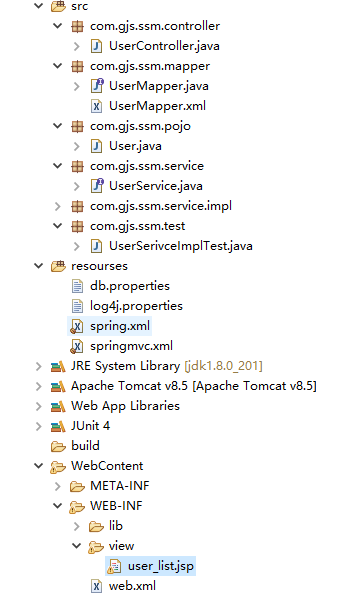
3.3 springmvc.xml配置文件
<?xml version="1.0" encoding="UTF-8"?>

<beans xmlns="http://www.springframework.org/schema/beans"

    xmlns:p="http://www.springframework.org/schema/p"

    xmlns:mvc="http://www.springframework.org/schema/mvc"

    xmlns:xsi="http://www.w3.org/2001/XMLSchema-instance"

    xsi:schemaLocation="

        http://www.springframework.org/schema/beans

        http://www.springframework.org/schema/beans/spring-beans.xsd

        http://www.springframework.org/schema/mvc

        http://www.springframework.org/schema/mvc/spring-mvc.xsd

        ">

    <!-- 开启springMVC注解驱动 -->

    <mvc:annotation-driven/>

</beans>
3.4 编写控制器
package com.gjs.ssm.controller;

import java.util.List;

import org.springframework.beans.factory.annotation.Autowired;

import org.springframework.stereotype.Controller;

import org.springframework.ui.Model;

import org.springframework.web.bind.annotation.RequestMapping;

import com.gjs.ssm.pojo.User;

import com.gjs.ssm.service.UserService;

@Controller

@RequestMapping("/user")

public class UserController {

    @Autowired

    private UserService userService;

    @RequestMapping("/list")

    public String list(Model model) {

        List<User> users = userService.selectList();

        model.addAttribute("users", users);

        return "/WEB-INF/view/user_list.jsp";

    }

}
3.5 在web.xml配置SpringMVC的前端控制器(关键)
web.xml是整个web项目的入口,其他配置文件都需要通过web.xml直接或间接读取。所以springMVC和spring集成的关键就在于在web.xml中配置读取spring和springMVC的配置文件。
<?xml version="1.0" encoding="UTF-8"?>

<web-app xmlns:xsi="http://www.w3.org/2001/XMLSchema-instance" xmlns="http://xmlns.jcp.org/xml/ns/javaee" xsi:schemaLocation="http://xmlns.jcp.org/xml/ns/javaee http://xmlns.jcp.org/xml/ns/javaee/web-app_3_1.xsd" version="3.1">

  <display-name>SSM集成</display-name>

  <welcome-file-list>

    <welcome-file>index.html</welcome-file>

    <welcome-file>index.htm</welcome-file>

    <welcome-file>index.jsp</welcome-file>

    <welcome-file>default.html</welcome-file>

    <welcome-file>default.htm</welcome-file>

    <welcome-file>default.jsp</welcome-file>

  </welcome-file-list>

  <!-- 配置字符编码过滤器 -->

  <filter>

      <filter-name>CharacterEncodingFilter</filter-name>

      <filter-class>org.springframework.web.filter.CharacterEncodingFilter</filter-class>

      <init-param>

          <param-name>encoding</param-name>

          <param-value>UTF-8</param-value>

      </init-param>

  </filter>

  <filter-mapping>

      <filter-name>CharacterEncodingFilter</filter-name>

      <url-pattern>/*</url-pattern>

  </filter-mapping>

  <!-- 配置前端控制器 (分发器)-->

  <servlet>

      <servlet-name>MVC</servlet-name>

      <servlet-class>org.springframework.web.servlet.DispatcherServlet</servlet-class>

      <init-param>

          <!-- 读取配置文件 用通配符 *可以读取多个有相同前缀和后缀的文件-->

          <param-name>contextConfigLocation</param-name>

          <param-value>classpath:spring*.xml</param-value>

      </init-param>

      <load-on-startup>1</load-on-startup>

  </servlet>

  <servlet-mapping>

      <servlet-name>MVC</servlet-name>

      <url-pattern>*.do</url-pattern>

  </servlet-mapping>

</web-app>
3.6 编写jsp页面测试
<%@ page language="java" contentType="text/html; charset=UTF-8"

pageEncoding="UTF-8"%>

<!-- 引入jstl标签库  -->

<%@ taglib uri="http://java.sun.com/jsp/jstl/core" prefix="c"%>

<!DOCTYPE html>

<html>

    <head>

        <meta charset="UTF-8">

        <title>Insert title here</title>

    </head>

<body>

    <h3>用户列表</h3>

    <table border="1" style="width: 500px;" cellspacing="0">

        <tr>

            <th>id</th>

            <th>名称</th>

            <th>密码</th>

            <th>年龄</th>

        </tr>

    <c:forEach items="${users}" var="user">

        <tr>

            <td>${user.id}</td>

            <td>${user.name}</td>

            <td>${user.password}</td>

            <td>${user.age}</td>

        </tr>

    </c:forEach>

    </table>

</body>

</html>
SSM 框架集成的更多相关文章
- Spring+SpringMVC+Mybatis(SSM)框架集成搭建
Spring+SpringMVC+Mybatis框架集成搭建教程 一.背景 最近有很多同学由于没有过SSM(Spring+SpringMvc+Mybatis , 以下简称SSM)框架的搭建的经历,所以 ...
- SSM框架集成各配置文件
SSM框架集成各配置文件 Spring Spring MVC Mybatis 的整合SpringMVC相当于Spring的一个组件 本来就是一个家族的不存在整合的问题,所以主要就是Spring于Myb ...
- Spring MVC 学习总结(十一)——IDEA+Maven+多模块实现SSM框架集成
一.SSM概要 与SSH(Struts/Spring/Hibernate/)一样,Spring+SpringMVC+MyBatis也有一个简称SSM,Spring实现业务对象管理,Spring MVC ...
- SSM框架集成Redis
SSM-Spring+SpringMVC+Mybatis框架相信大家都很熟悉了,但是有的时候需要频繁访问数据库中不变或者不经常改变的数据,就会加重数据库的负担,这时我们就会想起Redis Redis是 ...
- Java高并发秒杀系统API之SSM框架集成swagger与AdminLTE
初衷与整理描述 Java高并发秒杀系统API是来源于网上教程的一个Java项目,也是我接触Java的第一个项目.本来是一枚c#码农,公司计划部分业务转java,于是我利用业务时间自学Java才有了本文 ...
- SSM框架集成及配置详解(Maven管理)
一.pom.xml(依赖管理) <?xml version="1.0" encoding="UTF-8"?> <project xmlns=& ...
- ssm框架集成Quartz定时器
第一步:添加依赖 <dependency> <groupId>org.quartz-scheduler</groupId> <artifactId>qu ...
- Spring+SpringMvc+Mybatis框架集成搭建教程
一.背景 最近有很多同学由于没有过SSM(Spring+SpringMvc+Mybatis , 以下简称SSM)框架的搭建的经历,所以在自己搭建SSM框架集成的时候,出现了这样或者那样的问题,很是苦恼 ...
- 【SSM框架】Spring + Springmvc + Mybatis 基本框架搭建集成教程
本文将讲解SSM框架的基本搭建集成,并有一个简单demo案例 说明:1.本文暂未使用maven集成,jar包需要手动导入. 2.本文为基础教程,大神切勿见笑. 3.如果对您学习有帮助,欢迎各种转载,注 ...
随机推荐
- 开源libco库:单机千万连接、支撑微信8亿用户的后台框架基石
微信于2013年开源的ibco库,是微信后台大规模使用的c/c++协程库,2013年至今稳定运行在微信后台的数万台机器上.libco在2013年的时候作为腾讯六大开源项目首次开源,ibco支持后台敏捷 ...
- Standard C 语言标准函数库速查(彩色的函数列表,十分清楚)
Standard C 语言标准函数库速查 (Cheat Sheet) wcstombs 函数说明 #include <stdlib.h> size_t mbstowcs(wchar_t * ...
- UILabel实现自适应宽高需要注意的地方(三)
一.需求图如下所示 UILabel 的高度自适应 UILabel中的段落间距可设置 图片效果如下: 调整段落适应长宽高方式: 需求: 保证"游戏玩法 ...
- Flask学习之旅--数据库
一.写在前面 在Web开发中,数据库操作是很重要的一部分,因为网站的很多重要信息都保存在数据库之中.而Flask在默认情况下是没有数据库.表单验证等功能的,但是可以用Flask-extension为W ...
- TDD(测试驱动开发)死了吗?
01.前言 很早之前,曾在网络上见到过 TDD 这 3 个大写的英文字母,它是 Test Driven Development 这三个单词的缩写,也就是“测试驱动开发”的意思——听起来很不错的一种理念 ...
- vue+element——父级元素fixed,遮罩会在上方
前言 这种场景还是蛮场景的 一个共用的head组件,组件里面通常是当前系统登录账号名 退出登录 修改密码这样的弹框 但是现在我又想head不跟着main内容上下滑动.所以用了fixed 定位. 问题来 ...
- 高性能嵌入式核心板新标杆!米尔推出基于NXP i.MX8M处理器的MYC-JX8MX核心板
随着嵌入式及物联网技术的飞速发展,高性能计算的嵌入式板卡已经成为智能产品的基础硬件平台.为响应行业应用和满足客户需求,米尔电子推出基于NXP公司i.MX8M系列芯片的开发平台MYD-JX8MX系列开发 ...
- c#两种方式调用google地球,调用COM API以及调用GEPLUGIN 与js交互,加载kml文件,dae文件。将二维高德地图覆盖到到三维谷歌地球表面。
网络上资源很多不全面,自己在开发的时候走了不少弯路,在这里整理了最全面的google全套开发,COM交互,web端交互.封装好了各种模块功能. 直接就可以调用. 第一种方式:调用COMAPI实现调用g ...
- Metasploit渗透测试
原创博客,转载请注出处! 学习笔记 参考书籍<Metasploit渗透测试指南(修订版)> 经过多日学习,初步掌握metasploit基本参数和使用方法,现进行渗透测试实践 靶机IP:16 ...
- 解决kali linux 2016.2实体机安装后root用户没有声音
Kali Linux系统默认状态下,root用户是无法使用声卡的,也就没有声音.启用的方法如下:(1)在终端执行命令:systemctl --user enable pulseaudio (2)在/e ...