
C# 模拟浏览器并自动操作
本文主要讲解通过WebBrowser控件打开浏览页面,并操作页面元素实现自动搜索功能,仅供学习分享使用,如有不足之处,还请指正。
涉及知识点
- WebBrowser:用于在WinForm窗体中,模拟浏览器,打开并导航网页。
- HtmlDocument:表示一个Html文档的页面。每次加载都会是一个全新的页面。
- GetElementById(string id):通过ID或Name获取一个Html中的元素。
- HtmlElement:表示一个Html标签元素。
- BackgroundWorker 后台执行独立操作的进程。
设计思路
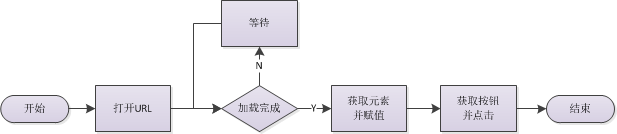
主要采用异步等待的方式,等待页面加载完成,流程如下所示:
示例效果图
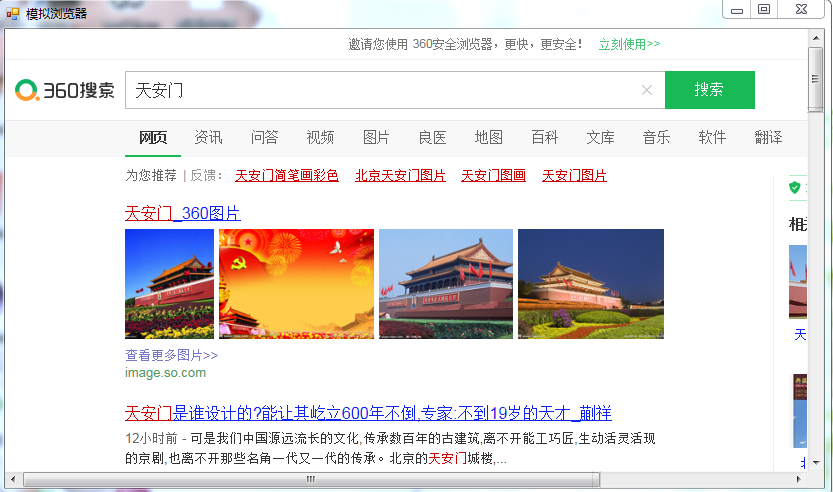
如下所示:加载完成后,自动输入【天安门】并点击搜索。
核心代码
加载新的页面,如下所示:
 string url = "https://www.so.com/";

 this.wb01.ScriptErrorsSuppressed = true;

 this.wb01.Navigate(url);
注意:this.wb01.ScriptErrorsSuppressed = true;用于是否弹出异常脚本代码错误框
获取元素并赋值,如下所示:
 string search_id = "input";

 string search_value = "天安门";

 string btn_id = "search-button";

 HtmlDocument doc = this.wb01.Document;

 HtmlElement search = doc.GetElementById(search_id);

 search.SetAttribute("value", search_value);

 HtmlElement btn = doc.GetElementById(btn_id);

 btn.InvokeMember("click");
示例整体代码,如下所示:
 using System;

 using System.Collections.Generic;

 using System.ComponentModel;

 using System.Data;

 using System.Drawing;

 using System.Linq;

 using System.Text;

 using System.Threading;

 using System.Threading.Tasks;

 using System.Windows.Forms;

 namespace DemoExplorer

 {

     public partial class FrmExplorer : Form

     {

         private bool isLoadOk = false;

         private BackgroundWorker bgWork;

         public FrmExplorer()

         {

             InitializeComponent();

         }

         private void FrmExplorer_Load(object sender, EventArgs e)

         {

             bgWork = new BackgroundWorker();

             bgWork.DoWork += bgWork_DoWork;

             bgWork.RunWorkerCompleted += bgWork_RunWorkerCompleted;

             string url = "https://www.so.com/";

             this.wb01.ScriptErrorsSuppressed = true;

             this.wb01.Navigate(url);

             bgWork.RunWorkerAsync();

         }

         private void bgWork_RunWorkerCompleted(object sender, RunWorkerCompletedEventArgs e)

         {

             string search_id = "input";

             string search_value = "天安门";

             string btn_id = "search-button";

             HtmlDocument doc = this.wb01.Document;

             HtmlElement search = doc.GetElementById(search_id);

             search.SetAttribute("value", search_value);

             HtmlElement btn = doc.GetElementById(btn_id);

             btn.InvokeMember("click");

         }

         private void bgWork_DoWork(object sender, DoWorkEventArgs e)

         {

             compWait();

         }

         private void compWait()

         {

             while (!isLoadOk)

             {

                 Thread.Sleep();

             }

         }

         private void wb01_DocumentCompleted(object sender, WebBrowserDocumentCompletedEventArgs e)

         {

             this.wb01.Document.Window.Error += new HtmlElementErrorEventHandler(Window_Error);

             if (this.wb01.ReadyState == WebBrowserReadyState.Complete)

             {

                 isLoadOk = true;

             }

             else

             {

                 isLoadOk = false;

             }

         }

         private void Window_Error(object sender, HtmlElementErrorEventArgs e)

         {

             e.Handled = true;

         }

     }

 }
另外一种实现方式(MSHTML)
什么是MSHTML?
MSHTML是windows提供的用于操作IE浏览器的一个COM组件,该组件封装了HTML语言中的所有元素及其属性,通过其提供的标准接口,可以访问指定网页的所有元素。
涉及知识点
InternetExplorer 浏览器对象接口,其中DocumentComplete是文档加载完成事件。
HTMLDocumentClass Html文档对象类,用于获取页面元素。
IHTMLElement 获取页面元素,通过setAttribute设置属性值,和click()触发事件。
示例核心代码
如下所示:
 1 namespace AutoGas

 2 {

 3     public class Program

 4     {

 5         private static bool isLoad = false;

 6

 7         public static void Main(string[] args)

 8         {

 9             string logUrl = ConfigurationManager.AppSettings["logUrl"]; //登录Url

10             string uid = ConfigurationManager.AppSettings["uid"];//用户名ID

11             string pid = ConfigurationManager.AppSettings["pid"];//密码ID

12             string btnid = ConfigurationManager.AppSettings["btnid"];//按钮ID

13             string uvalue = ConfigurationManager.AppSettings["uvalue"];//用户名

14             string pvalue = ConfigurationManager.AppSettings["pvalue"];//密码

15             InternetExplorer ie = new InternetExplorerClass();

16             ie.DocumentComplete += Ie_DocumentComplete;

17             object c = null;

18             ie.Visible = true;

19             ie.Navigate(logUrl, ref c, ref c, ref c, ref c);

20             ie.FullScreen = true;

21

22             compWait();

23             try

24             {

25                 HTMLDocumentClass doc = (HTMLDocumentClass)ie.Document;

26                 IHTMLElement username = doc.getElementById(uid);

27                 IHTMLElement password = doc.getElementById(pid);

28                 IHTMLElement btn = doc.getElementById(btnid);

29                 //如果有session,则自动登录,不需要输入账号密码

30                 if (username != null && password != null && btn != null)

31                 {

32                     username.setAttribute("value", uvalue);

33                     password.setAttribute("value", pvalue);

34                     btn.click();

35                 }

36             }

37             catch (Exception ex) {

38

39             }

40         }

41

42         public static void compWait() {

43             while (!isLoad)

44             {

45                 Thread.Sleep(200);

46             }

47         }

48

49         /// <summary>

50         ///

51         /// </summary>

52         /// <param name="pDisp"></param>

53         /// <param name="URL"></param>

54         private static void Ie_DocumentComplete(object pDisp, ref object URL)

55         {

56             isLoad = true;

57         }

58     }

59 }
备注
所谓的坚持,不过是每天努力一点点!!!
C# 模拟浏览器并自动操作的更多相关文章
- Python模拟浏览器前进后退操作
# 模拟浏览器前进后退操作 # 代码中引入selenium版本为:3.4.3 # 通过Chrom浏览器访问发起请求 # Chrom版本:59 ,chromdriver:2.3 # 需要对应版本的Chr ...
- splinter python浏览器自动化操作,模拟浏览器的行为
Splinter可以非常棒的模拟浏览器的行为,Splinter提供了丰富的API,可以获取页面的信息判断当前的行为所产生的结果 最近在研究网站自动登录的问题,涉及到需要实现浏览器自动化操作,网上有 ...
- 浏览器与服务器交互原理以及用java模拟浏览器操作v
浏览器应用服务器JavaPHPApache * 1,在HTTP的WEB应用中, 应用客户端和服务器之间的状态是通过Session来维持的, 而Session的本质就是Cookie, * 简单的讲,当浏 ...
- 孤荷凌寒自学python第八十五天配置selenium并进行模拟浏览器操作1
孤荷凌寒自学python第八十五天配置selenium并进行模拟浏览器操作1 (完整学习过程屏幕记录视频地址在文末) 要模拟进行浏览器操作,只用requests是不行的,因此今天了解到有专门的解决方案 ...
- python下selenium模拟浏览器基础操作
1.安装及下载 selenium安装: pip install selenium 即可自动安装selenium geckodriver下载:https://github.com/mozilla/ge ...
- casperjs配合phantomjs实现自动登录百度,模拟点击等等操作 - 怕虎在线www.ipahoo.com图文教程 - 怕虎在线
微信支付取消2万元保证金门槛,这是全民电商来袭!-观点-虎嗅网 微信支付取消2万元保证金门槛,这是全民电商来袭! casperjs配合phantomjs实现自动登录百度,模拟点击等等操作 - 怕虎在线 ...
- python3 scrapy 使用selenium 模拟浏览器操作
零. 在用scrapy爬取数据中,有写是通过js返回的数据,如果我们每个都要获取,那就会相当麻烦,而且查看源码也看不到数据的,所以能不能像浏览器一样去操作他呢? 所以有了-> Selenium ...
- php中curl模拟浏览器来传输数据
cURL可以使用URL的语法模拟浏览器来传输数据, 因为它是模拟浏览器,因此它同样支持多种协议,FTP, FTPS, HTTP, HTTPS, GOPHER, TELNET, DICT, FILE 以 ...
- 【Python】 Selenium 模拟浏览器 寻路
selenium 最开始我碰到SE,是上学期期末,我们那个商务小组做田野调查时发的问卷的事情.当时在问卷星上发了个问卷,但是当时我对另外几个组员的做法颇有微词,又恰好开始学一些软件知识了,就想恶作剧( ...
随机推荐
- 关于Java中2.0-1.1!=0.9的问题
关于Java中2.0-1.1!=0.9的问题 问题引出: 在<Java核心技术>中关于浮点数值计算部分提到,System.out.println(2.0-1.1)这条语句并不是想当然的0. ...
- ORA-00845 startup启动不起来关于磁盘空间扩充
问题描述:今天在虚拟机下进行startup的操作,但是没有起来,系统报错:ORA-00845: MEMORY_TARGET not supported on this system 1.startup ...
- linux-PAM
PAM(Pluggable Authentication Modules)即可插拔式认证模块,一种用户级别的认证方式,它也是当前Linux服务器普遍使用的认证方式. PAM认证原理:参考资料来自htt ...
- Java8 日期时间API
一.转换 1.与字符串 //LocalDateTime 转 字符串 String str = DateTimeFormatter.ofPattern("yyyy-MM-dd HH:mm:ss ...
- Centos 6、7 禁止密码验证登陆
Centos 6.7 禁止密码验证登陆 安全方面的考虑,秘钥对验证登陆相对密码验证要更安全 修改 /etc/ssh/sshd_config 配置文件 该配置文件中,只需要修改一个参数 Password ...
- react简单的tab切换 (styled-components)
其实,在我们日常的编程当中,经常会碰到tab切换的模块,那么,实现他的方法也有很多中,下面是一款简单,容易理解的react tab切换方法. 通过设置state中的current 属性去控制tab 和 ...
- 机器学习实战书-第二章K-近邻算法笔记
本章介绍第一个机器学习算法:A-近邻算法,它非常有效而且易于掌握.首先,我们将探讨女-近邻算法的基本理论,以及如何使用距离测量的方法分类物品:其次我们将使用?7««^从文本文件中导人并解析数据: 再次 ...
- SpringBoot系列之集成jsp模板引擎
目录 1.模板引擎简介 2.环境准备 4.源码原理简介 SpringBoot系列之集成jsp模板引擎 @ 1.模板引擎简介 引用百度百科的模板引擎解释: 模板引擎(这里特指用于Web开发的模板引擎)是 ...
- 【Python成长之路】python 基础篇 -- 装饰器【华为云分享】
[写在前面] 有时候看到大神们的代码,偶尔会用到@来装饰函数.当时查了资料,大致了解装饰器一般用于在不改变原函数的基础上 ,对原函数功能进行修改/增强.使用场景是:日志级别设置.权限校验.性能测试等. ...
- 即将到来的“分布式云”(DPaaS):分布式计算+ DB +存储即服务
我在区块链会议上就即将到来的公共"分布式云"系统进行了讨论,该系统将主流的公共云平台(如AWS,Azure,Google Cloud,Heroku等)与区块链和P2P网络相结合,比 ...