
【linux命令】权限管理命令(chattr、lsattr、sudo)
目录
一、chattr命令
chattr命令用来修改文件系统的权限属性,只有 root 用户可以使用,建立凌驾于 rwx 基础权限之上的授权。
PS:chattr 命令不宜对目录 /、/dev/、/tmp/、/var/ 等进行设置,严重者甚至容易导致系统无法启动。
chattr [+-=] [选项] 文件或目录名
选项:
+    増加权限

-    删除权限

=    等于某权限

i    如果对文件设置属性,不允许对文件进行删除、改名,也不能添加和修改数据;如果对目录设置 i 属性,只能修改目录下文件中的数据,不允许建立和删除文件

a    如果对文件设置 a 属性,只能在文件中増加数据,不能删除和修改数据;如果对目录设置 a 属性,只允许在目录中建立和修改文件,不允许删除文件

e    Linux 中大多数文件都默认拥有 e 属性,表示该文件是使用 ext 文件系统进行存储的,而且不能使用"chattr -e"命令取消 e 属性
给文件赋予属性:
# 创建测试文件

[root@VM_0_10_centos ~]# mkdir -p /study

[root@VM_0_10_centos ~]# cd /study/

[root@VM_0_10_centos study]# touch tfile.txt

[root@VM_0_10_centos study]# lsattr tfile.txt

-------------e-- tfile.txt

# 添加属性 +i表示加锁,文件不能被删除,修改,移动

[root@VM_0_10_centos study]# chattr +i tfile.txt

[root@VM_0_10_centos study]# lsattr tfile.txt

----i--------e-- tfile.txt

[root@VM_0_10_centos study]# rm -rf tfile.txt

rm: cannot remove ‘tfile.txt’: Operation not permitted

[root@VM_0_10_centos study]# mv tfile.txt tfile2.txt

mv: cannot move ‘tfile.txt’ to ‘tfile2.txt’: Operation not permitted

[root@VM_0_10_centos study]# vi tfile.txt

能输入,但左下方会显示“W10: Warning: Changing a readonly file”

并且也不能保存
给目录赋予权限:
# 创建测试目录

[root@VM_0_10_centos study]# mkdir dtest

[root@VM_0_10_centos study]# touch dtest/test.txt

# 添加i属性,加锁,目录不能被删除,也不能在该目录下创建文件和目录,但能修改该目录下文件的内容

[root@VM_0_10_centos study]# chattr +i dtest/

[root@VM_0_10_centos study]# lsattr dtest/

-------------e-- dtest/test.txt

# 不能创建目录和文件

[root@VM_0_10_centos study]# mkdir -p dtest/dir2

mkdir: cannot create directory ‘dtest/dir2’: Permission denied

[root@VM_0_10_centos study]# touch dtest/ftest2.txt

touch: cannot touch ‘dtest/ftest2.txt’: Permission denied

# 能修改目录下文件内容

[root@VM_0_10_centos study]# echo hello >> dtest/test.txt

[root@VM_0_10_centos study]# cat dtest/test.txt

hello

# 不能删除目录及目录下的文件

[root@VM_0_10_centos study]# rm -rf dtest/

rm: cannot remove ‘dtest/test.txt’: Permission denied

[root@VM_0_10_centos study]# rm -rf dtest/test.txt

rm: cannot remove ‘dtest/test.txt’: Permission denied
PS:root用户也不能删除,修改它。如果要修改和删除,需去掉i属性
[root@VM_0_10_centos study]# chattr -i dtest/

[root@VM_0_10_centos study]# lsattr dtest/

-------------e-- dtest/test.txt

[root@VM_0_10_centos study]# chattr -i tfile.txt

[root@VM_0_10_centos study]# lsattr tfile.txt

-------------e-- tfile.txt
案例:比如将备份的日志放入一个只能添加数据,不能删除数据的目录下
# 创建备份目录

[root@VM_0_10_centos study]# mkdir baklog

# 赋予a属性

[root@VM_0_10_centos study]# chattr +a baklog/

# 添加数据进去

[root@VM_0_10_centos study]# cp tfile.txt baklog/

[root@VM_0_10_centos study]# ls baklog/

tfile.txt

# 不能删除该目录下的数据

[root@VM_0_10_centos study]# rm -rf baklog/tfile.txt

rm: cannot remove ‘baklog/tfile.txt’: Operation not permitted

# 能修改该目录的文件内容

[root@VM_0_10_centos study]# echo test >> baklog/tfile.txt

[root@VM_0_10_centos study]# cat baklog/tfile.txt

test
二、lsattr命令
lsattr命令用于查看文件和目录的属性。
格式:
lsattr [选项] 文件或目录名
选项:
-a    显示所有文件和目录,包括隐藏文件

-d    如果目标是目录,则仅列出目录本身的属性,而不会列出文件的属性
-R  递归列出所有子目录中文件的属性
案例:查看目录属性
# 查看目录属性,需要加上-d

[root@VM_0_10_centos study]# lsattr -d baklog/

-----a-------e-- baklog/
三、sudo命令
管理员作为特权用户,可授权普通用户协助完成日常管理。现在较为流行的工具是 sudo,几乎所有 Linux 都已默认安装。sudo 的操作对象是系统命令,也就是 root 把本来只能由超级用户执行的命令赋予普通用户执行。简单的说,sudo 是一种权限管理机制,管理员可以授权于一些普通用户去执行一些 root 执行的操作,而不需要知道 root 的密码。
sudo 使用简单,管理员 root 使用 visudo 命令即可编辑其配置文件 /etc/sudoers 进行授权。命令如下:
[root@VM_0_10_centos study]# visudo

格式说明:
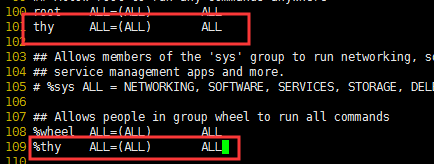
user ALL=(ALL) ALL

%userg ALL=(ALL) ALL

user ALL=(ALL) NOPASSWD: ALL

%userg ALL=(ALL) NOPASSWD: ALL

# 第一行:允许用户youuser执行sudo命令(需要输入密码).

# 第二行:允许用户组youuser里面的用户执行sudo命令(需要输入密码).

# 第三行:允许用户youuser执行sudo命令,并且在执行的时候不输入密码.

# 第四行:允许用户组youuser里面的用户执行sudo命令,并且在执行的时候不输入密码.
【linux命令】权限管理命令(chattr、lsattr、sudo)的更多相关文章
- linux笔记:linux常用命令-权限管理命令
一个文件的权限只有root和所有者可以更改. 权限管理命令:chmod(改变文件或目录的权限) 权限的数字表示: 用权限加减的方式改变权限(u代表所有者,g代表所属组,o代表其他人,a代表所有人): ...
- [Linux] 010 权限管理命令 chmod
1. 权限管理命令:chmod 命令名称:chmod 命令英文原意:change the permissions mode of a file 命令所在路径:/bin/chmod 执行权限:所有用户 ...
- Linux基本命令 权限管理命令
1.权限管理命令chmod ================================================================================== 命令名 ...
- Linux 基础——权限管理命令chown、chgrp
一.chown命令与chgrp命令的作用 有时你需要改变文件或目录的属主,比如有人离职或开发人员创建了一个在测试或生产环境中需要归属在系统账户下的应用.Linux提供了两个命令来实现这个功能:chow ...
- Linux 基础——权限管理命令chmod
一.Linux中的文件权限与目录权限 Linux中定义了3种访问权限,分别是r.w.x.其中r表示对象是可读的,w表示对象是可写的,x表示对象是可执行的,这3种权限组成一组rwx分别对应对象的3个安全 ...
- linux中权限管理命令(chmod/chown/chgrp/unmask)
目录 chmod chown chgrp umask chmod 解释 命令名称:chmod 命令英文原意:change the permissions mode of a file 命令所在路径:/ ...
- linux常用命令-权限管理命令
chmod [{ugoa}{+-=}{rwx}] [文件或目录] [mode=421] [文件或目录] -R 递归修改 例:chmod g+w,o-r 文件或目录 但是一般用数字配置权限,例:chm ...
- Linux经常使用命令-权限管理命令-其它权限管理命令
命令名称:chown 英文: change file ownership 命令所在路径:/bin/chown 语法:chown [用户][文件或者文件夹] 功能描写叙述:改变文件或者文件夹的全部者 范 ...
- Linux命令-权限管理命令:chown
选项:-R 处理指定目录以及其子目录下的所有文件 useradd wangyunpeng 创建一个用户名为wangyunpeng的用户 passwd wangyunpeng 给wangyunpeng这 ...
- Linux命令-权限管理命令:umask
umask -S 显示用户创建目录或文件时的默认权限 mkdir shuaige 创建一个shuaige目录 ls -ld shuaige 查看shuaige目录当前的权限(和上面默认的权限是一样的) ...
随机推荐
- Cocos2d-x.3.0开发环境搭建
配置:win7 + VS2012 + Cocos2d-x.3.0 + Cocos Studio v1.4.0.1 前言:本文介绍在上述配置下进行游戏开发的环境搭建.开发语言为C++.如果读者不需要查看 ...
- [考试反思]1112csp-s模拟测试111:二重
还是AK场.考前信心赛? 而且T3的部分分还放反了所有80的都其实只有50. 总算在AK场真正AK了一次... 手感好,整场考试很顺利.要不是因为T3是原题可能就没这么好看了. 20minT1,50m ...
- [python / selenium] - 用python刷公选课是一种什么体验?
前言 看公选课还是能学到很多知识的,这里是给大家提供一个selenium的使用思路(好好学公选课,我真的看了) 思路 当观看者移动鼠标到某一范围时就会停止播放,就让selenium一直将鼠标悬停在视频 ...
- C和C++常见误区以及问题整理
c和c++的关系 c是面向过程的语言,c++是在c的基础上扩展的面向对象的编程语言. c++具备c的所有功能,对c的库完全兼容. c++的标准在98年确定,在那之前已经有一些库大量使用. 新标准中,推 ...
- Python实战——基于股票的金融数据量化分析
说明:本文只是通过自己的已学知识对股票数据进行了一个简单的量化分析,只考虑了收盘情况,真实的量化交易中仅仅考虑收盘情况是不够的,还有很多的复杂因素,而且仅仅三年数据是不足以来指导真实的股票交易的,因此 ...
- 微信公众号支付提示当前页面的URL未注册
问题: 记一下前端时间自己做了一个微信公众号支付的功能,因为有一段时间没有接触过了微信支付方面的开发,居然忘记了在微信商户商户号中配置了对应的支付目录,所以提示我当前的域名是没有注册的. 设置支付目录 ...
- opencv与mfc显示图片操作,MFC的鼠标响应在opencv图片上失效,opencv滚轮事件没有响应问题描述解决。
原文作者:aircraft 原文链接:https://www.cnblogs.com/DOMLX/p/11588758.html 用mfc 与OPENCV编写成. 出了很多冲突异常事件导致鼠标操作没有 ...
- Elasticsearch 6.x版本全文检索学习之数据建模
1.什么是数据建模. 答:数据建模,英文为Data Modeling,为创建数据模型的过程.数据模型Data Mdel,对现实世界进行抽象描述的一种工具和方法,通过抽象的实体及实体之间联系的形式去描述 ...
- Flask 教程 第五章:用户登录
本文翻译自The Flask Mega-Tutorial Part V: User Logins 这是Flask Mega-Tutorial系列的第五部分,我将告诉你如何创建一个用户登录子系统. 你在 ...
- Java - IO 扫描流:Scanner
IO_扫描流:Scanner 在改进输出功能不足方面提供了打印流(PrintSream):利用BufferedReader类(缓冲输入流)解决了大文本数据的输入和读取操作,但是BufferedRead ...