
Spring Security Oauth2 自定义 OAuth2 Exception
付出就要得到回报,这种想法是错的。

前言
在使用Spring Security Oauth2登录和鉴权失败时,默认返回的异常信息如下
{

  "error": "unauthorized",

  "error_description": "Full authentication is required to access this resource"

}
。它与我们自定义返回信息不一致,并且描述信息较少。那么如何自定义Spring Security Oauth2异常信息呢,下面我们简单实现以下。格式如下:
{

"error": "400",

"message": "坏的凭证",

"path": "/oauth/token",

"timestamp": "1527432468717"

}
自定义登录失败异常信息
新增CustomOauthException
- 添加自定义异常类,指定
json序列化方式
@JsonSerialize(using = CustomOauthExceptionSerializer.class)

public class CustomOauthException extends OAuth2Exception {

    public CustomOauthException(String msg) {

        super(msg);

    }

}
新增CustomOauthExceptionSerializer
- 添加
CustomOauthException的序列化实现
public class CustomOauthExceptionSerializer extends StdSerializer<CustomOauthException> {

    public CustomOauthExceptionSerializer() {

        super(CustomOauthException.class);

    }

    @Override

    public void serialize(CustomOauthException value, JsonGenerator gen, SerializerProvider provider) throws IOException {

        HttpServletRequest request = ((ServletRequestAttributes) RequestContextHolder.getRequestAttributes()).getRequest();

        gen.writeStartObject();

        gen.writeStringField("error", String.valueOf(value.getHttpErrorCode()));

        gen.writeStringField("message", value.getMessage());

//        gen.writeStringField("message", "用户名或密码错误");

        gen.writeStringField("path", request.getServletPath());

        gen.writeStringField("timestamp", String.valueOf(new Date().getTime()));

        if (value.getAdditionalInformation()!=null) {

            for (Map.Entry<String, String> entry : value.getAdditionalInformation().entrySet()) {

                String key = entry.getKey();

                String add = entry.getValue();

                gen.writeStringField(key, add);

            }

        }

        gen.writeEndObject();

    }

}
添加CustomWebResponseExceptionTranslator
- 添加
CustomWebResponseExceptionTranslator,登录发生异常时指定exceptionTranslator
public class CustomOauthExceptionSerializer extends StdSerializer<CustomOauthException> {

    public CustomOauthExceptionSerializer() {

        super(CustomOauthException.class);

    }

    @Override

    public void serialize(CustomOauthException value, JsonGenerator gen, SerializerProvider provider) throws IOException {

        HttpServletRequest request = ((ServletRequestAttributes) RequestContextHolder.getRequestAttributes()).getRequest();

        gen.writeStartObject();

        gen.writeStringField("error", String.valueOf(value.getHttpErrorCode()));

        gen.writeStringField("message", value.getMessage());

//        gen.writeStringField("message", "用户名或密码错误");

        gen.writeStringField("path", request.getServletPath());

        gen.writeStringField("timestamp", String.valueOf(new Date().getTime()));

        if (value.getAdditionalInformation()!=null) {

            for (Map.Entry<String, String> entry : value.getAdditionalInformation().entrySet()) {

                String key = entry.getKey();

                String add = entry.getValue();

                gen.writeStringField(key, add);

            }

        }

        gen.writeEndObject();

    }

}
修改MerryyouAuthorizationServerConfig
- 指定自定义
customWebResponseExceptionTranslator
@Override

    public void configure(AuthorizationServerEndpointsConfigurer endpoints) throws Exception {

        endpoints.tokenStore(tokenStore)

                .authenticationManager(authenticationManager)

                .userDetailsService(userDetailsService);

        //扩展token返回结果

        if (jwtAccessTokenConverter != null && jwtTokenEnhancer != null) {

            TokenEnhancerChain tokenEnhancerChain = new TokenEnhancerChain();

            List<TokenEnhancer> enhancerList = new ArrayList();

            enhancerList.add(jwtTokenEnhancer);

            enhancerList.add(jwtAccessTokenConverter);

            tokenEnhancerChain.setTokenEnhancers(enhancerList);

            //jwt

            endpoints.tokenEnhancer(tokenEnhancerChain)

                    .accessTokenConverter(jwtAccessTokenConverter);

        }

        endpoints.exceptionTranslator(customWebResponseExceptionTranslator);

    }
自定义Token异常信息
添加AuthExceptionEntryPoint
- 自定义
AuthExceptionEntryPoint用于tokan校验失败返回信息
public class AuthExceptionEntryPoint implements AuthenticationEntryPoint {

    @Override

    public void commence(HttpServletRequest request, HttpServletResponse response,

                         AuthenticationException authException)

            throws  ServletException {

        Map map = new HashMap();

        map.put("error", "401");

        map.put("message", authException.getMessage());

        map.put("path", request.getServletPath());

        map.put("timestamp", String.valueOf(new Date().getTime()));

        response.setContentType("application/json");

        response.setStatus(HttpServletResponse.SC_UNAUTHORIZED);

        try {

            ObjectMapper mapper = new ObjectMapper();

            mapper.writeValue(response.getOutputStream(), map);

        } catch (Exception e) {

            throw new ServletException();

        }

    }

}
添加CustomAccessDeniedHandler
- 授权失败(forbidden)时返回信息
@Slf4j

@Component("customAccessDeniedHandler")

public class CustomAccessDeniedHandler implements AccessDeniedHandler {

    @Autowired

    private ObjectMapper objectMapper;

    @Override

    public void handle(HttpServletRequest request, HttpServletResponse response, AccessDeniedException accessDeniedException) throws IOException, ServletException {

        response.setContentType("application/json;charset=UTF-8");

            Map map = new HashMap();

            map.put("error", "400");

            map.put("message", accessDeniedException.getMessage());

            map.put("path", request.getServletPath());

            map.put("timestamp", String.valueOf(new Date().getTime()));

            response.setContentType("application/json");

            response.setStatus(HttpServletResponse.SC_UNAUTHORIZED);

            response.getWriter().write(objectMapper.writeValueAsString(map));

    }

}
修改MerryyouResourceServerConfig
    @Override

    public void configure(ResourceServerSecurityConfigurer resources) throws Exception {

        resources.authenticationEntryPoint(new AuthExceptionEntryPoint())

        .accessDeniedHandler(CustomAccessDeniedHandler);

    }
效果如下
登录异常
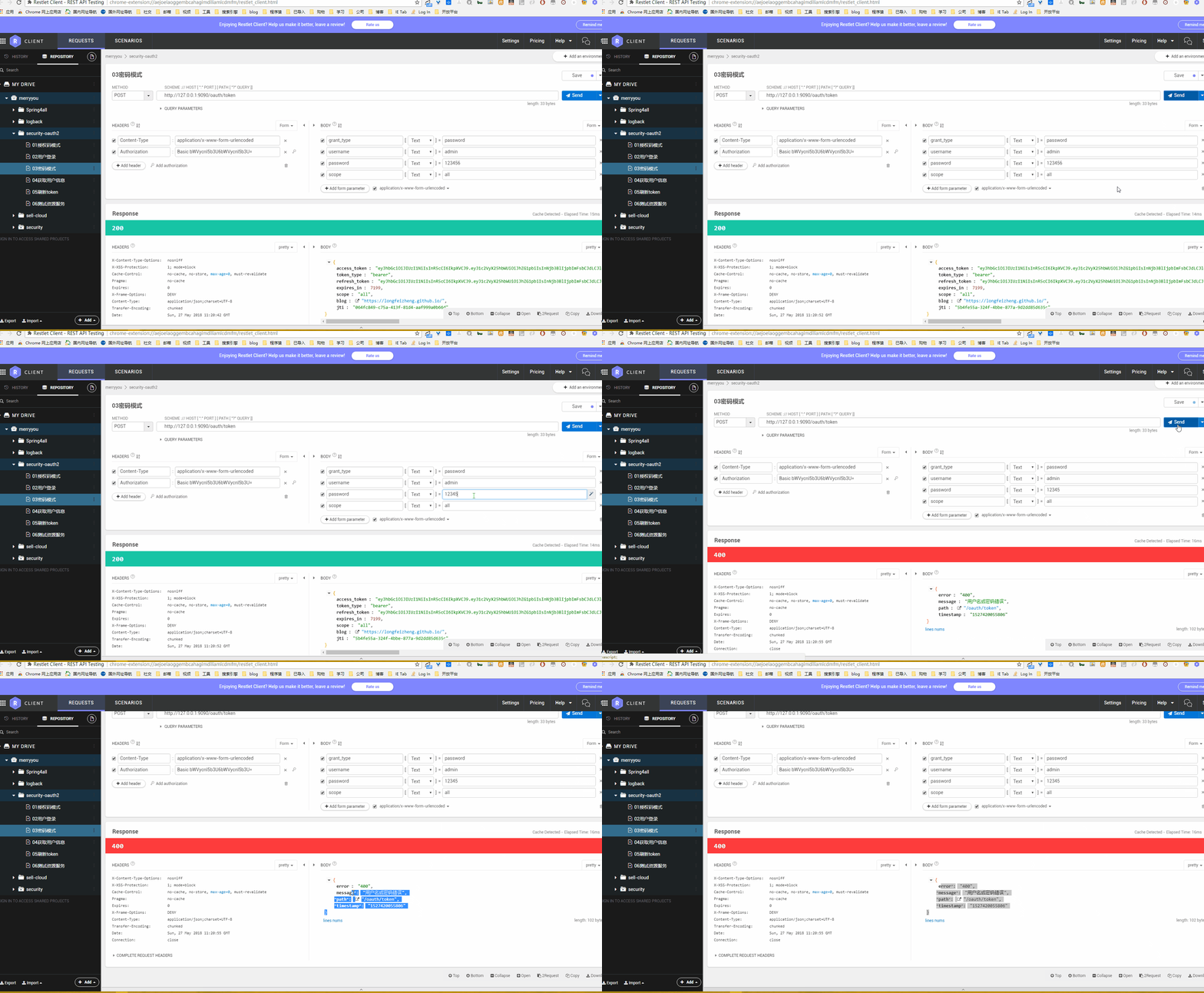
token异常
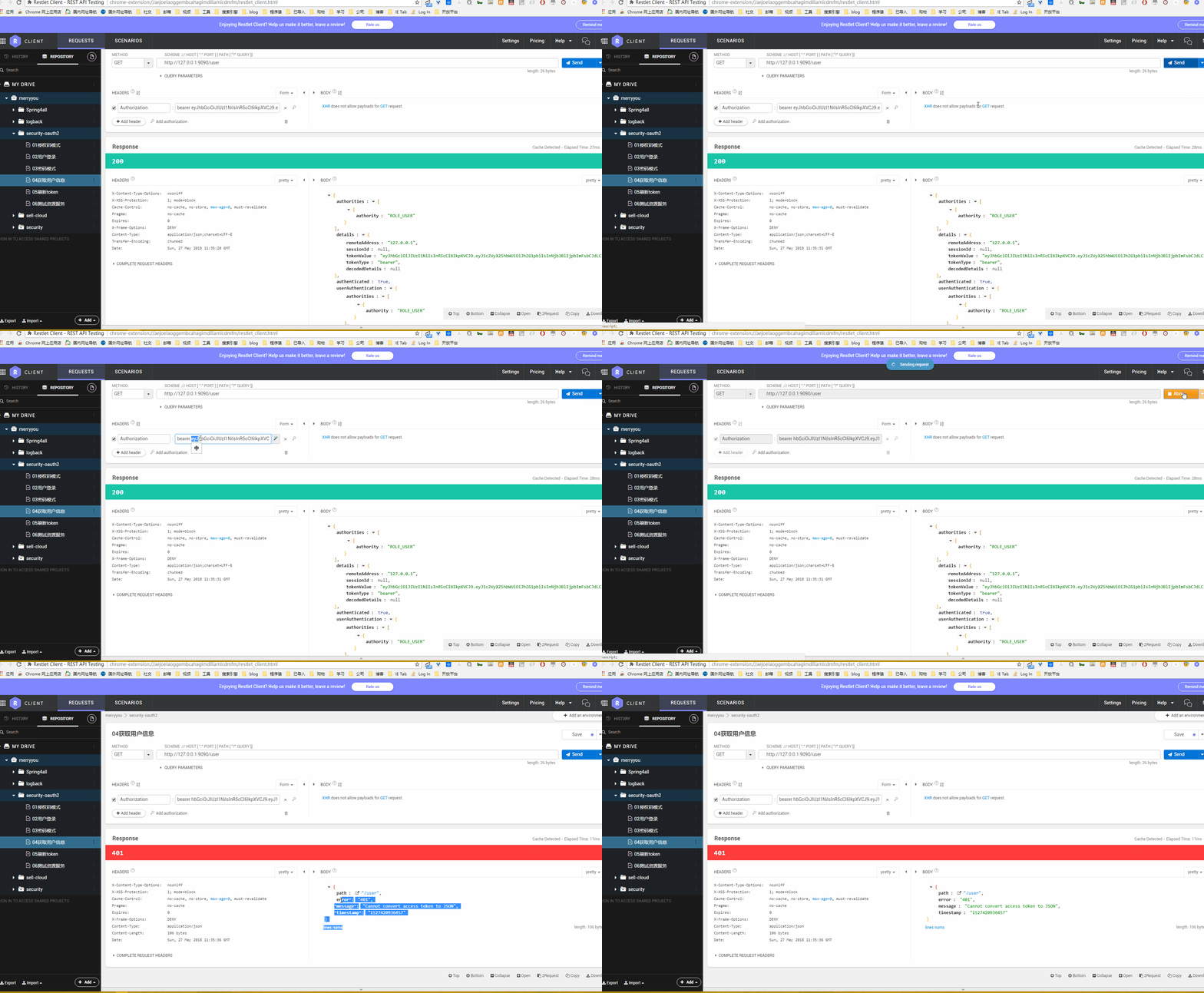
禁止访问
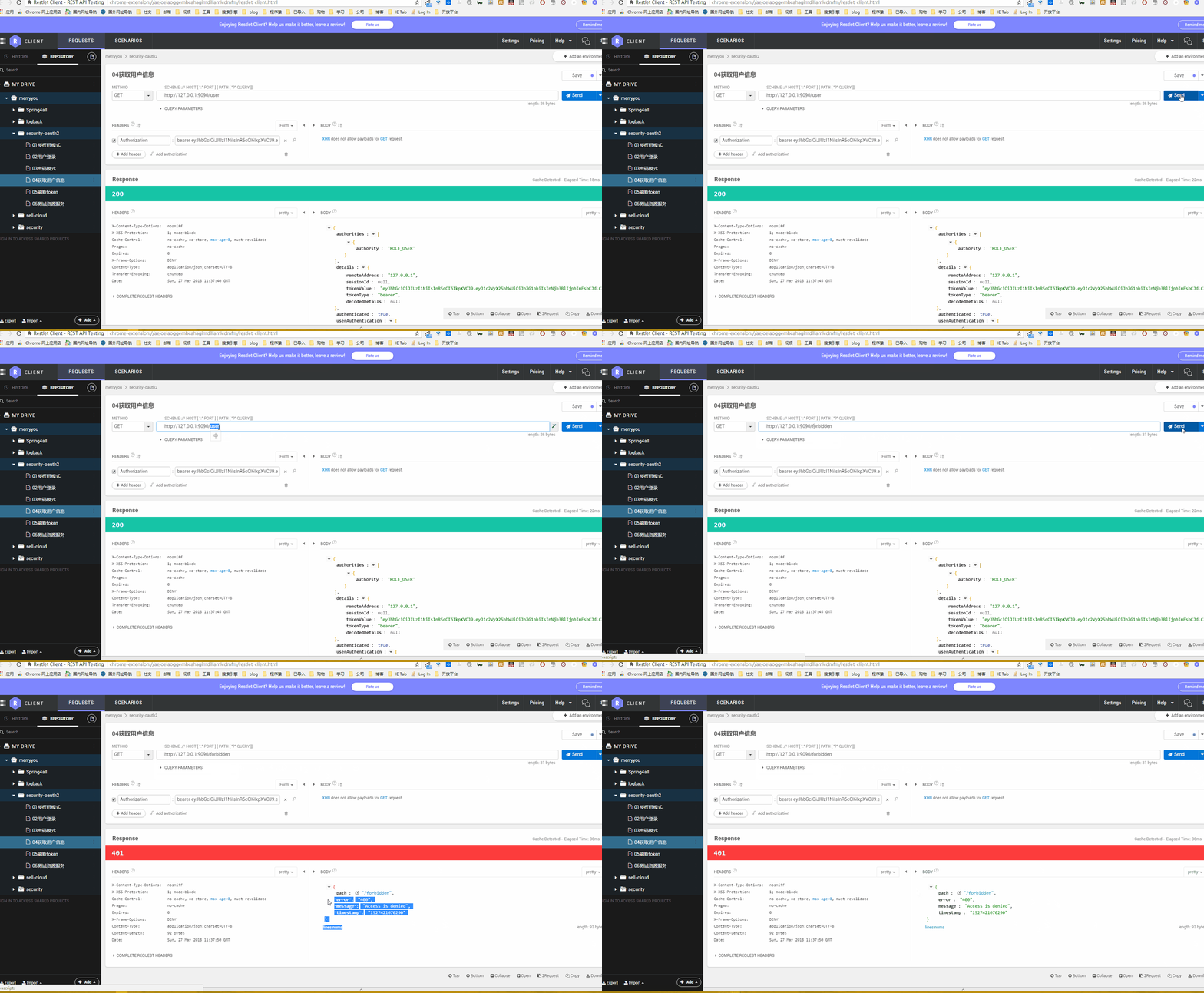
token失效
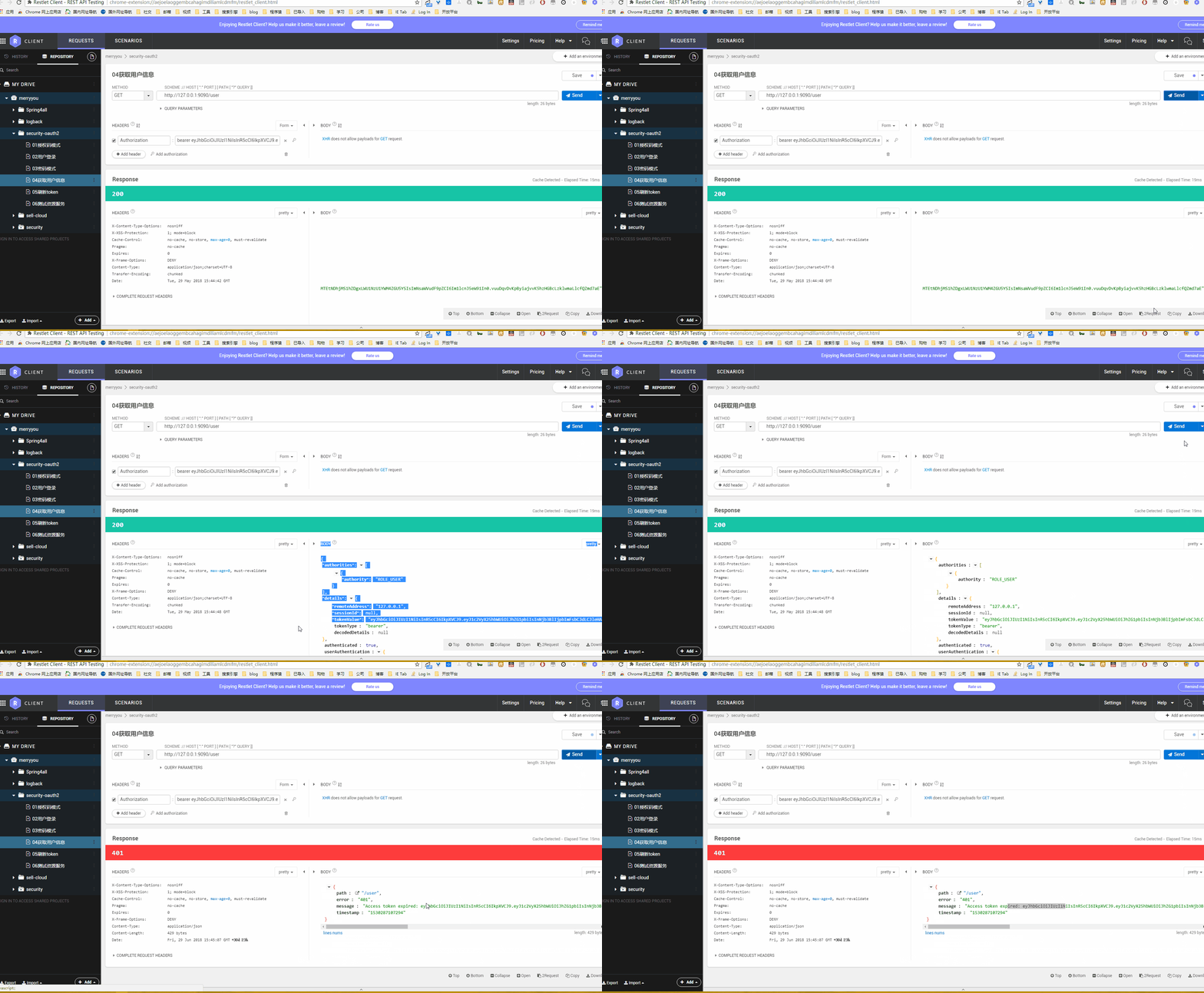
代码下载
- github:https://github.com/longfeizheng/security-oauth2
- gitee:https://gitee.com/merryyou/security-oauth2
推荐文章
- Java创建区块链系列
- Spring Security源码分析系列
- Spring Data Jpa 系列
- 【译】数据结构中关于树的一切(java版)
- SpringBoot+Docker+Git+Jenkins实现简易的持续集成和持续部署
Spring Security Oauth2 自定义 OAuth2 Exception的更多相关文章
- 朱晔和你聊Spring系列S1E10:强大且复杂的Spring Security(含OAuth2三角色+三模式完整例子)
Spring Security功能多,组件抽象程度高,配置方式多样,导致了Spring Security强大且复杂的特性.Spring Security的学习成本几乎是Spring家族中最高的,Spr ...
- spring security使用自定义登录界面后,不能返回到之前的请求界面的问题
昨天因为集成spring security oauth2,所以对之前spring security的配置进行了一些修改,然后就导致登录后不能正确跳转回被拦截的页面,而是返回到localhost根目录. ...
- spring security采用自定义登录页和退出功能
更新... 首先采用的是XML配置方式,请先查看 初识Spring security-添加security 在之前的示例中进行代码修改 项目结构如下: 一.修改spring-security.xml ...
- spring security 3 自定义认证,授权示例
1,建一个web project,并导入所有需要的lib. 2,配置web.xml,使用Spring的机制装载: <?xml version="1.0" encoding=& ...
- 阶段5 3.微服务项目【学成在线】_day16 Spring Security Oauth2_06-SpringSecurityOauth2研究-Oauth2授权码模式-申请令牌
3.3 Oauth2授权码模式 3.3.1 Oauth2授权模式 Oauth2有以下授权模式: 授权码模式(Authorization Code) 隐式授权模式(Implicit) 密码模式(Reso ...
- 阶段5 3.微服务项目【学成在线】_day16 Spring Security Oauth2_07-SpringSecurityOauth2研究-Oauth2授权码模式-资源服务授权测试
下面要完成 5.6两个步骤 3.3.4 资源服务授权 3.3.4.1 资源服务授权流程 资源服务拥有要访问的受保护资源,客户端携带令牌访问资源服务,如果令牌合法则可成功访问资源服务中的资 源,如下图 ...
- 阶段5 3.微服务项目【学成在线】_day16 Spring Security Oauth2_09-SpringSecurityOauth2研究-Oauth2密码模式授权
密码模式(Resource Owner Password Credentials)与授权码模式的区别是申请令牌不再使用授权码,而是直接 通过用户名和密码即可申请令牌. 测试如下: Post请求:htt ...
- spring security 之自定义表单登录源码跟踪
上一节我们跟踪了security的默认登录页的源码,可以参考这里:https://www.cnblogs.com/process-h/p/15522267.html 这节我们来看看如何自定义单表认 ...
- Spring Cloud Gateway自定义异常处理Exception Handler
版本: Spring Cloud 2020.0.3 常见的方法有 实现自己的 DefaultErrorWebExceptionHandler 或 仅实现ErrorAttributes. 方法1: Er ...
随机推荐
- 一文了解:Redis的AOF持久化
Redis的AOF持久化 每当Redis-Server接收到写数据时,就把命令以文本形式追加到AOF文件里,当重启Redis服务时,AOF文件里的命令会被重新执行一次,重新恢复数据.当AOF过大时将重 ...
- 树莓派dht11,土壤湿度传感器,继电器的使用。树莓派云灌溉(二)
关于传感器的一些说明 我的想法是这样的 我尽量用易于理解的语言去说我的想法 首先,土壤湿度传感器和dh11会获取数据,然后树莓派会处理这些数据,读出土壤温湿度和空气温湿度,并将这些数据上传到云服务器, ...
- 章节十六、2-TestNG注解和断言
一.TestNG注解的testcease不是自上而下运行的,而是按照方法名的字母排序或数字的大小顺序运行的. 二.断言:判断返回的结果与我们的预期结果是否一致. 1.Assert.assertTrue ...
- R 包 rgl 安装失败, 报错 X11 not found but required, configure aborted 及解决方法
R 包 rgl 安装失败, X11 not found but required, configure aborted * installing *source* package ‘rgl’ ... ...
- 多线程编程-synchronized
使用取钱的demo来模拟实现线程的同步 package com.iotec.synchronizedTest; import java.io.ObjectInputStream; public cla ...
- Nginx服务部署
1 企业常用网站服务 处理静态资源:nginx.apache.Lighttpd处理动态资源:tomcat(java语言编写).php(php语言编写).python(python语言编写)nginx网 ...
- **p,*p和&p使用有感
*p两种使用情况: 1.定义指针变量,如char *p:这里p是一个变量,单单在这一点上与int a 无差别:但p这个变量特殊在其中只能存地址. 引申:对于char **p,p中存一个地址add1,a ...
- 学习 Object-C: 简史
对于一门语言的历史,我认为写一本书可能都不为过,关键是看你如何介绍和表达.当然每一个人的理解也大相径庭.本文阐述也仅仅只是冰山一角,如果需要深入了解,自己可能需要多花费一些心思. 这里也不会给大家说太 ...
- Docker搭建Zookeeper&Kafka集群
最近在学习Kafka,准备测试集群状态的时候感觉无论是开三台虚拟机或者在一台虚拟机开辟三个不同的端口号都太麻烦了(嗯..主要是懒). 环境准备 一台可以上网且有CentOS7虚拟机的电脑 为什么使用虚 ...
- MVC整体运行流程一(进入管道)
1.在浏览器输入 https://www.cnblogs.com/zhangmm96/发送一个HTTP到web服务器,Web服务器WIndows内核中的HTTP.SYS组件捕捉当前请求,该组件分析出是 ...