
Shiro笔记---授权

1.搭建shiro环境(*)
idea2018.2、maven3.5.4、jdk1.8
项目结构:
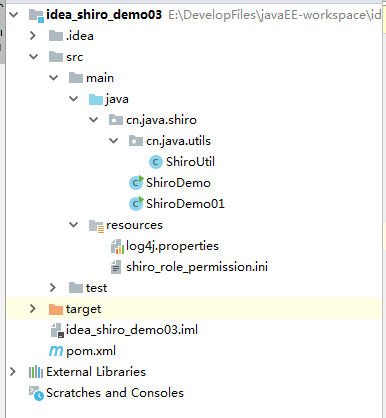
pom.xml:
<?xml version="1.0" encoding="UTF-8"?>

<project xmlns="http://maven.apache.org/POM/4.0.0"

         xmlns:xsi="http://www.w3.org/2001/XMLSchema-instance"

         xsi:schemaLocation="http://maven.apache.org/POM/4.0.0 http://maven.apache.org/xsd/maven-4.0.0.xsd">

    <modelVersion>4.0.0</modelVersion>

    <groupId>org.zyu</groupId>

    <artifactId>idea_shiro_demo03</artifactId>

    <version>1.0-SNAPSHOT</version>

    <dependencies>

        <dependency>

            <groupId>org.apache.shiro</groupId>

            <artifactId>shiro-core</artifactId>

            <version>1.2.4</version>

        </dependency>

        <dependency>

            <groupId>org.slf4j</groupId>

            <artifactId>slf4j-log4j12</artifactId>

            <version>1.7.12</version>

        </dependency>

        <dependency>

            <groupId>com.alibaba</groupId>

            <artifactId>druid</artifactId>

            <version>1.1.10</version>

        </dependency>

        <dependency>

            <groupId>commons-logging</groupId>

            <artifactId>commons-logging</artifactId>

            <version>1.2</version>

        </dependency>

        <dependency>

            <groupId>mysql</groupId>

            <artifactId>mysql-connector-java</artifactId>

            <version>5.1.37</version>

        </dependency>

    </dependencies>

</project>
shiro_role_permission.ini
[users]

superbird=123456,system

bigbird=123,role1,role2

[roles]

system=InRoom:select,InRoom:insert,InRoom:xiaoFei,InRoom:update,VIP:select,VIP:gaunli,VIP:add

role1=InRoom:xiaoFei

role2=VIP:select,VIP:add
【users】
用户名=密码,角色
【roles】
角色=对应的权限
ShiroUtil(封装对应的身份验证方法 --- 只有先登录之后才能判断权限):
public class ShiroUtil {

    public static Subject login(String configPath,String username,String password) {

        //找资源:ctrl+shift+n

        //核心类:SecurityManager

        Factory<SecurityManager> factory = new IniSecurityManagerFactory(configPath);

        SecurityManager securityManager = factory.getInstance();

        //当前用户Subject

        SecurityUtils.setSecurityManager(securityManager);

        Subject user = SecurityUtils.getSubject();

        //模拟用户输入用户名与密码

        UsernamePasswordToken token = new UsernamePasswordToken(username,password);

        try {

            user.login(token);

            System.out.println("登录成功");

        } catch (AuthenticationException e) {

            System.out.println("登录失败");

        }

        return user;

    }

}
判断用户所拥有的角色(一个用户对应的角色可以是一个,也可以是多个)
public class ShiroDemo {

    public static void main(String[] args) {

        Subject user = ShiroUtil.login("classpath:shiro_role_permission.ini", "bigbird", "123");

        //判断用户是否拥有某个角色

        boolean flag1 = user.hasRole("system");

//         System.out.println("flag1="+flag1);

        List<String> roles = Arrays.asList("role1", "role2","system");

        boolean[] flags = user.hasRoles(roles);

        System.out.println(Arrays.toString(flags));

    }

}
判断用户是否拥有某个具体的权限
public class ShiroDemo01 {

    public static void main(String[] args) {

        //判断bigbird=123的用户是否具有某个具体的权限

        Subject user = ShiroUtil.login("classpath:shiro_role_permission.ini", "bigbird", "123");

        boolean flag1 = user.isPermitted("InRoom:xiaoFei");

        //System.out.println("flag1="+flag1);

        //判断某个用户是否同时具有多个权限

        boolean[] flags = user.isPermitted("InRoom:xiaoFei", "InRoom:update");

        // System.out.println("flags="+ Arrays.toString(flags));

        try {

            user.checkPermission("InRoom:xiaoFei");

            System.out.println("bigbird有消费记录权限");

        } catch (AuthorizationException e) {

            System.out.println("bigbird有没有消费记录权限");

        }

    }

}
Shiro笔记---授权的更多相关文章
- Shiro笔记(三)授权
Shiro笔记(三)授权 一.授权方式 1.编程式: Subject subject=SecurityUtils.getSubject(); if(subject.hasRole("root ...
- Shiro笔记(一)基本概念
Shiro笔记(一)基本概念 一.简介 Shiro是一个Java安全框架,可以帮助我们完成:认证.授权.加密.会话管理.与Web集成.缓存等. Authentication:身份认证/登录,验证用户是 ...
- Shiro【授权、整合Spirng、Shiro过滤器】
前言 本文主要讲解的知识点有以下: Shiro授权的方式简单介绍 与Spring整合 初始Shiro过滤器 一.Shiro授权 上一篇我们已经讲解了Shiro的认证相关的知识了,现在我们来弄Shiro ...
- Shiro【授权过滤器、与ehcache整合、验证码、记住我】
前言 本文主要讲解的知识点有以下: Shiro授权过滤器使用 Shiro缓存 与Ehcache整合 Shiro应用->实现验证码功能 记住我功能 一.授权过滤器测试 我们的授权过滤器使用的是pe ...
- Shiro笔记(五)JSP标签
Shiro笔记(五)JSP标签 导入标签库 <%@taglib prefix="shiro" uri="http://shiro.apache.org/tags&q ...
- Shiro笔记(四)编码/加密
Shiro笔记(四)编码/加密 一.编码和解码 //base64编码.解码 @Test public void testBase64(){ String str="tang"; b ...
- Shiro笔记(二)身份验证
Shiro笔记(二)身份验证 一.核心代码 @Test public void helloWorldTest(){ IniSecurityManagerFactory factory = new In ...
- Shiro:授权的相关实现
Shiro:授权的相关实现 一.使用Shiro过滤器实现授权 设置好授权拦截跳转的请求地址 /** * 创建ShiroFilterFactoryBean */ @Bean public ShiroFi ...
- shiro的授权与认证
shiro的授权与认证 package com.cy.pj.common.aspect;import java.lang.reflect.Method;import java.util.Arrays; ...
随机推荐
- js 指定分隔符连接数组元素join()
示例:<script type="text/javascript"> var myarr = new Array(3); myarr[0] = "I" ...
- j2ee开发之struts2框架学习笔记
Struts2框架技术重点笔记 1.Struts2 是在webwork基础上发展而来. 2.Struts2 不依赖struts API和 servlet API 3.Struts2提供了拦截器,表现层 ...
- 关于Python selenium实现类似比价软件的功能
偶然间想实现比价的功能,正常requests途径比较难实现,于是乎想到可以selenium可以简易实现,下面是代码. import requests from selenium import webd ...
- Docker 网易镜像仓库使用
Docker 网易镜像仓库使用: 网易账号注册: https://id.163yun.com/register?h=fc&referrer=https://console.163yun.com ...
- 软件开发工具(第7章:Eclipse入门)
一.Eclipse简介 Eclipse [iˈklips],是一个开放源代 码的.基于Java的可扩展集成应 用程序开发环境. Eclipse最初主要用来进行Java语 言开发,但并非只有这个用途. ...
- mysql 分页offset过大性能问题解决思路
在公司干活一般使用sqlserver数据库.rownumber分页贼好用. 但是晚上下班搞自己的事情就不用sqlserver了.原因就是自己的渣渣1核2g的小服务器完全扛不住sqlserver那么大的 ...
- 某CTF平台一道PHP代码注入
这道题以前做过但是没有好好的总结下来.今天又做了一下,于是特地记录于此. 首先就是针对源码进行审计: 关于create_function这个函数可以看一下这个:http://www.php.cn/ph ...
- Ubuntu16.04安装java6(jdk 1.6)
目录 下载安装包 安装 移动到指定位置并设置版本 设置环境变量 切换java版本 下载安装包 先到官网下载安装包. 安装 输入命令 chmod 777 jdk-6u45-linux-x64.bin s ...
- 程序员IT狗有什么副业可以做呢?
1. 开篇 副业有很多,全网有做什么公众号.闲鱼.手机卡,各种各样的都有,大部分是骗子,小部分是通过自己的努力,获得了成功. 从年初就开始实践如何做一个自由职业者,近大半年有一些感受正好一起分享交流一 ...
- web安全之php中常见的INI文件配置
php.ini 在 PHP 启动时被读取.对于服务器模块版本的 PHP,仅在 web 服务器启动时读取 一次.对于 CGI 和 CLI 版本,每次调用都会读取. * Apache web 服务器在启动 ...