
WPF Adorner 弹出式工具栏 例子
源于MSDN 一个问题。
问:如何做出类似word的文字选中后工具栏弹出和动画效果。
我用的是adorner,其实用popup也是可以的。
效果图:
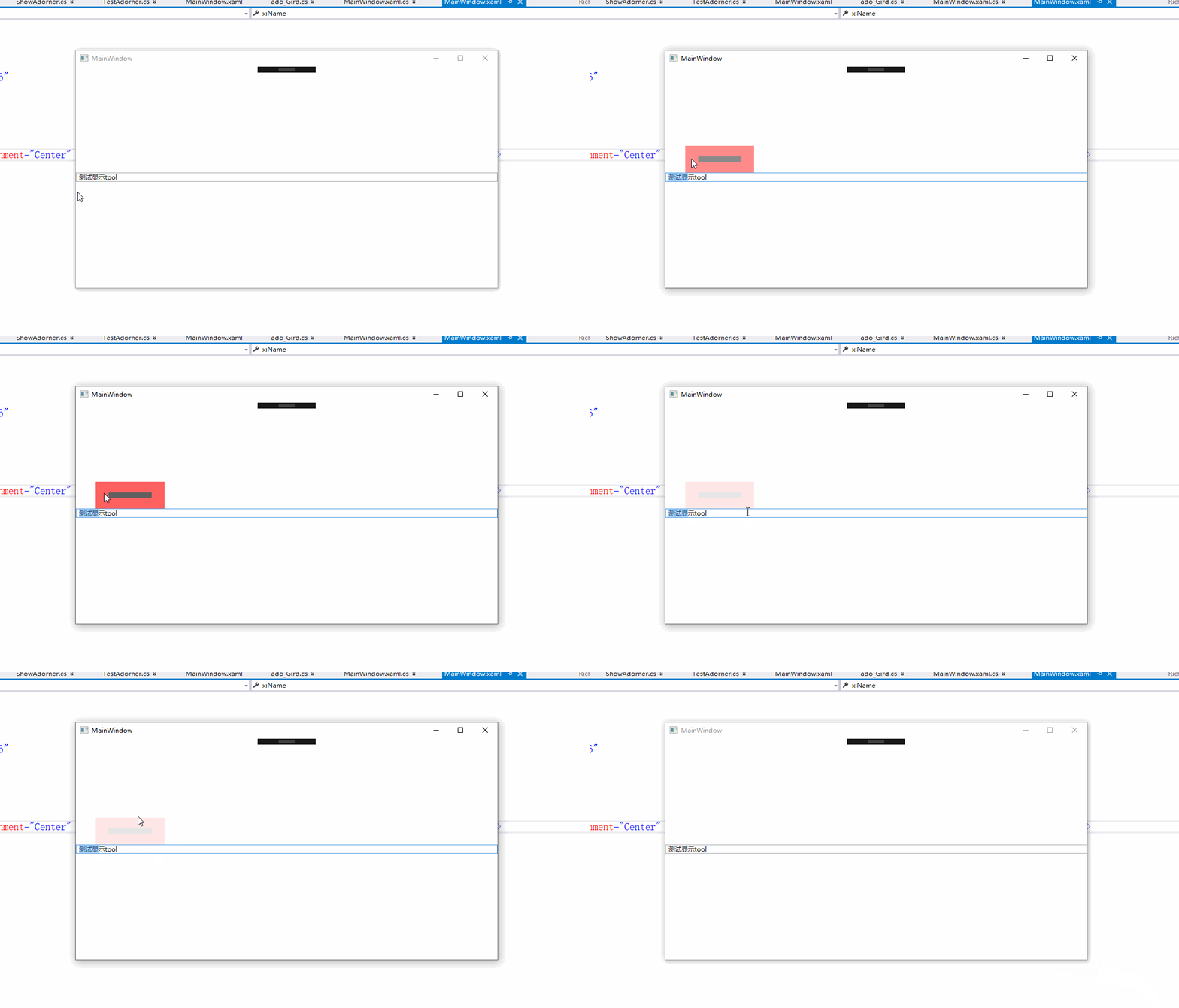
中间黑色部分代表真正的工具栏。
xaml代码:
<Window x:Class="ADO_TOOL.MainWindow"

        xmlns="http://schemas.microsoft.com/winfx/2006/xaml/presentation"

        xmlns:x="http://schemas.microsoft.com/winfx/2006/xaml"

        xmlns:d="http://schemas.microsoft.com/expression/blend/2008"

        xmlns:mc="http://schemas.openxmlformats.org/markup-compatibility/2006"

        xmlns:local="clr-namespace:ADO_TOOL"

        mc:Ignorable="d"

        Title="MainWindow" Height="" Width="">

    <Grid x:Name="adohost">

        <RichTextBox LostKeyboardFocus="RTB_LostKeyboardFocus"  VerticalAlignment="Center"  x:Name="RTB"  PreviewMouseLeftButtonUp="RichTextBox_PreviewMouseLeftButtonUp"  >

            <FlowDocument  >

                <Paragraph >

                    <Run    Text="测试显示tool"/>

                </Paragraph>

            </FlowDocument>

        </RichTextBox>

    </Grid>

</Window>
adoner代码类
using System.Windows;

using System.Windows.Controls;

using System.Windows.Documents;

using System.Windows.Media;

namespace ADO_TOOL

{

    public class ado_Gird : Adorner

    {

        private VisualCollection collection;

        protected override int VisualChildrenCount => collection.Count;

        protected override Visual GetVisualChild(int index) => collection[index];

        protected override Size MeasureOverride(Size constraint) => base.MeasureOverride(constraint);

        protected override Size ArrangeOverride(Size finalSize)

        {

            _gird.Arrange(new Rect(finalSize));

            var f = host as FrameworkElement;

            _gird.Margin = new Thickness(left, -top-_gird.Height,,);

           return base.ArrangeOverride(finalSize);

        }

        private  Grid _gird;

        private UIElement host;

        private double left;

        private double top;

        public   ado_Gird(UIElement adornedElement,double left,double top) :this(adornedElement)

        {

            this.left= left;

            this.top = top;

        }

        //h1是外部grid-内部grid的平均高度

        //h2是外部grid-内部grid的平均宽度

        readonly int h1 = ,h2=;

        public ado_Gird(UIElement adornedElement) : base(adornedElement)

        {

            collection = new VisualCollection(this);

            host = adornedElement;

            this._gird = new Grid();

            _gird.Height = ;

            _gird.Width = ;

            _gird.HorizontalAlignment = HorizontalAlignment.Left;

            _gird.Background = new SolidColorBrush(Colors.Red);

            Grid g2 = new Grid();

            g2.Height = ;

            g2.Width = ;

            g2.Background = new SolidColorBrush(Colors.Black);

            _gird.Children.Add(g2);

            _gird.MouseMove += _gird_MouseMove;

            _gird.MouseLeave += _gird_MouseLeave;

            _gird.Opacity = 0.5;

            collection.Add(_gird);

        }

        private void _gird_MouseLeave(object sender, System.Windows.Input.MouseEventArgs e)

        {

            _gird.Opacity = 0.1;

        }

        private void _gird_MouseMove(object sender, System.Windows.Input.MouseEventArgs e)

        {

            var point = e.GetPosition(_gird);

            var f = host as FrameworkElement;

            if (_gird.Width - point.X <= h2)

            {

                  _gird.Opacity = -((h2 -( _gird.Width - point.X)) / h2);

            }

            if(_gird.Height - point.Y <= h1)

            {

                _gird.Opacity =  - ((h1 - (_gird.Height - point.Y)) / h1);

            }

            if (point.X>&&point.X<=h2)

            {

                _gird.Opacity = -((h2 - point.X) / h2);

            }

            if (point.Y >  && point.Y <= h1)

            {

               _gird.Opacity =  - (h1 - point.Y) / h1;

            }

        }

    }

}
xaml.cs页面代码:
AdornerLayer layer;

        private void RichTextBox_PreviewMouseLeftButtonUp(object sender, MouseButtonEventArgs e)

        {

            var point = e.GetPosition(RTB);

            if (layer != null)

            {

                var b = layer.GetAdorners(adohost);

                if(b!=null)

                if(b.Count()>)

                   layer.Remove(b[]);

            }

            layer = AdornerLayer.GetAdornerLayer(adohost);

            var ado = new ado_Gird(adohost, point.X,RTB.ActualHeight);

            layer.Add(ado);

        }

        private void RTB_LostKeyboardFocus(object sender, KeyboardFocusChangedEventArgs e)

        {

            if (layer != null)

            {

                var b = layer.GetAdorners(adohost);

                if (b != null)

                    if (b.Count() > )

                    layer.Remove(b[]); ;

            }

        }
WPF Adorner 弹出式工具栏 例子的更多相关文章
- PropertyGrid—为复杂属性提供下拉式编辑框和弹出式编辑框
零.引言 PropertyGrid中我们经常看到一些下拉式的编辑方式(Color属性)和弹出式编辑框(字体),这些都是为一些复杂的属性提供的编辑方式,本文主要说明如何实现这样的编辑方式. 一.为属性提 ...
- ZH奶酪:Ionic中(弹出式窗口)的$ionicModal使用方法
Ionic中[弹出式窗口]有两种(如下图所示),$ionicModal和$ionicPopup; $ionicModal是完整的页面: $ionicPopup是(Dialog)对话框样式的,直接用Ja ...
- Operating System-Thread(5)弹出式线程&&使单线程代码多线程化会产生那些问题
本文主要内容 弹出式线程(Pop-up threads) 使单线程代码多线程化会产生那些问题 一.弹出式线程(Pop-up threads) 以在一个http到达之后一个Service的处理为例子来介 ...
- 【转】PyQt弹出式对话框的常用方法及标准按钮类型
pyQt之弹出式对话框(QMessageBox)的常用方法及标准按钮类型 一.控件说明 QMessageBox是一种通用的弹出式对话框,用于显示消息,允许用户通过单击不同的标准按钮对消息进行反馈,且每 ...
- web全栈开发之网站开发二(弹出式登录注册框前端实现-类腾讯)
这次给大家分享的是目前很多网站中流行的弹出式登录框,如下面的腾讯网登录界面,采用弹出式登录的好处是大大提升了网站的用户体验和交互性,用户不用重新跳转到指定的页面就能登录,非常方便 先来个演示地址 要实 ...
- web开发实战--弹出式富文本编辑器的实现思路和踩过的坑
前言: 和弟弟合作, 一起整了个智慧屋的小web站点, 里面包含了很多经典的智力和推理题. 其实该站点从技术层面来分析的话, 也算一个信息发布站点. 因此在该网站的后台运营中, 富文本的编辑器显得尤为 ...
- asp.net 弹出式日历控件 选择日期 Calendar控件
原文地址:asp.net 弹出式日历控件 选择日期 Calendar控件 作者:逸苡 html代码: <%@ Page Language="C#" CodeFile=&quo ...
- php弹出式登录窗口并获得登录后返回值
一款bootstrap样式结合php制作的弹出式登录窗口,输入用户名和密码后,ajax传参给后台,并获得登录后返回值. hwLayer+ajax弹出登录框 $(function() { $('#for ...
- 让小区运营再智能一点,EasyRadius正式向WayOs用户提供到期弹出式提示充值页面
其实一直没向用户提供到期弹出式页面,主要是给VIP群的用户一点优越感,随着这次EasyRadius的更新,海哥就免费向普通easyRadius用户提供这两个模板下载. 有些人会问,什么样的模板.有什么 ...
随机推荐
- vuePress自动部署到Github Page脚本踩坑
背景 照着官网的教程来就行了,踩了个小坑,记录一下,希望对你有帮助 这是部署后的效果 小坑1 如图所示,官网推荐部署命令 然而windows 没有bash 指令, 直接运行报错 两个解决方法: 项目根 ...
- The listener supports no services oracle注册监听
问题登场: [oracle@my-e450 ~]$ lsnrctl status …… The listener supports no servicesThe command completed s ...
- Debian x7中如何添加永久环境变量
一.进入/etc/bash.bashrc(使用文本编辑器打开) 二.在最后面添加新的环境变量 export PATH=usr/...(路径):$PATH 三.保存后,打开终端,输入source ~/. ...
- Python语言基础06-字符串和常用数据结构
本文收录在Python从入门到精通系列文章系列 1. 使用字符串 第二次世界大战促使了现代电子计算机的诞生,最初计算机被应用于导弹弹道的计算,而在计算机诞生后的很多年时间里,计算机处理的信息基本上都是 ...
- computed和watch的用法和区别
computed可以监听v-model(data)中的值,只要值发生变化 他就会重新去计算 computed必须是要有一个返回值的哦 <div id="app"> &l ...
- pytest文档29-allure-pytest(最新最全,保证能搞成功!)
前言 之前写了个pytest的allure相关的教程,只是停留在环境搭建完成,后续一直没用,小编一直不喜欢这种花里胡哨的报告. 没办法,领导就喜欢这种,小伙伴们也喜欢,所以还是得把allure用起来, ...
- 201871010108-高文利《面向对象程序设计(java)》第六七周学习总结
项目 内容 这个作业属于哪个课程 <任课教师博客主页链接> https://www.cnblogs.com/nwnu-daizh/ 这个作业的要求在哪里 <作业链接地址> ht ...
- Visual Studio 2017 软件包及教程
下载地址:https://files.cnblogs.com/files/yungle/VisualStudio2017.rar 安装教程:https://mp.weixin.qq.com/s?__b ...
- volatile关键字及Java内存模式
参考文档:https://www.cnblogs.com/_popc/p/6096517.html volatile关键字虽然从字面上理解起来比较简单,但是要用好不是一件容易的事情.它与Java的内存 ...
- day45 作业
一.将当前日期按"2017-12-27 11:11 星期三"格式输出 function getdate(){ var d = new Date(); year = d.getFul ...