
使用python脚本批量设置nginx站点的rewrite规则
一般情况下,配置rewrite重写规则使用shell脚本即可:
把url拼凑成1,2文件中中的格式,运行 chongxie.sh 即可生成我们需要的rewrite规则
[root@web01:/opt/rewrite]# more

^/facebook/recover-facebook-messages-on-android.html

[root@web01:/opt/rewrite]# more

https://www.chinasoft.com/facebook/recover-facebook-messages-on-android.html

[root@web01:/opt/rewrite]# more chongxie.sh

#!/bin/bash

> ./temp;

cat -n  >;cat -n  >;join -o 1.2,2.2   >301temp;

# 按行读取拼凑的内容,并且拼凑成我们需要的规则写入到temp中

while read line

do

        a=`echo $line|awk '{print "if (\$request_uri ~ " $1 ") { rewrite ^ " $2 " permanent; }"}'`

        echo $a >> temp;

done < 301temp

sed -i 's/.html\$/.html/' temp;sed -i 's/.php\$/.php/' temp;

[root@web01:/opt/rewrite]# more temp

if ($request_uri ~ ^/facebook/recover-facebook-messages-on-android.html) { rewrite ^ https://www.chinasoft.com/facebook/recover-facebook-messages-on-android.html permanent; }
如下配置:
rewrite规则写在 rewrite_web.d 目录中
# cat /usr/local/nginx/conf/web.d/no.chinasoft.com.conf

server {

        listen ;

        server_name     no.chinasoft.com  ;

        access_log      /data/www/logs/nginx_log/access/no.chinasoft.com_access.log main ;

        error_log       /data/www/logs/nginx_log/error/no.chinasoft.com_error.log ;

        root            /data/www/web/no.chinasoft.com/httpdocs ;

        index           index.html index.shtml index.php ;

        include         rewrite_web.d/no.chinasoft.com.conf ;

        error_page                /.html;

        location ~ \.php$ {

                        proxy_pass http://php_pool;

                        include proxy_params;

        }

        location / {

                include proxy_params;

                if (!-d $request_filename){

                        set $flag $flag;

                }

                if (!-f $request_filename){

                        set $flag $flag;

                }

                if ($flag = ""){

                                proxy_pass http://php_pool;

                }

        }

}
python脚本:
excel的插件下载地址:
https://files.pythonhosted.org/packages/b0/16/63576a1a001752e34bf8ea62e367997530dc553b689356b9879339cf45a4/xlrd-1.2.0-py2.py3-none-any.whl
pip install xlrd-1.2.0-py2.py3-none-any.whl 安装
# coding:utf-8

# 读取excel的每一行,获取host信息列表

import xlrd

import os

import sys

import datetime

workbook = xlrd.open_workbook('web01.xlsx')

for row in xrange(workbook.sheets()[0].nrows):

    src_url=workbook.sheets()[0].cell(row,0).value

    dst_url=workbook.sheets()[0].cell(row,1).value

    # 获取原始域名和path

    from urlparse import urlparse

    parsed_uri = urlparse(src_url)

    domain = '{src_url.netloc}'.format(src_url=parsed_uri)

    src_path = parsed_uri.path

    rewrite_url = "if ($request_uri ~ ^" + src_path +") { rewrite ^ " + dst_url + " permanent; }"

    time = datetime.datetime.now().strftime('%Y%m%d')

    today = "# "+time

    # 判断rewrite.d文件是否存在,存在就写入

    dst_file = "/usr/local/nginx/conf/rewrite_web.d/"+domain+".conf"

    if os.path.isfile(dst_file):

    #     cmd_addtime = 'echo ' + today + '>>' + dst_file

    # print cmd_addtime

    #     res1 = os.system(cmd_addtime)

    #     if res1 != 0:

    #         print 'write today fail'

    #     cmd_addurl = 'echo ' + rewrite_url + '>>' + dst_file

    # print cmd_addurl

    #     res2 = os.system(cmd_addurl)

    #     if res2 != 0:

    #         print 'write url %s failed' % rewrite_url

        with open(dst_file, mode='a+') as f:

            f.write('\n')

            f.write(today)

            f.write('\n')

            f.write(rewrite_url)

            f.write('\n')

    else:

        print "file %s is not exists" % dst_file
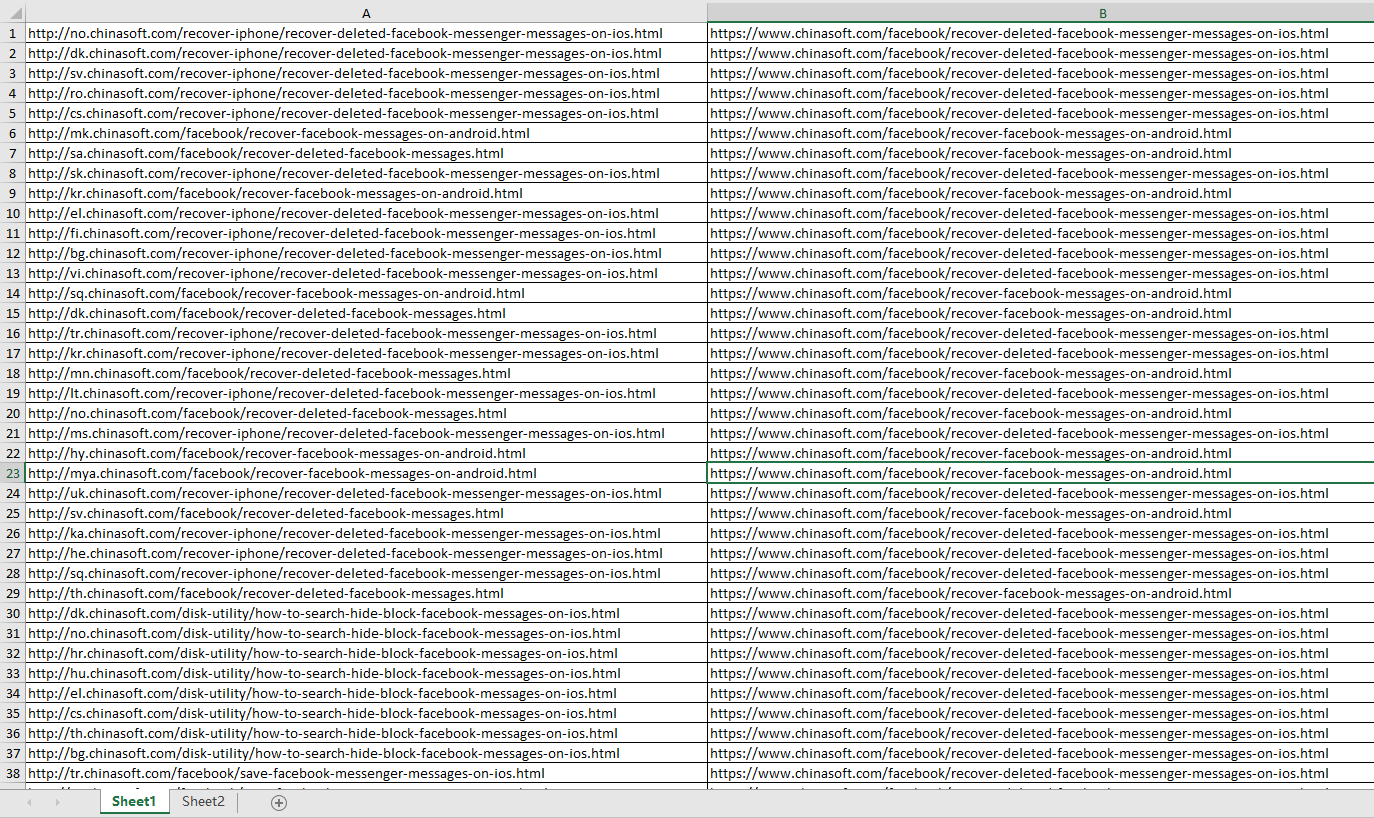
excel的规则,要编辑太多文件内容了,如果手动会浪费大量时间,于是写成了python脚本
注意,源url需要带 http://
使用python脚本批量设置nginx站点的rewrite规则的更多相关文章
- python脚本批量生成数据
在平时的工作中,经常会遇到造数据,特别是性能测试的时候更是需要大量的数据.如果一条条的插入数据库或者一条条的创建数据,效率未免有点低.如何快速的造大量的测试数据呢?在不熟悉存储过程的情况下,今天给大家 ...
- 使用Python脚本批量裁切栅格
对栅格的裁切,我们通常使用裁切(数据管理-栅格-栅格处理)或按掩膜提取(空间分析-提取分析)来裁切,裁切的矢量要素通常是一个要素图层或Shape文件.如果要进行批量处理,可以使用ToolBox中的批量 ...
- 在linux系统中如何通过shell脚本批量设置redis键值对
业务逻辑:批量设置redis中手机号的验证码为888888: 准备shell脚本如下:将18888888100~18888888110的手机号验证码设置为888888: #!/bin/bash ;i& ...
- 关于python脚本头部设置#!/usr/bin/python
今天又是贼几把菜的一天0.0 读别人程序的时候看到在python文件头部设置签名,感觉贼几把酷,自己也试着在文件前段设置了一下. 设置还是蛮简单的,设置过程如图所示. 设置后如图所示: 当然你也可能看 ...
- 在python脚本中设置环境变量,并运行相关应用
1. 问题 在自动化应用的时候 ,有时候环境变量与运行需要不一致.这时候有两种选择: 改变节点环境变量,使得其和运行需求保持一致: 在自动化脚本中设置环境变量,其范围只在脚本运行环境中有效. 显然,当 ...
- python redis 批量设置过期key
在使用 Redis.Codis 时,我们经常需要做一些批量操作,通过连接数据库批量对 key 进行操作: 关于未过期: 1.常有大批量的key未设置过期,导致内存一直暴增 2.rd需求 扫描出这些ke ...
- 实例讲解Nginx下的rewrite规则
一.正则表达式匹配,其中:* ~ 为区分大小写匹配* ~* 为不区分大小写匹配* !~和!~*分别为区分大小写不匹配及不区分大小写不匹配二.文件及目录匹配,其中:* -f和!-f用来判断是否存在文件* ...
- 实例讲解Nginx下的rewrite规则(转)
一.正则表达式匹配,其中:* ~ 为区分大小写匹配* ~* 为不区分大小写匹配* !~和!~*分别为区分大小写不匹配及不区分大小写不匹配二.文件及目录匹配,其中:* -f和!-f用来判断是否存在文件* ...
- 实例讲解Nginx下的rewrite规则 来源:Linux社区
一.正则表达式匹配,其中:* ~ 为区分大小写匹配* ~* 为不区分大小写匹配* !~和!~*分别为区分大小写不匹配及不区分大小写不匹配二.文件及目录匹配,其中:* -f和!-f用来判断是否存在文件* ...
随机推荐
- sqlite3 FTS全文索引按照相关性排序
PS.后来发现,以下代码并不准确.请大家不要试了. -------以下是原内容------------------------------------------------------------- ...
- golang之数据转换
golang按位取反符号和异或符号都是^. fmt.Printf("0x%X\n", 0xFF^0x55) var a uint8 = 0x55 fmt.Printf(" ...
- k8s的pod或者ns资源一直terminating删除办法
假设你要删掉的ns资源,发现一直删不了处于terminating状态 1.首先试一下先把这个ns的所有pod都删掉kubectl delete pod --all -n <terminating ...
- seaborn(1)---画关联图
将 Seaborn 提供的样式声明代码 sns.set() 放置在绘图前,就可以设置图像的样式 sns., color_codes=False, rc=None) context= 参数控制着默认的画 ...
- rootkit——一种特殊的恶意软件,它的功能是在安装目标上隐藏自身及指定的文件、进程和网络链接等信息,一般都和木马、后门等其他恶意程序结合使用
Rootkit是指其主要功能为隐藏其他程式进程的软件,可能是一个或一个以上的软件组合:广义而言,Rootkit也可视为一项技术. 目录 1 rootkit是什么 2 rootkit的功能 root ...
- js--获取和设置css属性
在这一章我们讲述一下如何通过js来操作css中的属性 1,首先,我们想获取元素的一些属性.例如innerHTML,value等值时,我们可以 var object=document.getELemen ...
- jquery ajax在ie9下跨域不执行 crossDomain: true == !(document.all)
<!DOCTYPE html> <html> <head> <title>jQuery CORS in IE7 - IE10</title> ...
- linux学习14 Linux运维高级系统应用-glob通配及IO重定向
一.回顾 1.bash基础特性:命令补全,路径补全,命令引用 2.文件或目录的复制,移动及删除操作 3.变量:变量类型 存储格式,数据表示范围,参与运算 二.bash的基础特性 1.globbing: ...
- vue分组全选权限,CheckBoxGroup
<template> <div class="comPower"> <div class="card_header" v-show ...
- Numpy | 14 字符串函数
本章函数用于对 dtype 为 numpy.string_ 或 numpy.unicode_ 的数组执行向量化字符串操作. 它们基于 Python 内置库中的标准字符串函数. 这些函数在字符数组类(n ...