
Spring-Boot之Admin服务监控-9
一、Spring Boot Admin用于管理和监控一个或者多个Spring Boot程序。Spring Boot Admin分为Server端和Client 端,Client端可以通过向Http Server端注册,也可以结合SpringCloud的服务注册组件Eureka 进行注册。SpringBoot Admin 提供了用AngularJs 写的 Ul 界面,用于管理和监控。其中监控内容包括Spring Boot的监控组件Actuator的各个Http节点,也支持更高级的功能,包括Turbine、Jmx、Loglevel 等。
二、直接使用Spring Boot Admin监控客户端
1、Admin Server
(1)加入依赖
        <dependency>

            <groupId>org.springframework.boot</groupId>

            <artifactId>spring-boot-starter-web</artifactId>

        </dependency>

        <dependency>

            <groupId>de.codecentric</groupId>

            <artifactId>spring-boot-admin-starter-server</artifactId>

            <version>2.0.4</version>

        </dependency>

        <dependency>

            <groupId>org.springframework.boot</groupId>

            <artifactId>spring-boot-starter-actuator</artifactId>

        </dependency>
(2)编写启动项
package com.cetc;

import de.codecentric.boot.admin.server.config.EnableAdminServer;

import org.springframework.boot.SpringApplication;

import org.springframework.boot.autoconfigure.SpringBootApplication;

@SpringBootApplication

@EnableAdminServer

public class AdminServerApplication {

    public static void main(String[] args) {

        SpringApplication.run(AdminServerApplication.class, args);

    }

}
(3)编写配置文件application.yaml
server:

  port: 8691

spring:

  application:

    name: admin-server

management:

  endpoints:

    web:

      exposure:

        include: ["*"]

  endpoint:

    health:

      show-details: always
2、Admin Client,为了简单使用,我这里还是通过feign的方式去接入Eureka的服务。
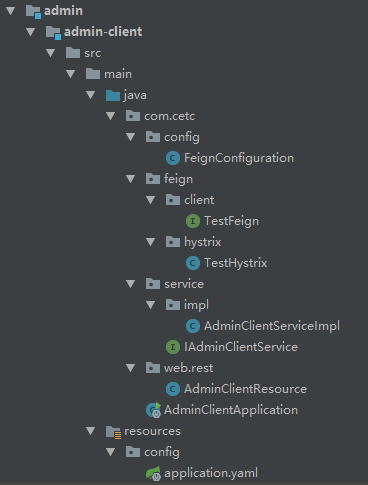
(1)目录结构和Spring-Cloud之Feign声明式调用-4类似,这里全部写出来,有兴趣可以看下方源码
(2)加入依赖
        <dependency>

            <groupId>org.springframework.boot</groupId>

            <artifactId>spring-boot-starter-web</artifactId>

        </dependency>

        <!--admin-client-->

        <dependency>

            <groupId>org.springframework.boot</groupId>

            <artifactId>spring-boot-starter-actuator</artifactId>

        </dependency>

        <dependency>

            <groupId>de.codecentric</groupId>

            <artifactId>spring-boot-admin-starter-client</artifactId>

            <version>2.0.4</version>

        </dependency>

        <!--admin-client-->
(3)启动项没有什么特别的,这里直接编写配置文件application.yaml
server:

  port: 8692

spring:

  application:

    name: admin-client

  boot:

    admin:

      client:

        url: ["http://127.0.0.1:8691"] # 配置注册的admin Server服务

eureka:

  client:

    service-url:

      defaultZone: http://127.0.0.1:8670/eureka/ # 实际开发中建议使用域名的方式

management:

  endpoints:

    web:

      exposure:

        include: ["*"]

  endpoint:

    health:

      show-details: always

    logfile:

      external-file: logs/log.log # 这里的配置主要是在admin server中看到日志记录

logging:

  path: logs

  file: logs/log.log # 日志配置
3、测试。启动Eureka-Server,Eureka-Client,Admin-Server,Admin-Client。端口分别为:8670、8673、8691、8692。
(1)Eureka-Server注册效果

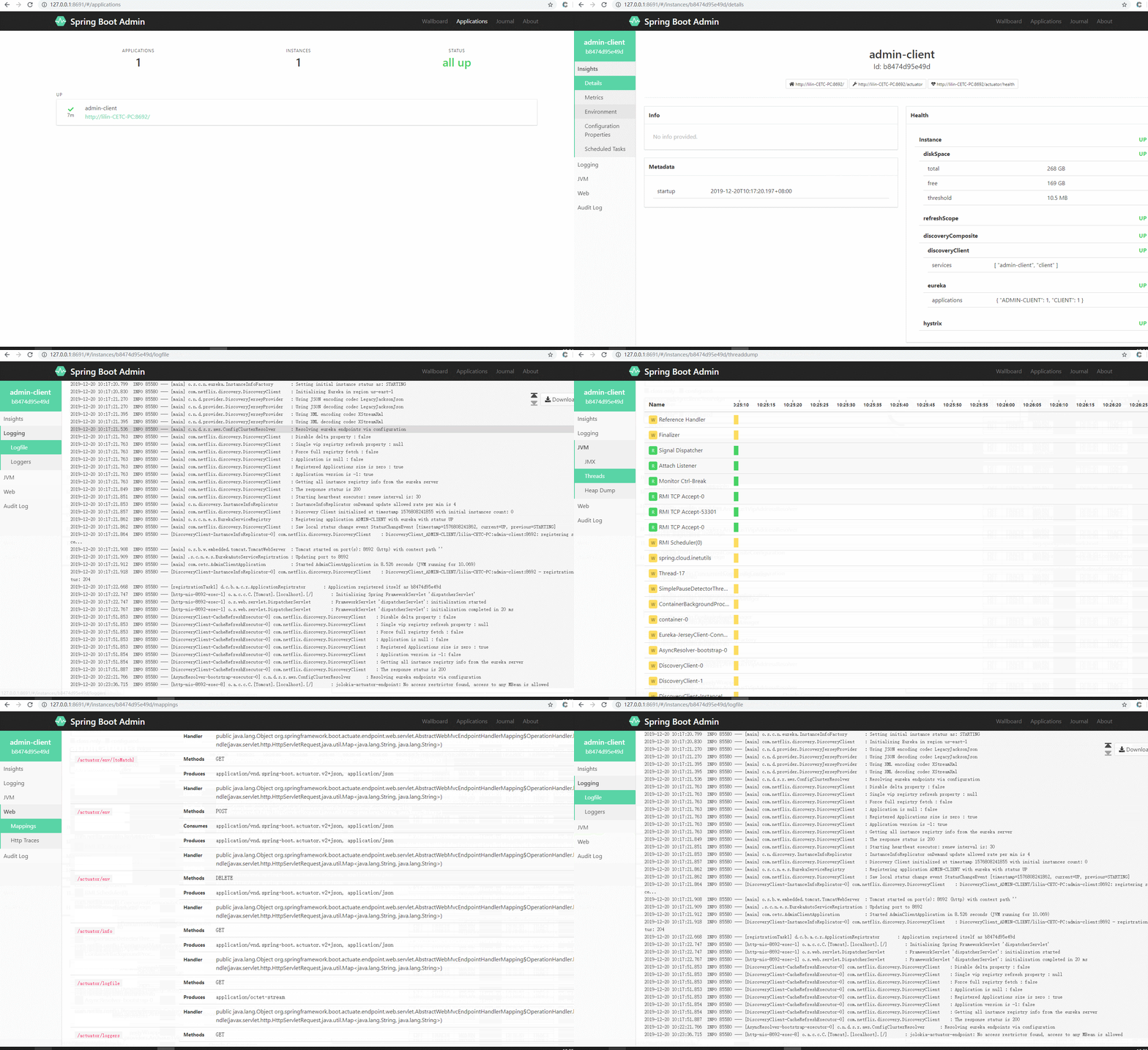
(2)Admin-Server效果
三、让Admin-Server通过Eureka注册中心来监控所有服务(这才是重点),这里还加入了Security配置,主要目的是为了安全。
1、Admin-Server
(1)所需依赖
        <dependency>

            <groupId>org.springframework.cloud</groupId>

            <artifactId>spring-cloud-starter-netflix-eureka-client</artifactId>

        </dependency>

        <dependency>

            <groupId>org.springframework.boot</groupId>

            <artifactId>spring-boot-starter-web</artifactId>

        </dependency>

        <dependency>

            <groupId>de.codecentric</groupId>

            <artifactId>spring-boot-admin-starter-server</artifactId>

            <version>2.0.4</version>

        </dependency>

        <dependency>

            <groupId>org.springframework.boot</groupId>

            <artifactId>spring-boot-starter-actuator</artifactId>

        </dependency>

        <dependency>

            <groupId>org.springframework.boot</groupId>

            <artifactId>spring-boot-starter-security</artifactId>

        </dependency>
说明:spring-boot-admin-starter-server的版本选择要慎重,不然会有很多坑。
(2)编写启动项
package com.cetc;

import de.codecentric.boot.admin.server.config.EnableAdminServer;

import org.springframework.boot.SpringApplication;

import org.springframework.boot.autoconfigure.SpringBootApplication;

import org.springframework.cloud.netflix.eureka.EnableEurekaClient;

@SpringBootApplication

@EnableAdminServer

@EnableEurekaClient

public class AdminServerApplication {

    public static void main(String[] args) {

        SpringApplication.run(AdminServerApplication.class, args);

    }

}
(3)编写Security配置,这里也可以参考官网配置:https://codecentric.github.io/spring-boot-admin/2.0.4/#_securing_spring_boot_admin_server
package com.cetc.config;

import org.springframework.context.annotation.Configuration;

import org.springframework.security.config.annotation.web.builders.HttpSecurity;

import org.springframework.security.config.annotation.web.configuration.EnableWebSecurity;

import org.springframework.security.config.annotation.web.configuration.WebSecurityConfigurerAdapter;

@Configuration

@EnableWebSecurity

public class SecurityConfiguration extends WebSecurityConfigurerAdapter{

    @Override

    protected void configure(HttpSecurity http) throws Exception {

        http

            .csrf().disable()

            .authorizeRequests()
        .antMatchers("/assets/**").permitAll()

            .anyRequest().authenticated()

        .and()

            //说明:这里和官网不同的是,因为默认端口为/login,所以我这里直接放开login.html就可以了不用配置loginProcessingUrl

            //在说明一点,这里是采用的本地页面的。如果前后端分开,请配具体的登录接口。

            .formLogin()

            .loginPage("/login.html").permitAll()

        .and()

            //默认接口/logout,不用配置logoutUrl

            .logout()

            .logoutSuccessUrl("/login.html")

        .and()

            //这里必须加入httpBasic,因为Eureka-Server是基于最原始的方式进行验证的。

            .httpBasic();

    }

}
(4)编写配置文件
server:

  port: 8691

spring:

  application:

    name: admin-server

  security:

    user:

      name: admin

      password: admin # 加入登录密码

eureka:

  client:

    service-url:

      defaultZone: http://127.0.0.1:8670/eureka/ # 实际开发中建议使用域名的方式

  instance:

    metadata-map:

      user.name: ${spring.security.user.name}

      user.password: ${spring.security.user.password}

management:

  endpoints:

    web:

      exposure:

        include: ["*"]

  endpoint:

    health:

      show-details: always # 显示具体详情
说明:metadata-map,主要用于方向验证使用。
2、Admin-Client这里不需要修改任何配置,只需要注册配置文件手动注册的配置
server:

  port: 8692

spring:

  application:

    name: admin-client

#  boot:

#    admin:

#      client:

#        url: ["http://127.0.0.1:8691"] # 配置注册的admin Server服务

eureka:

  client:

    service-url:

      defaultZone: http://127.0.0.1:8670/eureka/ # 实际开发中建议使用域名的方式

management:

  endpoints:

    web:

      exposure:

        include: ["*"]

  endpoint:

    health:

      show-details: always

    logfile:

      external-file: logs/log.log # 这里的配置主要是在admin server中看到日志记录

logging:

  path: logs

  file: logs/log.log # 日志配置
3、测试。启动Eureka-Server,Eureka-Client,Admin-Server,Admin-Client。端口分别为:8670、8673、8691、8692。
(1)Eureka-Server效果

(2)Admin-Server效果

说明:为什么Eureka-Client是INSTANCES DOWN的状态。这里服务其实是正常的,最主要的点在于Eureka-Client没有配置actuator。所以访问不到/acturtor/health接口。
四、源码地址:https://github.com/lilin409546297/spring-cloud/tree/master/admin
Spring-Boot之Admin服务监控-9的更多相关文章
- 如何做自己的服务监控?spring boot 2.x服务监控揭秘
Actuator是spring boot项目中非常强大一个功能,有助于对应用程序进行监视和管理,通过 restful api请求来监管.审计.收集应用的运行情况,针对微服务而言它是必不可少的一个环节. ...
- 如何做自己的服务监控?spring boot 1.x服务监控揭秘
1.准备 下载可运行程序:http://www.mkyong.com/spring-boot/spring-boot-hello-world-example-jsp/ 2.添加服务监控依赖 <d ...
- Spring Boot (27) actuator服务监控与管理
actuaotr是spring boot项目中非常强大的一个功能,有助于对应用程序进行监控和管理,通过restful api请求来监管.审计.收集应用的运行情况,针对微服务而言它是必不可少的一个环节. ...
- Spring Cloud第十三篇 | Spring Boot Admin服务监控
本文是Spring Cloud专栏的第十三篇文章,了解前十二篇文章内容有助于更好的理解本文: Spring Cloud第一篇 | Spring Cloud前言及其常用组件介绍概览 Spring Clo ...
- SpringBoot系列——admin服务监控
前言 springboot项目部署起来后,如何实时监控项目的运行状况呢?本文记录使用springboot-admin对服务进行监控. springboot-admin介绍:https://codece ...
- 一文读懂 Spring Boot、微服务架构和大数据治理三者之间的故事
微服务架构 微服务的诞生并非偶然,它是在互联网高速发展,技术日新月异的变化以及传统架构无法适应快速变化等多重因素的推动下诞生的产物.互联网时代的产品通常有两类特点:需求变化快和用户群体庞大,在这种情况 ...
- Spring Boot、微服务架构和大数据
一文读懂 Spring Boot.微服务架构和大数据治理三者之间的故事 https://www.cnblogs.com/ityouknow/p/9034377.html 微服务架构 微服务的诞生并非偶 ...
- Spring Boot开启Druid数据库监控功能
Druid是一个关系型数据库连接池,它是阿里巴巴的一个开源项目.Druid支持所有JDBC兼容的数据库,包括Oracle.MySQL.Derby.PostgreSQL.SQL Server.H2等.D ...
- 一文读懂spring boot 和微服务的关系
欢迎访问网易云社区,了解更多网易技术产品运营经验. Spring Boot 和微服务没关系, Java 微服务治理框架普遍用的是 Spring Cloud. Spring Boot 产生的背景,是开发 ...
- 在5分钟内将Spring Boot作为Windows服务启动
分享优锐课学习笔记~来看一下如何使用Spring Boot创建Windows服务以及通过配置详细信息来快速启动并运行. 最近不得不将Spring Boot应用程序部署为Windows服务,感到惊讶的是 ...
随机推荐
- ELK实时日志分析平台环境部署,以及可视化展示
ELK是三个开源软件的缩写,分别表示:Elasticsearch , Logstash, Kibana , 它们都是开源软件.新增了一个FileBeat,它是一个轻量级的日志收集处理工具(Agent) ...
- webpack4.0构建项目流程
webpack4.0构建项目流程,具体的就不一一唠叨了,这里给出构建流程步骤: 流程大图: 下载高清大图
- ELK(Elasticsearch + Logstash + Kibana) 日志收集
单体应用或微服务的场景下,每个服务部署在不同的服务器上,需要对日志进行集重收集,然后统一查看所以日志. ELK日志收集流程: 1.微服务器上部署Logstash,对日志文件进行数据采集,将采集到的数据 ...
- html在div中显示滚动条
基本思路:滚动条要添加到内容部分的父标签上(div),内容部分不设置大小,父标签要明确设置大小,并且父标签要添加overflow样式,并设置成auto. 打开的效果如下: 这时可能有人会问,父div的 ...
- 往hbase插入数据,你会选择哪种?
好久,好久没有写个博客了,自从上次封闭开始,到“自闭”,有了一段时间了,哈哈^_^ . 多亏了云桌面的歇菜, 一下午啥都干不了, 突然想到,好久没有写点啥了,就写的,让时间流走有点痕迹吧 _(:з」∠ ...
- Golang常见小细节总结(1)
本系列不定期更新,用于记录平常开发过程中出现的一些小问题 Array 类型的值作为函数参数    可以理解slice是对array的一个视图,底层还是array所以会被修改 通过map的ok来确 ...
- java多线程(四)死锁
1.1. 什么是死锁 多线程以及多进程改善了系统资源的利用率并提高了系统的处理能力.然而,并发执行也带来了新的问题--死锁. 所谓死锁是指多个线程因竞争资源而造成的一种僵局(互相等待),若无外力作用, ...
- Redux counterpart rematch dva
rematch https://github.com/rematch/rematch#examples 数据模型一个文件定义, 不用分散到 action actiontype reducer 文件 e ...
- coding git push 403 时
直接修改 项目目录下的 .git/config url url = https://coding用户名:coding密码@git.coding.net/coding账号/coding项目名称.gi ...
- 【Linux基础】vim如何显示文件名称
前言 使用vim的时候有时候需要查看文件路径或者名称,本文对此进行记录. 操作过程 一般模式下 method1: :f method2: 快捷键CTRL+g/G(大小写均可); method3: 查看 ...