
antd通过 filterDropdown 自定义--按某天时间搜索
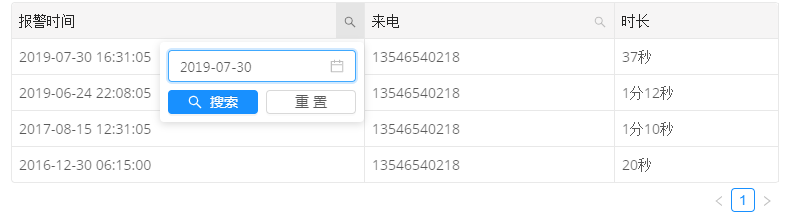
import React, { Component } from 'react';

import { Table, Input, Button, Icon, DatePicker } from 'antd';

import moment from 'moment';

import Highlighter from 'react-highlight-words';

export default class RpoliceRecord extends Component {

  constructor(props) {

    super(props);

    this.state = {

      searchText: '',

    }

  }

  render() {

    // 添加搜索

    this.getColumnSearchProps = (dataIndex, title) => ({

      filterDropdown: ({ setSelectedKeys, selectedKeys, confirm, clearFilters }) => (

        <div style={{ padding: 8 }}>

          <Input

            ref={node => {

              this.searchInput = node;

            }}

            placeholder={`搜索 ${title}`}

            value={selectedKeys[0]}

            onChange={e => setSelectedKeys(e.target.value ? [e.target.value] : [])}

            onPressEnter={() => this.handleSearch(selectedKeys, confirm)}

            style={{ width: 188, marginBottom: 8, display: 'block' }}

          />

          <Button

            type="primary"

            onClick={() => this.handleSearch(selectedKeys, confirm)}

            icon="search"

            size="small"

            style={{ width: 90, marginRight: 8 }}>

            搜索

          </Button>

          <Button onClick={() => this.handleReset(clearFilters)} size="small" style={{ width: 90 }}>重置</Button>

        </div>

      ),

      filterIcon: filtered => (

        <Icon type="search" style={{ color: filtered ? '#1890ff' : undefined }} />

      ),

      onFilter: (value, record) =>

        record[dataIndex]

          .toString()

          .toLowerCase()

          .includes(value.toLowerCase()),

      onFilterDropdownVisibleChange: visible => {

        if (visible) {

          setTimeout(() => this.searchInput.select());

        }

      },

      render: text => (

        <Highlighter

          highlightStyle={{ backgroundColor: '#ffc069', padding: 0 }}

          searchWords={[this.state.searchText]}

          autoEscape

          textToHighlight={text.toString()}

        />

      ),

    });

    //搜索

    this.handleSearch = (selectedKeys, confirm) => {

      confirm();

      console.log(selectedKeys,confirm);

      this.setState({ searchText: selectedKeys[0] });

    };

    this.handleSearchtime = (selectedKeys, confirm) => {

      confirm();

      this.setState({ searchText: selectedKeys });

    };

    //重置

    this.handleReset = clearFilters => {

      clearFilters();

      this.setState({ searchText: '' });

    };

    const columns = [

      { title: '报警时间', dataIndex: 'time', key: 'time',

      filterDropdown: ({ setSelectedKeys, selectedKeys, confirm, clearFilters }) => (

        <div style={{ padding: 8 }}>

           <DatePicker  placeholder={`搜索时间`}

            value={selectedKeys[0]}

            onChange={dateString => setSelectedKeys(dateString ? [dateString] : [])}

            onPressEnter={() => this.handleSearch(selectedKeys, confirm)}

            style={{ width: 188, marginBottom: 8, display: 'block' }}/>

          <Button

            type="primary"

            onClick={() => this.handleSearchtime(moment(selectedKeys[0]._d).format('YYYY-MM-DD'), confirm)}

            icon="search"

            size="small"

            style={{ width: 90, marginRight: 8 }}>

            搜索

          </Button>

          <Button onClick={() => this.handleReset(clearFilters)} size="small" style={{ width: 90 }}>重置</Button>

        </div>

      ),

      filterIcon: filtered => (

        <Icon type="search" style={{ color: filtered ? '#1890ff' : undefined }} />

      ),

      onFilter: (value, record) => {

        return record.time.indexOf(moment(value).format('YYYY-MM-DD')) != -1},

      render: text => (

        <Highlighter

          highlightStyle={{ backgroundColor: '#ffc069', padding: 0 }}

          searchWords={[this.state.searchText]}

          autoEscape

          textToHighlight={text.toString()}

        />

      ),

     },

      { title: '来电', key: 'callnum', dataIndex: 'callnum', ...this.getColumnSearchProps('callnum', '来电'), },

      { title: '时长', key: 'longtime', dataIndex: 'longtime', }

    ];

    const data = [

      { key: '1', time: '2019-07-30 16:31:05', callnum: '13546540218', longtime: '37秒' },

      { key: '2', time: '2019-06-24 22:08:05', callnum: '13546540218', longtime: '1分12秒' },

      { key: '3', time: '2017-08-15 12:31:05', callnum: '13546540218', longtime: '1分10秒' },

      { key: '4', time: '2016-12-30 06:15:00', callnum: '13546540218', longtime: '20秒' }

    ];

    return (

        <Table className="accidentTable" columns={columns} dataSource={data} bordered size="small" />

    )

  }

}
antd通过 filterDropdown 自定义--按某天时间搜索的更多相关文章
- python selenium 时间搜索框查询和日期大小比较
在做selenium自动化的时候遇到 时间搜索框查询(如下图)并比较查询结果是否在输入的时间之类. 首先,第一步要做的就是选择时间,并获取到所选时间的文本信息 如上图所示,获取到的时间搜索框并没有文本 ...
- SpringJPA主键生成采用自定义ID,自定义ID采用年月日时间格式
自定义主键生成策略 在entity类上添加注解 @Id @GeneratedValue(strategy = GenerationType.AUTO, generator = "custom ...
- Sublime2 DocBlocker插件在自动补全注释时输出自定义作者和当前时间等信息
Sublime在进行前端开发时非常棒,当然也少不了众多的插件支持,DocBlocker是在Sublime平台上开发一款自动补全代码插件,支持JavaScript (including ES6), PH ...
- spring-redis-session 自定义 key 和过期时间
对于分布式应用来说,最开始遇到的问题就是 session 的存储了,解决方案大致有如下几种 使用 spring-session 它可以把 session 存储到你想存储的位置,如 redis,mysq ...
- 小程序自定义pick(日期加时间组合)
最近小程序有个需求要使用日期加时间的pick组件 翻了小程序文档似乎没有符合的 手写一个 新建组件picker.js: Component({ properties: { disabled: { t ...
- spring cache之自定义keys的过期时间
spring @cacheable注解默认不支持方法级别的缓存失效时间,只能通过配置来配置全局的失效时间 如果需要实现对方法级别的缓存支持失效时间机制,有一种比较简单的方法,spring配置文件如下: ...
- 使用vue自定义组件以及动态时间
<!DOCTYPE html> <html> <head> <meta charset="utf-8"> <title> ...
- react中antd的表格自定义展开
antd的表格官方案例中给出的都是固定的图表展开,在做需求的时候,需要使用点击最后一列,然后出现展开内容,实现效果图如下 在最开始设置一个全局变量 const keys = [];在设置列参数的函数中 ...
- 【antd】如何自定义antd组件form表单中Form.Item里的内容组件
需求:现有一个form表单,但是其中一个元素比较复杂,并不是简单的输入框或者下拉框之类的.但是我又希望能通过form.validateFields().then()去获得它的值,就不需要在当前页面写大 ...
随机推荐
- 前端零基础入门:页面结构层HTML
HTML页面结构层HTML 分以下方面学习: HTML基础, HTML表格, HTML表单, 搭建网页结构 html基础 学习前端的第一门课程,为HTML基础,HTML标记语言,它是网页制作的第一步. ...
- 【jmeter】Include Controller控件&Test Fragment的使用
概念:简单说下Include Controller引用Test Fragment片段 Include Controller控件——给当前jmeter脚本引入外部片段的jmeter脚本(Test Fra ...
- Java常见集合的默认大小及扩容机制
在面试后台开发的过程中,集合是面试的热话题,不仅要知道各集合的区别用法,还要知道集合的扩容机制,今天我们就来谈下ArrayList 和 HashMap的默认大小以及扩容机制. 在 Java 7 中,查 ...
- [Gamma阶段]第一次Scrum Meeting
Scrum Meeting博客目录 [Gamma阶段]第一次Scrum Meeting 基本信息 名称 时间 地点 时长 第一次Scrum Meeting 19/05/27 大运村寝室6楼 60min ...
- java.lang.IllegalStateException: No instances www.xxxx.com available for localhost
在SpringCloud的项目中,我们使用了自动配置的OAuth2RestTemplate,RestTemplate,但是在使用这些restTemplate的时候,url必须是服务的名称,如果要调用真 ...
- 探索ENCODE数据库 | Encyclopedia of DNA Elements
ENCODE: Encyclopedia of DNA Elements 目标:按不同组织,收集人类(还有小鼠.worm.fly)基因组里面的所有功能元件 The primary goal of th ...
- github将本地仓库的代码上传到Github
本篇主要参考博文:https://blog.csdn.net/IT_faquir/article/details/52516214 你要先完成上一篇的操作,即将代码上传到本地仓库中,才能上传到gith ...
- C语言 宏定义之可变参数
可变参数宏定义 C99编译器标准允许你可以定义可变参数宏(variadic macros),这样你就可以使用拥有可以变化的参数表的宏.可变参数宏就像下面这个样子: #define dbgprint(. ...
- what's the psutil模块
what's the psutil模块 psutil 是一个跨平台库,能够轻松实现获取系统运行的进程和系统利用率(包括CPU.内存.磁盘.网络等)信息.它主要用来做系统监控,性能分析,进程管理.它实现 ...
- 验证ogg同步数据库表无主键表且目标表包含隐藏字段
问题描述: 已知:OGG在同步无主键的表时,OGG会自动设置表的全字段为主键,若目标表字段多于源表,同步过程中replicat进程可以读取insert操作但无法进行update/delete操作,从而 ...