
Jenkins+sonar+jcoco+ivy做代码覆盖率
首先,研发写的代码里要有单元测试相关的桩内容。
1.需要下载可用的jacoco.jar包配置到build.xml中
2.jenkins配置:
sonar.projectKey=${JOB_NAME}
sonar.projectName=$JOB_NAME
sonar.projectVersion=$SVN_REVISION
sonar.sources=.
sonar.language=java
sonar.sourceEncoding=UTF-8
sonar.dynamicAnalysis=reuseReports
sonar.core.codeCoveragePlugin=jacoco
sonar.surefire.reportsPath=${WORKSPACE}/billtrunk/target/junit
sonar.java.binaries=${WORKSPACE}/billtrunk/bin/classes
sonar.jacoco.reportPath=${WORKSPACE}/billtrunk/target/sonar/jacoco.exec
sonar.junit.reportPaths=${WORKSPACE}/billtrunk/target/junit
sonar.jacoco.itReportPath=${WORKSPACE}/billtrunk/target/ITCoverageReport/jacocoIT.exec
3.build.xml样本
<?xml version="1.0" encoding="UTF-8"?>
<project name="Simple Java Project analyzed with the Sonar Ant Task" default="all" basedir="." xmlns:jacoco="antlib:org.jacoco.ant" xmlns:sonar="antlib:org.sonar.ant" xmlns:ivy="antlib:org.apache.ivy.ant">
<!-- ========= Define the main properties of this project ========= -->
<property name="src.dir" value="src" />
<property name="build.dir" value="bin" />
<property name="classes.dir" value="${build.dir}/classes" />
<property name="lib.dir" value="${build.dir}/lib/"/>
<property name="reports.junit.xml.dir" value="${basedir}/target/junit"/>
<property name="sonar.coverage.lib" value="/opt/lib_coverage"/>
<property name="ivysettings.dir" value="/opt/ivysettings"/>
<property name="jacoco.dir" value="${basedir}/target/sonar"/>
<property name="reports.ITCoverageReport.exec" value="${basedir}/target/ITCoverageReport"/>
<property name="reports.ITCoverageReport.dir" value="${reports.ITCoverageReport.exec}/report"/>
<path id="project.classpath">
<fileset dir="${lib.dir}">
<include name="*.jar"/>
</fileset>
<pathelement path="${classes.dir}"/>
</path>
<ivy:settings file="${ivysettings.dir}/ivysettings.xml" />
<target name="resolve" description="--> parse ivy.xml">
<ivy:resolve file="ivy.xml" conf="*" />
<ivy:retrieve pattern="${lib.dir}/[artifact].[ext]"/>
</target>
<target name="clean">
<delete dir="${build.dir}" />
<delete dir="${jacoco.dir}"/>
</target>
<target name="init">
<mkdir dir="${build.dir}" />
<mkdir dir="${classes.dir}" />
<mkdir dir="${reports.junit.xml.dir}" />
<mkdir dir="${jacoco.dir}" />
</target>
<target name="compile" depends="init">
<javac srcdir="${src.dir}" destdir="${classes.dir}" source="1.7" target="1.7" debug="true"
deprecation="false" optimize="false" failonerror="true" >
<compilerarg line="-encoding UTF-8"/>
<classpath refid="project.classpath"></classpath>
</javac>
<copy todir="${classes.dir}" overwrite="true">
<fileset dir="${src.dir}/main/java/">
<exclude name="**/*.java"/>
</fileset>
<fileset dir="${src.dir}/test/java/">
<exclude name="**/*.java"/>
</fileset>
<fileset dir="${src.dir}/main/resources/">
<exclude name="**/*.java"/>
</fileset>
<fileset dir="${src.dir}/test/resources/">
<exclude name="**/*.java"/>
</fileset>
</copy>
</target>
<target name="test" depends="compile">
<taskdef name="junit" classname="org.apache.tools.ant.taskdefs.optional.junit.JUnitTask">
<classpath>
<path refid="project.classpath"/>
</classpath>
</taskdef>
<!-- Import the JaCoCo Ant Task -->
<taskdef uri="antlib:org.jacoco.ant" resource="org/jacoco/ant/antlib.xml">
<!-- Update the following line, or put the "jacocoant.jar" file in your "$HOME/.ant/lib" folder -->
<classpath path="${sonar.coverage.lib}/jacocoant0.7.9.jar" />
</taskdef>
<!-- Run your unit tests, adding the JaCoCo agent -->
<jacoco:coverage destfile="${jacoco.dir}/jacoco.exec">
<junit fork="on" forkmode="once" printsummary="on" showoutput="true">
<formatter type="xml" usefile="true"/>
<classpath>
<path refid="project.classpath"/>
</classpath>
<batchtest todir="${reports.junit.xml.dir}">
<fileset dir="${classes.dir}">
<include name="test/**/*Test.class" />
</fileset>
</batchtest>
</junit>
</jacoco:coverage>
<junitreport todir="${reports.junit.xml.dir}">
<fileset dir="${reports.junit.xml.dir}">
<include name="TEST-*.xml" />
</fileset>
<report format="frames" todir="${reports.junit.xml.dir}" />
</junitreport>
<jacoco:report>
<executiondata>
<file file="${jacoco.dir}/jacoco.exec" />
</executiondata>
<structure name="ma project coverage report">
<classfiles>
<fileset dir="${classes.dir}" />
</classfiles>
<sourcefiles encoding="UTF-8">
<fileset dir="${src.dir}" />
</sourcefiles>
</structure>
<html destdir="${basedir}/target/report" />
<csv destfile="${basedir}/target/report/report.csv" />
<xml destfile="${basedir}/target/report/report.xml" />
</jacoco:report>
</target>
<target name="it coverage" depends="test">
<jacoco:dump address="192.168.126.7" reset="true" destfile="${reports.ITCoverageReport.exec}/jacocoIT.exec" port="8080" append="true">
</jacoco:dump>
</target>
<target name="it coverage report" depends="it coverage">
<delete dir="${reports.ITCoverageReport.dir}" />
<mkdir dir="${reports.ITCoverageReport.dir}" />
<jacoco:report>
<executiondata>
<file file="${reports.ITCoverageReport.exec}/jacocoIT.exec" />
</executiondata>
<structure name="integration test coverage rate report">
<group name="Check Order Related">
<classfiles>
<fileset dir="${classes.dir}" />
</classfiles>
<sourcefiles encoding="UTF-8">
<fileset dir="${basedir}/src" />
</sourcefiles>
</group>
</structure>
<html footer="baby-console it coverage report" destdir="${reports.ITCoverageReport.dir}" />
<csv destfile="${reports.ITCoverageReport.dir}/coverage-report.csv" />
<xml destfile="${reports.ITCoverageReport.dir}/coverage-report.xml" />
</jacoco:report>
</target>
<!-- ========= The main target "all" ========= -->
<target name="all" depends="clean,resolve,compile,it coverage report" />
</project>
4.单元测试要显示在sonarqube中,需要在web端配置
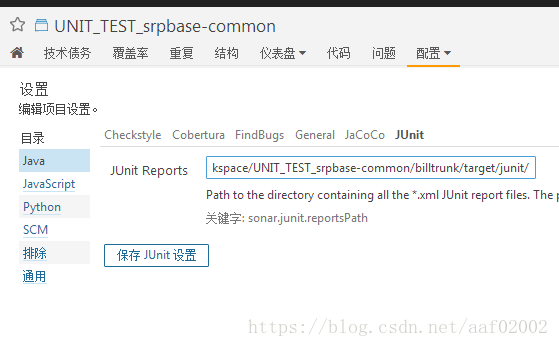
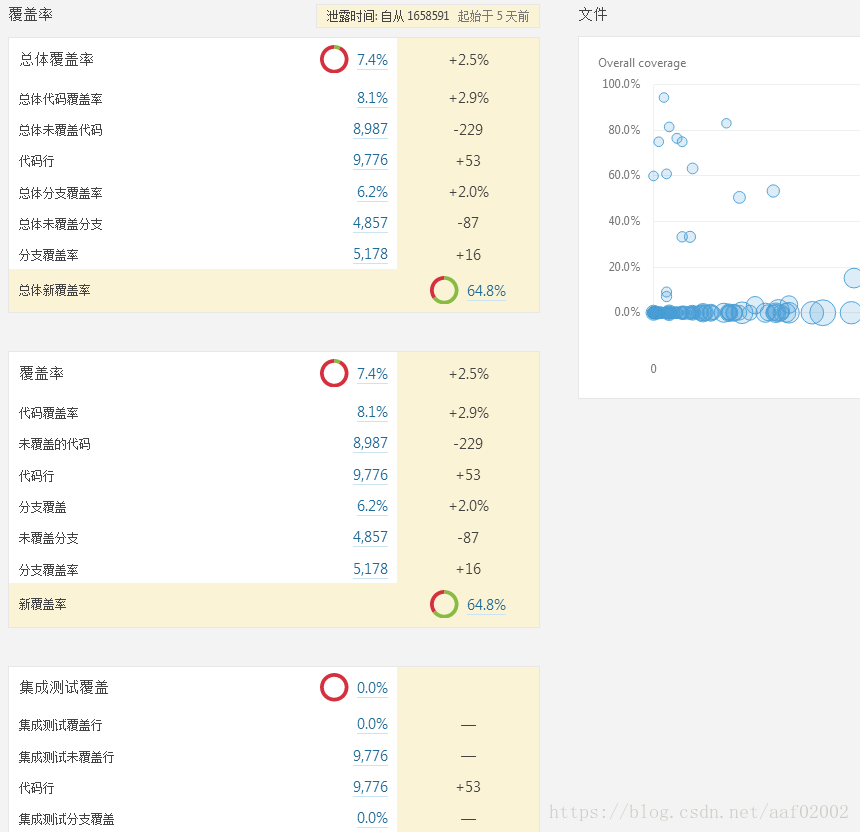
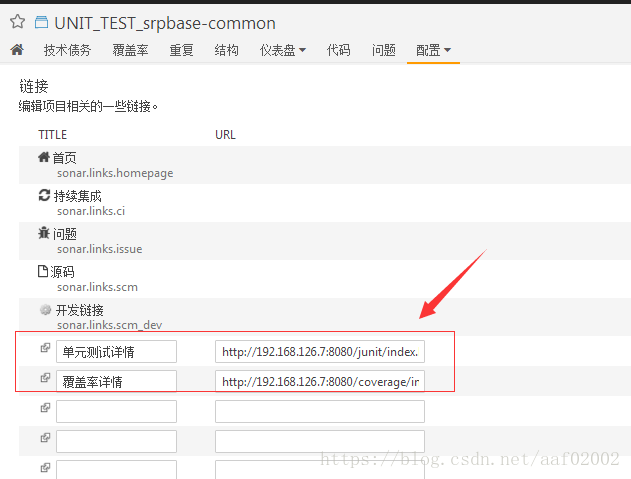
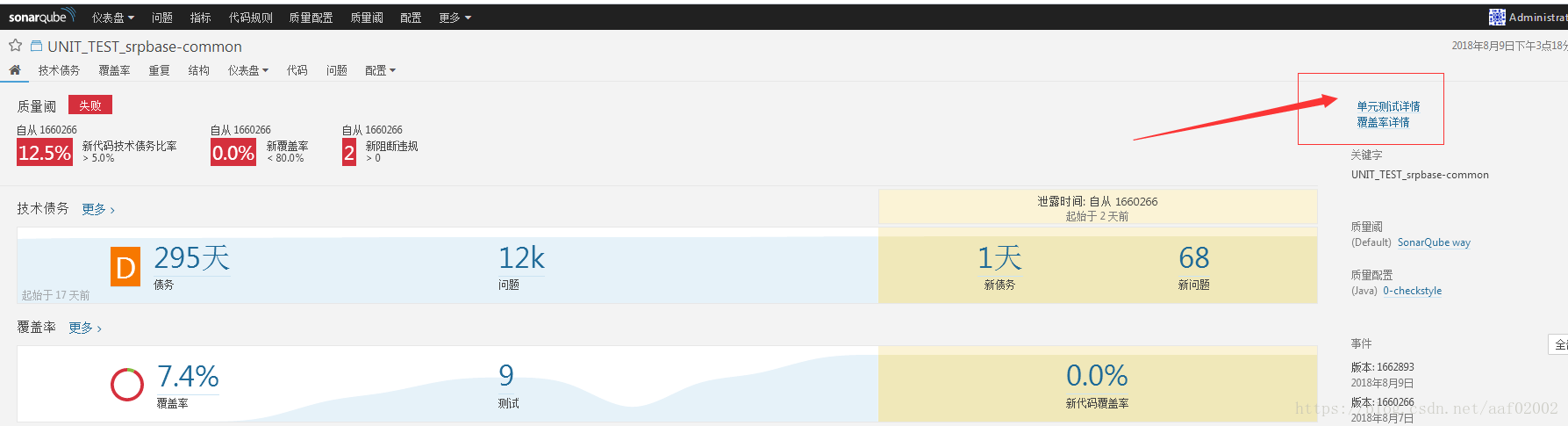
5.可以在设计,链接中加入详情
可以tomcat的conf/server.xml中配置链接 <host>标签内加上访问url
<Context path="/coverage" docBase="/opt/jenkins/workspace/UNIT_TEST_srpbase-common/billtrunk/target/report" debug="0" privileged="true">
</Context>
<Context path="/junit" docBase="/opt/jenkins/workspace/UNIT_TEST_srpbase-common/billtrunk/target/junit" debug="0" privileged="true">
</Context>


---------------------
原文:https://blog.csdn.net/aaf02002/article/details/81507410
版权声明:本文为博主原创文章,转载请附上博文链接!
Jenkins+sonar+jcoco+ivy做代码覆盖率的更多相关文章
- Jenkins+Sonar 项目构建前代码审查
一.sonar简介 1.概述 Sonar (SonarQube)是一个开源平台,用于持续检查代码质量,不只是一个质量数据报告工具,更是代码质量管理平台. 支持Java, C#, C/C++, PL/S ...
- 使用Cobertura做代码覆盖率测试
经验总结:首先要把cobertura.jar包含ant的classpath路径中,其次要求它包含在测试用例的classpath中: 使用cobertura做代码覆盖率测试中出现的问题:覆盖率始终为0, ...
- Jenkins+Sonar质量门禁【实践篇-maven版】
Jenkins+Sonar质量门禁[实践篇-maven版] 配置文档百度挺多的,就不展开来了 首先很遗憾的告诉大家,maven版做不了质量门禁!只能扫描!!! 就我们公司项目里,jenkins ...
- jenkins + sonar 安装配置
最近把snoar 添加上了 [root@snoar data]# wget https://sonarsource.bintray.com/Distribution/sonarqube/sonar ...
- Jenkins+Sonar搭建持续集成和代码质量检查环境
Jenkins+Sonar搭建 一.相关环境及下载地址 系统:Ubuntu JDK:1.8 MySQL:5.7 软件包: jenkins_2.121.3_all.deb sonarqube-7.3.z ...
- jenkins+sonar发送结果邮件的状态问题修复
在我的这篇博文中:使用jenkins+sonar进行代码扫描,并发送自定义邮件 邮件的配置为默认的$PROJECT_DEFAULT_SUBJECT 所以发送的邮件标题中的状态是jenkins构建的状态 ...
- Jenkins+Sonar集成对代码进行持续检测
介绍 SonarQube(曾用名Sonar(声纳)[1])是一个开源的代码质量管理系统. 特征 支持超过25种编程语言[2]:Java.C/C++.C#.PHP.Flex.Groovy.JavaScr ...
- Jenkins Sonar
sonar简介 SonarQube是 一个开源的代码质量分析平台,便于管理代码的质量,可检查出项目代码的漏洞和潜在的逻辑问题.同时,它提供了丰富的插件,支持多种语言的检测, 如 Java.Python ...
- jenkins使用jacoco插件检测代码覆盖率(八)
代码覆盖率:类覆盖,方法覆盖,行覆盖,指令覆盖……(简而言之,就是判断有没有被执行) 覆盖率 = 已经执行的代码 / 总代码 (1)创建maven项目,配置pom.xml如下 pom.xml < ...
随机推荐
- 【西北师大-2108Java】第三次作业成绩汇总
[西北师大-2108Java]第三次作业成绩汇总 熟悉PTA平台线上测试环境: 理解用户自定义类的定义: 掌握对象的声明: 学会使用构造函数初始化对象: 使用类属性与方法的使用掌握使用: 掌握pack ...
- 攻防世界web-unserialize3
漏洞编号CVE-2016-7124 详情 https://xz.aliyun.com/t/378 题目源码 class xctf{ '; public function __wakeup(){ ex ...
- python 绘制词云图
1. 先下载并安装nltk包,准备一张简单的图片存入代码所在文件目录,搜集英文停用词表 import nltk nltk.download() 2. 绘制词云图 import re import nu ...
- oracle 数据库下所有表结构、数据量及缺失值统计
表结构 SELECT t1.TABLE_NAME, t1.COLUMN_NAME, t1.DATA_TYPE || '(' || t1.DATA_LENGTH || ')', t2.COMMENTS ...
- 第三方系统平台如何对接gooflow2.0
第一步,参与者数据源配置 目前提供3种参与者数据源(员工,角色,部门),还有一种sql语句 XML配置如下 <?xml version="1.0" encoding=&quo ...
- Python之爬虫-校花网
Python之爬虫-校花网 #!/usr/bin/env python # -*- coding:utf-8 -*- import re import requests # 拿到校花网主页的内容 re ...
- sql 合并结果集数据
起因:项目上查询一些数据,需要将查询后的结果合并到一列中. 1.STUFF函数 官方api: https://docs.microsoft.com/zh-cn/sql/t-sql/functions/ ...
- spring cloud启动zipkin,报错maven依赖jar包冲突 Class path contains multiple SLF4J bindings
项目启动报错: Connected to the target VM, address: '127.0.0.1:59412', transport: 'socket' SLF4J: Class pat ...
- 【Java并发专题之一】Java内存模型
一.计算机内存模型 针对计算机机器而言,操作系统.JVM程序等其他所有程序都需要遵循内存模型规范.1.CPU技术发展1.1 CPU缓存的出现CPU的发展快于内存条,CPU的运算速度越来越快,内存条的读 ...
- golang实战--家庭收支记账软件(面向对象)
首先是具体的目录结构: 其中myAccount.go中调用utils包中的函数:utils.go实现记账软件的一些相应的功能: myAccount.go package main import ( & ...