
python 绘制词云图
1. 先下载并安装nltk包,准备一张简单的图片存入代码所在文件目录,搜集英文停用词表
import nltk

nltk.download()
2. 绘制词云图
import re

import numpy as np

import pandas as pd

#import matplotlib

import matplotlib.pyplot as plt

from nltk.tokenize import word_tokenize, sent_tokenize

from nltk.corpus import stopwords

from PIL import Image

from wordcloud import WordCloud

from sklearn.datasets import fetch_20newsgroups

#from sklearn.feature_extraction.text import CountVectorizer

from collections import Counter, defaultdict

def word_cut(contents, cut=','):

    res = []

    for content in contents:

        content = content.lower()

        words = [word for word in re.split(cut, content) if word]

        res.append(words)

    return res

def word_count(contents):

    #words_count = Counter(sum(contents,[]))  #慢

    word_count_dict = defaultdict(lambda: 0)

    for content in contents:

        temp_dict = Counter(content)

        for key in temp_dict:

            word_count_dict[key] += temp_dict[key]

    return word_count_dict

def stopwords_filter(contents, stopwords):

    contents_clean = []

    word_count_dict = defaultdict(lambda: 0)

    for line in contents:

        line_clean = []

        for word in line:

            if word in stopwords:

                continue

            line_clean.append(word)

            word_count_dict[word] += 1

        contents_clean.append(line_clean)

    words_count = list(word_count_dict.items())

    words_count.sort(key=lambda x:-x[1])

    words_count = pd.DataFrame(words_count, columns=['word', 'count'])

    return contents_clean, words_count

# 从外部导入数据

'''

df_news = pd.read_table('val.txt', names=['category','theme','URL','content'], encoding='utf-8')

stopwords = pd.read_csv("stopwords.txt", index_col = False, sep="\t",

                        quoting=3, names=['stopword'], encoding='utf-8')

contents = df_news.content.values.tolist()

stopwords = stopwords.stopword.values.tolist()'''

# 自定义切词

'''

#[ ,.\n\t--\':;?!/+<>@]

#[ ,.\n\t=--\'`_\[\]:;?!^/|+<>{}@~\\]

#contents = word_cut(contents=news.data, cut='[ ,.\n\t-\`_\[\]:;?!\^/|+<>{}@~]')

'''

# 将数据整理为模型入参形式

'''

#vec = CountVectorizer()

#X_train = vec.fit_transform(X_train)  #不可直接将vec用在测试集上

#vectorizer_test = CountVectorizer(vocabulary=vec.vocabulary_)

#X_test = vectorizer_test.transform(X_test)

'''

# 可从中筛选停用词

'''

word_count_dict = word_count(contents)

temp = list(word_count_dict.items())

temp.sort(key=lambda x:-x[1])

df = pd.DataFrame(temp, columns=['word','count'])

df.to_csv(r'D:\PycharmProjects\zsyb\stop_words.csv')

'''

# 调包实现上述功能

news = fetch_20newsgroups(subset='all')

# 自定义的快好几倍,可以加if not in ‘’去标点

contents = [word_tokenize(content.lower()) for content in news.data]  #sent_tokenize(content)

punctuations = set(list(',.\n\t-\`_()\[\]:;?!$#%&.*=\^/|+<>{}@~'))  #标点

digits = {str(i) for i in range(50)}

others = {'--', "''", '``', "'", '...'}

# 下载网上的停用词表加入 nltk_data\corpora\stopwords,低频词过滤(不要加入停用词)

stopWords = set(stopwords.words('english')) | punctuations | digits | others

contents_clean, words_count = stopwords_filter(contents, stopWords)

#df.groupby(by=['word']).agg({"count": np.size})

# 绘制词云图

fontpath = 'simhei.ttf'

aimask = np.array(Image.open(r"D:\PycharmProjects\zsyb\pig.png"))

wc = WordCloud(font_path = fontpath,          #设置字体

               background_color = "white",    #背景颜色

               max_words = 1000,              #词云显示的最大词数

               max_font_size = 100,           #字体最大值

               min_font_size = 10,            #字体最小值

               random_state = 42,             #随机数

               collocations = False,          #避免重复单词

               mask = aimask,                 #造型遮盖

               width = 1200, height = 800,    #图像宽高,需配合plt.figure(dpi=xx)放缩才有效

               margin = 2                     #字间距

               )

word_frequence = {x[0]:x[1] for x in words_count.head(100).values}

word_cloud=wc.fit_words(word_frequence)

plt.figure(dpi=100) #通过这里可以放大或缩小

plt.subplot(121)

plt.imshow(aimask)

#plt.axis("off")  #隐藏坐标

plt.subplot(122)

plt.imshow(word_cloud)

#plt.axis("off")  #隐藏坐标
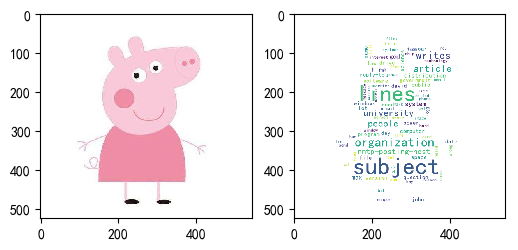
python 绘制词云图的更多相关文章
- Python pyecharts绘制词云图
一.pyecharts绘制词云图WordCloud.add()方法简介 WordCloud.add()方法简介 add(name,attr,value, shape="circle" ...
- python爬虫+词云图,爬取网易云音乐评论
又到了清明时节,用python爬取了网易云音乐<清明雨上>的评论,统计词频和绘制词云图,记录过程中遇到一些问题 爬取网易云音乐的评论 一开始是按照常规思路,分析网页ajax的传参情况.看到 ...
- 使用python绘制词云
最近在忙考试的事情,没什么时间敲代码,一个月也没几天看代码,最近看到可视化的词云,看到网上也很多这样的工具, 但是都不怎么完美,有些不支持中文,有的中文词频统计得莫名其妙.有的不支持自定义形状.所有的 ...
- 使用pyecharts绘制词云图-淘宝商品评论展示
一.什么是词云图? 词云图是一种用来展现高频关键词的可视化表达,通过文字.色彩.图形的搭配,产生有冲击力地视觉效果,而且能够传达有价值的信息. 制作词云图的网站有很多,简单方便,适合小批量操作. BI ...
- python 数据分析--词云图,图形可视化美国竞选辩论
这篇博客从用python实现分析数据的一个完整过程.以下着重几个python的moudle的运用"pandas",""wordcloud"," ...
- python 可视化 词云图
文本挖掘及可视化知识链接 我的代码: # -*- coding: utf-8 -*- from pandas import read_csv import numpy as np from sklea ...
- python 做词云图
#导入需要模块 import jieba import numpy as np import matplotlib.pyplot as plt from PIL import Image from w ...
- Python 绘制词云
文本内容:data(包含很多条文本) 1.分词: import jieba data_cut = data.apply(jieba.lcut) 2.去除停用词: stoplist.txt:链接:htt ...
- 吃瓜的正确姿势,Python绘制罗志祥词云图
前言 文的文字及图片来源于网络,仅供学习.交流使用,不具有任何商业用途,版权归原作者所有,如有问题请及时联系我们以作处理. 这篇文章中向大家介绍了Python绘制词云的方法,不难看出绘制词云可以说是一 ...
随机推荐
- 压测工具ab
1.安装abyum install httpd-tools 2.使用ab -n 2000 -c 2 http://www.cctv.com-n:总的请求数-c:并发数-k:是否开启长连接 3.结果举例 ...
- RabbitMQ入门及其几种工作模式
1.简介 MQ全程Message Queue,用于应用程序和应用程序间进行通信.RabbitMQ采用Erlang编写,实现了AMQP(高级消息队列)协议,跨平台,支持各种主流的操作系统和多种客户端. ...
- 201871010108-高文利《面向对象程序设计(java)》第一周学习总结
项目 内容 这个作业属于哪个课程 <任课教师博客主页链接> https://www.cnblogs.com/nwnu-daizh/ 这个作业的要求在哪里 <作业链接地址> ...
- NVIDIA-SMI has failed because it couldn't communicate with the NVIDIA driver ...
显卡驱动找不到解决方案:亲测有效 step1:sudo apt-get install dkms step2: sudo dkms install -m nvidia -v 390.129 nvi ...
- js如何手写一个new
手写new 看一下正常使用new function Dog(name){ this.name = name } Dog.prototype.sayName = function(){ console. ...
- 第04组 Alpha冲刺(1/4)
队名:斗地组 组长博客:地址 作业博客:Alpha冲刺(1/4) 各组员情况 林涛(组长) 过去两天完成了哪些任务: 1.安排好各个组员的任务 2.收集各个组员的进度 3.写页面 4.写博客 展示Gi ...
- swoole client有什么用
PHP常用socket创建TCP连接,使用CURL创建HTTP连接,为了简化操作,Swoole提供了Client类用于实现客户端功能,并增加了异步非阻塞模式,让用户在客户端也能使用事件循环. 作为客户 ...
- activiti5初识
因工作需要,接手新的项目,其中用到了activiti实现的工作流,特意去大致学习下,特此记录下. 1.acticiti5框架说明及表结构介绍 Activiti5工作流引擎框架: 它实际上是一个java ...
- Python爬取十四万条书籍信息告诉你哪本网络小说更好看
前言 本文的文字及图片来源于网络,仅供学习.交流使用,不具有任何商业用途,版权归原作者所有,如有问题请及时联系我们以作处理. 作者: TM0831 PS:如有需要Python学习资料的小伙伴可以加点击 ...
- java核心技术第一篇之数据库基础
01.数据库的概念: 1).数据库的概念:数据库(Database),就是存储数据的仓库. 2).作用:用来存储和管理大量数据的.内部采用了非常便于查询的机制来存储数据,能保证我们在大量数据的情况下 ...