
vux tabbar 组件
1.App.vue
<!-- 入口文件 -->

<template>

  <div id="app">

    <!-- 视图层 -->

    <router-view></router-view>

    <!-- 底部选项卡 -->

    <tabbar @on-index-change="onIndexChange" v-if="tabbarShow">

      <tabbar-item selected link="/home">

        <img slot="icon" src="./assets/img/ic_tab_home_normal.png">

        <img slot="icon-active" src="./assets/img/ic_tab_home_active.png">

        <span slot="label">首页</span>

      </tabbar-item>

      <tabbar-item show-dot link="/audioBook">

        <img slot="icon" src="./assets/img/ic_tab_subject_normal.png">

        <img slot="icon-active" src="./assets/img/ic_tab_subject_active.png">

        <span slot="label">书影音</span>

      </tabbar-item>

      <tabbar-item badge="2" link="/mine">

        <img slot="icon" src="./assets/img/ic_tab_profile_normal.png">

        <img slot="icon-active" src="./assets/img/ic_tab_profile_active.png">

        <span slot="label">我的</span>

      </tabbar-item>

    </tabbar>

  </div>

</template>

<script>

  // 引入 vux tabbar 组件

  import { Tabbar, TabbarItem } from 'vux'

  // 引入 vuex 的两个方法

  import {mapGetters, mapActions} from 'vuex'

  export default {

    name: 'app',

    components:{

      Tabbar,

      TabbarItem

    },

    data() {

      return {

        select:"Home"

      }

    },

    // 计算属性

    computed:mapGetters([

      // 从 getters 中获取值

      'tabbarShow'

    ]),

    // 监听,当路由发生变化的时候执行

    watch:{

      $route(to,from){

        if(to.path == '/' || to.path == '/home' || to.path == '/audioBook' || to.path == '/mine'){

          /**

           * $store来自Store对象

           * dispatch 向 actions 发起请求

           */

          this.$store.dispatch('showTabBar');

        }else{

          this.$store.dispatch('hideTabBar');

        }

      }

    },

    methods: {

      onIndexChange (newIndex, oldIndex) {

        console.log(newIndex, oldIndex);

      }

    }

  }

</script>

<style lang="less" scoped>

</style>
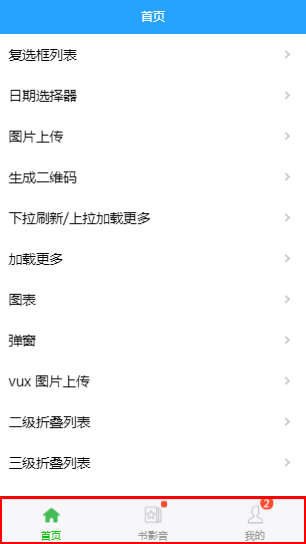
2.效果图
3.其他情况
<template>

  <div class="weui-tab">

    <div class="weui-tab__panel">

      <p v-for="i in 100">{{i}}</p>

    </div>

    <tabbar>

      <!--use v-link-->

      <tabbar-item v-link="{path:'/component/cell'}">

        <img slot="icon" src="../assets/demo/icon_nav_button.png">

        <span slot="label">Wechat</span>

      </tabbar-item>

      <!--use http link-->

      <tabbar-item show-dot link="https://vux.li">

        <img slot="icon" src="../assets/demo/icon_nav_msg.png">

        <span slot="label">Message</span>

      </tabbar-item>

      <!--use vue-router link-->

      <tabbar-item selected link="/component/cell">

        <img slot="icon" src="../assets/demo/icon_nav_article.png">

        <span slot="label">Explore</span>

      </tabbar-item>

      <!--use vue-router object link-->

      <tabbar-item :link="{path:'/component/cell'}">

        <img slot="icon" src="../assets/demo/icon_nav_cell.png">

        <span slot="label">News</span>

      </tabbar-item>

    </tabbar>

  </div>

</template>

<script>

import { Tabbar, TabbarItem } from 'vux'

export default {

  ready () {

    document.querySelector('body').style.height = '100%'

    document.querySelector('html').style.height = '100%'

    document.querySelector('#app').style.height = '100%'

  },

  components: {

    Tabbar,

    TabbarItem

  }

}

</script>
.
vux tabbar 组件的更多相关文章
- vux Tabbar组件入门备忘大佬多指点
一.Tabbar引入及使用 1.新创建vue文件 2.在vue文件中添加插件 <template> <div> <tabbar style="position: ...
- Taro-ui TabBar组件使用路由跳转
1. 安装taro-ui (此处使用cnpm) cnpm install taro-ui 2. 全局引入样式 app.scss sass :@import "~taro-ui/dist/st ...
- react 自定义 TabBar 组件
1.创建 组件 src/components/TabBar/index.js /** * TabBar 组件 */ import React ,{ PureComponent } from 'reac ...
- weex 项目开发(四)项目框架搭建 及 自定义 TabBar 组件
1.安装 路由模块 及 状态管理模块 npm install vue-router --save npm install vuex --save 2.自定义 TabBar 组件 src / ...
- vue 做的tabBar组件
效果如下 调用 <tabbar :selected='selected'></tabbar> 组件 <template> <div class='tabbar ...
- Flutter——TabBar组件(顶部Tab切换组件)
TabBar组件的常用属性: 属性 描述 tabs 显示的标签内容,一般使用 Tab 对象,也可以是其他的Widget controller TabController 对象 isScrollabl ...
- Nuxt/Vue自定义导航栏Topbar+标签栏Tabbar组件
基于Vue.js实现自定义Topbar+Tabbar组件|仿咸鱼底部凸起导航 最近一直在倒腾Nuxt项目,由于Nuxt.js是基于Vue.js的服务端渲染框架,只要是会vue,基本能很快上手了. 一般 ...
- 基于uniapp自定义Navbar+Tabbar组件「兼容H5+小程序+App端Nvue」
uni-app跨端自定义navbar+tabbar组件|沉浸式导航条|仿咸鱼凸起标签栏 在跨端项目开发中,uniapp是个不错的框架.采用vue.js和小程序语法结构,使得入门开发更容易.拥有非常丰富 ...
- vue+vux 父组件控制子组件弹层
知识点用到了vue父子组件之间的传值,以及使用watch和v-model控制vux中XDialog组件. 需要注意的问题: 1.父组件向子组件传值使用的是props(单向传值),子组件创建props, ...
随机推荐
- 对faster rcnn代码讲解的很好的一个
http://www.cnblogs.com/houkai/p/6824455.html http://blog.csdn.net/u014696921/article/details/6032142 ...
- [SQL]连续三天有销售额
店铺 销售日期 销售额 A 2017-10-11 300 A 2017-10-12 200 B 2017-10-11 400 B 2017-10-12 200 A 2017-10-13 100 A 2 ...
- sqlserver生成脚本
1.只生成数据 2.只生成架构 3.生成数据和架构
- CF716E Digit Tree 点分治
题意: 给出一个树,每条边上写了一个数字,给出一个P,求有多少条路径按顺序读出的数字可以被P整除.保证P与10互质. 分析: 统计满足限制的路径,我们首先就想到了点分治. 随后我们就需要考量,我们是否 ...
- MYSQL数据库攻防与加固
这是“官方”原本的模样搬过来的..写的很粗略啊.还有篇详细的请查看:MySQL安全加固题目及答案参考解析 启动xserver-mysql,进入xserver-mysql,开始实验,实验步骤如下: 1. ...
- LeetCode(237)Delete Node in a Linked List
题目 Write a function to delete a node (except the tail) in a singly linked list, given only access to ...
- .NET中的缓存实现
软件开发中最常用的模式之一是缓存,这是一个简单但非常有效的概念,想法是重用操作结果,执行繁重的操作时,我们会将结果保存在缓存容器中,下次我们需要该结果时,我们将从缓存容器中取出它,而不是再次执行繁重的 ...
- ES6(Iterator 和 for...of 循环)
Iterator 和 for...of 循环 1.什么是 Iterator 接口 Iterator 接口功能:用一种相同办法的接口让不同的数据结构得到统一的读取命令的方式 2.Iterator的基本用 ...
- 【Codeforces 1107D】Compression
[链接] 我是链接,点我呀:) [题意] 题意 [题解] 先把所给的压缩形式的字符串转成二进制 然后对获得的01数组做一个前缀和(a[i][j]=以(i,j)为右下角,(1,1)为左上角的矩形内的数字 ...
- 【转】反向AJAX
原文链接:http://blog.csdn.net/lccone/article/details/7743886 反向Ajax的基本概念是客户端不必从服务器获取信息,服务器会把相关信息直接推送到客户端 ...