
soapUI系列之—-02 Groovy脚本常用方法
------Groovy脚本常用方法
1. 设置参数值:setPropertyValue
a. 设置 project level property
//set to project level property 下面两种写法都可
testRunner.testCase.testSuite.project.setPropertyValue("Name", "propValue");
testRunner.testCase.getTestSuite().getProject().setPropertyValue("Name", "propValue");; //项目对象
b. 设置 testSuite level property
//set to testSuite level property
testRunner.testCase.testSuite.setPropertyValue("Name","testSuiteValue");
testRunner.testCase.getTestSuite().setPropertyValue("Name","testSuiteValue");
c. 设置 testCase level property
//set to testCase level property
testRunner.testCase.setPropertyValue("Name","testCaseValue");
d. 设置 testStep level property
//set to testStep level property
testRunner.testCase.testSteps['Groovy'].setPropertyValue("Name","testSuiteValue");
testRunner.testCase.getTestStepByName("Groovy").setPropertyValue("Name","testSuiteValue");
2. 定位到某个testSuites
def testSuite = testRunner.testCase.testSuite.project.testSuites['testSuites Name'];
3. 获取TestCase个数:getTestCaseCount()
for(int i=0; i<testSuite.getTestCaseCount(); i++) {
if (!testSuite.getTestCaseAt(i).isDisabled()) {
if (!(testSuite.getTestCaseAt(i).getTestStepByName("stepName")).equals()){
.....
}
}
}
4. 获取TestSuite个数:getTestSuiteCount()
testRunner.testCase.testSuite.project.getTestSuiteCount()
5. 获取名称
a. 取test case的名称:getLabel()
def tc = testRunner.testCase;
log.info (tc.getLabel());
b. 取test suite的名称:getLabel()
def ts = testRunner.testCase.testSuite;
log.info (ts.getLabel());
c. 取project 名称
def tp = testRunner.testCase.testSuite.project;
log.info (tp.getName());
6.层级访问
testRunner.testCase.testSuite.project.testSuites[testSuiteName].testCases[testCaseName].testSteps[testStepName]
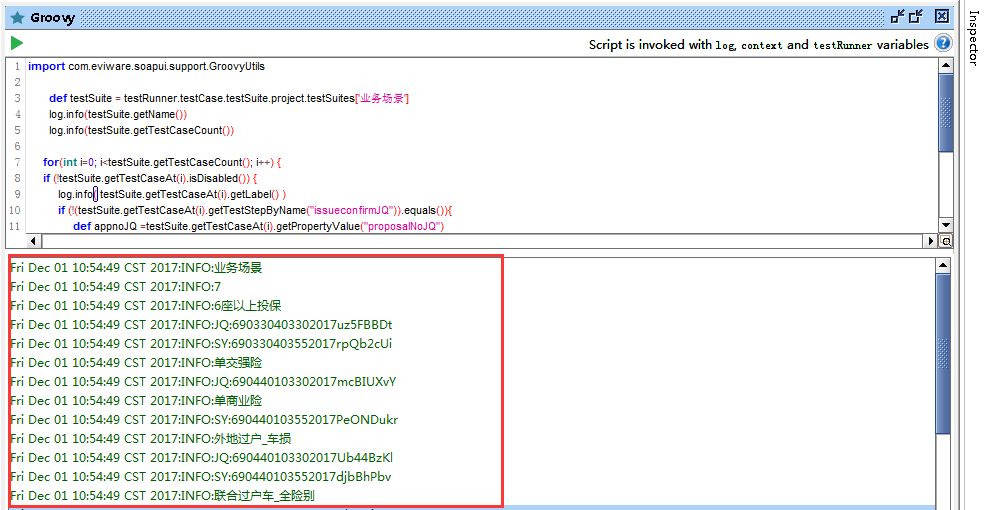
/*Case1:练手详图如下*/
import com.eviware.soapui.support.GroovyUtils
def testSuite = testRunner.testCase.testSuite.project.testSuites['业务场景']
log.info(testSuite.getName())
log.info(testSuite.getTestCaseCount())
for(int i=0; i<testSuite.getTestCaseCount(); i++) {
if (!testSuite.getTestCaseAt(i).isDisabled()) {
log.info( testSuite.getTestCaseAt(i).getLabel() )
if (!(testSuite.getTestCaseAt(i).getTestStepByName("issueconfirmJQ")).equals()){
def appnoJQ =testSuite.getTestCaseAt(i).getPropertyValue("proposalNoJQ")
log.info( "JQ:"+ appnoJQ)
}
if (!(testSuite.getTestCaseAt(i).getTestStepByName("issueconfirmSY")).equals()){
def appnoSY =testSuite.getTestCaseAt(i).getPropertyValue("proposalNoSY")
log.info( "SY:"+ appnoSY)
}
}
}
层级关系如下图所示

log 如下图:
7.SoapUI允许在项目的各个层次中定义变量,常用的层次包括: Project,TestSuite,TestCase,Global等
如果在 Groovy Script中使用这些全局变量的话,可以用以下方法:
def time_num= context.expand ('${#Project#hospitalId}') //##号内为定义哪个级别的属性变量,后面为属性名
soapUI系列之—-02 Groovy脚本常用方法的更多相关文章
- soapUI系列之—-03 Groovy脚本常用方法2
------Groovy脚本常用方法 1.解析Json数据脚本 //groovy读取json的方式很简单,re.body.businessinfo.c2rate读取c2rate对应的值 import ...
- [SoapUI] Post请求Body里面限制特殊字符(&、%),Groovy脚本里特殊字符需要添加“\”转义($)。
SoapUI的Post请求,在body里面不能包含(&.%),如果含有这些特殊字符,请求会报错:在添加的Groovy脚本里有些特殊字符需要使用“\”转义($),不然也会报错.
- soapUI参数中文乱码问题解决方法 (groovy脚本中文乱码)
soapUI参数中文乱码问题解决方法 可能方案1: 字体不支持中文,将字体修改即可: file-preferences-editor settings-select font 修改字体,改成能显示中文 ...
- excel文件的groovy脚本在SoapUI中进行数据驱动测试
SoapUI Pro具有从外部文件读取数据的功能,例如:excel,csv等.但SoapUI不提供从excel文件读取数据的功能.因此,为了从SoapUI中的excel文件中读取数据,我们需要在gro ...
- 180807-Quick-Task 动态脚本支持框架之Groovy脚本加载执行
Quick-Task 动态脚本支持框架之Groovy脚本加载执行 上一篇简答说了如何判断有任务动态添加.删除或更新,归于一点就是监听文件的变化,判断目录下的Groovy文件是否有新增删除和改变,从而判 ...
- [Tomcat 源码分析系列] (二) : Tomcat 启动脚本-catalina.bat
概述 Tomcat 的三个最重要的启动脚本: startup.bat catalina.bat setclasspath.bat 上一篇咱们分析了 startup.bat 脚本 这一篇咱们来分析 ca ...
- jenkins2 groovy脚本参考
使用plugin生成groovy脚本,或者参考已有的groovy脚本. 文章来自:http://www.ciandcd.com文中的代码来自可以从github下载: https://github.co ...
- ODI 12c中使用Groovy脚本创建工程
本文主要介绍在ODI中使用groovy创建工程,并添加一个表转换的映射.要创建groovy脚本,可以从ODI Studio的菜单:工具->Groovy->新脚本 打开一个编辑窗口.在执行下 ...
- JAVA嵌入运行Groovy脚本
摘自: http://shift-alt-ctrl.iteye.com/blog/1938238 . 最近设计一个数据统计系统,系统中上百种数据统计维度,而且这些数据统计的指标可能随时会调整.如果基于 ...
随机推荐
- 解决Invalid bound statement (not found)(Mybatis的Mapper绑定问题)
一.问题描述 使用mybatis的项目在本地可以正常运行,但当使用maven或Jenkins打包部署到服务器上时出现了绑定错误,异常信息为: org.apache.ibatis.binding.Bin ...
- 第1节 flume:10、flume的更多组件介绍
作业:flume如何实现收集mysql的数据,没隔几秒钟,查看mysql中的数据是否有变化,一旦有变化,把数据拿过来,存到hdfs上. 需要使用custom source.可网上搜索,github上.
- ping ip
def ip_and_time(): """ get ip to ping from ip.txt then return two list , each ip that ...
- luogu P1519 穿越栅栏 Overfencing
题目描述 描述 农夫John在外面的田野上搭建了一个巨大的用栅栏围成的迷宫.幸运的是,他在迷宫的边界上留出了两段栅栏作为迷宫的出口.更幸运的是,他所建造的迷宫是一个“完美的”迷宫:即你能从迷宫中的任意 ...
- C语言int *a 和int* a的写法
- IDEA下maven工程的classpath
IDEA开发maven项目,此工程的classpath就是指src/main/java,src/main/resources,src/main/webapp,假如在main文件夹下新建一个文件prop ...
- rc-local.service服务启动失败,导致rc.local中的开机启动服务不能启动
chmod +x /etc/rc.d/rc.local 打开/etc/rc.local文件,将启动非后台执行的指令的最后添加 &,以使相关指令后台运行,然后启动服务 systemctl ...
- 一个关于vue+mysql+express的全栈项目(三)------ 登录注册功能的实现(已经密码安全的设计)
本系列文章,主要是一个前端的视角来实现一些后端的功能,所以不会讲太多的前端东西,主要是分享做这个项目学到的一些东西,,,,, 好了闲话不多说,我们开始搭建后端服务,这里我们采用node的express ...
- 剑指Offer(书):斐波那契数列
题目:大家都知道斐波那契数列,现在要求输入一个整数n,请你输出斐波那契数列的第n项(从0开始,第0项为0).n<=39 分析:第一种方法:递归,45时,时间为5s,50时,我就等不及了.原因是重 ...
- POJ 1161 Walls(Floyd , 建图)
题意: 给定n个城市, 然后城市之间会有长城相连, 长城之间会围成M个区域, 有L个vip(每个vip会处于一个城市里)要找一个区域聚会, 问一共最少跨越多少个长城. 分析: 其实这题难就难在建图, ...