
soapUI系列之—-03 Groovy脚本常用方法2
------Groovy脚本常用方法
1.解析Json数据脚本
//groovy读取json的方式很简单,re.body.businessinfo.c2rate读取c2rate对应的值

import groovy.json.JsonSlurper

def xresponse = testRunner.testCase.testSteps["Request"].testRequest.response.contentAsString

def slurper = new JsonSlurper()

def re = slurper.parseText(xresponse)

def num=re.body.businessinfo.size()

log.info(re.body.businessinfo.c2rate)
例:Json格式
{
"body":{
"businessinfo":{
"c1rate":"0.00",
"c2rate":"12.00",
"c4rate":"21.00",
"c5rate":"0.00",
"c6rate":"0.00",
"c8rate":"0.00",
"d1rate":"0.00",
"d2rate":"0.00",
"riskcode":"0355",
"ruleid":"R32000213878_11-0"
}
},
"head":{
"error_code":"0000",
"error_message":"成功",
"request_type":"???",
"response_code":"0"
}
}
2.获取reponse
//Get response

def groovyUtils = new GroovyUtils( context )

def holder = groovyUtils.getXmlHolder('inquire#Response')

//Parse return value

def data = holder.getNodeValue("//return")

log.info(data)
3. 导入需要用到的方法和脚本:例如MD5方法、groovy.json.JsonSlurper方法
例如:import groovy.json.JsonSlurper //导入groovy.json包中的JsonSlurper方法
4. 调用 Groovy,java 的jar包的方法
import pub.Text

// 调用 Groovy 的jar包中方法, //此包必须与jar包中的包名一致

def text = new Text()

text.writeFile("D:\\1.log", "test")
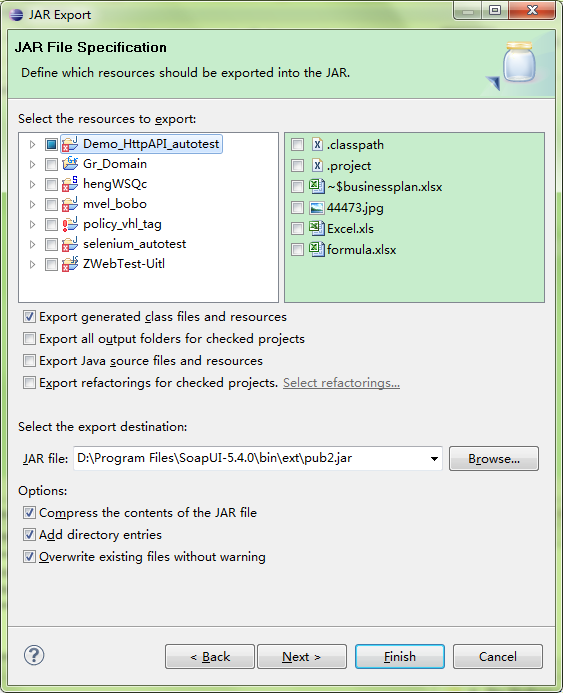
操作方法:选中工程->Export-> JAR
这里打jar包时候要注意
1)\WebContent\META-INF\MANIFEST.MF 这个文件打到jar包中去(这个文件描述了该Jar文件的很多信息)
2)要打的是class文件,即要选择Export generated class files and resources
5. 使用Groovy脚本执行接口请求
import com.eviware.soapui.impl.wsdl.testcase.WsdlTestRunContext

CURRENT_TESTCASE = testRunner.testCase

TEST_SUITE = CURRENT_TESTCASE.parent

def testStep = TEST_SUITE.getTestCaseByName('TestSuite').getTestStepByName('login')

def testStepContext = new WsdlTestRunContext(testStep)

def result = testStep.run(testRunner, testStepContext)

log.info result.responseContent
调用另一个TestSuite中的teststep脚本如下:
def testproject = testRunner.testCase.testSuite.project
def testcase = testproject.testSuites['PublicCase'].testCases['TestCase1']
testcase.testSteps["CreateService1"].run(testRunner, context)
调用本TestSuite中的TestStep脚本如下:
testRunner.runTestStepByName("Login")
testRunner.runTestStepByName("CreateAPI1-Scenario2")
6. 步骤跳转脚本
testRunner.gotoStepByName("Step2") 跳转到指定步骤
testRunner.runTestStepByName("Step2") 运行指定步骤或脚本
7. 得到32位的UUID
import java.util.UUID

//得到32位的UUID

//格式为:xxxxxxxx-xxxx-xxxx-xxxx-xxxxxxxxxxxx (8-4-4-4-12)

def uuids = UUID.randomUUID().toString().toLowerCase()

//得到去除横线的UUID

def uuids = UUID.randomUUID().toString().replace("-", "").toLowerCase();
8. 获取cookie并添加到对应的请求中
import com.eviware.soapui.support.types.StringToStringMap

def cookiesList = testRunner.testCase.getTestStepByName("login").testRequest.response.responseHeaders["Set-Cookie"]

log.info cookiesList

//Get the cookie

String cookieNew = cookiesList.get(0)

log.info "cookie : "+cookieNew

//Put cookie to a StringMap

def cookieMap = new StringToStringMap()

cookieMap.put("Cookie",cookieNew)

testRunner.testCase.getTestStepByName("filter").testRequest.setRequestHeaders(cookieMap);
其他参考资料:
soapUI系列之—-03 Groovy脚本常用方法2的更多相关文章
- soapUI系列之—-02 Groovy脚本常用方法
------Groovy脚本常用方法 1. 设置参数值:setPropertyValuea. 设置 project level property//set to project level prope ...
- [SoapUI] Post请求Body里面限制特殊字符(&、%),Groovy脚本里特殊字符需要添加“\”转义($)。
SoapUI的Post请求,在body里面不能包含(&.%),如果含有这些特殊字符,请求会报错:在添加的Groovy脚本里有些特殊字符需要使用“\”转义($),不然也会报错.
- soapUI参数中文乱码问题解决方法 (groovy脚本中文乱码)
soapUI参数中文乱码问题解决方法 可能方案1: 字体不支持中文,将字体修改即可: file-preferences-editor settings-select font 修改字体,改成能显示中文 ...
- excel文件的groovy脚本在SoapUI中进行数据驱动测试
SoapUI Pro具有从外部文件读取数据的功能,例如:excel,csv等.但SoapUI不提供从excel文件读取数据的功能.因此,为了从SoapUI中的excel文件中读取数据,我们需要在gro ...
- SSAS系列——【03】多维数据(多维数据集对象)
原文:SSAS系列--[03]多维数据(多维数据集对象) 1.什么是Cube? 简单 Cube 对象由基本信息.维度和度量值组组成. 基本信息包括多维数据集的名称.多维数据集的默认度量值.数据源和存储 ...
- 180807-Quick-Task 动态脚本支持框架之Groovy脚本加载执行
Quick-Task 动态脚本支持框架之Groovy脚本加载执行 上一篇简答说了如何判断有任务动态添加.删除或更新,归于一点就是监听文件的变化,判断目录下的Groovy文件是否有新增删除和改变,从而判 ...
- Groovy脚本-通用SQL开关
备注:使用Groovy语言进行编写,看不懂的同学请先了解Groovy脚本. Groovy学习地址:https://www.cnblogs.com/tiechui2015/p/10828457.html ...
- [Tomcat 源码分析系列] (二) : Tomcat 启动脚本-catalina.bat
概述 Tomcat 的三个最重要的启动脚本: startup.bat catalina.bat setclasspath.bat 上一篇咱们分析了 startup.bat 脚本 这一篇咱们来分析 ca ...
- jenkins2 groovy脚本参考
使用plugin生成groovy脚本,或者参考已有的groovy脚本. 文章来自:http://www.ciandcd.com文中的代码来自可以从github下载: https://github.co ...
随机推荐
- 利用canvas写一个验证码小功能
刚刚开始接触canvas,写个验证码小功能练练手,实现效果图如下: 主要代码如下: html <!DOCTYPE html> <html lang="en"> ...
- 常见的linux命令及其翻译
常见的linux指令 1.ls ll 查看文件信息 2.cd 切换工作目录 cd 或 cd ~ 切换到/home/用户目录 cd. 切换到当前目录 cd.. 切换到上级目录 cd- 切换入上次所在的目 ...
- Linux文件属性和压缩解压
目 录 第1章 Linux系统文件的属性 1 1.1 命令ls 1 1.2 inode 2 1.3 文件属性 2 1.4 env命令 2 1.5 注意: 2 第2章 ...
- 蓝牙bluez学习(1) Stack Architecture
Bluez支持的features Core Specification 4.2 (GAP, L2CAP, RFCOMM, SDP, GATT) Classic Bluetooth (BR/EDR) B ...
- day15-python之变量和递归
1.局部变量与全局变量 #!/usr/bin/env python # -*- coding:utf-8 -*- # name='lhf' # def change_name(): # global ...
- 剑指Offer(书):从尾到头打印链表
题目:输入一个链表,按链表值从尾到头的顺序返回一个ArrayList. 分析:若不允许修改原链表的值,则可以使用栈来实现,也可以使用另外一个ArrayList做中转的数据. public ArrayL ...
- Cannot delete or update a parent row: a foreign key constraint fails....
在操作”小弟“这张表时候报错 想在“小弟”上面加入数据或者更新数据,就要听老大的, 这句话后面跟着的表就是“老大”,必须老大有数据索引,“小弟“才可以加入或者更新 查看“小弟”表的外键,会发现有对“老 ...
- selenium之文件上传
文件上传是所有UI自动化测试都要面对的一个头疼问题,今天博主在这里给大家分享下自己处理文件上传的经验,希望能够帮助到广大被文件上传坑住的seleniumer. 首先,我们要区分出上传按钮的种类,大体上 ...
- 虚拟机(Virtual Machine)和容器(Container)的对比
目前云计算平台常用的虚拟化技术有虚拟机(Virtual Machine)和容器(Container)两种.虚拟机已经是比较成熟的技术,容器技术作为下一代虚拟化技术,国内的各厂商应用还不广,但似乎其代表 ...
- C# CreateDataTable
public DataTable CreateDataTable() { DataTable dataTable = new DataTable(); ...