
ssm基础配置
1.导包
   <dependencies>

     <dependency>

         <groupId>org.springframework</groupId>

         <artifactId>spring-webmvc</artifactId>

         <version>3.2.8.RELEASE</version>

     </dependency>

     <dependency>

         <groupId>org.springframework</groupId>

         <artifactId>spring-tx</artifactId>

         <version>3.2.8.RELEASE</version>

     </dependency>

     <dependency>

         <groupId>org.springframework</groupId>

         <artifactId>spring-web</artifactId>

         <version>3.2.8.RELEASE</version>

     </dependency>

     <dependency>

         <groupId>org.codehaus.jackson</groupId>

         <artifactId>jackson-mapper-asl</artifactId>

         <version>1.9.13</version>

     </dependency>

     <dependency>

         <groupId>com.fasterxml.jackson.core</groupId>

         <artifactId>jackson-annotations</artifactId>

         <version>2.9.7</version>

     </dependency>

     <dependency>

         <groupId>com.fasterxml.jackson.core</groupId>

         <artifactId>jackson-core</artifactId>

         <version>2.9.7</version>

     </dependency>

     <dependency>

         <groupId>org.springframework</groupId>

         <artifactId>spring-jdbc</artifactId>

         <version>3.2.8.RELEASE</version>

     </dependency>

     <dependency>

         <groupId>commons-dbcp</groupId>

         <artifactId>commons-dbcp</artifactId>

         <version>1.4</version>

     </dependency>

     <dependency>

         <groupId>mysql</groupId>

         <artifactId>mysql-connector-java</artifactId>

         <version>5.0.8</version>

     </dependency>

     <dependency>

         <groupId>org.mybatis</groupId>

         <artifactId>mybatis</artifactId>

         <version>3.3.0</version>

     </dependency>

     <dependency>

         <groupId>org.mybatis</groupId>

         <artifactId>mybatis-spring</artifactId>

         <version>1.2.3</version>

     </dependency>

     <dependency>

         <groupId>junit</groupId>

         <artifactId>junit</artifactId>

         <version>4.12</version>

     </dependency>

   </dependencies>
pom.xml
2.spring配置文件
 <?xml version="1.0" encoding="UTF-8"?>

 <beans xmlns="http://www.springframework.org/schema/beans"

     xmlns:xsi="http://www.w3.org/2001/XMLSchema-instance" xmlns:p="http://www.springframework.org/schema/p"

     xmlns:context="http://www.springframework.org/schema/context"

     xmlns:mvc="http://www.springframework.org/schema/mvc" xmlns:util="http://www.springframework.org/schema/util"

     xsi:schemaLocation="

             http://www.springframework.org/schema/beans http://www.springframework.org/schema/beans/spring-beans-3.2.xsd

             http://www.springframework.org/schema/context http://www.springframework.org/schema/context/spring-context-3.2.xsd

             http://www.springframework.org/schema/jdbc http://www.springframework.org/schema/jdbc/spring-jdbc-3.2.xsd

             http://www.springframework.org/schema/jee http://www.springframework.org/schema/jee/spring-jee-3.2.xsd

             http://www.springframework.org/schema/tx http://www.springframework.org/schema/tx/spring-tx-3.2.xsd

             http://www.springframework.org/schema/data/jpa http://www.springframework.org/schema/data/jpa/spring-jpa-1.3.xsd

             http://www.springframework.org/schema/aop http://www.springframework.org/schema/aop/spring-aop-3.2.xsd

             http://www.springframework.org/schema/mvc http://www.springframework.org/schema/mvc/spring-mvc-3.2.xsd

             http://www.springframework.org/schema/util http://www.springframework.org/schema/util/spring-util-3.2.xsd">

     <!-- 1.启用注解驱动 -->

     <mvc:annotation-driven conversion-service="conversionService" />

     <!-- 2.配置组件扫描 -->

     <context:component-scan base-package="com.goatherd.ssm" />

     <!-- 3.视图解析 -->

     <bean

         class="org.springframework.web.servlet.view.InternalResourceViewResolver">

         <property name="prefix" value="/WEB-INF/" />

         <property name="suffix" value=".jsp" />

     </bean>

     <!-- 4.session拦截器配置(多个拦截器以配置的顺序为主) -->

     <mvc:interceptors>

         <mvc:interceptor>

             <mvc:mapping path="/**"/>

             <mvc:exclude-mapping path="/toLogin.do"/>

             <mvc:exclude-mapping path="/login.do"/>

             <!-- 拦截器的实现类 -->

             <bean class="com.session.SessionInterceptor"></bean>

         </mvc:interceptor>

     </mvc:interceptors>

     <!-- 自定义参数绑定,不知道为啥这里还需要配置 multipartResolver bean -->

     <bean id="conversionService" class="org.springframework.format.support.FormattingConversionServiceFactoryBean"></bean>

 </beans>
spring-mvc.xml
3.mybatis配置文件
 <?xml version="1.0" encoding="UTF-8"?>

 <beans xmlns="http://www.springframework.org/schema/beans"

     xmlns:xsi="http://www.w3.org/2001/XMLSchema-instance" xmlns:p="http://www.springframework.org/schema/p"

     xmlns:context="http://www.springframework.org/schema/context"

     xmlns:mvc="http://www.springframework.org/schema/mvc" xmlns:util="http://www.springframework.org/schema/util"

     xsi:schemaLocation="

             http://www.springframework.org/schema/beans http://www.springframework.org/schema/beans/spring-beans-3.2.xsd

             http://www.springframework.org/schema/context http://www.springframework.org/schema/context/spring-context-3.2.xsd

             http://www.springframework.org/schema/jdbc http://www.springframework.org/schema/jdbc/spring-jdbc-3.2.xsd

             http://www.springframework.org/schema/jee http://www.springframework.org/schema/jee/spring-jee-3.2.xsd

             http://www.springframework.org/schema/tx http://www.springframework.org/schema/tx/spring-tx-3.2.xsd

             http://www.springframework.org/schema/data/jpa http://www.springframework.org/schema/data/jpa/spring-jpa-1.3.xsd

             http://www.springframework.org/schema/aop http://www.springframework.org/schema/aop/spring-aop-3.2.xsd

             http://www.springframework.org/schema/mvc http://www.springframework.org/schema/mvc/spring-mvc-3.2.xsd

             http://www.springframework.org/schema/util http://www.springframework.org/schema/util/spring-util-3.2.xsd">

     <!-- 引入数据库配置文件(读取properties文件),这种方式可以引入多个properties文件 -->

     <bean id="propertyConfigurer" class="org.springframework.beans.factory.config.PropertyPlaceholderConfigurer">

         <property name="locations">

             <list>

                 <value>classpath:config/jdbc.properties</value>

                 <!--<value>classpath:config/redis.properties</value> -->

             </list>

         </property>

     </bean>

     <!-- 数据库配置  -->

     <bean id="dbcp" class="org.apache.commons.dbcp.BasicDataSource">

       <!-- 初级配置 -->

       <property name="driverClassName" value="${mysql.driverClassName}"/>

       <property name="url" value="${mysql.url}"/>

       <property name="username" value="${mysql.username}"/>

       <property name="password" value="${mysql.password}"/>

     </bean>

     <!-- session工厂(映射器) -->

     <bean id="ssf" class="org.mybatis.spring.SqlSessionFactoryBean">

       <!-- 注入DataSource -->

       <property name="dataSource" ref="dbcp"></property>

       <!-- 注入SQL语句(映射文件的位置) -->

       <property name="mapperLocations" value="classpath:mapper/*.xml"></property>

     </bean>

     <!-- 扫描器 -->

     <bean id="mapperScanner" class="org.mybatis.spring.mapper.MapperScannerConfigurer">

         <!-- 指定mapper接口 -->

         <property name="basePackage" value="com.ssm.dao"></property>

         <!-- 指定sqlSession资源 -->

         <property name="sqlSessionFactoryBeanName" value="ssf" />

     </bean>

 </beans>
spring-mybatis.xml
4.jdbc配置文件
 #MySQL数据库

 mysql.driverClassName=com.mysql.jdbc.Driver

 mysql.url=jdbc:mysql://localhost/erp?useUnicode=true&characterEncoding=utf8&useSSL=false&zeroDateTimeBehavior=convertToNull&allowMultiQueries=true

 mysql.username=root

 mysql.password=123456
jdbc.properties
5.web.xml文件配置
  <!-- 初始配置 -->

   <context-param>

     <param-name>contextConfigLocation</param-name>

     <param-value>classpath:config/xml/spring-*.xml</param-value>

   </context-param>

   <listener>

     <listener-class>org.springframework.web.context.ContextLoaderListener</listener-class>

   </listener>

   <!-- 配置DispatcherServlet -->

   <servlet>

     <servlet-name>mvc</servlet-name>

     <servlet-class>org.springframework.web.servlet.DispatcherServlet</servlet-class>

     <init-param>

       <param-name>contextConfigLocation</param-name>

       <param-value>classpath:config/xml/spring-*.xml</param-value>

     </init-param>

     <load-on-startup>1</load-on-startup>

   </servlet>

   <servlet-mapping>

     <servlet-name>mvc</servlet-name>

     <url-pattern>*.do</url-pattern>

   </servlet-mapping>
web.xml
6.项目结构图
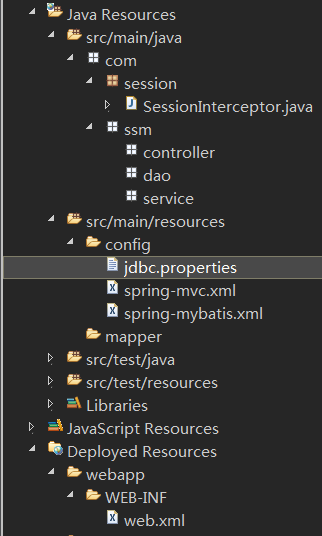
ssm基础配置的更多相关文章
- ssm框架配置过程
1.pom.xml配置 1.1<build>标签中配置<plugins>和<resources>,即插件和资源文件 1.2 <properties>标签 ...
- 搭建SSM基础环境>基于idea
目录 搭建SSM基础环境 创建一个Web项目 导入所需要的jar包 在项目目录下创建一个Resources文件夹并设置为类路径 在src目录下创建项目的初始文件夹目录 在resources文件夹下创建 ...
- StackExchange.Redis帮助类解决方案RedisRepository封装(基础配置)
本文版权归博客园和作者吴双本人共同所有,转载和爬虫,请注明原文地址.http://www.cnblogs.com/tdws/p/5815735.html 写在前面 这不是教程,分享而已,也欢迎园友们多 ...
- Hibernate 基础配置及常用功能(三)
本章重点讲述Hibernate对象的三种状态以及如何配置二级缓存 有关Hibernate的三种状态如何相互转换网上都能查到,官方文档描述的也比较详细.这里主要是针对几个重点方法做代码演示. 一.状态转 ...
- Emacs学习心得之 基础配置
作者:枫雪庭 出处:http://www.cnblogs.com/FengXueTing-px/ 欢迎转载 Emacs学习心得之 基础配置 1.前言2.基础配置 一.前言 本篇博文记录了Emacs的一 ...
- nginx 的基础配置[转]
nginx 的基础配置 分类: 工具软件2013-11-13 23:26 11人阅读 评论(0) 收藏 举报 目录(?)[-] 管理配置文件 全局配置 虚拟机server配置 location配置 ...
- freeRadius 基础配置及测试
国内私募机构九鼎控股打造APP,来就送 20元现金领取地址:http://jdb.jiudingcapital.com/phone.html 内部邀请码:C8E245J (不写邀请码,没有现金送) 国 ...
- Oracle 10g DataGuard手记之基础配置
DataGuard为企业数据的高可用性,数据安全以及灾难恢复提供支持,一般由一个primary db与几个物理或逻辑standby db组成一个DataGuard配置. 系统环境 操作系统为windo ...
- SpringMVC最基础配置
SpringMVC和Struts2一样,是前后台的一个粘合剂,struts2用得比较熟悉了,现在来配置一下SpringMVC,看看其最基础配置和基本使用.SpriingMVC不是太难,学习成本不高,现 ...
随机推荐
- Linux环境搭建:1. 安装VMware
我家淘宝店,主要协助同学做毕业设计:https://shop104550034.taobao.com/?spm=2013.1.1000126.d21.pPCzDZ 1. 下载VMware 能够到我的3 ...
- uva live 4394 String painter 区间dp
// uva live 4394 String painter // // 这一题是训练指南上dp专题的习题,初看之下认为仅仅是稍微复杂了一点 // 就敲阿敲阿敲,两个半小时后,发现例子过了.然而自己 ...
- 五------Jsp九大内置对象。
Jsp九大内置对象,当中最基本的是前五个对象. 5-1 out对象 out对象是JSPWriter类的实例.是向client输出内容经常使用的对象. out对象经常使用的方法例如以下: 1.out.p ...
- iOS开发——高级篇——iOS抽屉效果实现原理
实现一个简单的抽屉效果: 核心思想:KVO实现监听mainV的frame值的变化 核心代码: #import "ViewController.h" // @"frame& ...
- 【转】Android性能优化之GPU过度绘制与图形渲染优化
标签: android / 优化 / 过度绘制 / 图形渲染优化 Android之GPU过度绘制与图形渲染优化 写在前面的话 本文主要对过度绘制和图形渲染做一个概念性的描述,和简单的优化措施. 如果你 ...
- bzoj 2726 任务安排
题目大意: 机器上有N个需要处理的任务,它们构成了一个序列 把这些任务分成若干批 从时刻0开始,这些任务被分批加工,第i个任务单独完成所需的时间是Ti 在每批任务开始前,机器需要启动时间S,而完成这批 ...
- SPOJ:Just One Swap(统计&思维)
You are given an array of size N. How many distinct arrays can you generate by swapping two numbers ...
- Activity快速入门理解
在Java领域,JBPM和Activity是两个主流的工作流系统,而Activity的出现无疑将会取代JBPM(Activity的开发者就是从Jbpm开发者出来的 1. 1个插件 在Eclipse ...
- Watir: 对浏览器的保存文件操作, 其实应用的是AutoIt脚本
def save_file(filepath) ai =WIN32OLE.new("AutoItX3.Control") ai.WinWait("FileDownload ...
- bzoj1513
二维线段树 听说二维线段树不能下传标记? 就是裸的二维线段树,由于每次高度只能增加,所以我们就可以标记永久化 每个线段树里有两个数组,mx和mark,每次修改路径上所有mx都要修改,mark是区间的精 ...