
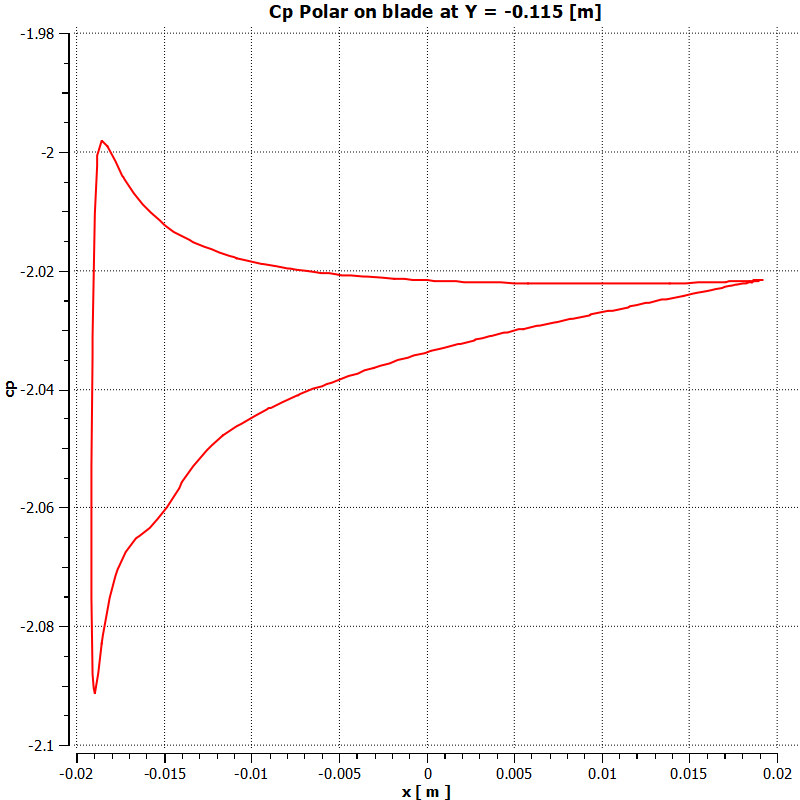
pressure coeffcient of a wing/blade
software: CFD POST ANSYS
menu bar, select Tools > Macro Calculator.
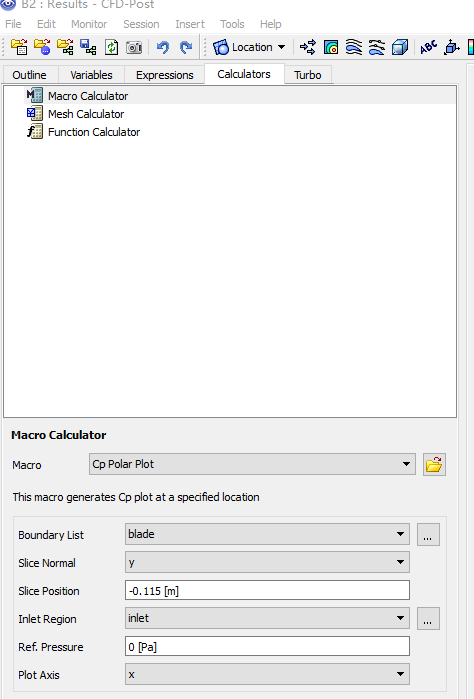 \
\
correction:
Ref pressure is relative pressure = abs pressure - reference pressure (in Fluent)
definitions;
Cp expression can be defined
as:
(Pressure - $pref [Pa])/dynHead
Pressure: static pressure
- $pref : the Ref. Pressure set in the macro calculator
- dynHead : a reference dynamic head (evaluated at the inlet) that can be defined as:
0.5 * areaAve(Density)@inlet * areaAve(Velocity)@inlet^2
- dynHead is a reference dynamic head
The
following information must be specified:
•
Boundary List: A list of boundaries
used in the simulation (blade).
•
Slice Normal: The axis that will be
normal to the slice plane.
•
Slice Position: The offset of the
slice plane in the direction specified by the normal axis.
•
Inlet Region: The locator used to
calculate inlet
quantities.
•
Ref. Pressure: The reference
pressure for the simulation.
•
Plot Axis: The axis on which the
results will be plotted.
Note for moving reference frame
use pressure as y variable, if moving reference frame is used,
cause the 'velocity' is 'relative velocity'

Code for ' pressure coefficient vs. x/c' in matlab
- Cpr.m
% plot and save 'pressure coefficient vs. x/c'

load pressure_9r_7.1m.out;

pressure=pressure_9r_7_1m(:,2);

x=pressure_9r_7_1m(:,1);

x=x+0.0139;

x_nor=x/0.0276;

cp=pressure_coeff(pressure);  % user defined function

plot(x_nor,cp);

cp_x = [x_nor cp];

save -ascii presure_coeff_7.1m.txt cp_x
- pressure_coeff.m code is as below
function cp= pressure_coeff(p)

% v : velocity

% p :  pressure

% p0 :   reference pressure

% rho : density

% omega: angular velocity, rad/s

% r : radius

  r=0.207;

v = 0.6;

p0=0;

omega = 13.043;

rho = 998.2;

U = v^2 + (omega*r)^2;

cp=2*(p-p0)/(rho*U)
gnuplot script
#set terminal jpeg

#set output 'coeff_epp_gci.jpg'

#set terminal png

#set output 'pressure_tsr5.png'

set terminal postscript eps font 24

set out 'pressure_coeff_tsr5.eps'

#set terminal x11

set autoscale

unset log

unset label

unset pm3d

set key at graph .7, .4

set key spacing 1

set xtic auto

set ytic auto

set xlabel "x/c - Normalized chord length"

set xrange [*:*]

# r0 initial pulse

set yrange [*:*]

set ylabel "C_{pr} - Pressure coefficient"

set style line 1 lt 1 lc rgb "black" lw 4 pointtype 6

set style line 2 lt 2 lc rgb "black" lw 4 pointtype 2

set style line 3 lt 3 lc rgb "black" lw 4

set style line 4 lt 4 lc rgb "red" lw 4

set style line 5 lt 5 lc rgb "black" lw 4

set style line 6 lt 6 lc rgb "brown" lw 4

set pointsize 2

set bars 3

plot "presure_coeff_3.3m.txt" using 1:2  t  "3.5M" ls 1 with lines,\

"presure_coeff_5.4m.txt" using 1:2  t  "5.4M" ls 2 with lines,\

"presure_coeff_7.1m.txt" using 1:2  t  "7.1M" ls 3 with lines
pressure coeffcient of a wing/blade的更多相关文章
- mesh topology for airfoil, wing, blade, turbo
ref Ch. 5, Anderson, CFD the basics with applications numerical grid generation foundations and appl ...
- post processing in CFD
post post Table of Contents 1. Post-processing 1.1. Reverse flow 1.1.1. reasons 1.1.2. solutions 1.2 ...
- stall and flow separation on airfoil or blade
stall stall and flow separation Table of Contents 1. Stall and flow separation 1.1. Separation of Bo ...
- TODO:Laravel 使用blade标签布局页面
TODO:Laravel 使用blade标签布局页面 本文主要介绍Laravel的标签使用,统一布局页面.主要用到到标签有@yield,@ stack,@extends,@section,@stop, ...
- egret GUI 和 egret Wing 是我看到h5 最渣的设计
一个抄袭FlexLite抄的连自己思想都没有,别人精髓都不懂的垃圾框架.也不学学MornUI,好歹有点自己想法. 先来个最小可用集合吧: 1. egret create legogame --type ...
- 【blade利刃出鞘】一起进入移动端webapp开发吧
前言 在移动浪潮袭来的时候,小钗有幸进入框架组做webapp框架开发,过程中遇到了移动端的各种坑,也产生了各种激情,就我们公司的发展历程来说 第一阶段:使用传统方式开发移动站点,少量引入HTML5元素 ...
- 【blade的UI设计】理解前端MVC与分层思想
前言 最近校招要来了,很多大三的同学一定按捺不住心中的焦躁,其中有期待也有彷徨,或许更多的是些许担忧,最近在开始疯狂的复习了吧 这里小钗有几点建议给各位: ① 不要看得太重,关心则乱,太紧张反而表现不 ...
- Reporting Service 告警"w WARN: Thread pool pressure. Using current thread for a work item"
如果Reporting Service偶尔出现不可访问或访问出错情况,这种情况一般没有做监控的话,很难捕捉到.出现这种问题,最好检查Reporting Service的日志文件. 今天早上就遇到这样一 ...
- Traveling in Blade & Soul
Traveling in Blade & Soul Walking is too simple. Having trained their physics and spirits for ye ...
随机推荐
- SVN主干与分支的合并 ***
下面我将step by step地演示如何一次完整的branching和merging,包括创建分支.分支开发.分支和主线同步,分支合并到主线的全过程,甚至包括如何在本地创建一个测试用的reposit ...
- html5 画图板
8个最新炫酷的HTML5动画应用 http://www.php100.com/html/it/qianduan/2015/0107/8281.html 另外一个画板demo http://www.os ...
- Linux进入单用户模式的两种方法
单用户模式的作用 在使用Linux系统中,维护人员经常会碰到一个问题,就是在拥有root账号权限和密码的用户中,总是会出现忘记root密码的情况. 遇到这种情况,一般情况下,维护人员就会通过最常用的方 ...
- 04-Vue中的动画
Vue中的动画 为什么要有动画:动画能够提高用户的体验,帮助用户更好的理解页面中的功能: -使用过渡类名 1.html <div id="app"> <input ...
- SVN安装失败提示
svnserve: error while loading shared libraries: libaprutil-1.so.0: cannot open shared object file: 1 ...
- JSON使用讲解
前端操作json 一.JSON字符串与JSON对象的区别 1. 一个对象以“{” 开始, “}”结束. 每个“名称”后跟一个“:”(冒号):“‘名称/值’ 对”之间运用 “,”(逗号) ...
- vue+elementUI table篇
1.table内容展示 <el-table stripe :key='tableKey' header-cell-class-name="bindonce" :data=&q ...
- HTML+CSS 基础布局(案列一)
刚html刚讲完马上就接着css,周末的任务就是高仿案例,结果有点遭 图文布局 代码 css(内部样式) html <!DOCTYPE html><html><head& ...
- linux小白成长之路5————安装Docker
1.安装docker 命令: yum -y install docker   2.启动docker 命令: systemctl start docker.service 3.查看docker版本 ...
- Android学习笔记(五)Android框架
一.技术结构图 注:开发者最需要关注的是第三层“Application Framework” 二.基于组件的应用程序开发 1)Activity 一个Activity就是一个界面,负责和用户交互. 2) ...