
css代码整理、收集
整理了一下之前用到过的css代码,实现一种效果或许有许多种写法,我这里整理了一下我个人认为兼容性比较好,结构比较简洁的代码……如有写得不对的地方敬请前辈们指点赐教一下,小弟不胜感激!此学习笔记是动态的——我日后发现有好的代码段会陆陆续续整理添加上去。
css:ellipsis省略号
<style>

.news{width:320px; text-overflow:ellipsis; -o-text-overflow:ellipsis; -moz-binding:url('ellipsis.xml#ellipsis'); -ms-text-overflow:ellipsis; -webkit-text-overflow:ellipsis; overflow:hidden;}

.news a{white-space:nowrap;}

</style>

<div class="news">

    <a href="javascript:void(0);">你好,我是个css省略号,支持各种浏览器,包括大IE6</a>

    <a href="javascript:void(0);">你好,我是个css省略号,支持各种浏览器,包括大IE6</a>

</div>
鼠标移过去图片慢慢变暗(亮)一点
也就是用到了透明(opacity),渐变(transition)实现,如下是变暗的情况:
<style>

.link_img{display:inline-block; width:auto; height:auto;}

.link_img:hover{  background-color:#000;}

.link_img:hover img{ display:block; filter:alpha(opacity=80); opacity:0.8; transition:all 0.5s ease-out; -webkit-transition:all 0.5s ease-out; -moz-transition:all 0.5s ease-out; -o-transition:all 0.5s ease-out;}

</style>

<a href="javascript:void(0);" class="link_img"><img src="data:images/zy_19.jpg" /></a>

<a href="javascript:void(0);" class="link_img"><img src="data:images/pro3.jpg" /></a>
css:border实现的三角形
如要实现汽包,如新浪微博里的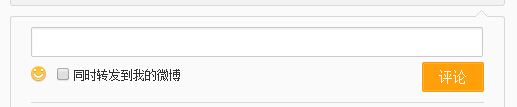 ,新浪里用到的是的是特殊字符“◆”,
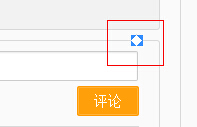 ,能实现兼容到IE6,html代码结构上不简洁了,在html里要多写了class为”WB_arrow“的一层代码,如图: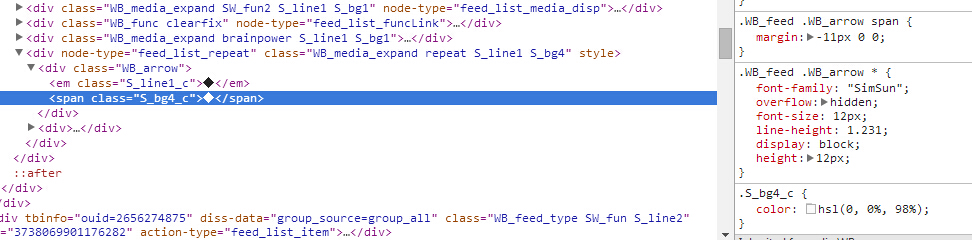
要简洁点,只能用border与伪类before,after了,附代码如下:
 <!DOCTYPE html PUBLIC "-//W3C//DTD XHTML 1.0 Strict//EN" "http ://www.w3.org/TR/xhtml1/DTD/xhtml1-strict.dtd">

 <html xmlns="http://www.w3.org/1999/xhtml">

 <head>

 <meta http-equiv="Content-Type" content="text/html; charset=utf-8" />

 <title>css制作三角形</title>

 <style type="text/css">

 body{background-color:#E8E8E8;}

 .triangle1{ display:inline-block; width:20px; height:20px;  border-width:20px 30px 40px 50px; border-style:solid; border-color:green yellow blue red;}

 .triangle2{ display:inline-block; width:0; height:0;  border-width:20px 30px 40px 50px; border-style:solid; border-color:transparent yellow blue red;}

 .triangle3{ display:inline-block; width:0; height:0;  border-width:20px 30px 40px 50px; border-style:dashed solid solid solid; border-color:transparent yellow blue red;}

 .triangle4{ display:inline-block; width:0; height:0; _line-height:0;  border-width:20px 30px 40px 50px; border-style:dashed solid solid solid; border-color:transparent yellow blue red;}/*对于ie6要设置一下line-height,以及透明的border-style要设置成dashed*/

 .rightdirection{ display:inline-block; width:0;height:0; _line-height:0; border-width:20px; border-style:dashed dashed dashed solid;   border-color:transparent transparent transparent #333;  }

 .bottomdirection{ display:inline-block; width:0;height:0;  border-width:20px; border-style:solid dashed dashed dashed; border-color: #333 transparent transparent transparent;  }

 .leftdirection{ display:inline-block; width:0;height:0; _line-height:0; border-width:20px; border-style:dashed solid dashed dashed;  border-color: transparent #333 transparent transparent;  }

 .topdirection{ display:inline-block; width:0;height:0;  border-width:20px; border-style:dashed dashed solid dashed;  border-color: transparent transparent #333 transparent;  }

 .dome{ margin-top:10px; width:200px; padding:10px; text-align:center; background-color:#ccc; border:1px solid #666; position:relative; left:30px;}

 .dome:before{ display:block; content:""; border-width:8px 10px; border-style:dashed solid dashed dashed; border-color:transparent #666 transparent transparent; position:absolute; top:10px; left:-20px; z-index:1; }

 .dome:after{ display:block; content:""; border-width:8px 10px; border-style:dashed solid dashed dashed; border-color:transparent #ccc transparent transparent; position:absolute; top:10px; left:-19px; z-index:2;}

 </style>

 </head>

 <body>

 <em class="triangle1"></em>

 <em class="triangle2"></em>

 <em class="triangle3"></em>

 <em class="triangle4"></em>

 <em class="rightdirection"></em>

 <em class="bottomdirection"></em>

 <em class="leftdirection"></em>

 <em class="topdirection"></em>

 <div class="dome">hello world</div>

 </body>

 </html>
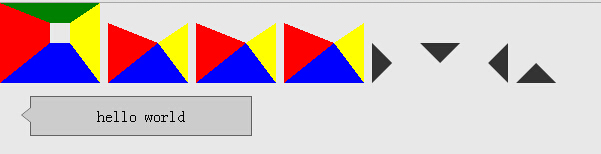
运行结果如下图:
IE6的截图: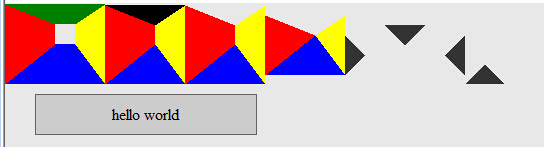
但是用伪类before,after的border在大IE6里不能做出三角形来,如要兼容IE6还得用新浪里的方法,或者用与新浪的相似,不过不是用特殊字符,而是也是用border做三角形,如下:
 <style>

 .dome{width:300px; padding:30px 20px; border:1px solid #beceeb; position:relative;}

 .dome .triangle{ position:absolute; bottom:0px; left:50px;}

 .dome .triangle .bot{

     _display:block;

     _line-height:0px;

     border-width:20px;

     border-style:solid dashed dashed dashed;

     border-color:#beceeb transparent transparent transparent;

     position:absolute;

     bottom:-40px;

 }

 .dome .triangle .top{

     _display:block;

     _line-height:0px;

     border-width:20px;

     border-style:solid dashed  dashed dashed;

     border-color:#FFF transparent transparent transparent;

     position:absolute;

     bottom:-39px;

 }

 </style>

 <div class="dome">

   <div class="triangle">

       <em class="bot"></em>

       <em class="top"></em>

   </div>

   <div class="txtBox">

      我是用border实现的三角形,html结构上跟新浪微博上的结构相似

   </div>

 </div>
css代码整理、收集的更多相关文章
- css代码整理
width:(宽度) height:(高度) border:1px solid red:(边框 :边框粗细 显示 颜色) border-radius:10deg:(边框变圆角) box-shadow: ...
- 转载网易博客:整理各大网站让网站变灰的css代码
2013-07-21 15:06:47 北京时间2013年4月20日8时02分四川省雅安市芦山县(北纬30.3,东经103.0)发生7.0级地震.震源深度13公里.各大网站将其网站变灰,本人整理了下部 ...
- 在sublimen中整理CSS代码及其兼容性问题
1,使用鼠标选中前面浅灰色缩进. 2,Ctrl+H 查找替换 点击 Find All 查找全部缩进. 3,按backspace向后删除两次,如下图所示: 4,向下按一次方向键,再向左按一次方向键,最 ...
- html Css PC 移动端 公用部分样式代码整理
css常用公用部分样式代码整理: body, html, div, blockquote, img, label, p, h1, h2, h3, h4, h5, h6, pre, ul, ol, li ...
- div+css通用兼容性代码整理
一.Div+css通用兼容性代码 你可以在css开头加入 *html{padding:0px} <style> *html{padding:0px} /* Clear Fix */ .cl ...
- 整理及优化CSS代码的7个原则
作为网页设计师(前端工程师),你可能还记得曾经的那个网页大小建议:一个网页(包括HTML.CSS.Javacript.Flash和图片)尽量不要超过30KB的大小,随着互联网的日益庞大,网络带宽也在飞 ...
- [No00007B]DreamweaverCC 的CSS代码格式化
Dreamweaver自带的代码格式化功能. 1.步骤:命令 -> 应用源格式. 2.你可以选择你的偏好.特别是css代码,有些人喜欢每个属性单独一行,有些人喜欢把所有属性写在同一行.步骤:编辑 ...
- 30+有用的CSS代码片段
在一篇文章中收集所有的CSS代码片段几乎是不可能的事情,但是我们这里列出了一些相对于其他的更有用的代码片段,不要被这些代码的长度所吓到,因为它们都很容易实现,并且具有良好的文档.除了那些解决常见的恼人 ...
- 如何写出优雅的CSS代码 ?(转)
对于同样的项目或者是一个网页,尽管最终每个前端开发工程师都可以实现相同的效果,但是他们所写的代码一定是不同的.有的优雅,看起来清晰易懂,代码具有可拓展性,这样的代码有利于团队合作和后期的维护:而有的混 ...
随机推荐
- 存储过程中拼接sql的示例
create or replace package body CRF_CMS_DOCTOR_PKG is --根据医院查询医生PROCEDURE P_HOSPITALBYDOCTOR_LIST ( v ...
- javascript 版的 SuperMario
注册博客园4年了,还没发表过一篇文章.明年就是超级马里奥这款游戏诞生30周年了,作为一个喜欢2d卷轴游戏的玩家,决定用js实现一个.目前只实现了基本玩法,得分什么的也还没做.项目的GitHub的地址是 ...
- 摇滚吧HTML5!有声前端交互!(Hello, Jsonic!)
软件工程师们摆弄1和0编写他们的乌托邦,音乐人门把玩12平均律上的音符构筑他们的伊甸园.最近,我偶然看了<蓝色骨头>这部电影,片中的男主角是位黑客,同时又兼具音乐创作的才华.在现实生活中, ...
- Android 读取和保存文件(手机内置存储器)
1:activity_main.xml <RelativeLayout xmlns:android="http://schemas.android.com/apk/res/androi ...
- 如何进行fragment中的来回切换?
本文选自StackOverflow(简称:SOF)精选问答汇总系列文章之一,本系列文章将为读者分享国外最优质的精彩问与答,供读者学习和了解国外最新技术,本文为大家讲解如何进行fragment中的来回切 ...
- Cracking the coding interview--Q1.7
原文 Write an algorithm such that if an element in an MxN matrix is 0, its entire row and column are s ...
- 浅析门户网站体育赛事CDN加速解决方案
经过近些年来的高速发展,互联网已经成为现今媒体传播的主要力量.这一点在大型体育赛事的报道与转播上,体现的尤为明显.更及时的信息内容.更多样的报道形式.更齐全的资料组成.更方便的阅读查询.更具互动性的报 ...
- COJ 0248 HDNOIP201408生成树
HDNOIP201408生成树 难度级别: A: 编程语言:不限:运行时间限制:5000ms: 运行空间限制:262144KB: 代码长度限制:2000000B 试题描述 输入 第一行包括两个整数V, ...
- 安装与使用smarty
1.安装 下载最新的smarty.下载地址:http://www.smarty.net/download 下载成功后,解压压缩包后的文件如图所示: 将解压后的文件存放在web文档根目录外的某个位置.w ...
- 2014-07-24 .NET实现微信公众号的消息回复与自定义菜单
今天是在吾索实习的第12天.我们在这一天中,基本实现了微信公众号的消息回复与自定义菜单的创建. 首先,是实现消息回复,其关键点如下: 读取POST来的数据流:Stream 数据流变量 = HttpCo ...