
In Depth : Android Boot Sequence / Process
In Depth : Android Boot Sequence / Process
What is Android boot sequence ?
What is linux kernel ?
What is different between desktop linux kernel and Android linux kernel ?
What is bootloader ?
What is Zygote ?
What is x86 and ARM linux ?
What is init.rc ?
What is System Server ?
Many questions pop-up in mind when we think about Android boot sequence.
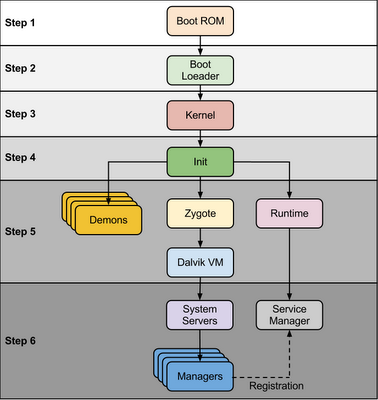 |
| Android Boot Sequence / Process |
When power start Boot ROM code start execution from pre defined location which is hardwired on ROM. It load Bootloader into RAM and start execution
Step 2 : Bootloader
Bootloader is small program which runs before Android operating system running. Bootloader is first program to run so It is specific for board and processor. Device manufacturer either use popular bootloaders like redboot,uboot, qi bootloader or they develop own bootloaders, It’s not part of Android Operating System. bootloader is the place where OEMs and Carriers put there locks and restrictions.
Bootloader perform execution in two stages, first stage It to detect external RAM and load program which helps in second stage, In second stage bootloader setup network, memory, etc. which requires to run kernel, bootloader is able to provide configuration parameters or inputs to the kernel for specific purpose.
Android bootloader can be found at
2. main.c - Initializes hardware (clocks, board, keypad, console), creates Linux tags
Refer this link to know more about Android bootloader :
https://motorola-global-portal.custhelp.com/app/answers/detail/a_id/86208/~/bootloader-frequently-asked-questions
Step 3: Kernel
Android kernel start similar way as desktop linux kernel starts, as kernel launch it start setup cache, protected memory, scheduling, loads drivers. When kernel finish system setup first thing it look for “init” in system files and launch root process or first process of system.
Step 4: init process
init it very first process, we can say it is root process or grandmother of all processes. init process has two responsibilities 1. mount directories like /sys, /dev, /proc and 2. run init.rc script.
- init process can be found at init : <android source>/system/core/init
- init.rc file can be found in source tree at <android source>/system/core/rootdir/init.rc
- readme.txtfile can be found in source tree at <andorid source>/system/core/init/readme.txt
Android has specific format and rules for init.rc files. In Android we call it as “Android Init Language”
The Android Init Language consists of four broad classes of statements,which are Actions, Commands, Services, and Options.
Action : Actions are named sequences of commands. Actions have a trigger which is used to determine when the action should occur.
Syntax
on <trigger>
<command>
<command>
<command>
Service : Services are programs which init launches and (optionally) restarts when they exit. Syntax
service <name> <pathname> [ <argument> ]*
<option>
<option>
...
Options : Options are modifiers to services. They affect how and when init runs the service.
Let’s take a look of default init.rc file. Here I have listed only major events and services.
| Action / Service | Description |
| on early-init | Set init and its forked children's oom_adj. Set the security context for the init process. |
| on init | setup the global environment Create cgroup mount point for cpu accounting and many |
| on fs | mount mtd partitions |
| on post-fs | change permissions of system directories |
| on post-fs-data | change permission of /data folders and sub folders |
| on boot | basic network init ,Memory Management ,etc |
| service servicemanager | start system manager to manage all native services like location, audio, shared preference etc.. |
| service zygote | start zygote as app_process |
At this stage you can see “Android” logo on device screen.
Step 5: Zygote and Dalvik
1. Load ZygoteInit class,
Source Code :<Android Source> /frameworks/base/core/java/com/android/internal/os/ZygoteInit.java
2. registerZygoteSocket() - Registers a server socket for zygote command connections
3. preloadClasses() - “preloaded-classes” is simple text file contains list of classes that need to be preloaded, you cna find “preloaded-classes” file at <Android Source>/frameworks/base
4. preloadResources() - preloadReaources means native themes and layouts, everything that include android.R file will be load using this method.
Step 6: System Service or Services
Other services
Step 7 : Boot Completed
Once System Services up and running in memory, Android has completed booting process, At this time “ACTION_BOOT_COMPLETED” standard broadcast action will fire.
In Depth : Android Boot Sequence / Process的更多相关文章
- In Depth : Android Shutdown Sequence
What happened when I long press power button ?What is shutdown sequence ?How is it different from de ...
- Android Stduio 发生 Process 'command 'somePath:java.exe'' finished with non-zero exit value 2 异常的解决办法
有时你会发现,在你使用Android Studio 进行编译的时候提示: Error:Execution failed for task ':demo:dexDebug'.> com.andro ...
- com.android.ide.common.process.ProcessException: org.gradle.process.internal.ExecException: Process 'command ' finished with non-zero exit value 1
Error:Execution failed for task ':lenovoAlbum:processReleaseResources'. > com.android.ide.common. ...
- Error:Execution failed for task ':app:dexDebug'. > com.android.ide.common.process.ProcessException
异常Log: Error:Execution failed for task ‘:app:dexDebug’. > com.android.ide.common.process.ProcessE ...
- Error:Execution failed for task ':app:dexDebug'. > com.android.ide.common.process.ProcessException
异常Log: Error:Execution failed for task ':app:dexDebug'. > com.android.ide.common.process.ProcessE ...
- ionic 打包 报错Execution failed for task ':processDebugResources'. > com.android.ide.common.process.ProcessException: Failed to execute aapt
在platform --> android目录下找到build.gradle文件,打开并在def promptForReleaseKeyPassword() {...}函数前加入以下内容: 完整 ...
- java.util.concurrent.ExecutionException: com.android.ide.common.process.ProcessException 的解决办法之一
在查看别人的代码的时候,遇到了把工程导入到 Android Studio ,报:ExecutionException: com.android.ide.common.process.ProcessEx ...
- om.android.ide.common.process.ProcessException: org.gradle.process.internal.ExecException
Error:Execution failed for task ':app:dexDebug'.> com.android.ide.common.process.ProcessException ...
- 高德地图Demo运行报错 com.android.ide.common.process.ProcessException: Failed to execute aapt
最近由于有需求去做导航方面的Android开发,很是无奈,以前也的确是没有搞过,领导开大会当着所有人的面说这是给我分配的第一个工作,无论如何要做好,突然间感觉压力好大,自己已经多年没有敲过代码,而且A ...
随机推荐
- Windows Message Queue--hdu1509
Windows Message Queue Time Limit: 2000/1000 MS (Java/Others) Memory Limit: 65536/32768 K (Java/Ot ...
- JavaScript学习笔记:数组reduce()和reduceRight()方法
很多时候需要累加数组项的得到一个值(比如说求和).如果你碰到一个类似的问题,你想到的方法是什么呢?会不会和我一样,想到的就是使用for或while循环,对数组进行迭代,依次将他们的值加起来.比如: v ...
- read write spinlock
发一个自己基于 C++11 写的 read write spinlock,在 MinGW 4.8.2 (gcc 4.8 全面支持c++ 11,但由于gcc windows平台 libstdc++ 目前 ...
- windows2003 64位注册码 序列号 激活码
Windows 2003 R2 64bit Enterprise VOL Edition 企业版 MR78C-GF2CY-KC864-DTG74-VMT73 VPT7T-77D38-KWVW2-2G3 ...
- #include <boost/shared_array.hpp>
共享数组 共享数组的行为类型于共享指针.关键不同在于共享数组在析构时,默认使用delete[]操作符来释放所含的对象.因为这个操作符只能用于数组对象,共享数组必须通过动态分配的数组的地址来初始化.共享 ...
- apache端口被占用
1.80端口被占用,先去服务里将IIS关闭掉,然后重启apache,如果还是继续弹窗the requested operation has failed...需要去Internet信息服务里面停止 ...
- check cable connection PXE-M0F: Exiting intel PXE ROM no bootable device-- insert boot disk and pre
今天修电脑遇到一个问题,新买的电脑的原装的是linux,然后我按常规方式进入PE后重装系统,然后开机一直显示下面的代码,进不去: check cable connection PXE-M0F: Exi ...
- vim 多窗口编辑
本文出自 http://blog.csdn.net/shuangde800 ------------------------------------------------------------ ...
- 最新的手机/移动设备jQuery插件
随着互联网的流行,移动网站开始急速增加,在2014年手机网站将会出现很多,所以手机网站是必须要学会制作的.手机网站不像桌面平台一样制作,否则会影响显示效果,目前大部分手机网站使用响应式设计技术,而且也 ...
- 月赛-Crackhash
Crackhash 这个题目是我为月赛出的,完全仿照自mma 1st simple_hash. 这道题目比较有意思的地方在于在32位的程序中模拟了64位的算术运算. 题目的思路很清晰.要求输入全为数字 ...