
大神的vim配置
大神的vim配置,O(∩_∩)O
spf13-vim : Steve Francia's Vim Distribution
                __ _ _____              _

     ___ _ __  / _/ |___ /      __   __(_)_ __ ___

    / __| '_ \| |_| | |_ \ _____\ \ / /| | '_ ` _ \

    \__ \ |_) |  _| |___) |_____|\ V / | | | | | | |

    |___/ .__/|_| |_|____/        \_/  |_|_| |_| |_|

        |_|
spf13-vim is a distribution of vim plugins and resources for Vim, Gvim and MacVim.
It is a good starting point for anyone intending to use VIM for development running equally well on Windows, Linux, *nix and Mac.
The distribution is completely customisable using a ~/.vimrc.local, ~/.vimrc.bundles.local, and ~/.vimrc.before.local Vim RC files.
Unlike traditional VIM plugin structure, which similar to UNIX throws all files into common directories, making updating or disabling plugins a real mess, spf13-vim 3 uses the Vundle plugin management system to have a well organized vim directory (Similar to mac's app folders). Vundle also ensures that the latest versions of your plugins are installed and makes it easy to keep them up to date.
Great care has been taken to ensure that each plugin plays nicely with others, and optional configuration has been provided for what we believe is the most efficient use.
Lastly (and perhaps, most importantly) It is completely cross platform. It works well on Windows, Linux and OSX without any modifications or additional configurations. If you are using MacVim or Gvim additional features are enabled. So regardless of your environment just clone and run.
Installation
Requirements
To make all the plugins work, specifically neocomplete, you need vim with lua.
Linux, *nix, Mac OSX Installation
The easiest way to install spf13-vim is to use our automatic installer by simply copying and pasting the following line into a terminal. This will install spf13-vim and backup your existing vim configuration. If you are upgrading from a prior version (before 3.0) this is also the recommended installation.
Requires Git 1.7+ and Vim 7.3+
curl https://j.mp/spf13-vim3 -L > spf13-vim.sh && sh spf13-vim.sh
If you have a bash-compatible shell you can run the script directly:
sh <(curl https://j.mp/spf13-vim3 -L)
Installing on Windows
On Windows and *nix Git and Curl are required. Also, if you haven't done so already, you'll need to install Vim. The quickest option to install all three dependencies (Git, Curl, Vim and spf13-vim) is via Chocolatey NuGet. After installing Chocolatey, execute the following commands on the command prompt:
C:\> choco install spf13-vim
Note: The spf13-vim package will install Vim also!
If you want to install msysgit, Curl and spf13-vim individually, follow the directions below.
Installing dependencies
Install Vim
After the installation of Vim you must add a new directory to your environment variables path to make it work with the script installation of spf13.
Open Vim and write the following command, it will show the installed directory:
:echo $VIMRUNTIME

C:\Program Files (X86)\Vim\vim74
Then you need to add it to your environment variable path. After that try execute vim within command prompt (press Win-R, type cmd, press Enter) and you’ll see the default vim page.
Install msysgit
After installation try running git --version within command prompt (press Win-R, type cmd, press Enter) to make sure all good:
C:\> git --version

git version 1.7.4.msysgit.0
Setup Curl
Instructions blatently copied from vundle readme Installing Curl on Windows is easy as Curl is bundled with msysgit! But before it can be used with Vundleit's required make curl run in command prompt. The easiest way is to create curl.cmd with this content
@rem Do not use "echo off" to not affect any child calls.

@setlocal

@rem Get the abolute path to the parent directory, which is assumed to be the

@rem Git installation root.

@for /F "delims=" %%I in ("%~dp0..") do @set git_install_root=%%~fI

@set PATH=%git_install_root%\bin;%git_install_root%\mingw\bin;%PATH%

@if not exist "%HOME%" @set HOME=%HOMEDRIVE%%HOMEPATH%

@if not exist "%HOME%" @set HOME=%USERPROFILE%

@curl.exe %*
And copy it to C:\Program Files\Git\cmd\curl.cmd, assuming msysgit was installed to c:\Program Files\Git
to verify all good, run:
C:\> curl --version

curl 7.21.1 (i686-pc-mingw32) libcurl/7.21.1 OpenSSL/0.9.8k zlib/1.2.3

Protocols: dict file ftp ftps http https imap imaps ldap ldaps pop3 pop3s rtsp smtp smtps telnet tftp

Features: Largefile NTLM SSL SSPI libz
Installing spf13-vim on Windows
The easiest way is to download and run the spf13-vim-windows-install.cmd file. Remember to run this file in Administrator Mode if you want the symlinks to be created successfully.
Updating to the latest version
The simpliest (and safest) way to update is to simply rerun the installer. It will completely and non destructively upgrade to the latest version.
curl https://j.mp/spf13-vim3 -L -o - | sh
Alternatively you can manually perform the following steps. If anything has changed with the structure of the configuration you will need to create the appropriate symlinks.
    cd $HOME/to/spf13-vim/

    git pull

    vim +BundleInstall! +BundleClean +q
Fork me on GitHub
I'm always happy to take pull requests from others. A good number of people are already contributors to spf13-vim. Go ahead and fork me.
A highly optimized .vimrc config file
The .vimrc file is suited to programming. It is extremely well organized and folds in sections. Each section is labeled and each option is commented.
It fixes many of the inconveniences of vanilla vim including
- A single config can be used across Windows, Mac and linux
- Eliminates swap and backup files from littering directories, preferring to store in a central location.
- Fixes common typos like :W, :Q, etc
- Setup a solid set of settings for Formatting (change to meet your needs)
- Setup the interface to take advantage of vim's features including
- omnicomplete
- line numbers
- syntax highlighting
- A better ruler & status line
- & more
- Configuring included plugins
Customization
Create ~/.vimrc.local and ~/.gvimrc.local for any local customizations.
For example, to override the default color schemes:
echo colorscheme ir_black >> ~/.vimrc.local
Before File
Create a ~/.vimrc.before.local file to define any customizations that get loaded before the spf13-vim .vimrc.
For example, to prevent autocd into a file directory:
echo let g:spf13_no_autochdir = 1 >> ~/.vimrc.before.local
For a list of available spf13-vim specific customization options, look at the ~/.vimrc.before file.
Fork Customization
There is an additional tier of customization available to those who want to maintain a fork of spf13-vim specialized for a particular group. These users can create .vimrc.fork and .vimrc.bundles.fork files in the root of their fork. The load order for the configuration is:
.vimrc.before- spf13-vim before configuration.vimrc.before.fork- fork before configuration.vimrc.before.local- before user configuration.vimrc.bundles- spf13-vim bundle configuration.vimrc.bundles.fork- fork bundle configuration.vimrc.bundles.local- local user bundle configuration.vimrc- spf13-vim vim configuration.vimrc.fork- fork vim configuration.vimrc.local- local user configuration
See .vimrc.bundles for specifics on what options can be set to override bundle configuration. See .vimrc.before for specifics on what options can be overridden. Most vim configuration options should be set in your .vimrc.fork file, bundle configuration needs to be set in your .vimrc.bundles.fork file.
You can specify the default bundles for your fork using .vimrc.before.fork file. Here is how to create an example .vimrc.before.fork file in a fork repo for the default bundles.
echo let g:spf13_bundle_groups=[\'general\', \'programming\', \'misc\', \'youcompleteme\'] >> .vimrc.before.fork
Once you have this file in your repo, only the bundles you specified will be installed during the first installation of your fork.
You may also want to update your README.markdown file so that the bootstrap.sh link points to your repository and your bootstrap.sh file to pull down your fork.
For an example of a fork of spf13-vim that provides customization in this manner see taxilian's fork.
Easily Editing Your Configuration
<Leader>ev opens a new tab containing the .vimrc configuration files listed above. This makes it easier to get an overview of your configuration and make customizations.
<Leader>sv sources the .vimrc file, instantly applying your customizations to the currently running vim instance.
These two mappings can themselves be customized by setting the following in .vimrc.before.local:
let g:spf13_edit_config_mapping='<Leader>ev'

let g:spf13_apply_config_mapping='<Leader>sv'
Plugins
spf13-vim contains a curated set of popular vim plugins, colors, snippets and syntaxes. Great care has been made to ensure that these plugins play well together and have optimal configuration.
Adding new plugins
Create ~/.vimrc.bundles.local for any additional bundles.
To add a new bundle, just add one line for each bundle you want to install. The line should start with the word "Bundle" followed by a string of either the vim.org project name or the githubusername/githubprojectname. For example, the github project spf13/vim-colors can be added with the following command
echo Bundle \'spf13/vim-colors\' >> ~/.vimrc.bundles.local
Once new plugins are added, they have to be installed.
vim +BundleInstall! +BundleClean +q
Removing (disabling) an included plugin
Create ~/.vimrc.local if it doesn't already exist.
Add the UnBundle command to this line. It takes the same input as the Bundle line, so simply copy the line you want to disable and add 'Un' to the beginning.
For example, disabling the 'AutoClose' and 'scrooloose/syntastic' plugins
    echo UnBundle \'AutoClose\' >> ~/.vimrc.bundles.local

    echo UnBundle \'scrooloose/syntastic\' >> ~/.vimrc.bundles.local
Remember to run ':BundleClean!' after this to remove the existing directories
Here are a few of the plugins:
Undotree
If you undo changes and then make a new change, in most editors the changes you undid are gone forever, as their undo-history is a simple list. Since version 7.0 vim uses an undo-tree instead. If you make a new change after undoing changes, a new branch is created in that tree. Combined with persistent undo, this is nearly as flexible and safe as git ;-)
Undotree makes that feature more accessible by creating a visual representation of said undo-tree.
QuickStart Launch using <Leader>u.
NERDTree
NERDTree is a file explorer plugin that provides "project drawer" functionality to your vim editing. You can learn more about it with :help NERDTree.
QuickStart Launch using <Leader>e.
Customizations:
- Use
<C-E>to toggle NERDTree - Use
<leader>eor<leader>ntto load NERDTreeFind which opens NERDTree where the current file is located. - Hide clutter ('.pyc', '.git', '.hg', '.svn', '.bzr')
- Treat NERDTree more like a panel than a split.
ctrlp
Ctrlp replaces the Command-T plugin with a 100% viml plugin. It provides an intuitive and fast mechanism to load files from the file system (with regex and fuzzy find), from open buffers, and from recently used files.
QuickStart Launch using <c-p>.
Surround
This plugin is a tool for dealing with pairs of "surroundings." Examples of surroundings include parentheses, quotes, and HTML tags. They are closely related to what Vim refers to as text-objects. Provided are mappings to allow for removing, changing, and adding surroundings.
Details follow on the exact semantics, but first, consider the following examples. An asterisk (*) is used to denote the cursor position.
  Old text                  Command     New text ~

  "Hello *world!"           ds"         Hello world!

  [123+4*56]/2              cs])        (123+456)/2

  "Look ma, I'm *HTML!"     cs"<q>      <q>Look ma, I'm HTML!</q>

  if *x>3 {                 ysW(        if ( x>3 ) {

  my $str = *whee!;         vllllS'     my $str = 'whee!';
For instance, if the cursor was inside "foo bar", you could type cs"' to convert the text to 'foo bar'.
There's a lot more, check it out at :help surround
NERDCommenter
NERDCommenter allows you to wrangle your code comments, regardless of filetype. View help :NERDCommenter or checkout my post on NERDCommenter.
QuickStart Toggle comments using <Leader>c<space> in Visual or Normal mode.
neocomplete
Neocomplete is an amazing autocomplete plugin with additional support for snippets. It can complete simulatiously from the dictionary, buffer, omnicomplete and snippets. This is the one true plugin that brings Vim autocomplete on par with the best editors.
QuickStart Just start typing, it will autocomplete where possible
Customizations:
- Automatically present the autocomplete menu
- Support tab and enter for autocomplete
<C-k>for completing snippets using Neosnippet.
YouCompleteMe
YouCompleteMe is another amazing completion engine. It is slightly more involved to set up as it contains a binary component that the user needs to compile before it will work. As a result of this however it is very fast.
To enable YouCompleteMe add youcompleteme to your list of groups by overriding it in your .vimrc.before.local like so: let g:spf13_bundle_groups=['general', 'programming', 'misc', 'scala', 'youcompleteme'] This is just an example. Remember to choose the other groups you want here.
Once you have done this you will need to get Vundle to grab the latest code from git. You can do this by calling :BundleInstall!. You should see YouCompleteMe in the list.
You will now have the code in your bundles directory and can proceed to compile the core. Change to the directory it has been downloaded to. If you have a vanilla install then cd ~/.spf13-vim-3/.vim/bundle/YouCompleteMe/ should do the trick. You should see a file in this directory called install.sh. There are a few options to consider before running the installer:
- Do you want clang support (if you don't know what this is then you likely don't need it)?
- Do you want to link against a local libclang or have the installer download the latest for you?
- Do you want support for c# via the omnisharp server?
The plugin is well documented on the site linked above. Be sure to give that a read and make sure you understand the options you require.
For java users wanting to use eclim be sure to add let g:EclimCompletionMethod = 'omnifunc' to your .vimrc.local.
Syntastic
Syntastic is a syntax checking plugin that runs buffers through external syntax checkers as they are saved and opened. If syntax errors are detected, the user is notified and is happy because they didn't have to compile their code or execute their script to find them.
AutoClose
AutoClose does what you expect. It's simple, if you open a bracket, paren, brace, quote, etc, it automatically closes it. It handles curlys correctly and doesn't get in the way of double curlies for things like jinja and twig.
Fugitive
Fugitive adds pervasive git support to git directories in vim. For more information, use :help fugitive
Use :Gstatus to view git status and type - on any file to stage or unstage it. Type p on a file to enter git add -p and stage specific hunks in the file.
Use :Gdiff on an open file to see what changes have been made to that file
QuickStart <leader>gs to bring up git status
Customizations:
<leader>gs:Gstatus<leader>gd:Gdiff<leader>gc:Gcommit<leader>gb:Gblame<leader>gl:Glog<leader>gp:Git push<leader>gw:Gwrite- :Git ___ will pass anything along to git.
PIV
The most feature complete and up to date PHP Integration for Vim with proper support for PHP 5.3+ including latest syntax, functions, better fold support, etc.
PIV provides:
- PHP 5.3 support
- Auto generation of PHP Doc (,pd on (function, variable, class) definition line)
- Autocomplete of classes, functions, variables, constants and language keywords
- Better indenting
- Full PHP documentation manual (hit K on any function for full docs)
Ack.vim
Ack.vim uses ack to search inside the current directory for a pattern. You can learn more about it with :help Ack
QuickStart :Ack
Tabularize
Tabularize lets you align statements on their equal signs and other characters
Customizations:
<Leader>a= :Tabularize /=<CR><Leader>a: :Tabularize /:<CR><Leader>a:: :Tabularize /:\zs<CR><Leader>a, :Tabularize /,<CR><Leader>a<Bar> :Tabularize /<Bar><CR>
Tagbar
spf13-vim includes the Tagbar plugin. This plugin requires exuberant-ctags and will automatically generate tags for your open files. It also provides a panel to navigate easily via tags
QuickStart CTRL-] while the cursor is on a keyword (such as a function name) to jump to its definition.
Customizations: spf13-vim binds <Leader>tt to toggle the tagbar panel
Note: For full language support, run brew install ctags to install exuberant-ctags.
Tip: Check out :help ctags for information about VIM's built-in ctag support. Tag navigation creates a stack which can traversed via Ctrl-] (to find the source of a token) and Ctrl-T (to jump back up one level).
EasyMotion
EasyMotion provides an interactive way to use motions in Vim.
It quickly maps each possible jump destination to a key allowing very fast and straightforward movement.
QuickStart EasyMotion is triggered using the normal movements, but prefixing them with <leader><leader>
For example this screen shot demonstrates pressing ,,w
Airline
Airline provides a lightweight themable statusline with no external dependencies. By default this configuration uses the symbols ‹ and › as separators for different statusline sections but can be configured to use the same symbols as Powerline. An example first without and then with powerline symbols is shown here:
To enable powerline symbols first install one of the Powerline Fonts or patch your favorite font using the provided instructions. Configure your terminal, MacVim, or Gvim to use the desired font. Finally add let g:airline_powerline_fonts=1 to your .vimrc.before.local.
Additional Syntaxes
spf13-vim ships with a few additional syntaxes:
- Markdown (bound to *.markdown, *.md, and *.mk)
- Twig
- Git commits (set your
EDITORtomvim -f)
Amazing Colors
spf13-vim includes solarized and spf13 vim color pack:
- ir_black
- molokai
- peaksea
Use :color molokai to switch to a color scheme.
Terminal Vim users will benefit from solarizing their terminal emulators and setting solarized support to 16 colors:
let g:solarized_termcolors=16

color solarized
Terminal emulator colorschemes:
- http://ethanschoonover.com/solarized (iTerm2, Terminal.app)
- https://github.com/phiggins/konsole-colors-solarized (KDE Konsole)
- https://github.com/sigurdga/gnome-terminal-colors-solarized (Gnome Terminal)
Snippets
It also contains a very complete set of snippets for use with snipmate or neocomplete.
Intro to VIM
Here's some tips if you've never used VIM before:
Tutorials
- Type
vimtutorinto a shell to go through a brief interactive tutorial inside VIM. - Read the slides at VIM: Walking Without Crutches.
Modes
- VIM has two (common) modes:
- insert mode- stuff you type is added to the buffer
- normal mode- keys you hit are interpreted as commands
- To enter insert mode, hit
i - To exit insert mode, hit
<ESC>
Useful commands
- Use
:qto exit vim - Certain commands are prefixed with a
<Leader>key, which by default maps to\. Spf13-vim useslet mapleader = ","to change this to,which is in a consistent and convenient location. - Keyboard cheat sheet.
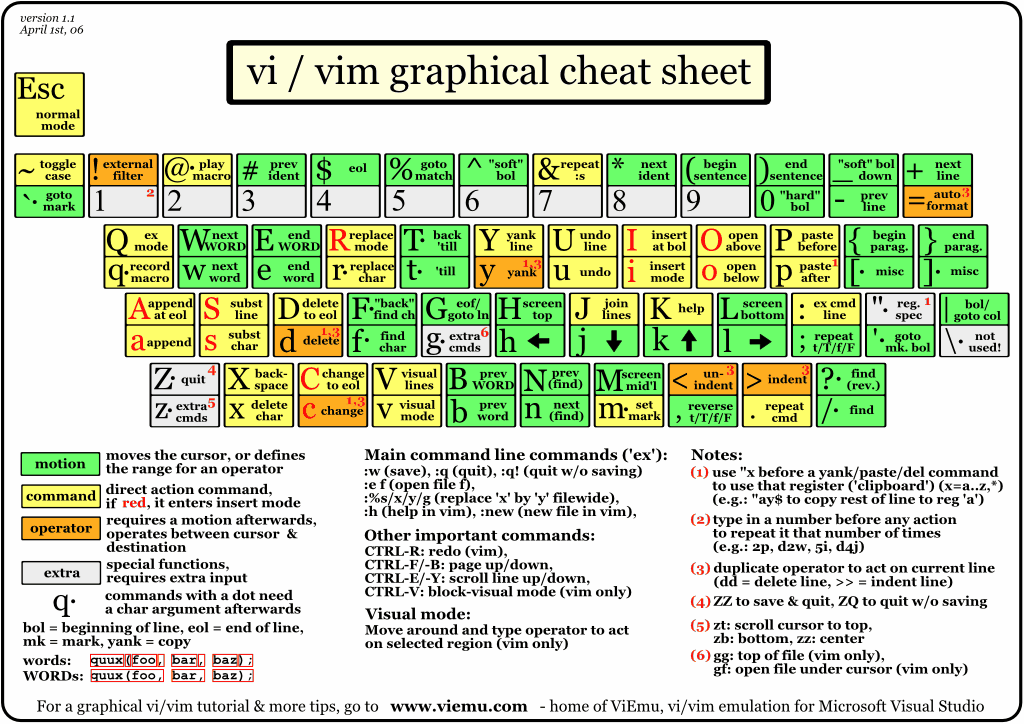
大神的vim配置的更多相关文章
- Vim配置及使用技巧
要说Linux下比较好用的文本编辑器,我推荐vim(当然很多人都用emacs,可我没用过),用vim也有一年左右,有些心得体会想与诸位分享.在我的学习过程中,借鉴了不少优秀的博客,其中有csdn大神n ...
- Linux Vim配置
用过很多vim配置的版本,怎么说,想轻量级就不要胡加乱七八糟的功能:如果不在乎反应是不是快速,侧重功能是否强大,可以参考vim大神的配置策略(spf13-vim)https://github.com/ ...
- mac系统终端的color scheme配置和vim配置
一.配置终端 solarized http://ethanschoonover.com/solarized 简单配置脚本: #!/bin/sh git clone git://github.com/a ...
- 爱了,字节跳动大神最佳整理:582页Android NDK七大模块学习宝典,理论与实践
前言 时至今日,短视频App可谓是如日中天,一片兴兴向荣.随着短视频的兴起,音视频开发也越来越受到重视,而且薪资水涨船高,以一线城市为例,音视频工程开发的薪资比Android应用层开发高出40%. 但 ...
- acm的ubuntu (ubuntu16.04 安装指南,chrome安装,vim配置,git设置和github,装QQ)
日常手贱把ubuntu14.04更新到了16.04,然后就game over了.mdzz,不然泥萌也看不到这篇博客了=.= 然后花了些时间重装了一个16.04版的,原来那个14.04的用可以用,就是动 ...
- 学习大神笔记之“MyBatis学习总结(二)”
MyBatis对表的增删改查操作 主要有两种方式:基于XML实现和基于注解实现. 完整项目结构: 工具类:MyBatisUtil-------用于获取 sqlsession pack ...
- 快速学习C语言三: 开发环境, VIM配置, TCP基础,Linux开发基础,Socket开发基础
上次学了一些C开发相关的工具,这次再配置一下VIM,让开发过程更爽一些. 另外再学一些linux下网络开发的基础,好多人学C也是为了做网络开发. 开发环境 首先得有个Linux环境,有时候家里机器是W ...
- VIM自动补全插件 - YouCompleteMe--"大神级vim补全插件"
VIM自动补全插件 - YouCompleteMe 序言 vim 之所以被称为编辑器之神多半归功于其丰富的可DIY的灵活插件功能,( 例如vim下的这款神级般的代码补全插件YouCompleteMe) ...
- Vim配置IDE开发环境
我的vim IDE界面: 1.安装Vim和Vim基本插件首先安装好Vim和Vim的基本插件.这些使用apt-get安装即可:lingd@ubuntu:~/arm$sudo apt-get instal ...
随机推荐
- [HDU 4741]Save Labman No.004[计算几何][精度]
题意: 求两条空间直线的距离,以及对应那条距离线段的两端点坐标. 思路: 有一个参数方程算最短距离的公式, 代入求即可. 但是这题卡精度... 用另外的公式(先算出a直线上到b最近的点p的坐标, 再算 ...
- FPGA STA(静态时序分析)
1 FPGA设计过程中所遇到的路径有输入到触发器,触发器到触发器,触发器到输出,例如以下图所看到的: 这些路径与输入延时输出延时,建立和保持时序有关. 2. 应用背景 静态时序分析简称STA,它是一种 ...
- struts2+hibernate环境搭建
使用的是myeclipse2014,搭建比较简单,很多jar包不用自己引入,很多初始配置文件不需要自己写.后面会介绍ssh的搭建. 首先新建web project. 1.右键项目,如图所示 这个直接f ...
- video标签 拖动 转自w3school
调整视频大小 播放 暂停 用js实现 详细参见http://www.w3school.com.cn/tiy/t.asp?f=html5_video_dom 图片的拖动详见http://www.w3sc ...
- C#复习三(Day 22)
哈哈,又到了总结的时间了.今天还是在继续复习C#的基础语法.这次总结主要以一下小程序为主. Split()的运用 123-456---789-----123-2把类似的字符串中重复符号去掉,得到123 ...
- 【Tomcat】使用Eclipse发布项目时,项目启动路径错误。
这种情况下,,通常会去C:\User\[USERNAME]\或者Tomcat路径下面的一个temp文件夹里面找项目文件,由此出现报错. 这时候解决方法为: 双击Eclipse的Servers里面的to ...
- 未能从程序集“System.ServiceModel,xxx”中加载类型“System.ServiceModel.Activation.HttpModule”。
一.平台环境 二.问题描述 未能从程序集“System.ServiceModel, Version=3.0.0.0, Culture=neutral, PublicKeyToken=b77a5c561 ...
- python自定义排序函数
Python内置的 sorted()函数可对list进行排序: >>>sorted([36, 5, 12, 9, 21]) [5, 9, 12, 21, 36] 但 sorted() ...
- 闲来无事写写-Huffman树的生成过程
前言:最近项目上一直没事干,感觉无聊到了极点,给自己找点事做,补一下大学没有完成的事情,写一个huffman算法Java版的,学校里面写过c语言的. 因为很久没搞数据结构和算法这方面了(现在搞Java ...
- JS 修改元素
var ele; window.onload=function(){ ele=document.createElement('div'); ele.id='myEle1'; ele.style.bor ...