
使用Kotlin对ViewGroup的视图进行函数使操作
原文标题:Functional operations over Views in ViewGroup using Kotlin
原文链接:http://antonioleiva.com/functional-operations-viewgroup-kotlin/
原文作者:Antonio Leiva(http://antonioleiva.com/about/)
原文发布:2015-07-29

集合、迭代、数组、序列 ... 所有这些共用一套好用的函数,这组函数可帮助对它们的元素进行转换、排序以及其它操作。但是,由于类的构造方法,在Android SDK中,有部分函数还不能用。
例如,我们不能直接获得ViewGroup内部视图列表,所以这些操作是不可能使用的。但是并非所有一切都失去了。在Kotlin中,我们有方法为这些操作准备任何数据。诀窍简单:我们只需要创建一个Sequence。在我们的例子中,Sequence将是一组有序的View。我们只需要实现一个函数,其返回Iterator。
如果我们有了Sequence,函数式操作领域就为我们打开了使用它们的大门。所以让我们从它开始。
注:阅读文章结尾
如lakedaemon666在评论中所建议的那样,有一个不用Sequence的更简单的方法可以获得同样的结果。我会保留原文记录,但是建议你看看替代的解决方案。
创建ViewGroup的Sequence
如前所述,我们将创建迭代器(iterator),它必须知道是否有下一项,下一项是哪个。我们还创建一个扩展函数,为了任何 ViewGroup 和继承类提供一个简单的方法做那项工作:
 fun ViewGroup.asSequence(): Sequence<View> = object : Sequence<View> {

     override fun iterator(): Iterator<View> = object : Iterator<View> {

         private var nextValue: View? = null

         private var done = false

         private var position: Int = 0

         override public fun hasNext(): Boolean {

             if (nextValue == null && !done) {

                 nextValue = getChildAt(position)

                 position++

                 if (nextValue == null) done = true

             }

             return nextValue != null

         }

         override fun next(): View {

             if (!hasNext()) {

                 throw NoSuchElementException()

             }

             val answer = nextValue

             nextValue = null

             return answer!!

         }

     }

 }
检索视图递归列表
获得一个视图列表,并对其进行函数操作是非常有用的。因此,我们可以先创建顶层视图列表,然后,用它以递归方式逐级检索ViewGroup中视图。
让我们为ViewGroup创建新扩展属性。扩展属性非常类似扩展函数,可用于任何类:
 public val ViewGroup.views: List<View>

     get() = asSequence().toList()
我们可以用这,创建递归函数,它返回布局中任何ViewGroup内部的所有View:
 public val ViewGroup.viewsRecursive: List<View>

     get() = views flatMap {

         when (it) {

             is ViewGroup -> it.viewsRecursive

             else -> listOf(it)

         }

     }
用flatMap,我们把全部结果的多个列表转换到一个列表中。它将遍历任何视图;如果是ViewGroup,它还会遍历自己的视图。否则,就返回仅有一项的列表。
用法实例
现在,我们得到viewRecursive属性,执行我们想要的任何操作。这里你可以看到两个例子。我创建这样一个简单的布局:
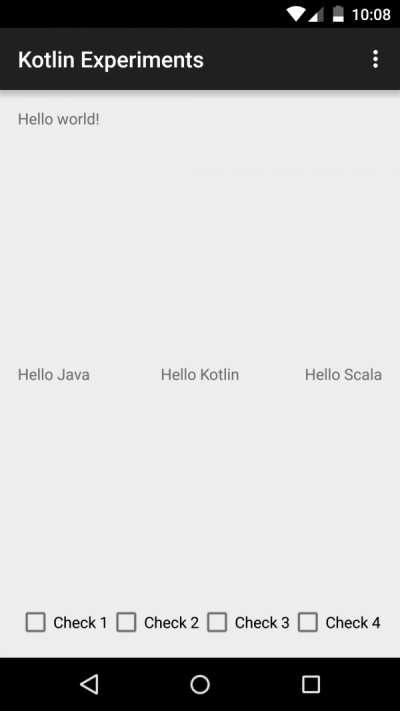
 <RelativeLayout xmlns:android="http://schemas.android.com/apk/res/android"

                 xmlns:tools="http://schemas.android.com/tools"

                 android:id="@+id/container"

                 android:layout_width="match_parent"

                 android:layout_height="match_parent"

                 android:paddingBottom="@dimen/activity_vertical_margin"

                 android:paddingLeft="@dimen/activity_horizontal_margin"

                 android:paddingRight="@dimen/activity_horizontal_margin"

                 android:paddingTop="@dimen/activity_vertical_margin"

                 tools:context=".MainActivity">

     <TextView

         android:layout_width="wrap_content"

         android:layout_height="wrap_content"

         android:text="@string/hello_world"/>

     <FrameLayout

         android:layout_width="match_parent"

         android:layout_height="wrap_content"

         android:layout_centerInParent="true">

         <TextView

             android:layout_width="wrap_content"

             android:layout_height="wrap_content"

             android:text="Hello Java"/>

         <TextView

             android:layout_width="wrap_content"

             android:layout_height="wrap_content"

             android:layout_gravity="center_horizontal"

             android:text="Hello Kotlin"/>

         <TextView

             android:layout_width="wrap_content"

             android:layout_height="wrap_content"

             android:layout_gravity="end"

             android:text="Hello Scala"/>

     </FrameLayout>

     <LinearLayout

         android:layout_width="match_parent"

         android:layout_height="wrap_content"

         android:layout_alignParentBottom="true"

         android:orientation="horizontal">

         <CheckBox

             android:layout_width="wrap_content"

             android:layout_height="wrap_content"

             android:text="Check 1"/>

         <CheckBox

             android:layout_width="wrap_content"

             android:layout_height="wrap_content"

             android:text="Check 2"/>

         <CheckBox

             android:layout_width="wrap_content"

             android:layout_height="wrap_content"

             android:text="Check 3"/>

         <CheckBox

             android:layout_width="wrap_content"

             android:layout_height="wrap_content"

             android:text="Check 4"/>

     </LinearLayout>

 </RelativeLayout>
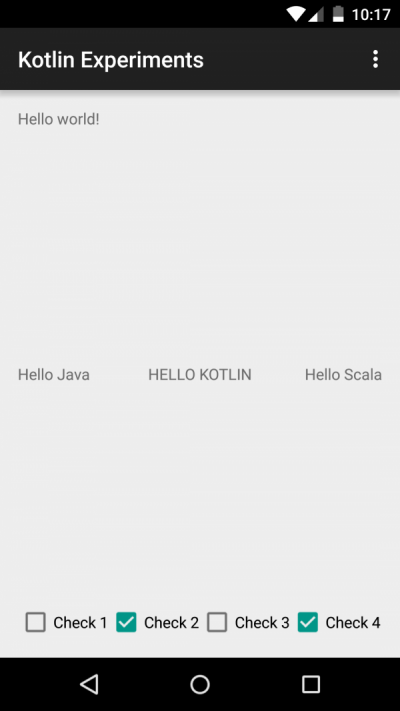
例如,在MainActivity.onCreate()中,可应用这段代码。它将Hello Kotlin!串转换为大写字母,选中偶数复选框:
 val container: ViewGroup = find(R.id.container)

 val views = container.viewsRecursive

 // Set Kotlin TextView to Upper

 val kotlinText = views.first {

     it is TextView && it.text.toString().contains("Kotlin")

 } as TextView

 kotlinText.text = kotlinText.text.toString().toUpperCase()

 // Set even checkboxes as checked, and odd as unchecked

 views filter {

     it is CheckBox

 } forEach {

     with(it as CheckBox) {

         val number = text.toString().removePrefix("Check ").toInt()

         setChecked(number % 2 == 0)

     }

 }
替代的解决方案
如lakedaemon666在评论中所提及的那样(谢谢解释),如果之后我们遍历整个sequence,那么创建sequence就没有什么意义了。例如,当按行读取文件时,sequence是懒惰迭代。只有要求必要的项目。而我们却要使用所有项,所以简单的列表就足够了。
另外,有许多简单的方法可以产生视图列表。我们可以依赖值域产生视图的索引列表,将它们映射到我们需要的视图列表中。所有这一切就一行:
 public val ViewGroup.views: List<View>

     get() = (0..getChildCount() - 1) map { getChildAt(it) }
总结
这是个无聊的例子,但是这个概念或许可使你的所有代码函数化,停止依靠那些典型迭代式编程的循环和其它控制流。
记住从我写的书《Android开发者的Kotlin》中,你能够学习到Kotlin的这点以及许多其它能力,你将通过从0开始创建Android APP学习Kotlin。
使用Kotlin对ViewGroup的视图进行函数使操作的更多相关文章
- 用Kotlin实现Android定制视图(KAD 06)
作者:Antonio Leiva 时间:Dec 27, 2016 原文链接:https://antonioleiva.com/custom-views-android-kotlin/ 在我们阅读有关c ...
- onAttachedToWindow () 和 onDetachedFromWindow () ; 以及更新视图的函数ondraw() 和dispatchdraw()的区别
protected void onAttachedToWindow() This is called when the view is attached to a window. At this po ...
- MS SQL Server中数据表、视图、函数/方法、存储过程是否存在判断及创建
前言 在操作数据库的时候经常会用到判断数据表.视图.函数/方法.存储过程是否存在,若存在,则需要删除后再重新创建.以下是MS SQL Server中的示例代码. 数据表(Table) 创建数据表的时候 ...
- .Net程序员学用Oracle系列(7):视图、函数、过程、包
<.Net程序员学用Oracle系列:导航目录> 本文大纲 1.视图 1.1.创建视图 2.函数 2.1.创建函数 2.2.调用函数 3.过程 3.1.创建过程 3.2.调用过程 4.包 ...
- .Net程序员学用Oracle系列(7):视图、函数、存储过程、包
1.视图 1.1.创建.删除及调用普通视图 1.2.高级视图介绍 2.函数 2.1.系统函数介绍 2.2.创建.删除及调用自定义函数 3.存储过程 3.1.创建.修改及删除存储过程 3.2.调用存储过 ...
- [转]动态管理视图和函数 (Transact-SQL)
动态管理视图和函数返回可用于监视服务器实例的运行状况.诊断故障以及优化性能的服务器状态信息. 重要提示 动态管理视图和函数返回特定于实现的内部状态数据. 在未来的 SQL Server 版本中,它们的 ...
- .Net程序员学用Oracle系列:视图、函数、存储过程、包
1.视图 在实际操作过程中,本人发现 Oracle 视图定义有一个缺陷,就是不大方便注释,每次写好的注释执行之后再打开视图定义所有注释就全都没了.后来我发现把注释写到末尾就不会被清除,但这样总感觉乖乖 ...
- flask 在视图函数里操作数据库
在视图函数里操作数据库 在视图函数里操作数据的方式和在python shell中的联系基本相同,只不过需要一些额外的工作.比如把查询结果作为参数 传入模板渲染出来,或是获取表单的字段值作为提交到数据库 ...
- navicat上如何导出视图,函数等
如何导出视图,函数,一般通过linux命令行,如果简单点就用navicat把. image.png 这样函数,视图都可以导出来后续更新.....
随机推荐
- 从贝叶斯到粒子滤波——Round 1
粒子滤波确实是一个挺复杂的东西,从接触粒子滤波到现在半个多月,博主哦勒哇看了N多篇文章,查略了嗨多资料,很多内容都是看了又看,细细斟酌.今日,便在这里验证一下自己的修炼成果,请各位英雄好汉多多指教. ...
- .NET面试题系列[6] - 反射
反射 - 定义,实例与优化 在面试中,通常会考察反射的定义(操作元数据),可以用反射做什么(获得程序集及其各个部件),反射有什么使用场景(ORM,序列化,反序列化,值类型比较等).如果答得好,还可能会 ...
- web音乐播放器总结
前言 项目暂时告一段落,胸中有股炽热之气望喷涌而出!忍不住吐槽,为什么程序员要加班啊,为什么产品下达deadline,就得把这生死剑架在程序员的脖子上.卧槽,听说程序员在国外是叫工程师的.最近看了很多 ...
- C#将Word转换成PDF方法总结(基于Office和WPS两种方案)
有时候,我们需要在线上预览word文档,当然我们可以用NPOI抽出Word中的文字和表格,然后显示到网页上面,但是这样会丢失掉Word中原有的格式和图片.一个比较好的办法就是将word转换成pdf,然 ...
- 触控的手牌—Cocos Creator
科普 Cocos Creator是触控最新一代游戏工具链的名称.如果不太清楚的,可以先看一些新闻. 新编辑器Cocos Creator发布: 对不起我来晚了! http://ol.tgbus.co ...
- Entity Framework 6 Recipes 2nd Edition(10-7)译 -> TPH继承模型中使用存储过程
10-7. TPH继承模型中使用存储过程 问题 用一个存储过程来填充TPH继承模型的实体 解决方案 假设已有如Figure 10-7所示模型. 我们有两个派生实体: Instructor(教员)和St ...
- Jmeter安装与环境部署
Jmeter安装与环境部署 版权声明:本文为博主原创文章,未经博主允许不得转载. 博主:海宁 联系:whnsspu@163.com
- SQLServer 数据库镜像+复制方案
目标: 主机做了Mirror和Replication,当主机出现问题时,Replication和Mirror实现自动的故障转移(Mirror 和Replication都切换到备机,而当主机 重新启动后 ...
- Android数据加密之Aes加密
前言: 项目中除了登陆,支付等接口采用rsa非对称加密,之外的采用aes对称加密,今天我们来认识一下aes加密. 其他几种加密方式: Android数据加密之Rsa加密 Android数据加密之Aes ...
- windows 环境下nginx + tomcat群 + redis 实现session共享
nginx作为负载均衡根据定义将不同的用户请求分发到不同的服务器,同时也解决了因单点部署服务器故障导致的整个应用不能访问的问题 在加入nginx之后,如果多个服务器中的一个或多个(不是全部)发生故障, ...