
Fantageek翻译系列之《使用Autolayout显示变化高度的UITableViewCell》
这篇博客主要在于,解释如何通过仅仅使用Autolayout很很少的代码,显示高度不同的Cell。虽然标题说的是TableView,但是CollectionView同样适合。但是,这种方法只使用iOS7和iOS8。
在Github上的实例代码是DynamicTableViewCellHeight。
这个Demo显示了一些名人名言,他看起来像这样:
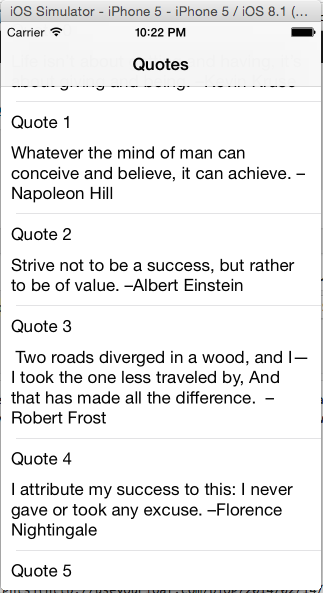
preferredMaxLayoutWidth
这种方法,主要来自于preferredMaxLayoutWidth属性。对于更多高级用法,请看Auto Layout and Views that Wrap。
User Interface
我使用的是Storyboard, 但是你能够使用xib或者代码, 对于如何使用代码,你可以看一下这篇文章AutoSize UITableViewCell height programmatically。
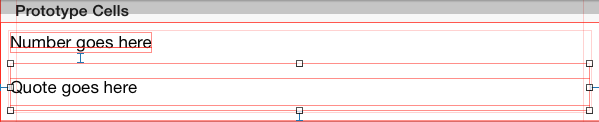
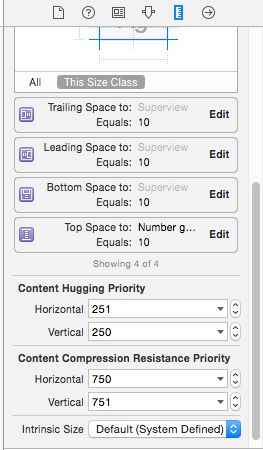
这里,“引言Label”显示多行(通过设置numberOfLines属性为0)。因为我们有2个Label,AutoLayout不知道如何扩大,不知道cell的大小改变时哪一个Label保持大小不变。在这种情况下,我想要“引言Label”扩大,所以减少减少垂直方向Hugging优先级,并且增加保持自身大小不变优先级。
关于hugging和resistance优先级的区别,可以看这篇文章Cocoa Autolayout: content hugging vs content compression resistance priority。
注意:
1、Dynamic Table View Cell Height and Auto Layout,这篇博客告诉我们,我们应该给labels的“intrinsic content”属性到1000,并且设置Intrinsic Size为占位符大小。我认为这是不需要的。
2、你必须给TableViewCell的contentView设置属性。
3、对于在Interface Builder中的CollectionViewCell。你不会看到contentView,但是你真的是和contentView打交道。
Cell
QuoteTableViewCell.h
 @interface QuoteTableViewCell : UITableViewCell

 @property (weak, nonatomic) IBOutlet UILabel *numberLabel;

 @property (weak, nonatomic) IBOutlet UILabel *quoteLabel;

 @end
QuoteTableViewCell.m
 @implementation QuoteTableViewCell

 // (1)

 - (void)setBounds:(CGRect)bounds

 {

     [super setBounds:bounds];

     self.contentView.frame = self.bounds;

 }

 - (void)layoutSubviews

 {

     [super layoutSubviews];

     // (2)

     [self.contentView updateConstraintsIfNeeded];

     [self.contentView layoutIfNeeded];

     // (3)

     self.quoteLabel.preferredMaxLayoutWidth = CGRectGetWidth(self.quoteLabel.frame);

 }

 @end
ViewController
ViewController.m
 #define SYSTEM_VERSION                              ([[UIDevice currentDevice] systemVersion])

 #define SYSTEM_VERSION_GREATER_THAN_OR_EQUAL_TO(v)  ([SYSTEM_VERSION compare:v options:NSNumericSearch] != NSOrderedAscending)

 #define IS_IOS8_OR_ABOVE                            (SYSTEM_VERSION_GREATER_THAN_OR_EQUAL_TO(@"8.0"))

 @interface ViewController () <UITableViewDataSource, UITableViewDelegate>

 @property (weak, nonatomic) IBOutlet UITableView *tableView;

 @property (nonatomic, strong) NSArray *items;

 @property (nonatomic, strong) QuoteTableViewCell *prototypeCell;

 @end

 @implementation ViewController

 - (void)viewDidLoad {

     [super viewDidLoad];

     [self setupTableView];

     [self loadData];

 }

 - (void)didReceiveMemoryWarning {

     [super didReceiveMemoryWarning];

     // Dispose of any resources that can be recreated.

 }

 #pragma mark - Setup

 - (void)setupTableView

 {

     self.tableView.dataSource = self;

     self.tableView.delegate = self;

 }

 #pragma mark - Data

 - (void)loadData

 {

     NSString *plistPath = [[NSBundle mainBundle] pathForResource:@"quotes" ofType:@"plist"];

     self.items = [[NSArray alloc] initWithContentsOfFile:plistPath];

     [self.tableView reloadData];

 }

 #pragma mark - PrototypeCell

 // (4)

 - (QuoteTableViewCell *)prototypeCell

 {

     if (!_prototypeCell) {

         _prototypeCell = [self.tableView dequeueReusableCellWithIdentifier:NSStringFromClass([QuoteTableViewCell class])];

     }

     return _prototypeCell;

 }

 #pragma mark - Configure

 - (void)configureCell:(QuoteTableViewCell *)cell forRowAtIndexPath:(NSIndexPath *)indexPath

 {

     NSString *quote = self.items[indexPath.row];

     cell.numberLabel.text = [NSString stringWithFormat:@"Quote %ld", (long)indexPath.row];

     cell.quoteLabel.text = quote;

 }

 #pragma mark - UITableViewDataSouce

 - (NSInteger)numberOfSectionsInTableView:(UITableView *)tableView

 {

     return ;

 }

 - (NSInteger)tableView:(UITableView *)tableView numberOfRowsInSection:(NSInteger)section

 {

     return self.items.count;

 }

 - (UITableViewCell *)tableView:(UITableView *)tableView cellForRowAtIndexPath:(NSIndexPath *)indexPath

 {

     QuoteTableViewCell *cell = [tableView dequeueReusableCellWithIdentifier:NSStringFromClass([QuoteTableViewCell class])];

     [self configureCell:cell forRowAtIndexPath:indexPath];

     return cell;

 }

 #pragma mark - UITableViewDelegate

 // (5)

 - (CGFloat)tableView:(UITableView *)tableView estimatedHeightForRowAtIndexPath:(NSIndexPath *)indexPath

 {

     return UITableViewAutomaticDimension;

 }

 - (CGFloat)tableView:(UITableView *)tableView heightForRowAtIndexPath:(NSIndexPath *)indexPath

 {

     // (6)

     if (IS_IOS8_OR_ABOVE) {

         return UITableViewAutomaticDimension;

     }

     // (7)

     //self.prototypeCell.bounds = CGRectMake(0, 0, CGRectGetWidth(self.tableView.bounds), CGRectGetHeight(self.prototypeCell.bounds));

     [self configureCell:self.prototypeCell forRowAtIndexPath:indexPath];

     // (8)

     [self.prototypeCell updateConstraintsIfNeeded];

     [self.prototypeCell layoutIfNeeded];

     // (9)

     return [self.prototypeCell.contentView systemLayoutSizeFittingSize:UILayoutFittingCompressedSize].height;

 }

 @end
注意以下几点:
1、Auto Layout in UICollectionViewCell not working
2、AutoSize UITableViewCell height programmatically
Make sure the contentView does a layout pass here so that its subviews have their frames set, which we need to use to set the preferredMaxLayoutWidth below.

Set the preferredMaxLayoutWidth of the mutli-line bodyLabel based on the evaluated width of the label’s frame, as this will allow the text to wrap correctly, and as a result allow the label to take on the correct height.
3、你只需要调用[self.contentView layoutIfNeeded]。
4、如果你要改变某些限制,你需要调用[self.contentView updateConstraintsIfNeeded]。
5、如果你调用[self.contentView updateConstraintsIfNeeded],你必须在之前调用[self.contentView layoutIfNeeded]。
6、不需要调用[self.contentView setsNeedLayout],或者self.contentView setsNeedUpdateConstraints]。
ViewController
 #define SYSTEM_VERSION                              ([[UIDevice currentDevice] systemVersion])

 #define SYSTEM_VERSION_GREATER_THAN_OR_EQUAL_TO(v)  ([SYSTEM_VERSION compare:v options:NSNumericSearch] != NSOrderedAscending)

 #define IS_IOS8_OR_ABOVE                            (SYSTEM_VERSION_GREATER_THAN_OR_EQUAL_TO(@"8.0"))

 @interface ViewController () <UITableViewDataSource, UITableViewDelegate>

 @property (weak, nonatomic) IBOutlet UITableView *tableView;

 @property (nonatomic, strong) NSArray *items;

 @property (nonatomic, strong) QuoteTableViewCell *prototypeCell;

 @end

 @implementation ViewController

 - (void)viewDidLoad {

     [super viewDidLoad];

     [self setupTableView];

     [self loadData];

 }

 - (void)didReceiveMemoryWarning {

     [super didReceiveMemoryWarning];

     // Dispose of any resources that can be recreated.

 }

 #pragma mark - Setup

 - (void)setupTableView

 {

     self.tableView.dataSource = self;

     self.tableView.delegate = self;

 }

 #pragma mark - Data

 - (void)loadData

 {

     NSString *plistPath = [[NSBundle mainBundle] pathForResource:@"quotes" ofType:@"plist"];

     self.items = [[NSArray alloc] initWithContentsOfFile:plistPath];

     [self.tableView reloadData];

 }

 #pragma mark - PrototypeCell

 // (4)

 - (QuoteTableViewCell *)prototypeCell

 {

     if (!_prototypeCell) {

         _prototypeCell = [self.tableView dequeueReusableCellWithIdentifier:NSStringFromClass([QuoteTableViewCell class])];

     }

     return _prototypeCell;

 }

 #pragma mark - Configure

 - (void)configureCell:(QuoteTableViewCell *)cell forRowAtIndexPath:(NSIndexPath *)indexPath

 {

     NSString *quote = self.items[indexPath.row];

     cell.numberLabel.text = [NSString stringWithFormat:@"Quote %ld", (long)indexPath.row];

     cell.quoteLabel.text = quote;

 }

 #pragma mark - UITableViewDataSouce

 - (NSInteger)numberOfSectionsInTableView:(UITableView *)tableView

 {

     return ;

 }

 - (NSInteger)tableView:(UITableView *)tableView numberOfRowsInSection:(NSInteger)section

 {

     return self.items.count;

 }

 - (UITableViewCell *)tableView:(UITableView *)tableView cellForRowAtIndexPath:(NSIndexPath *)indexPath

 {

     QuoteTableViewCell *cell = [tableView dequeueReusableCellWithIdentifier:NSStringFromClass([QuoteTableViewCell class])];

     [self configureCell:cell forRowAtIndexPath:indexPath];

     return cell;

 }

 #pragma mark - UITableViewDelegate

 // (5)

 - (CGFloat)tableView:(UITableView *)tableView estimatedHeightForRowAtIndexPath:(NSIndexPath *)indexPath

 {

     return UITableViewAutomaticDimension;

 }

 - (CGFloat)tableView:(UITableView *)tableView heightForRowAtIndexPath:(NSIndexPath *)indexPath

 {

     // (6)

     if (IS_IOS8_OR_ABOVE) {

         return UITableViewAutomaticDimension;

     }

     // (7)

     //self.prototypeCell.bounds = CGRectMake(0, 0, CGRectGetWidth(self.tableView.bounds), CGRectGetHeight(self.prototypeCell.bounds));

     [self configureCell:self.prototypeCell forRowAtIndexPath:indexPath];

     // (8)

     [self.prototypeCell updateConstraintsIfNeeded];

     [self.prototypeCell layoutIfNeeded];

     // (9)

     return [self.prototypeCell.contentView systemLayoutSizeFittingSize:UILayoutFittingCompressedSize].height;

 }

 @end
7、原型cell绝不会显示出来,它用来布局一个cell并且决定一个需要的高度。
8、你能够使用UITableViewAutomaticDimension,或者使用一个大约合理的高度。
9、iOS8 autoSizing属性需要使用UITableViewAutomaticDimension。
Fantageek翻译系列之《使用Autolayout显示变化高度的UITableViewCell》的更多相关文章
- 《Entity Framework 6 Recipes》中文翻译系列 目录篇 -持续更新
为了方便大家的阅读和学习,也是响应网友的建议,在这里为这个系列做一个目录.在目录开始这前,我先来回答之前遇到的几个问题. 1.为什么要学习EF? 这个问题很简单,项目需要.这不像学校,没人强迫你学习! ...
- 使用Material Design 创建App翻译系列----材料主题的使用(Using Material Theme)
上一篇是使用Material Design 创建App翻译系列--開始学习篇,进入正题: 新的材料主题提供了下面内容: 1. 提供了同意设置颜色板的系统部件组件. 2. 为这些系统组件提供了触摸反馈动 ...
- ASP.NET MVC with Entity Framework and CSS一书翻译系列文章之第六章:管理产品图片——多对多关系(上篇)
在这章中,我们将学习如何创建一个管理图片的新实体,如何使用HTML表单上传图片文件,并使用多对多关系将它们和产品关联起来,如何将图片存储在文件系统中.在这章中,我们还会学习更加复杂的异常处理,如何向模 ...
- 21.翻译系列:Entity Framework 6 Power Tools【EF 6 Code-First系列】
原文链接:https://www.entityframeworktutorial.net/code-first/entity-framework-power-tools.aspx 大家好,这里就是EF ...
- 《Entity Framework 6 Recipes》中文翻译 ---- 系列教程
为了方便大家的阅读和学习,也是响应网友的建议,在这里为这个系列做一个目录.在目录开始这前,我先来回答之前遇到的几个问题. 1.为什么要学习EF? 这个问题很简单,项目需要.这不像学校,没人强迫你学习! ...
- 使用Material Design 创建App翻译系列---列表和卡片集的创建
上一篇是使用Material Design 创建App翻译系列--材料主题的使用(Using Material Theme),进入正题: 想要在应用里创建Material Design风格的复杂列表和 ...
- 20.2.翻译系列:EF 6中基于代码的数据库迁移技术【EF 6 Code-First系列】
原文链接:https://www.entityframeworktutorial.net/code-first/code-based-migration-in-code-first.aspx EF 6 ...
- 20.1翻译系列:EF 6中自动数据迁移技术【EF 6 Code-First系列】
原文链接:https://www.entityframeworktutorial.net/code-first/automated-migration-in-code-first.aspx EF 6 ...
- 20.翻译系列:Code-First中的数据库迁移技术【EF 6 Code-First系列】
原文链接:https://www.entityframeworktutorial.net/code-first/migration-in-code-first.aspx EF 6 Code-First ...
随机推荐
- LayoutInflater 原理分析 示例
LayoutInflater简介 LayoutInflater 顾名思义就是布局填充器,做过Android界面编程,相信对这个类都比较熟悉,可能有人说,我们在activity中使用set ...
- PropertyGird( 属性表格) 组件
本节课重点了解 EasyUI 中 PropertyGird(属性表格)组件的使用方法,这个组件依赖于 DataGrid(数据表格)组件. 一. 加载方式 //class 加载方式<table i ...
- for循环删除list元素陷阱
首先我们先看一段代码,如下: List<String> list=new ArrayList<String>(); list.add("123"); lis ...
- ORACLE主要的系统表和系统视图
ORACLE主要的系统表和系统视图 1.系统表 ORACLE数据库的系统参数都存储在数据库中,可以通过SQLPLUS,以用户SYS进行查询.几个重要的表或者视图如下: v$controlfile:控制 ...
- python学习第七天 -- dict 和set
今天主要学习关于python 的dict(全称dictionary)和set.dict的用法跟javascript 中map表类似,key + value结构语言.而set,准确来说,只是key的集合 ...
- Python 基础教程中的问题及解决方案(1)
1. 在ubuntu中,调用终端时如: f = open('/home/theone/test_input.txt', 'r') 中的txt格式文本不能加后缀 正确的应为: f = open('/h ...
- win7下的iis配置
1.配置错误 说明:在处理向该请求提供服务所需的配置文件时出错.请检查下面的特定错误详细信息并适当地修改配置文件. 分析器错误消息:无法识别的属性“targetFramework”.请注意属性名称区分 ...
- 一些常用的js,jquerry 样例
1 设置属性 $(document).attr("title", str) 2 删除属性在增加属性 $("#" + bottonname).remo ...
- js限制input只能输入有效的数字,有且只有一个小数点,第一个不能为小数点-备
<!doctype html> <html lang="en"> <head> <meta charset="UTF-8&quo ...
- ubuntu "mkdir -p"命令
mkdir的-p选项允许你一次性创建多层次的目录,而不是一次只创建单独的目录.例如,我们要在当前目录创建目录Projects/a/src,使用命令: mkdir -p Project/a/src 而不 ...