
学习Maven之Maven Surefire Plugin(JUnit篇)

1.maven-surefire-plugin是个什么鬼?
如果你执行过mvn test或者执行其他maven命令时跑了测试用例,你就已经用过maven-surefire-plugin了。maven-surefire-plugin是maven里执行测试用例的插件,不显示配置就会用默认配置。这个插件的surefire:test命令会默认绑定maven执行的test阶段。
maven的生命周期有哪些阶段?
[validate, initialize, generate-sources, process-sources, generate-resources, process-resources, compile, process-classes, generate-test-sources, process-test-sources, generate-test-resources, process-test-resources, test-compile, process-test-classes,
test, prepare-package, package, pre-integration-test, integration-test, post-integration-test, verify, install, deploy]
2.maven-surefire-plugin的使用
如果说maven已经有了maven-surefire-plugin的默认配置,我们还有必要了解maven-surefire-plugin的配置么?答案是肯定的。虽说maven-surefire-plugin有默认配置,但是当需要修改一些测试执行的策略时,就有必要我们去重新配置这个插件了。
2.1.配置JUnit
2.1.1.插件自动匹配
最简单的配置方式就不配置或者是只声明插件。
<plugin>

	<groupId>org.apache.maven.plugins</groupId>

	<artifactId>maven-surefire-plugin</artifactId>

	<version>2.19</version>

</plugin>
这个时候maven-surefire-plugin会按照如下逻辑去寻找JUnit的版本并执行测试用例。
if the JUnit version in the project >= 4.7 and the parallel attribute has ANY value

	use junit47 provider

if JUnit >= 4.0 is present

	use junit4 provider

else

	use junit3.8.1
2.1.2.插件手动匹配
当然,如果你明确用的是JUnit4.7及以上版本,可以明确声明:
<plugin>

	<groupId>org.apache.maven.plugins</groupId>

	<artifactId>maven-surefire-plugin</artifactId>

	<version>2.19</version>

	<dependencies>

		<dependency>

			<groupId>org.apache.maven.surefire</groupId>

			<artifactId>surefire-junit47</artifactId>

			<version>2.19</version>

		</dependency>

	</dependencies>

</plugin>
JUnit4.0(含)到JUnit4.7(不含)的版本,这样声明:
<plugin>

	<groupId>org.apache.maven.plugins</groupId>

	<artifactId>maven-surefire-plugin</artifactId>

	<version>2.19</version>

	<dependencies>

		<dependency>

			<groupId>org.apache.maven.surefire</groupId>

			<artifactId>surefire-junit4</artifactId>

			<version>2.19</version>

		</dependency>

	</dependencies>

</plugin>
JUnit3.8(含)到JUnit4.0(不含)的版本,这样声明:
<plugin>

	<groupId>org.apache.maven.plugins</groupId>

	<artifactId>maven-surefire-plugin</artifactId>

	<version>2.19</version>

	<dependencies>

		<dependency>

			<groupId>org.apache.maven.surefire</groupId>

			<artifactId>surefire-junit3</artifactId>

			<version>2.19</version>

		</dependency>

	</dependencies>

</plugin>
JUnit3.8以下的版本surefire不支持。建议大家用最新的JUnit版本,目前是4.12.
<dependencies>

	[...]

    <dependency>

        <groupId>junit</groupId>

        <artifactId>junit</artifactId>

        <version>4.12</version>

        <scope>test</scope>

    </dependency>

	[...]

</dependencies>
本文的例子我们用的Junit4.12.
2.2.准备测试用例
我们现在准备两个类,一个被测试的类,一个测试用例.目录结构如下
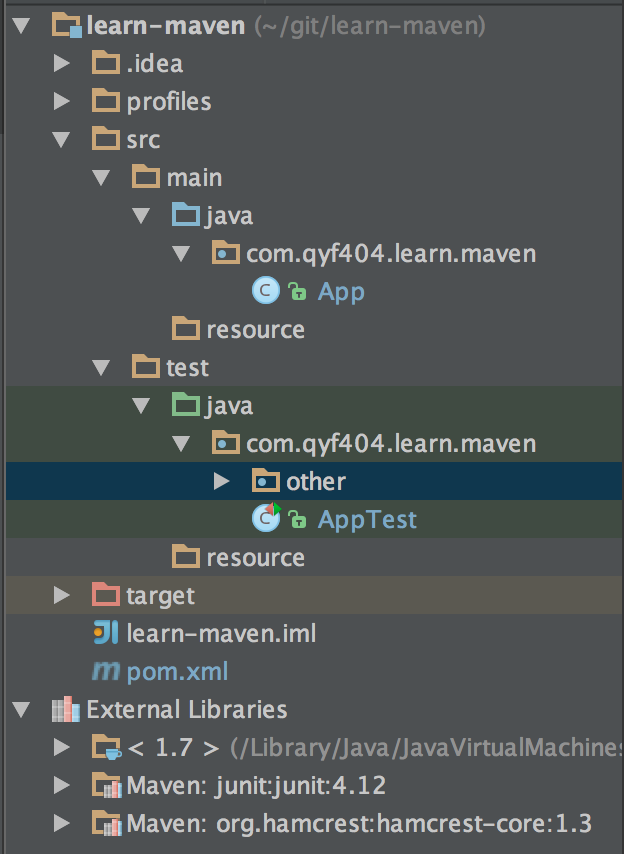
现在我们准备一个简单的类.
package com.qyf404.learn.maven;

public class App {

    public int add(int a, int b) {

        return a + b;

    }

    public int subtract(int a, int b) {

        return a - b;

    }

}
再创建一个测试用例.
package com.qyf404.learn.maven;

import org.junit.After;

import org.junit.Assert;

import org.junit.Before;

import org.junit.Test;

public class AppTest {

    private App app;

    @Before

    public void setUp() {

        app = new App();

    }

    @Test

    public void testAdd() throws InterruptedException {

        int a = 1;

        int b = 2;

        int result = app.add(a, b);

        Assert.assertEquals(a + b, result);

    }

    @Test

    public void testSubtract() throws InterruptedException {

        int a = 1;

        int b = 2;

        int result = app.subtract(a, b);

        Assert.assertEquals(a - b, result);

    }

    @After

    public void tearDown() throws Exception {

    }

}
2.3.用maven执行测试用例
用maven执行测试用例很简单,直接运行mvn test就可以.一般我们执行maven打包命令mvn package前maven会默认执行test命令.
qyfmac$ mvn test

[INFO] Scanning for projects...

[INFO]

[INFO] ------------------------------------------------------------------------

[INFO] Building learn-maven 1.0-SNAPSHOT

[INFO] ------------------------------------------------------------------------

[INFO]

[INFO] --- maven-resources-plugin:2.6:resources (default-resources) @ learn-maven ---

[WARNING] Using platform encoding (UTF-8 actually) to copy filtered resources, i.e. build is platform dependent!

[INFO] skip non existing resourceDirectory /Users/qyfmac/git/learn-maven/src/main/resources

[INFO]

[INFO] --- maven-compiler-plugin:3.1:compile (default-compile) @ learn-maven ---

[INFO] Changes detected - recompiling the module!

[WARNING] File encoding has not been set, using platform encoding UTF-8, i.e. build is platform dependent!

[INFO] Compiling 1 source file to /Users/qyfmac/git/learn-maven/target/classes

[INFO]

[INFO] --- maven-resources-plugin:2.6:testResources (default-testResources) @ learn-maven ---

[WARNING] Using platform encoding (UTF-8 actually) to copy filtered resources, i.e. build is platform dependent!

[INFO] skip non existing resourceDirectory /Users/qyfmac/git/learn-maven/src/test/resources

[INFO]

[INFO] --- maven-compiler-plugin:3.1:testCompile (default-testCompile) @ learn-maven ---

[INFO] Changes detected - recompiling the module!

[WARNING] File encoding has not been set, using platform encoding UTF-8, i.e. build is platform dependent!

[INFO] Compiling 2 source files to /Users/qyfmac/git/learn-maven/target/test-classes

[INFO]

[INFO] --- maven-surefire-plugin:2.19:test (default-test) @ learn-maven ---

[WARNING] The parameter forkMode is deprecated since version 2.14. Use forkCount and reuseForks instead.

[INFO] Surefire report directory: /Users/qyfmac/git/learn-maven/target/surefire-reports

[INFO] Using configured provider org.apache.maven.surefire.junit4.JUnit4Provider

-------------------------------------------------------

 T E S T S

-------------------------------------------------------

Running com.qyf404.learn.maven.AppTest

Tests run: 2, Failures: 0, Errors: 0, Skipped: 0, Time elapsed: 0.003 sec - in com.qyf404.learn.maven.AppTest

Results :

Tests run: 2, Failures: 0, Errors: 0, Skipped: 0

[INFO] ------------------------------------------------------------------------

[INFO] BUILD SUCCESS

[INFO] ------------------------------------------------------------------------

[INFO] Total time: 2.622 s

[INFO] Finished at: 2015-12-01T11:36:04+08:00

[INFO] Final Memory: 14M/228M

[INFO] ------------------------------------------------------------------------

qyfmac$
其实我们会发现关键内容还是JUnit的东西,maven只是作为一个调用器调用了一下这些测试用例.
3.进阶
后面让我们来研究一下maven-surefire-plugin这个插件更多的知识,这些多数都是和配置相关的.
3.1.跳过测试用例
在工作中,很多情况下我们打包是不想执行测试用例的,可能是测试用例不完事,或是测试用例会影响数据库数据.跳过测试用例执行过程有三个种方法.
3.1.1.在configuration中声明
在插件的configuration配置中声明跳过测试用例
<plugin>

    <groupId>org.apache.maven.plugins</groupId>

    <artifactId>maven-surefire-plugin</artifactId>

    <version>2.19</version>

    <dependencies>

        <dependency>

            <groupId>org.apache.maven.surefire</groupId>

            <artifactId>surefire-junit47</artifactId>

            <version>2.19</version>

        </dependency>

    </dependencies>

    <configuration>

        <skipTests>true</skipTests>

    </configuration>

</plugin>
3.1.2.在properties中声明
在properties配置中声明跳过测试用例
<properties>

    <maven.test.skip>true</maven.test.skip>

</properties>
或
<properties>

    <skipTests>true</skipTests>

</properties>
3.1.3.在执行命令中声明
在执行maven命令时可以声明跳过测试用例
qyfmac$ mvn test -Dmaven.test.skip=true
或
qyfmac$ mvn test -DskipTests=true
3.1.4.跳过测试用例优先级排序
首先分两种情况,一种是配置skipTests,一种是配置maven.test.skip(真要命,声明位置就三处了,还搞出两个变量名,一共就是5中情况).
如果是配置
skipTests, configuration的配置优先级最高,命令中得配置次之, properties的配置最低.即
configuration > 命令 > properties如果是配置
maven.test.skip,命令中得配置优先级最高, properties的配置最低.
即命令 > propertiesskipTests和maven.test.skip有一个被设置成了true,则跳过测试用例.
即skipTests||maven.test.skip决定是否跳过测试用例执行.
3.2.maven命令执行一个测试用例
很多情况下我们写完一个测试用例后,想马上运行一下,看看执行情况.如果用IDE开发,里面一般都有直接运行一个测试用例的方法.但是如果用maven命令达到同样的效果,就需要加些命令参数了.
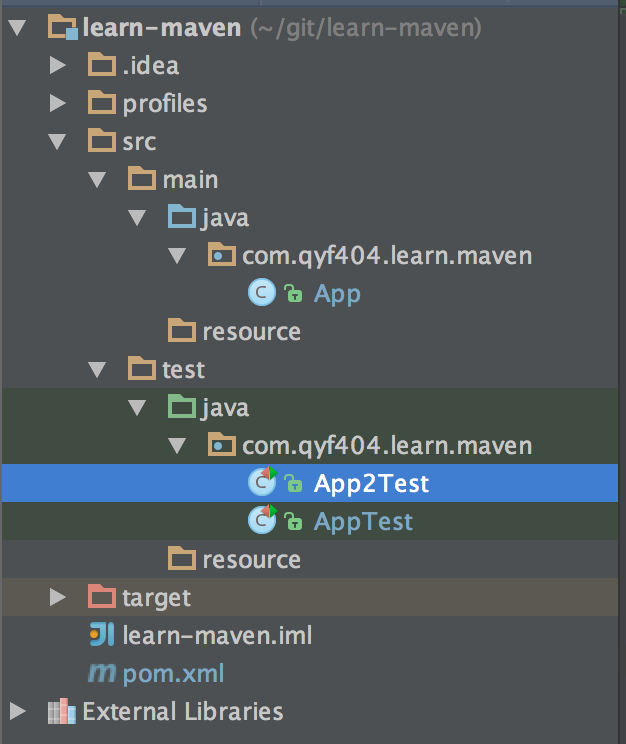
比如我们现在再加一个测试用例App2Test.java.
package com.qyf404.learn.maven;

import org.junit.After;

import org.junit.Assert;

import org.junit.Before;

import org.junit.Test;

import org.junit.runner.RunWith;

import org.junit.runners.JUnit4;

@RunWith(JUnit4.class)

public class App2Test {

    private App app;

    @Before

    public void setUp() {

        app = new App();

    }

    @Test

    public void testAdd() throws InterruptedException {

        int a = 1;

        int b = 2;

        int result = app.add(a, b);

        Thread.currentThread().sleep(1000);

        Assert.assertEquals(a + b, result);

    }

    @After

    public void tearDown() throws Exception {

    }

}
直接运行 mvn test是这样的,它执行了全部测试用例.
qyfmac$ mvn test

[INFO] Scanning for projects...

[INFO]

[INFO] ------------------------------------------------------------------------

[INFO] Building learn-maven 1.0-SNAPSHOT

[INFO] ------------------------------------------------------------------------

...

-------------------------------------------------------

 T E S T S

-------------------------------------------------------

Running com.qyf404.learn.maven.App2Test

Tests run: 1, Failures: 0, Errors: 0, Skipped: 0, Time elapsed: 1.004 sec - in com.qyf404.learn.maven.App2Test

Running com.qyf404.learn.maven.AppTest

Tests run: 2, Failures: 0, Errors: 0, Skipped: 0, Time elapsed: 0 sec - in com.qyf404.learn.maven.AppTest

Results :

Tests run: 3, Failures: 0, Errors: 0, Skipped: 0

[INFO] ------------------------------------------------------------------------

[INFO] BUILD SUCCESS

[INFO] ------------------------------------------------------------------------

[INFO] Total time: 2.773 s

[INFO] Finished at: 2015-12-01T14:57:00+08:00

[INFO] Final Memory: 9M/156M

[INFO] ------------------------------------------------------------------------
现在我们用命令mvn test -Dtest=App2Test指定执行App2Test.
qyfmac$ mvn test -Dtest=App2Test

[INFO] Scanning for projects...

[INFO]

[INFO] ------------------------------------------------------------------------

[INFO] Building learn-maven 1.0-SNAPSHOT

[INFO] ------------------------------------------------------------------------

...

-------------------------------------------------------

 T E S T S

-------------------------------------------------------

Running com.qyf404.learn.maven.App2Test

Tests run: 1, Failures: 0, Errors: 0, Skipped: 0, Time elapsed: 1.003 sec - in com.qyf404.learn.maven.App2Test

Results :

Tests run: 1, Failures: 0, Errors: 0, Skipped: 0

[INFO] ------------------------------------------------------------------------

[INFO] BUILD SUCCESS

[INFO] ------------------------------------------------------------------------

[INFO] Total time: 3.061 s

[INFO] Finished at: 2015-12-01T14:58:59+08:00

[INFO] Final Memory: 9M/156M

[INFO] ------------------------------------------------------------------------
-Dtest的参数是可以用表达式的.
比如执行多个测试用例可以用逗号分开
mvn test -Dtest=App2Test,AppTest.也可以用ant风格的路径表达式
mvn test -Dtest=*2Test,mvn test -Dtest=???2Test.甚至指定具体的测试方法
mvn test -Dtest=*Test#testAdd.指定具体包里的测试用例
mvn test -Dtest=com/qyf404/learn/maven/*.
3.3.测试用例的包含与例外配置
上面说了,在执行命令时可以指定执行哪个或哪些测试用例,其实在pom.xml里也是可以配置的.
比如打包时执行测试用例AppTest,不执行App2Test,可以这么配置.
<plugin>

    <groupId>org.apache.maven.plugins</groupId>

    <artifactId>maven-surefire-plugin</artifactId>

    <version>2.19</version>

    <dependencies>

        <dependency>

            <groupId>org.apache.maven.surefire</groupId>

            <artifactId>surefire-junit47</artifactId>

            <version>2.19</version>

        </dependency>

    </dependencies>

    <configuration>

        <!--配置是否跳过测试用例执行-->

        <!--<skipTests>true</skipTests>-->

        <includes>

            <include>**/AppTest.java</include>

        </includes>

        <excludes>

            <exclude>**/App2Test.java</exclude>

        </excludes>

    </configuration>

</plugin>
<include>和<exclude>里的配置方式和-Dtest后面的一样可以配置表达式:
指定具体类
<include>AppTest</include>.指定具体类
<include>AppTest.java</include>.指定具体类
<include>AppTest.class</include>.指定具体类
<include>com/qyf404/learn/maven/AppTest.class</include>.指定具体类
<include>com/qyf404/learn/maven/AppTest.class,App2Test</include>.叹号[!]表示否定
<include>!*2Test.class</include>.使用ant风格的路径表达式
<include>**/*Test</include>.使用ant风格的路径表达式
<include>**/???Test</include>.更复杂的
%regex[expr]表达式<include>%regex[com.qyf404.learn.maven.*Test.class]</include>.更复杂的
%regex[expr]表达式<include>%regex[com.qyf404.*.*Test.class]</include>.更复杂的
%regex[expr]表达式<include>%regex[com.qyf404.[learn|test].*Test.class]</include>,中间的方括号表示或的概念,即learn或test的情况.更复杂的
%regex[expr]表达式<include>!%regex[com.qyf404.*.*2Test.class]</include>,这里面的叹号表示否定,即包含不符合该表达式的测试用例.更复杂的
%regex[expr]表达式<include>%regex[.*2Test.class]</include>,这种配置方式忽略了包前缀,可以理解成倒着匹配全类名.更复杂的
%regex[expr]表达式里最好不要有问号[?],而且匹配的是类的全类名.不可以指定具体方法,这种配置是错误的
<include>*Test#testAdd</include>.不可以指定java文件在
%regex[expr]里具体方法,这种配置是错误的<include>%regex[com.qyf404.learn.maven.*Test.java]</include>.如果同时配置了
<include>和<exclude>,最终执行的测试用例是二者的交集.
3.4.分组执行测试用例
上面我们说了,可以配置<include>这些信息来控制执行哪些测试用例,但是JUnit里有个注解@Category可以对测试用例组分组标记,而用maven执行测试用例时,我们也可以根据这个注解的标记,来确定执行哪组测试用例.
比如我们的测试用例是这样的:
package com.qyf404.learn.maven;

import org.junit.After;

import org.junit.Assert;

import org.junit.Before;

import org.junit.Test;

import org.junit.experimental.categories.Category;

public class AppTest {

    private App app;

    @Before

    public void setUp() {

        app = new App();

    }

    @Test

    @Category(com.qyf404.learn.maven.FastTests.class)

    public void testAdd() throws InterruptedException {

        int a = 1;

        int b = 2;

        int result = app.add(a, b);

        System.out.println("---" + Thread.currentThread().getName());

        Assert.assertEquals(a + b, result);

    }

    @Test()

    @Category(com.qyf404.learn.maven.SlowTests.class)

    public void testSubtract() throws InterruptedException {

        int a = 1;

        int b = 2;

        int result = app.subtract(a, b);

        System.out.println("---" + Thread.currentThread().getName());

        Assert.assertEquals(a - b, result);

    }

    @After

    public void tearDown() throws Exception {

    }

}
pom.xml里这么配置:
<plugin>

    <groupId>org.apache.maven.plugins</groupId>

    <artifactId>maven-surefire-plugin</artifactId>

    <version>2.19</version>

    <configuration>

        <groups>com.qyf404.learn.maven.SlowTests</groups>

    </configuration>

</plugin>
在执行mvn test时,则只执行标记@Category(com.qyf404.learn.maven.SlowTests.class)的测试用例.
3.5.若有测试执行失败则跳过其他测试
在打包时,默认情况会执行全部测试用例,然后给出一个执行的统计结果,如下所示:
Results :

Tests run: 3, Failures: 1, Errors: 0, Skipped: 0
很多情况下我们希望测试用例没有失败的才能打包,如果出现打包失败,需要立刻停止执行其他测试用例.为满足这个要求,我们需要增加一些配置设定.
<configuration>

    <skipAfterFailureCount>1</skipAfterFailureCount>

</configuration>
里面的数字1表示当有一个测试用例执行失败或发生异常时,跳过后续的其他测试用例.这个数字其实只要是一个大于零的数就可以.表达的意思就是当有N个测试用例执行失败或异常时,跳过后续的其他测试用例.
3.6.重新运行失败的测试用例
当我们的一个测试用例测试的是一个远程服务,在某些情况下可能由于环境问题(比如网络)导致测试用例执行失败,但这并不是程序问题.换句话说,当一个测试用例执行N次,有一次执行成功就认为成功.这个时候我们就需要配置一个参数,运行执行失败的此时用例重新执行.
<configuration>

    <rerunFailingTestsCount>2</rerunFailingTestsCount>

</configuration>
里面的数字2表示当某个测试用例执行失败以后,还可以重新执行2次,有一次执行成功就认为测试用例执行成功.里面的2只要是一个大于零的整数就可以,表示重试次数.如果发生重试,在maven的执行报告中会多一个Flakes.
-------------------------------------------------------

 T E S T S

-------------------------------------------------------

Running com.qyf404.learn.maven.App2Test

Tests run: 3, Failures: 2, Errors: 0, Skipped: 0, Time elapsed: 3.023 sec <<< FAILURE! - in com.qyf404.learn.maven.App2Test

testAdd(com.qyf404.learn.maven.App2Test)  Time elapsed: 1.012 sec  <<< FAILURE!

java.lang.AssertionError: expected:<2> but was:<3>

        at com.qyf404.learn.maven.App2Test.testAdd(App2Test.java:32)

testAdd(com.qyf404.learn.maven.App2Test)  Time elapsed: 1.006 sec  <<< FAILURE!

java.lang.AssertionError: expected:<2> but was:<3>

        at com.qyf404.learn.maven.App2Test.testAdd(App2Test.java:32)

Running com.qyf404.learn.maven.AppTest

Tests run: 2, Failures: 0, Errors: 0, Skipped: 0, Time elapsed: 0 sec - in com.qyf404.learn.maven.AppTest

Results :

Flaked tests:

com.qyf404.learn.maven.App2Test.testAdd(com.qyf404.learn.maven.App2Test)

  Run 1: App2Test.testAdd:32 expected:<2> but was:<3>

  Run 2: App2Test.testAdd:32 expected:<2> but was:<3>

  Run 3: PASS

Tests run: 3, Failures: 0, Errors: 0, Skipped: 0, Flakes: 1
3.7.Debugging Tests
一般情况我们可以在IDE中直接执行测试用例,有时候会出现这种情况,IED中直接执行测试用例是没问题的,但是用maven命令打包时就执行失败了.我们可以在命令中加入-X或--debug来打印更多的日志信息来排查问题.但也可以开启JVM的调试端口来远程debug.
3.7.1.以调试模式执行maven命令
执行maven命令mvn -Dmaven.surefire.debug test以开启调试模式.当然也可以用完整的命令来指定端口
mvn -Dmaven.surefire.debug="-Xdebug -Xrunjdwp:transport=dt_socket,server=y,suspend=y,address=5005 -Xnoagent -Djava.compiler=NONE" test
命令执行后是这个样子:
qyfmac$ mvn -Dmaven.surefire.debug test

[INFO] Scanning for projects...

[INFO]

[INFO] ------------------------------------------------------------------------

[INFO] Building learn-maven 1.0-SNAPSHOT

[INFO] ------------------------------------------------------------------------

[INFO]

[INFO] --- maven-resources-plugin:2.6:resources (default-resources) @ learn-maven ---

[WARNING] Using platform encoding (UTF-8 actually) to copy filtered resources, i.e. build is platform dependent!

[INFO] skip non existing resourceDirectory /Users/qyfmac/git/learn-maven/src/main/resources

[INFO]

[INFO] --- maven-compiler-plugin:3.1:compile (default-compile) @ learn-maven ---

[INFO] Nothing to compile - all classes are up to date

[INFO]

[INFO] --- maven-resources-plugin:2.6:testResources (default-testResources) @ learn-maven ---

[WARNING] Using platform encoding (UTF-8 actually) to copy filtered resources, i.e. build is platform dependent!

[INFO] skip non existing resourceDirectory /Users/qyfmac/git/learn-maven/src/test/resources

[INFO]

[INFO] --- maven-compiler-plugin:3.1:testCompile (default-testCompile) @ learn-maven ---

[INFO] Nothing to compile - all classes are up to date

[INFO]

[INFO] --- maven-surefire-plugin:2.19:test (default-test) @ learn-maven ---

-------------------------------------------------------

 T E S T S

-------------------------------------------------------

Listening for transport dt_socket at address: 5005
后面我们就需要根据这个5005端口去启动本地源码了.
3.7.2.使用IDE远程调试
开始调试前需要先配置IDE,我以idea为例说明如何配置.
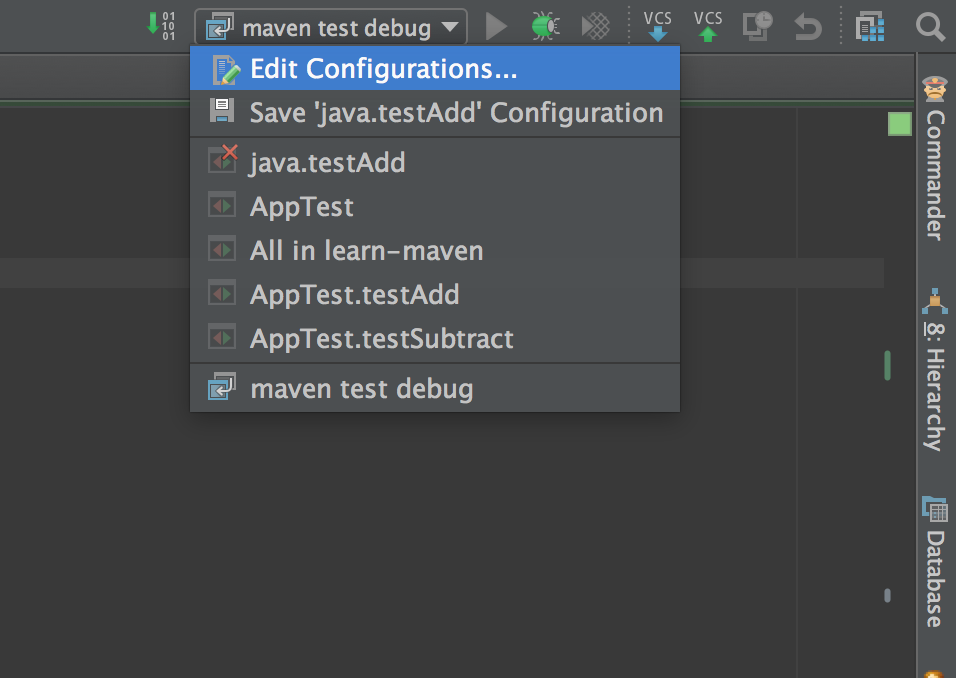
- 在右上角选择
Edit Configurations....
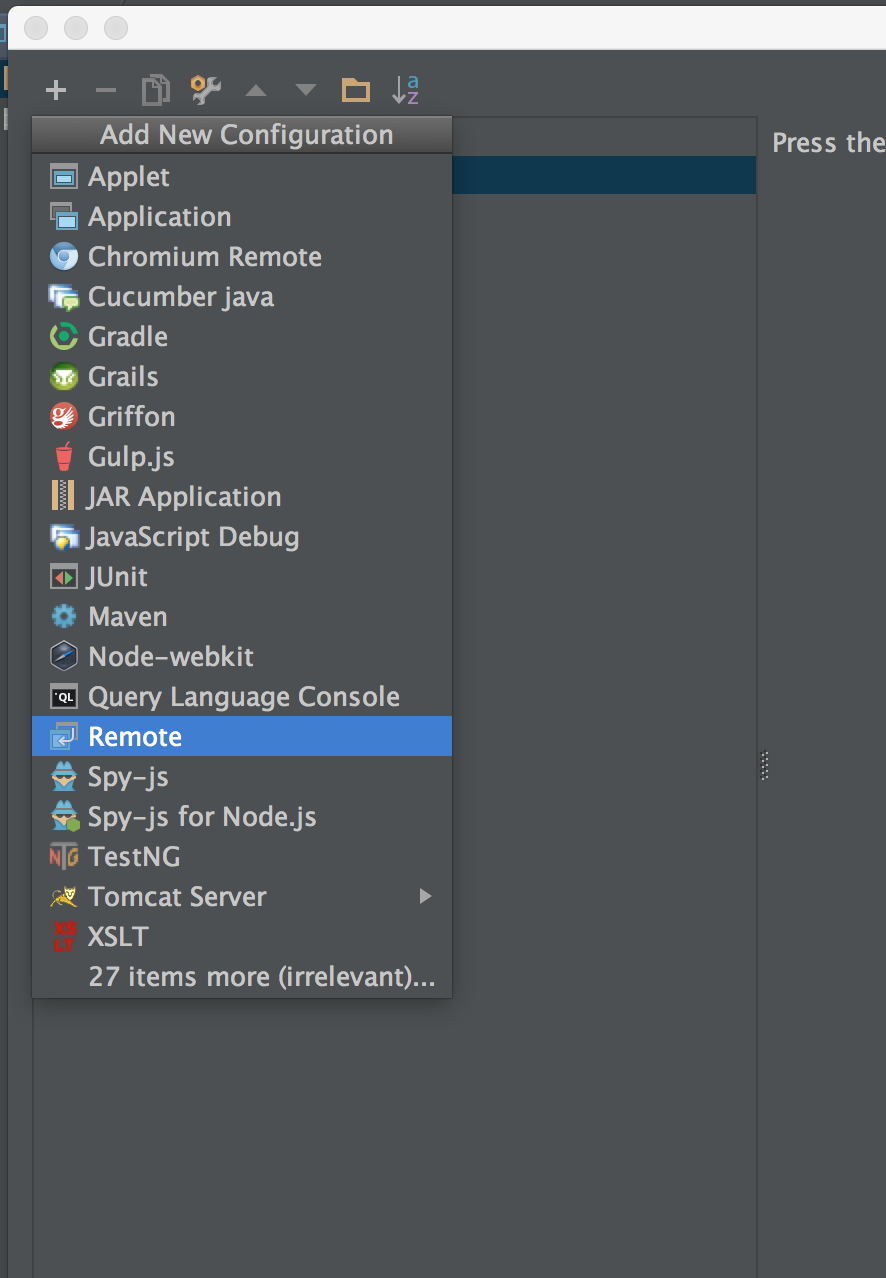
- 在打开的对话框中选择左上角的加号,然后选择
Remote.
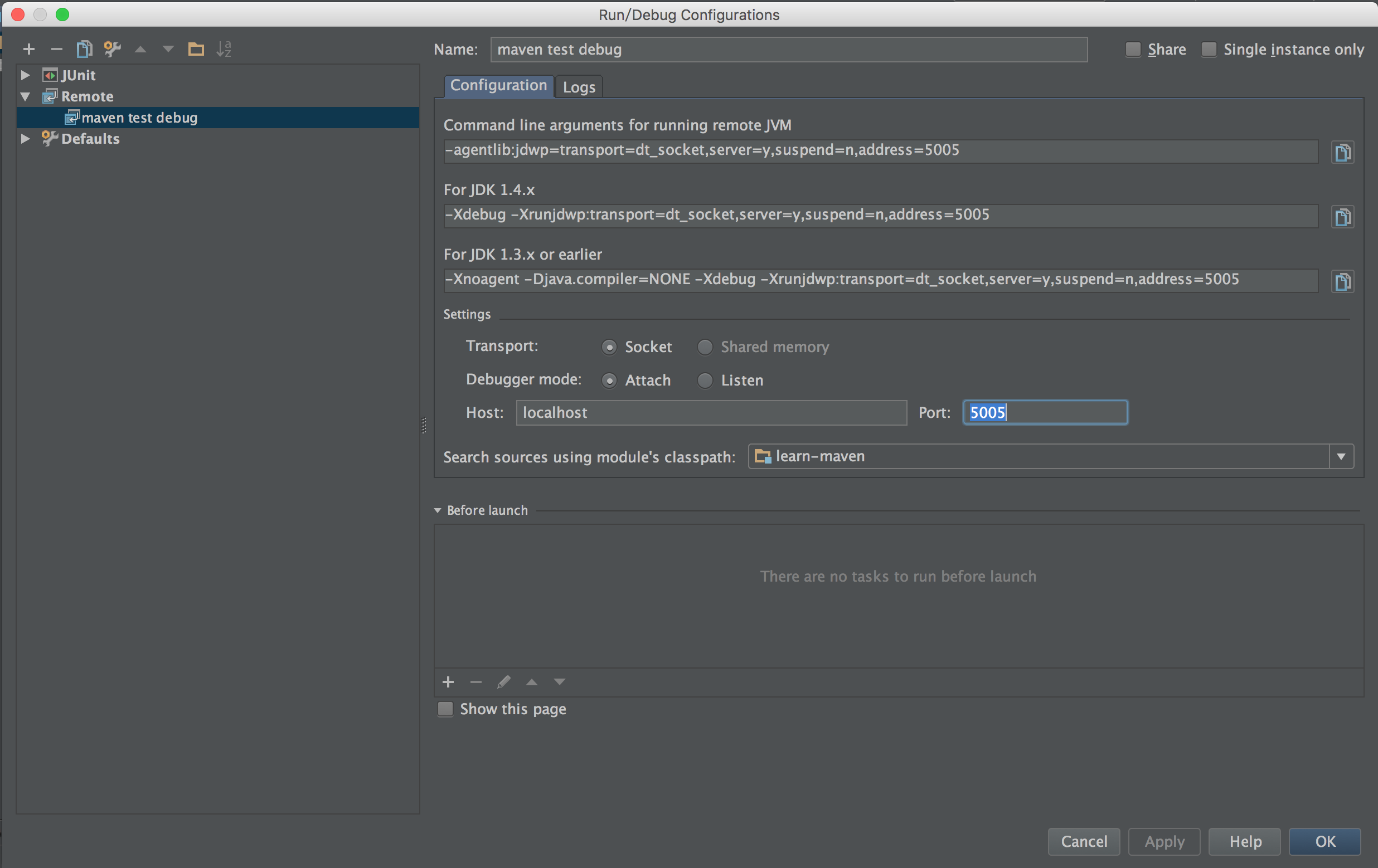
- 配置远程调试的参数,主要就是改个名字和端口,其他的配置一般不需要修改.设定好后点保存.
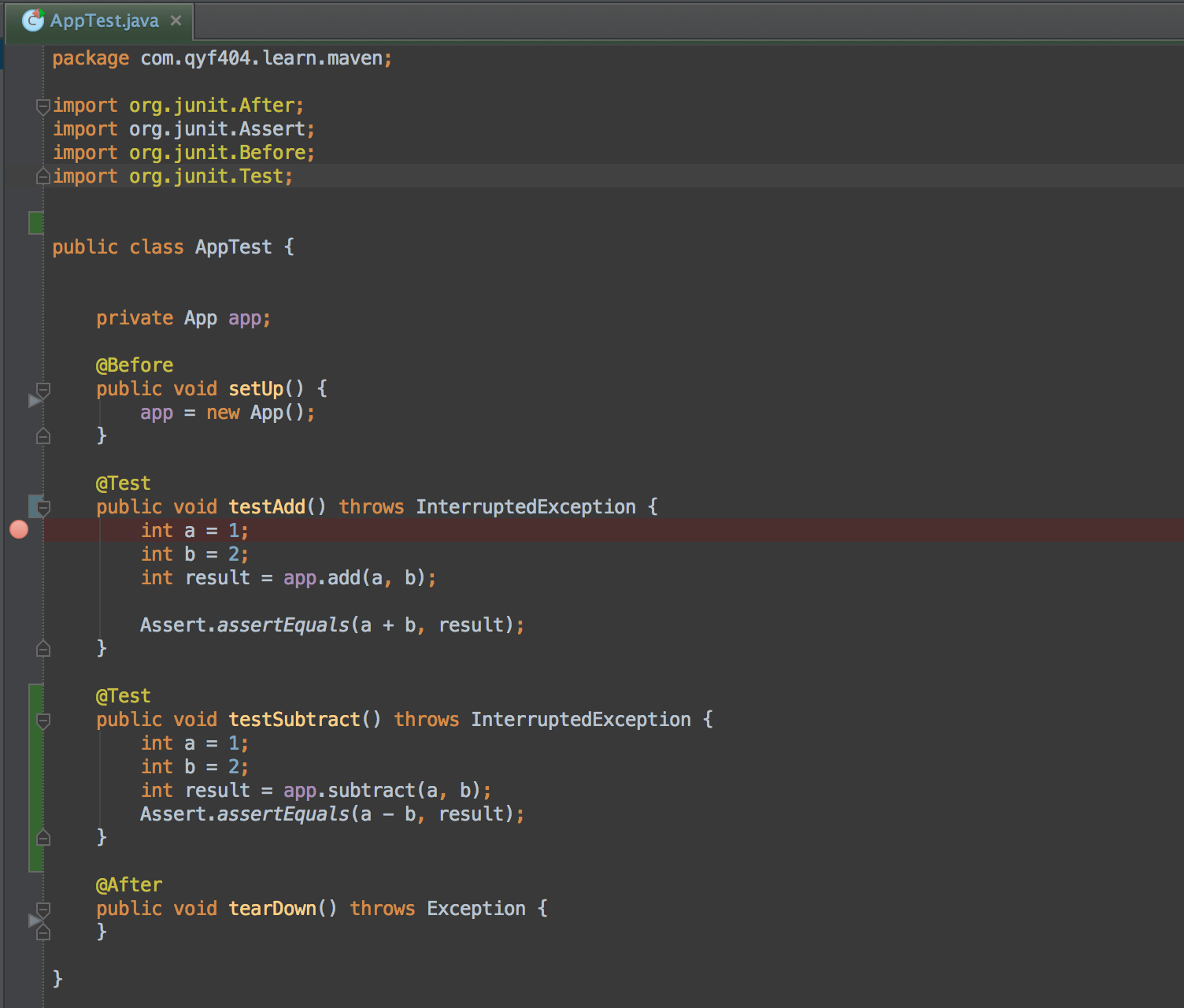
- 在要debug得测试用例上设置一个断点.
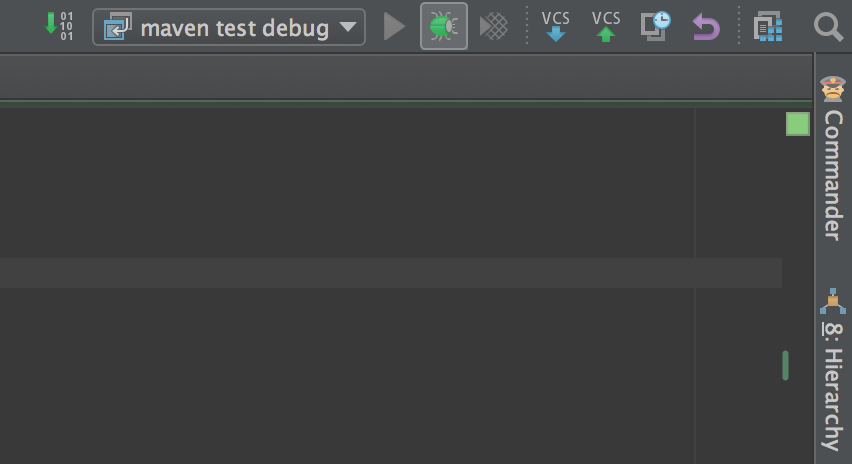
- 选择刚才设置好的配置启动远程调试.
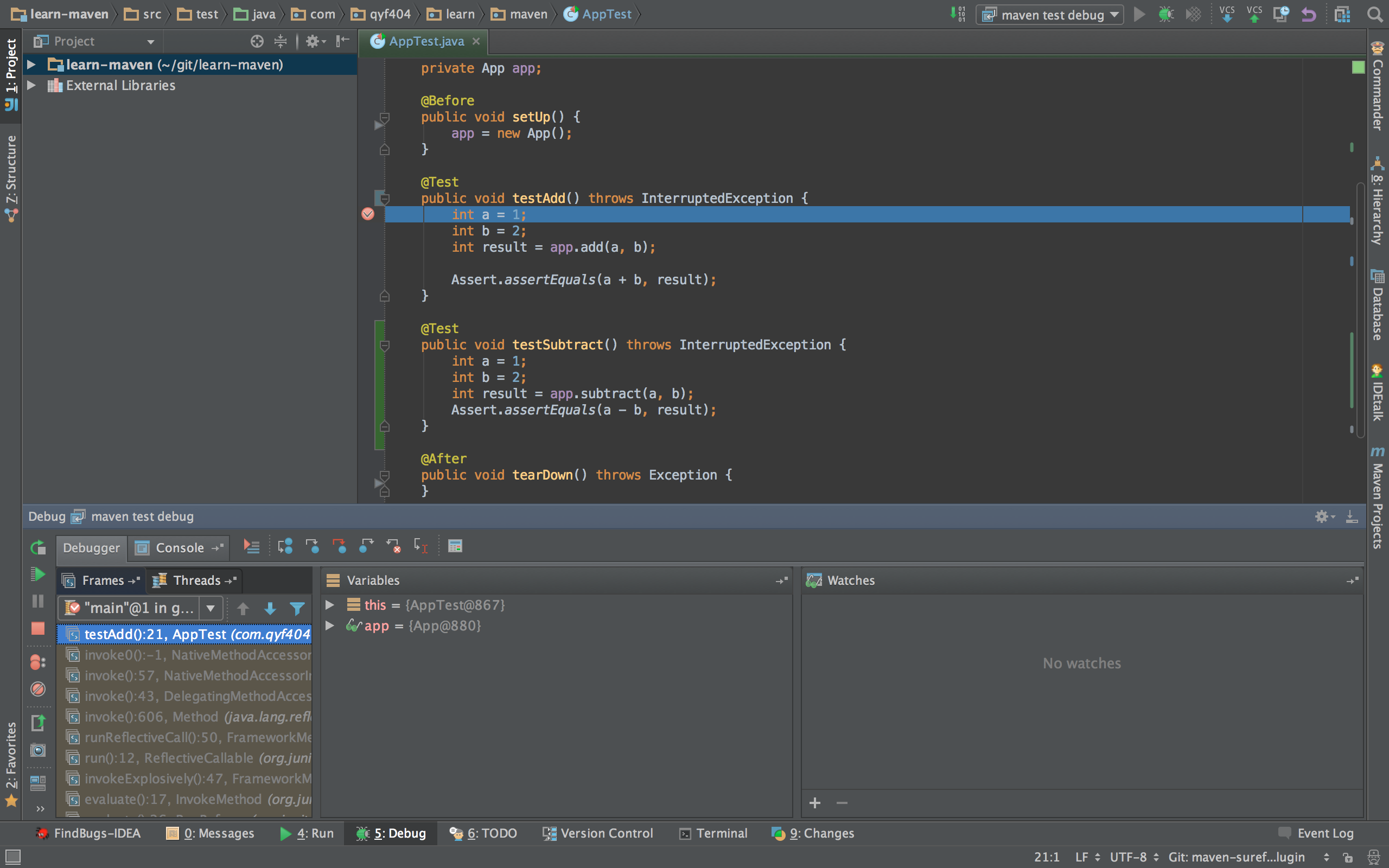
- 开始debug你的程序吧.
3.8.并发执行测试用例
如果测试用例很多,而且并行执行时不会互相影响,这时我们可以配置一个线程数来加快测试用例的执行效率.
<plugin>

	<groupId>org.apache.maven.plugins</groupId>

	<artifactId>maven-surefire-plugin</artifactId>

	<version>2.19</version>

	<configuration>

		<parallel>methods</parallel>

		<threadCount>10</threadCount>

	</configuration>

</plugin>
3.9.查看测试报告
在执行完mvn test后,会在target目录下生成测试报告
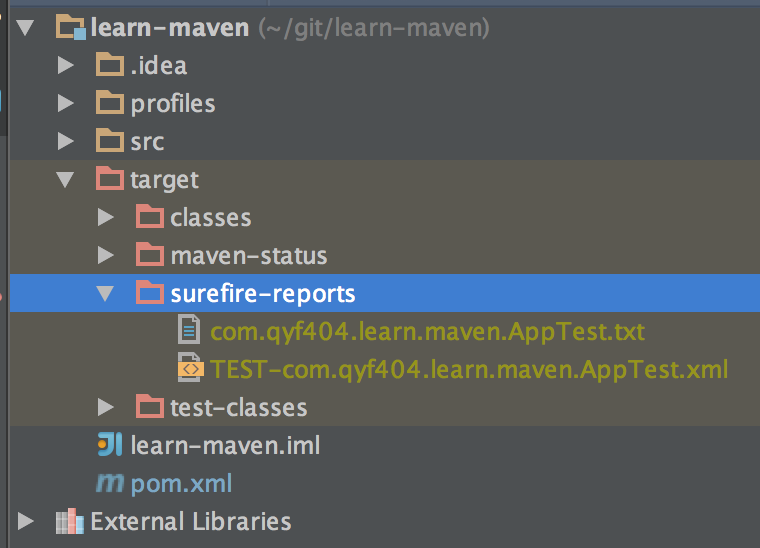 一共两个文件,txt文件记录了汇总信息,xml文件里记录了测试用例执行的环境和执行情况,而且方便程序解析展现.
txt文件内容:
-------------------------------------------------------------------------------

Test set: com.qyf404.learn.maven.AppTest

-------------------------------------------------------------------------------

Tests run: 1, Failures: 0, Errors: 0, Skipped: 0, Time elapsed: 0.001 sec - in com.qyf404.learn.maven.AppTest
xml文件内容:
<?xml version="1.0" encoding="UTF-8"?>

<testsuite xmlns:xsi="http://www.w3.org/2001/XMLSchema-instance" xsi:schemaLocation="https://maven.apache.org/surefire/maven-surefire-plugin/xsd/surefire-test-report.xsd" name="com.qyf404.learn.maven.AppTest" time="0.001" tests="1" errors="0" skipped="0" failures="0">

  <properties>

    <property name="java.runtime.name" value="Java(TM) SE Runtime Environment"/>

    <property name="sun.boot.library.path" value="/Library/Java/JavaVirtualMachines/jdk1.7.0_75.jdk/Contents/Home/jre/lib"/>

    <property name="java.vm.version" value="24.75-b04"/>

    <property name="gopherProxySet" value="false"/>

    ...

  </properties>

  <testcase name="testAdd" classname="com.qyf404.learn.maven.AppTest" time="0.001"/>

</testsuite>
结语
写了这么多,基本上把maven-surefire-plugin这个插件常用的都介绍了.但是maven-surefire-plugin没介绍的远比这些多,看看它的配置项就知道了.
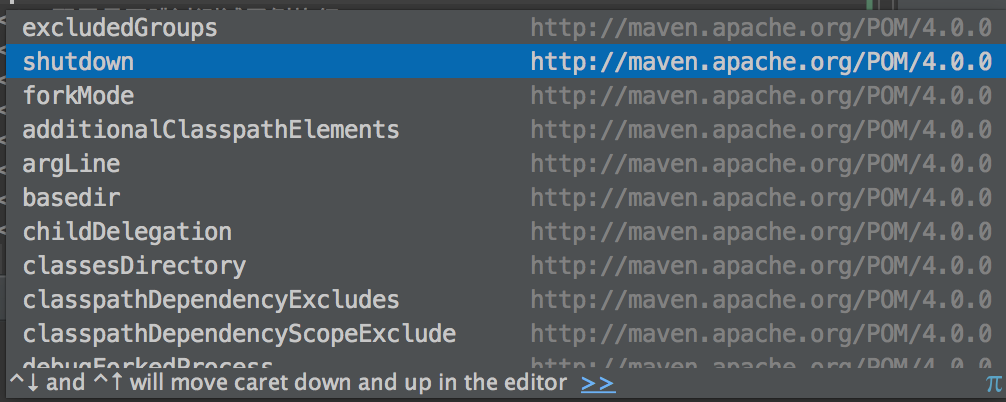
再加上依据测试结果展现的测试报告就更多了.如果想更加深入了解可以到官网学习.
示例代码github地址: https://github.com/qyf404/learn-maven/tree/maven-surefire-plugin.
参考
pdf文件下载:http://pan.baidu.com/s/1c1corG8
学习Maven之Maven Surefire Plugin(JUnit篇)的更多相关文章
- maven surefire plugin介绍
示例 <!-- 测试运行器,生成测试报告 --> <plugin> <groupId>org.apache.maven.plugins</groupId> ...
- [Maven]Apache Maven 入门篇
作者:George Ma 上 写这个 maven 的入门篇是因为之前在一个开发者会的动手实验中发现挺多人对于 maven 不是那么了解,所以就有了这个想法.这个入门篇分上下两篇.本文着重动手,用 ma ...
- (转)Maven学习总结(二)——Maven项目构建过程练习
孤傲苍狼 只为成功找方法,不为失败找借口! Maven学习总结(二)——Maven项目构建过程练习 上一篇只是简单介绍了一下maven入门的一些相关知识,这一篇主要是体验一下Maven高度自动化构建项 ...
- 转】Maven学习总结(二)——Maven项目构建过程练习
原博文出自于:http://www.cnblogs.com/xdp-gacl/p/4051690.html 感谢! 上一篇只是简单介绍了一下maven入门的一些相关知识,这一篇主要是体验一下Maven ...
- (转)Maven学习总结(四)——Maven核心概念
孤傲苍狼只为成功找方法,不为失败找借口! Maven学习总结(四)——Maven核心概念 一.Maven坐标 1.1.什么是坐标? 在平面几何中坐标(x,y)可以标识平面中唯一的一点. 1.2.Mav ...
- Maven学习(十六)-----Maven插件
Maven插件 Maven 是一个执行插件的框架,每一个任务实际上是由插件完成的.Maven 插件通常用于: 创建 jar 文件 创建 war 文件 编译代码文件 进行代码单元测试 创建项目文档 创建 ...
- Maven学习(十一)-----使用Maven创建Web应用程序项目
使用Maven创建Web应用程序项目 用到的技术/工具: Maven 3.3.3 Eclipse 4.3 JDK 8 Spring 4.1.1.RELEASED Tomcat 7 Logback 1. ...
- Maven学习(十)-----使用Maven创建Java项目
所需要的工具: Maven 3.3.3 Eclipse 4.2 JDK 8 注意:请确保 Maven 是正确安装和配置(在Windows,*nix,Mac OSX系统中),然后再开始本教程,避免 mv ...
- MAVEN学习笔记之Maven插件的应用(4)
MAVEN学习笔记之Maven插件的应用(4) <build> <pluginManagement> <plugins> <plugin> <gr ...
随机推荐
- ASP.NET:注销功能实现
原理:清空Session 1.Web窗体:index.aspx <a href="logoutHandler.ashx">注销</a> 2.一般处理程序:L ...
- JavaWeb:EL表达式
JavaWeb:EL表达式 说明 1.Expression Language语言,一种用于JSP文件中的数据访问的语言. 2.能够简化JSP文件中该数据访问的代码,可用来替代传统的基于<%= % ...
- cordova plugin add出现CERT_UNTRUSTED错误解决方法
介绍 目前使用ionic+cordova完成hybmid app开发,在安装geolocation插件时爆出来一个莫名的错误: Fetching from npm failed: CERT_UNTRU ...
- Node.js、express、mongodb 实现分页查询、条件搜索
前言 在上一篇Node.js.express.mongodb 入门(基于easyui datagrid增删改查) 的基础上实现了分页查询.带条件搜索. 实现效果 1.列表第一页. 2.列表第二页 3. ...
- JavaScript把项目本地的图片或者图片的绝对路径转为base64字符串、blob对象在上传
主题: JavaScript把项目本地的图片或者图片的绝对路径转为base64字符串.blob对象在上传. 用处: 从本地选择图片上传,如项目规定只能选择本项目文件夹下的图像上传为头像等. 主要思想: ...
- Android AlertDialog去除黑边白边自定义布局(转)
LayoutInflater inflater = this.getLayoutInflater(); View view = inflater.inflate(R.layout.test_alert ...
- VS编译链接时错误(Error Link2005)的解决方法
近期参与的项目中使用了公司另外一个同事提供的一个静态库文件.该静态库文件集成了CUDA, OpenCL两个库,用于做图形加速计算,提高视频解码拼接速度.但是在编译链接项目时,VS爆出如下错误: 1&g ...
- sealed、new、virtual、abstract与override 趣解
1. sealed——“断子绝孙” 密封类不能被继承.密封方法可以重写基类中的方法,但其本身不能在任何派生类中进一步重写.当应用于 方法或属性时,sealed修饰符必须始终与override一起使用. ...
- ASP.NET MVC自定义验证Authorize Attribute
前几天Insus.NET有在数据库实现过对某一字段进行加密码与解密<使用EncryptByPassPhrase和DecryptByPassPhrase对MS SQLServer某一字段时行加密和 ...
- 初识nginx之第一个demo
商城项目做了一个多月了,想到必须用到负载均衡,简单了解了一下nginx,首先分享第一个demo,五月份上线后,会继续分享一系列相关知识. 在nginx根目录下,用了一个园友的批处理文件nginx.ba ...