
ASP.NET MVC自定义验证Authorize Attribute
前几天Insus.NET有在数据库实现过对某一字段进行加密码与解密《使用EncryptByPassPhrase和DecryptByPassPhrase对MS SQLServer某一字段时行加密和解密》http://www.cnblogs.com/insus/p/5983645.html那今次Insus.NET在ASP.NET MVC实现自定义验证Authorize Attribute。
实现之前,Insus.NET对usp_Users_VeryLoginVerify修改一下,改为更好理解与使用:
SET ANSI_NULLS ON

GO

SET QUOTED_IDENTIFIER ON

GO

ALTER PROCEDURE [dbo].[usp_Users_VeryLoginVerify]

(

    @U_nbr NVARCHAR(20),

    @pwd NVARCHAR(100)

)

AS

BEGIN

    DECLARE @errmsg NVARCHAR(50) = N'用户名或密码错误。'

    IF NOT EXISTS(SELECT TOP 1 1 FROM [dbo].[Users] WHERE [U_nbr] = @U_nbr)

    BEGIN

        RAISERROR(@errmsg,16,1)

        RETURN

    END

    SELECT [U_nbr] AS [Account] FROM [dbo].[Users] WHERE [U_nbr] = @U_nbr AND CONVERT(NVARCHAR(100),DECRYPTBYPASSPHRASE('insus#sec!%y',[Pwd]))  = @pwd

    IF @@ROWCOUNT <= 0

    BEGIN

        RAISERROR(@errmsg,16,1)

        RETURN

    END

END
Source Code
OK,上面是数据库方面。
接下你需要在ASP.NET MVC写程序:
使用Cookie来存储登录以及验证信息,写一个Cookie类别:
using System;

using System.Collections.Generic;

using System.Linq;

using System.Web;

namespace Insus.NET.Utilities

{

    public abstract class CookieBase

    {

        private static HttpResponse Response

        {

            get

            {

                return HttpContext.Current.Response;

            }

        }

        private static HttpRequest Request

        {

            get

            {

                return HttpContext.Current.Request;

            }

        }

        public static HttpCookie Cookie

        {

            get

            {

                return Request.Cookies["CookieBase"] as HttpCookie;

            }

            set

            {

                if (Request.Cookies["CookieBase"] != null)

                {

                    Request.Cookies.Remove("CookieBase");

                }

                Response.Cookies.Add(value);

            }

        }

        public static HttpCookie NewCookie

        {

            get

            {

                return new HttpCookie("CookieBase");

            }

        }

        public static void RemoveCookie()

        {

            if (Cookie == null)

                Response.Cookies.Remove("CookieBase");

            else

                Response.Cookies["CookieBase"].Expires = DateTime.Now.AddDays(-1);

        }

    }

}
Source Code
其实上面这个CookeBase.cs是一个能存储多对象的集合类。在真正的程序中,你想存储什么信息,可以写一个如下面的类来操作:
using System;

using System.Collections.Generic;

using System.Linq;

using System.Text;

using System.Threading.Tasks;

using System.Web;

namespace Insus.NET.Utilities

{

   public class SecurityBase

    {

        public static bool IsAuthorized

        {

            get

            {

                return CookieBase.Cookie == null ? false : bool.Parse(CookieBase.Cookie.Values["IsAuthorized"]);

            }

            set

            {

                HttpCookie httpCookie = CookieBase.Cookie == null ? CookieBase.NewCookie : CookieBase.Cookie;

                httpCookie.Values["IsAuthorized"] = value.ToString();

                CookieBase.Cookie = httpCookie;

            }

        }

        public static string UserName

        {

            get

            {

                return CookieBase.Cookie == null ? string.Empty : CookieBase.Cookie.Values["UserName"];

            }

            set

            {

                HttpCookie httpCookie = CookieBase.Cookie == null ? CookieBase.NewCookie : CookieBase.Cookie;

                httpCookie.Values["UserName"] = value;

                CookieBase.Cookie = httpCookie;

            }

        }

        public static void RemoveCooke()

        {

            CookieBase.RemoveCookie();

        }

    }

}
Source Code
接下来,我们需要创建一个验证过滤器:
using System;

using System.Collections.Generic;

using System.Linq;

using System.Text;

using System.Threading.Tasks;

using System.Web;

using System.Web.Mvc;

using Insus.NET.Utilities;

using System.Web.Routing;

namespace Insus.NET.Attributes

{

    public class SecurityAuthorizeAttribute : AuthorizeAttribute

    {

        protected override bool AuthorizeCore(HttpContextBase httpContext)

        {

            return SecurityBase.IsAuthorized;

        }

        public override void OnAuthorization(AuthorizationContext filterContext)

        {

            string controllerName = filterContext.ActionDescriptor.ControllerDescriptor.ControllerName;

            string actionName = filterContext.ActionDescriptor.ActionName;

            base.OnAuthorization(filterContext);

        }

        protected override void HandleUnauthorizedRequest(AuthorizationContext filterContext)

        {

            var routeValue = new RouteValueDictionary {

                { "Controller", "Home"},

                { "Action", "Index"}

            };

            filterContext.Result = new RedirectToRouteResult(routeValue);

        }

    }

}
Source Code
这个过滤器SecurityAuthorizeAttribute.cs,稍后我们会在控制器中应用到它。
接下你需要写控制器了,不,我们似乎少写了一些物件,如model和Entity:

Models写好,还差一个Entity,这个实体是与数据连接的物件:
在ASP.NET MVC中,实现登录验证的演示,最少需要两个控制器,一个是给匿名用户访问的,它包含普通的页面和一些基本的操作。另一个控制器是经过验证通过之后才能访问的页面。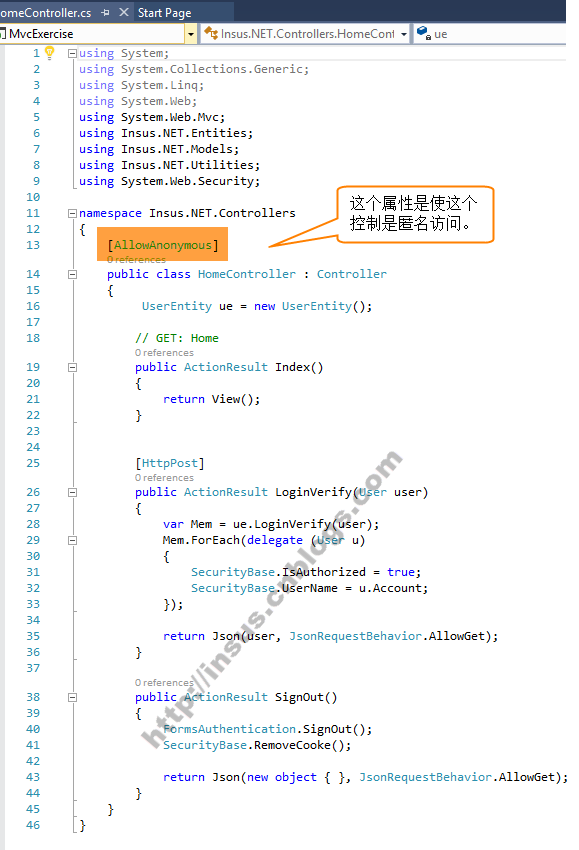
另一个控制器: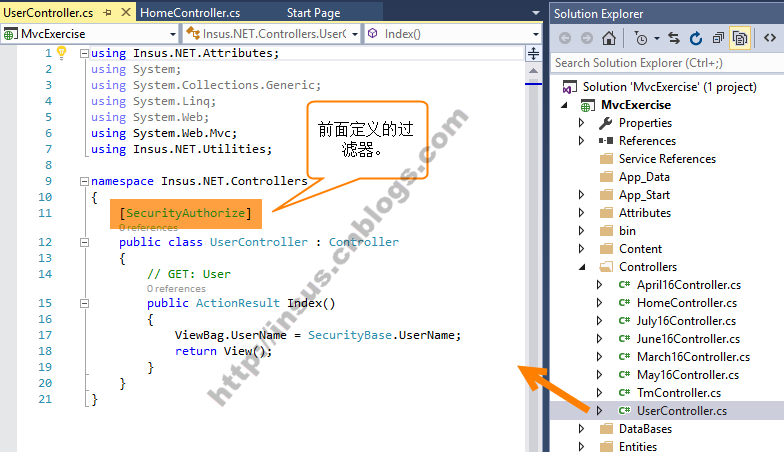
最后是创建视图了: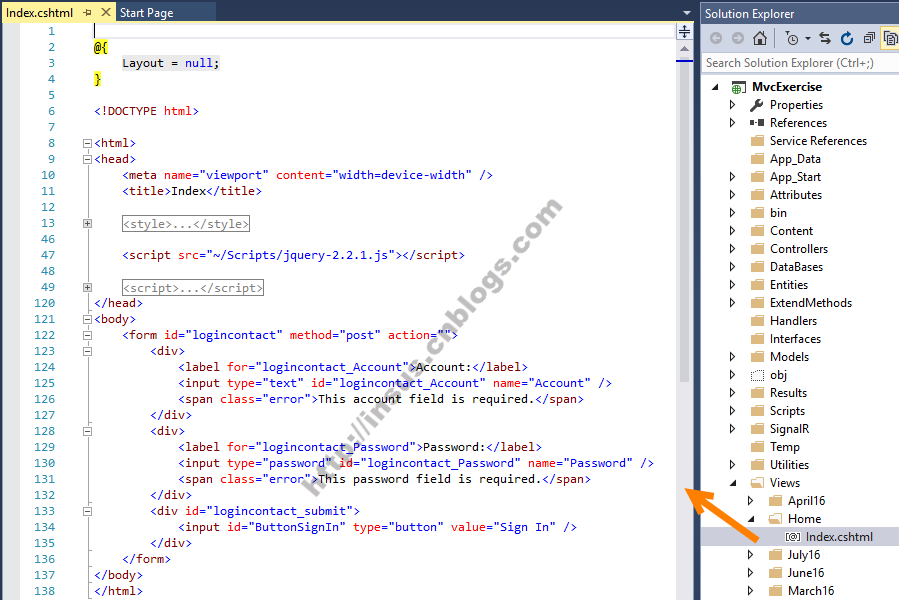
@{

    Layout = null;

}

<!DOCTYPE html>

<html>

<head>

    <meta name="viewport" content="width=device-width" />

    <title>Index</title>

    <style type="text/css">

        #logincontact label {

            display: inline-block;

            width: 100px;

            text-align: right;

        }

        #logincontact_submit {

            padding-left: 100px;

        }

        #logincontact div {

            margin-top: 1em;

        }

        .error {

            display: none;

            margin-left: 10px;

        }

        .error_show {

            color: red;

            margin-left: 10px;

        }

        input.invalid {

            border: 2px solid red;

        }

        input.valid {

            border: 2px solid green;

        }

    </style>

    <script src="~/Scripts/jquery-2.2.1.js"></script>

    <script type="text/javascript">

        ////<![CDATA[

        $(document).ready(function () {

            $('#logincontact_Account').on('input', function () {

                var input = $(this);

                var is_Account = input.val();

                if (is_Account) {

                    input.removeClass("invalid").addClass("valid");

                }

                else {

                    input.removeClass("valid").addClass("invalid");

                }

            });

            $('#logincontact_Password').on('input', function () {

                var input = $(this);

                var is_Password = input.val();

                if (is_Password) {

                    input.removeClass("invalid").addClass("valid");

                }

                else {

                    input.removeClass("valid").addClass("invalid");

                }

            });

            $('#ButtonSignIn').click(function (event) {

                var form_data = $("#logincontact").serializeArray();

                var error_free = true;

                for (var input in form_data) {

                    var element = $("#logincontact_" + form_data[input]['name']);

                    var valid = element.hasClass("valid");

                    var error_element = $("span", element.parent());

                    if (!valid) {

                        error_element.removeClass("error").addClass("error_show");

                        error_free = false;

                    }

                    else {

                        error_element.removeClass("error_show").addClass("error");

                    }

                }

                if (!error_free) {

                    event.preventDefault();

                }

                else {

                    var obj = {};

                    obj.Account = $('#logincontact_Account').val(),

                    obj.Password = $('#logincontact_Password').val()

                    $.ajax({

                        type: 'POST',

                        url: '/Home/LoginVerify',

                        dataType: 'json',

                        data: JSON.stringify(obj),

                        contentType: 'application/json; charset=utf-8',

                        success: function (data, textStatus) {

                            alert("登录成功。");

                            window.location.href = "/User/Index";

                        },

                        error: function (XMLHttpRequest, textStatus, errorThrown) {

                            alert(errorThrown);

                        },

                    });

                }

            });

        });

        //]]>

    </script>

</head>

<body>

    <form id="logincontact" method="post" action="">

        <div>

            <label for="logincontact_Account">Account:</label>

            <input type="text" id="logincontact_Account" name="Account" />

            <span class="error">This account field is required.</span>

        </div>

        <div>

            <label for="logincontact_Password">Password:</label>

            <input type="password" id="logincontact_Password" name="Password" />

            <span class="error">This password field is required.</span>

        </div>

        <div id="logincontact_submit">

            <input id="ButtonSignIn" type="button" value="Sign In" />

        </div>

    </form>

</body>

</html>
Source Code
还有一个:
@{

    Layout = null;

}

<!DOCTYPE html>

<html>

<head>

    <meta name="viewport" content="width=device-width" />

    <title>Index</title>

    <script src="~/Scripts/jquery-2.2.1.js"></script>

    <script type="text/javascript">

        ////<![CDATA[

        $(document).ready(function () {

            $('#ButtonSignOut').click(function (event) {

                $.ajax({

                    type: 'POST',

                    url: '/Home/SignOut',

                    contentType: 'application/json; charset=utf-8',

                    success: function (data, textStatus) {

                        alert("已经安全退出网站。");

                        window.location.href = "/Home/Index";

                    },

                    error: function (XMLHttpRequest, textStatus, errorThrown) {

                        alert(errorThrown);

                    },

                });

            });

        });

        //]]>

    </script>

</head>

<body>

    <div>

        Hi @ViewBag.UserName

        <br />

        <input id="ButtonSignOut" type="button" value="Sign Out" />

    </div>

</body>

</html>
Source Code
结束了,来一个实时演示吧: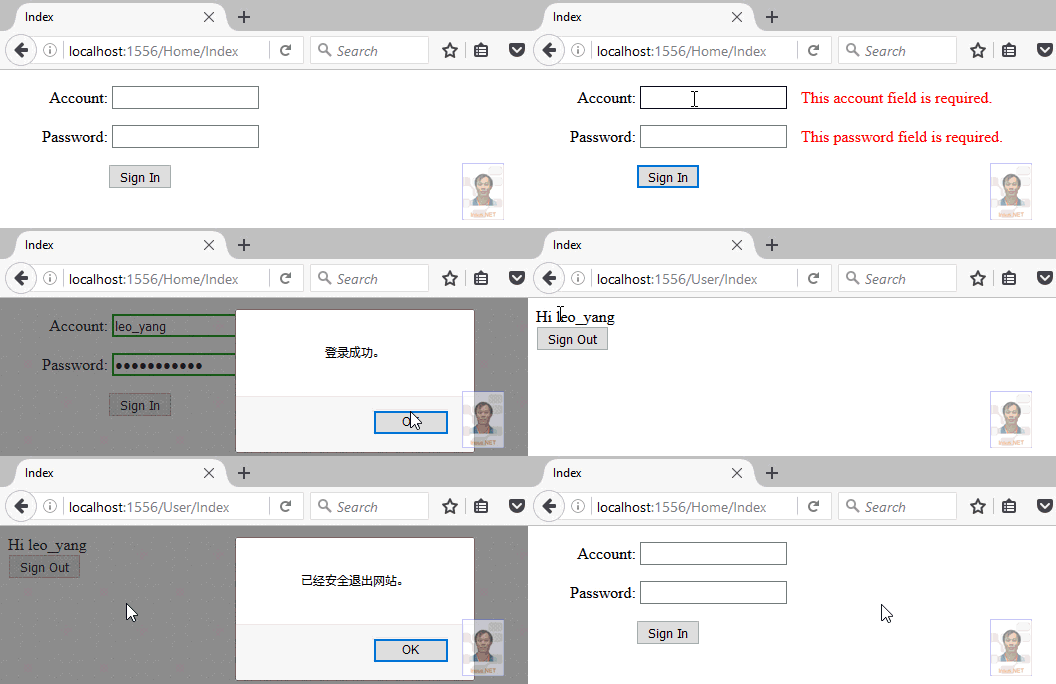
ASP.NET MVC自定义验证Authorize Attribute的更多相关文章
- ASP.NET MVC自定义验证Authorize Attribute(包含cookie helper)
前几天Insus.NET有在数据库实现过对某一字段进行加密码与解密<使用EncryptByPassPhrase和DecryptByPassPhrase对MS SQLServer某一字段时行加密和 ...
- ASP.NET MVC Model验证(五)
ASP.NET MVC Model验证(五) 前言 上篇主要讲解ModelValidatorProvider 和ModelValidator两种类型的自定义实现, 然而在MVC框架中还给我们提供了其它 ...
- 通过扩展改善ASP.NET MVC的验证机制[实现篇]
原文:通过扩展改善ASP.NET MVC的验证机制[实现篇] 在<使用篇>中我们谈到扩展的验证编程方式,并且演示了本解决方案的三大特性:消息提供机制的分离.多语言的支持和多验证规则的支持, ...
- Asp.Net MVC 身份验证-Forms
Asp.Net MVC 身份验证-Forms 在MVC中对于需要登录才可以访问的页面,只需要在对应的Controller或Action上添加特性[Authorize]就可以限制非登录用户访问该页面.那 ...
- ASP.NET MVC异步验证是如何工作的03,jquery.validate.unobtrusive.js是如何工作的
在上一篇"ASP.NET MVC异步验证是如何工作的02,异步验证表单元素的创建"中了解了ASP.NET异步验证是如何创建表单元素的,本篇体验jquery.validate.uno ...
- ASP.NET MVC Model验证(四)
ASP.NET MVC Model验证(四) 前言 本篇主要讲解ModelValidatorProvider 和ModelValidator两种类型的自定义实现,前者是Model验证提供程序,而Mod ...
- ASP.NET MVC Model验证(三)
ASP.NET MVC Model验证(三) 前言 上篇中说到在MVC框架中默认的Model验证是在哪里验证的,还讲到DefaultModelBinder类型的内部执行的示意图,让大家可以看到默认的M ...
- ASP.NET MVC Model验证(二)
ASP.NET MVC Model验证(二) 前言 上篇内容演示了一个简单的Model验证示例,然后在文中提及到Model验证在MVC框架中默认所处的位置在哪?本篇就是来解决这个问题的,并且会描述一下 ...
- ASP.NET MVC Model验证(一)
ASP.NET MVC Model验证(一) 前言 前面对于Model绑定部分作了大概的介绍,从这章开始就进入Model验证部分了,这个实际上是一个系列的Model的绑定往往都是伴随着验证的.也会在后 ...
随机推荐
- TaintDroid剖析之Native方法级污点跟踪分析
1.Native方法的污点传播 在前两篇文章中我们详细分析了TaintDroid对DVM栈帧的修改,以及它是如何在修改之后的栈帧中实现DVM变量级污点跟踪的.现在我们继续分析其第二个粒度的污点跟踪—— ...
- Module Zero之Nuget包
返回<Module Zero学习目录> ABP module-zero已经发布在了nuget上了.这里是所有的包列表. Abp.Zero module zero的核心包. Abp.Zero ...
- solve the problem of 'java web project cannot display verification code'
my java code of the function: package com.util; import java.awt.Color; import java.awt.Font; import ...
- React 生命周期
前言 学习React,生命周期很重要,我们了解完生命周期的各个组件,对写高性能组件会有很大的帮助. Ract生命周期 React 生命周期分为三种状态 1. 初始化 2.更新 3.销毁 初始化 1.g ...
- WCF学习之旅—WCF第二个示例(五)
二.WCF服务端应用程序 第一步,创建WCF服务应用程序项目 打开Visual Studio 2015,在菜单上点击文件—>新建—>项目—>WCF服务应用程序.在弹出界面的“名称”对 ...
- meta标签中的http-equiv属性使用介绍(转载)
meta是html语言head区的一个辅助性标签.也许你认为这些代码可有可无.其实如果你能够用好meta标签,会给你带来意想不到的效果,meta标签的作用有:搜索引擎优化(SEO),定义页面使用语言, ...
- 当GitHub把我当成DDos攻击者拉进了黑名单中。。。
Github黑名单自救+快速稳定FQ 异常处理汇总-开发工具 http://www.cnblogs.com/dunitian/p/4522988.html 原因:项目冲突,没有先更新后提交,他自行更 ...
- SQL Server 2014新特性探秘(2)-SSD Buffer Pool Extension
简介 SQL Server 2014中另一个非常好的功能是,可以将SSD虚拟成内存的一部分,来供SQL Server数据页缓冲区使用.通过使用SSD来扩展Buffer-Pool,可以使得大量随 ...
- Notes:DOM的事件模拟
首先使用document对象的createEvent方法创建一个事件对象,然后初始化该事件对象,接着使用支持事件DOM节点的dispatchEvent方法触发事件. DOM2级事件和DOM3级事件有些 ...
- 窥探Swift编程之错误处理与异常抛出
在Swift 2.0版本中,Swift语言对其错误处理进行了新的设计,当然了,重新设计后的结果使得该错误处理系统用起来更爽.今天博客的主题就是系统的搞一下Swift中的错误处理,以及看一下Swift中 ...