
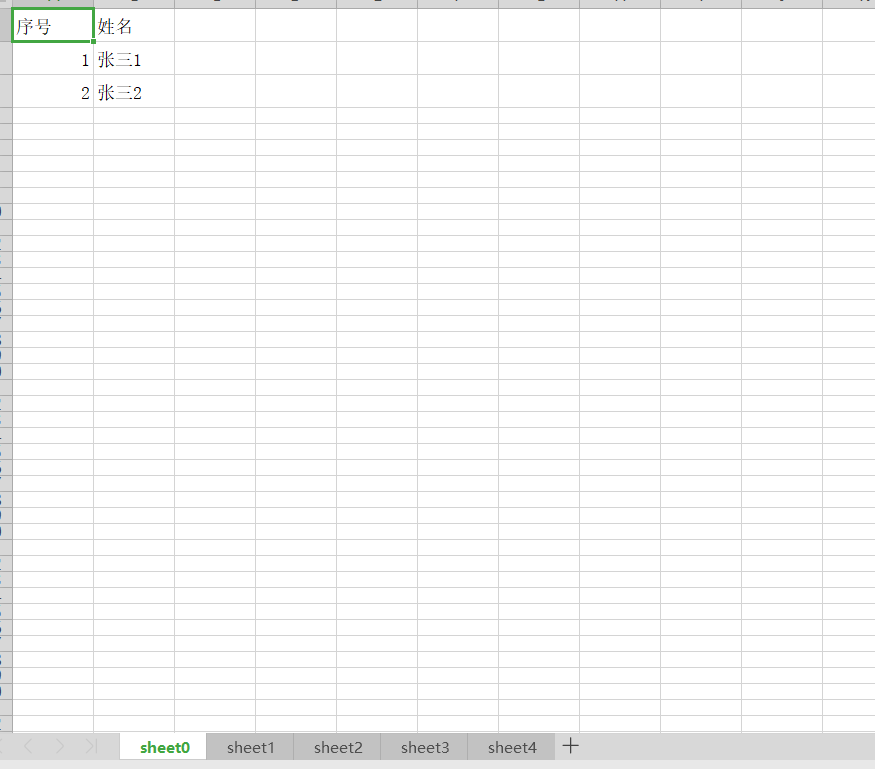
NPOI导出Excel生成多个sheet
using System;

using System.Collections.Generic;

using System.Linq;

using System.Web;

using System.Web.Mvc;

using NPOI.SS.UserModel;

using NPOI.XSSF.UserModel;

using System.IO;

using System.Reflection;

namespace WebApplication1.Controllers

{

    public class Info

    {

        public int Id { get; set; }

        public string Name { get; set; }

    }

    public class TestController : Controller

    {

        // GET: Test

        public ActionResult Index()

        {

            List<Info> list = new List<Info>();

            for (int i = ; i < ; i++)

            {

                Info info = new Info();

                info.Id = i + ;

                info.Name = "张三" + (i + );

                list.Add(info);

            }

            Dictionary<string, string> columnInfo = new Dictionary<string, string>();

            columnInfo.Add("Id","序号");

            columnInfo.Add("Name", "姓名");

            byte[] btyBytes=null;

            var a = ExportExcelTest<Info>(list, @"F://111.xlsx", ref btyBytes, columnInfo, );

            return View();

        }

        #region  NPOI大数据量多个sheet导出

        /// <summary>

        /// 大数据量多个sheet导出

        /// </summary>

        /// <typeparam name="T">数据源实体类</typeparam>

        /// <param name="objList">数据源</param>

        /// <param name="fileName">文件名称</param>

        /// <param name="btyBytes">导出数据流</param>

        /// <param name="columnInfo">显示列对应数据字典</param>

        /// <param name="listCount">每个sheet包含数据条数</param>

        /// <returns></returns>

        public static bool ExportExcelTest<T>(List<T> objList, string fileName, ref byte[] btyBytes,

Dictionary<string, string> columnInfo = null, int listCount = )

        {

            bool bResult = false;

            //在内存中生成一个Excel文件:

            XSSFWorkbook book = new XSSFWorkbook();

            if (objList != null && objList.Count > )

            {

                double sheetCount = Math.Ceiling((double)objList.Count / listCount);

                for (int i = ; i < sheetCount; i++)

                {

                    ISheet sheet = null;

                    sheet = book.CreateSheet("sheet" + i);

                    sheet.DefaultRowHeight =  * ;

                    List<T> list = new List<T>();

                    list = objList.Skip<T>(listCount * i).Take<T>(listCount).ToList();

                    int rowIndex = ;

                    int StartColIndex = ;

                    int colIndex = StartColIndex;

                    //创建表头样式

                    ICellStyle style = book.CreateCellStyle();

                    style.Alignment = HorizontalAlignment.CENTER;

                    style.WrapText = true;

                    IFont font = book.CreateFont();

                    font.FontHeightInPoints = ;

                    font.Boldweight = (short)NPOI.SS.UserModel.FontBoldWeight.BOLD;

                    font.FontName = "简体中文";

                    style.SetFont(font);//HEAD 样式

                    Type myType = null;

                    myType = objList[].GetType();

                    //根据反射从传递进来的属性名信息得到要显示的属性

                    List<PropertyInfo> myPro = new List<PropertyInfo>();

                    PropertyInfo[] properties = myType.GetProperties();

                    #region 定义表头

                    int m = ;

                    if (columnInfo != null)

                    {

                        var rowheader = sheet.CreateRow();

                        rowheader.Height = rowheader.Height =  * ;

                        foreach (string cName in columnInfo.Keys)

                        {

                            PropertyInfo p = myType.GetProperty(cName);

                            if (p != null)

                            {

                                myPro.Add(p);

                                rowheader.CreateCell(m).SetCellValue(columnInfo[cName]);

                                m++;

                            }

                        }

                    }

                    #endregion

                    #region 定义表体并赋值

                    //如果没有找到可用的属性则结束

                    if (myPro.Count == ) { return bResult; }

                    foreach (T obj in list)

                    {

                        int n = ;

                        if (sheet != null)

                        {

                            rowIndex++;

                            var sheetrow = sheet.CreateRow(rowIndex);

                            sheetrow.Height = sheetrow.Height =  * ;

                            foreach (PropertyInfo p in myPro)

                            {

                                dynamic val = p.GetValue(obj, null) ?? "";

                                string valtype = val.GetType().ToString();

                                if (valtype.ToLower().IndexOf("decimal", StringComparison.Ordinal) > -)

                                {

                                    val = Convert.ToDouble(val);

                                }

                                else if (valtype.ToLower().IndexOf("datetime", StringComparison.Ordinal) > -)

                                {

                                    val = val.ToString("yyyy-MM-dd HH:mm:ss");

                                    if (val.Equals("0001-01-01 00:00:00"))

                                    {

                                        val = "";

                                    }

                                }

                                sheetrow.CreateCell(n).SetCellValue(val);

                                n++;

                            }

                        }

                    }

                    #endregion

                }

            }

            else

            {

                //在工作薄中建立工作表

                XSSFSheet sheet = book.CreateSheet() as XSSFSheet;

                sheet.SetColumnWidth(,  * );

                if (sheet != null) sheet.CreateRow().CreateCell().SetCellValue("暂无数据!");

            }

          var  fs = new FileStream(fileName, FileMode.OpenOrCreate, FileAccess.ReadWrite);

            book.Write(fs);

            //try

            //{

            //    HttpResponse rs = System.Web.HttpContext.Current.Response;

            //    rs.ContentEncoding = System.Text.Encoding.GetEncoding("GB2312");

            //    rs.AppendHeader("Content-Disposition", "attachment;filename=" + fileName);

            //    rs.ContentType = "application/vnd.ms-excel";

            //    //application/vnd.openxmlformats-officedocument.spreadsheetml.sheet

            //    using (MemoryStream ms = new MemoryStream())

            //    {

            //        book.Write(ms);

            //        btyBytes = ms.GetBuffer();

            //        rs.AddHeader("Content-Length", btyBytes.Length.ToString());

            //        rs.BinaryWrite(ms.GetBuffer());

            //        ms.Flush();

            //    }

            //}

            //catch (SystemException ex)

            //{

            //    throw ex;

            //}

            //catch (ApplicationException ex)

            //{

            //    throw ex;

            //}

            return bResult;

        }

        #endregion

    }

}
NPOI导出Excel生成多个sheet的更多相关文章
- .NET NPOI导出Excel详解
NPOI,顾名思义,就是POI的.NET版本.那POI又是什么呢?POI是一套用Java写成的库,能够帮助开发者在没有安装微软Office的情况下读写Office的文件. 支持的文件格式包括xls, ...
- NPOI导出Excel(含有超过65335的处理情况)
NPOI导出Excel的网上有很多,正好自己遇到就学习并总结了一下: 首先说明几点: 1.Excel2003及一下:后缀xls,单个sheet最大行数为65335 Excel2007 单个sheet ...
- 分享使用NPOI导出Excel树状结构的数据,如部门用户菜单权限
大家都知道使用NPOI导出Excel格式数据 很简单,网上一搜,到处都有示例代码. 因为工作的关系,经常会有处理各种数据库数据的场景,其中处理Excel 数据导出,以备客户人员确认数据,场景很常见. ...
- NPOI导出Excel表功能实现(多个工作簿)(备用)
Excel生成操作类: 代码 using System; using System.Collections.Generic; using System.Text; using System.IO; u ...
- NPOI导出Excel示例
摘要:使用开源程序NPOI导出Excel示例.NPOI首页地址:http://npoi.codeplex.com/,NPOI示例博客:http://tonyqus.sinaapp.com/. 示例编写 ...
- 使用NPOI导出Excel文件
使用NPOI导出Excel文件,本实例使用了ASP.NET MVC. 1.使用NPOI导出Excel文件 实例:导出商品列表. 要求:1.通过NPOI导出导出商品列表信息: 2.使用Excel函数计算 ...
- NPOI导出Excel (C#) 踩坑 之--The maximum column width for an individual cell is 255 charaters
/******************************************************************* * 版权所有: * 类 名 称:ExcelHelper * 作 ...
- Asp.Net 使用Npoi导出Excel
引言 使用Npoi导出Excel 服务器可以不装任何office组件,昨天在做一个导出时用到Npoi导出Excel,而且所导Excel也符合规范,打开时不会有任何文件损坏之类的提示.但是在做导入时还是 ...
- NPOI导出EXCEL 打印设置分页及打印标题
在用NPOI导出EXCEL的时候设置分页,在网上有查到用sheet1.SetRowBreak(i)方法,但一直都没有起到作用.经过研究是要设置 sheet1.FitToPage = false; 而 ...
随机推荐
- Codeforces Round #198 (Div. 1 + Div. 2)
A. The Wall 求下gcd即可. B. Maximal Area Quadrilateral 枚举对角线,根据叉积判断顺.逆时针方向构成的最大面积. 由于点坐标绝对值不超过1000,用int比 ...
- springboot+jpa分页(Pageable+Page)
Pageable+Page实现分页无需配置,也不需要加入jar包(maven依赖) Controller控制层 package com.gxuwz.late.controller; import co ...
- vue-learning:3-template-{{}}-and-v-html
插值{{ }} 和 v-html 本节开始,我们按如下顺序学习vue模板API-指令.点击各部分的DEMO可在线查看代码 输出字符串文本内容的插值:{{}} 输出HMTL元素作为内容的指令:v-htm ...
- 移动端H5多页开发拍门砖经验
两年前刚接触移动端开发,刚开始比较疑惑,每次遇到问题都是到社区里提问或者吸取前辈的经验分享,感谢热衷于分享的开发者为前端社区带来欣欣向上的生命力.本文结合先前写的文章和开发经验分享给大家,希望也能帮助 ...
- Java 学习笔记(11)——多线程
Java内部提供了针对多线程的支持,线程是CPU执行的最小单位,在多核CPU中使用多线程,能够做到多个任务并行执行,提高效率. 使用多线程的方法 创建Thread类的子类,并重写run方法,在需要启动 ...
- C++Review4_代码的组织
当一个项目越来越大,代码该如何组织?C++组织程序的策略是什么?遇到类.变量.函数的重名问题该如何解决? =============================================== ...
- csredis-in-asp.net core理论实战-主从配置、哨兵模式
csredis GitHub https://github.com/2881099/csredis 看了github上的开源项目,上面真的只是单纯的使用文档,可能对于我这种人(菜鸟)就不太友好, 我知 ...
- jquery中动态添加的标签绑定的click事件失效的解决办法
把.click()换成.live('click',function(){})(如果你的jquery的版本是1.10之前) 把.click()换成.on('click',function(){})(jq ...
- $Luogu2680/NOIp2015$ 运输计划
传送门 $Sol$ 最暴力的做法就是枚举最长链上的边,然后再算一次所有的链长,更新$ans$. 这里要求最大的最小,容易想到二分答案.对于二分的值$mid$,扫一遍所有的链,若链长小于等于$mid$, ...
- HDU3394 Railway 题解(边双连通分量)
题目链接:http://acm.hdu.edu.cn/showproblem.php?pid=3394 题目大意: 给定一个无向图,如果从一个点出发经过一些点和边能回到该点本身,那么一路走过来的这些点 ...