
Android基础控件ListView和自定义BaseAdapter适配器
1、简介
ListView用于列表显示,相当于OC中的TableView,和适配器一块使用,相关属性:
footerDividersEnabled:是否在footerView(表尾)前绘制一个分隔条,默认为true

headerDividersEnabled:是否在headerView(表头)前绘制一个分隔条,默认为true

divider:设置分隔条,可以用颜色分割,也可以用drawable资源分割

dividerHeight:设置分隔条的高度

addHeaderView(View v):添加headView(表头),括号中的参数是一个View对象

addFooterView(View v):添加footerView(表尾),括号中的参数是一个View对象

addHeaderView(headView, null, false):和前面的区别:设置Header是否可以被选中

addFooterView(View,view,false):和前面的区别:设置Footer是否可以被选中
android:stackFromBottom="true":底部对齐显示
android:scrollbars="none":滑动条样式
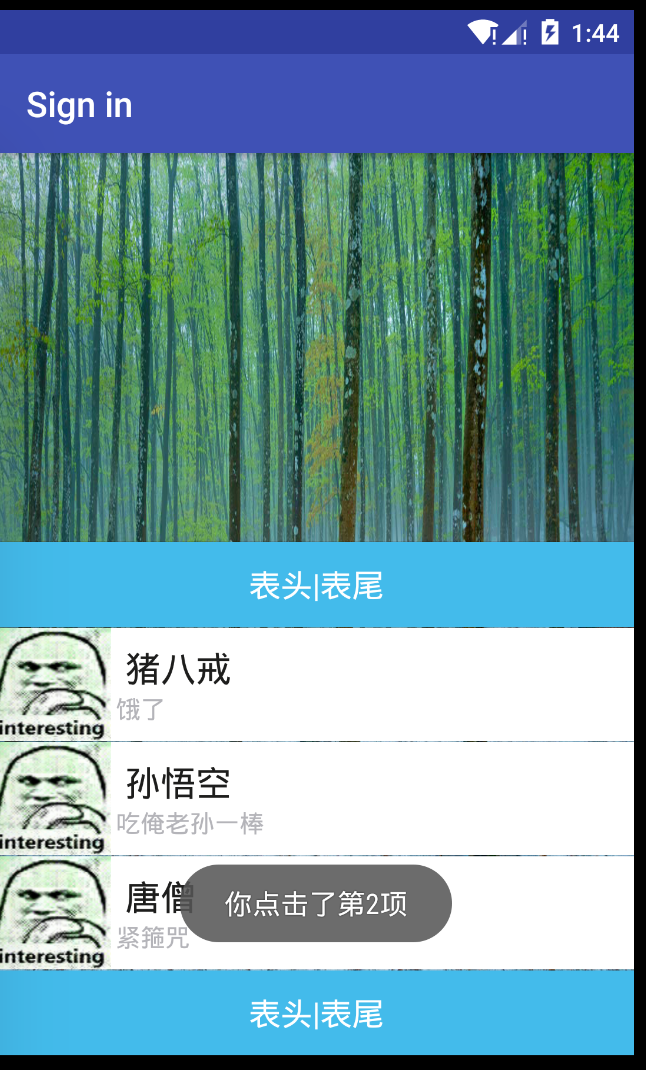
2、自定义的CustomAdapter
自定义model类Custom:
public class Custom {

    private  String aName;

    private  String aSpeak;

    private  int aIcon;

    public Custom(){}

    public Custom(String aName,String aSpeak,int aIcon){

        this.aIcon = aIcon;

        this.aName = aName;

        this.aSpeak = aSpeak;

    }

    public  String getaName(){

        return aName;

    }

    public  String getaSpeak(){

        return aSpeak;

    }

    public int getaIcon(){

        return aIcon;

    }

    public void setaName(String aName) {

        this.aName = aName;

    }

    public void setaSpeak(String aSpeak) {

        this.aSpeak = aSpeak;

    }

    public void setaIcon(int aIcon) {

        this.aIcon = aIcon;

    }

}
自定义的CustomAdapter:
public class CustomAdapter extends BaseAdapter {

    private LinkedList<Custom> aData;

    private Context mContext;

    public CustomAdapter(LinkedList<Custom> aData,Context mContext){

        this.aData = aData;

        this.mContext = mContext;

    }

    @Override

    public int getCount(){

        return aData.size();

    }

    @Override

    public  Object getItem(int position){

        return null;

    }

    @Override

    public long getItemId(int position){

        return position;

    }

    @Override

    public View getView(int position, View convertView, ViewGroup parent){

        ViewHolder holder = null;

        if (convertView==null){

            convertView = LayoutInflater.from(mContext).inflate(R.layout.list_item,parent,false);

            holder = new ViewHolder();

            holder.imageView = (ImageView)convertView.findViewById(R.id.imgtou);

            holder.nameTextView = (TextView)convertView.findViewById(R.id.name);

            holder.sayTextView = (TextView)convertView.findViewById(R.id.says);

            convertView.setTag(holder);

        }else {

            holder = (ViewHolder)convertView.getTag();

        }

        holder.imageView.setBackgroundResource(aData.get(position).getaIcon());

        holder.nameTextView.setText(aData.get(position).getaName());

        holder.sayTextView.setText(aData.get(position).getaSpeak());

        return convertView;

    }

    static class ViewHolder{

        ImageView imageView;

        TextView nameTextView;

        TextView sayTextView;

    }

}
3、实现自定义显示
list_item.xml文件item的布局文件:
<LinearLayout xmlns:android="http://schemas.android.com/apk/res/android"

    xmlns:tools="http://schemas.android.com/tools"

    android:layout_width="match_parent"

    android:layout_height="match_parent"

    android:background="#ffffff"

    android:gravity="center"

    android:orientation="horizontal">

    <ImageView

        android:id="@+id/imgtou"

        android:layout_width="64dp"

        android:layout_height="64dp"

        android:baselineAlignBottom="true"

        android:paddingLeft="8dp" />

    <LinearLayout

        android:layout_width="match_parent"

        android:layout_height="wrap_content"

        android:orientation="vertical">

        <TextView

            android:id="@+id/name"

            android:layout_width="wrap_content"

            android:layout_height="wrap_content"

            android:paddingLeft="8dp"

            android:textColor="#1D1D1C"

            android:textSize="20sp" />

        <TextView

            android:id="@+id/says"

            android:layout_width="wrap_content"

            android:layout_height="wrap_content"

            android:paddingLeft="8px"

            android:textColor="#B4B4B9"

            android:textSize="14sp" />

    </LinearLayout>

</LinearLayout>
Java文件:
public class LoginActivity extends AppCompatActivity implements AdapterView.OnItemClickListener {

    private String[] names = new String[]{"猪八戒","孙悟空","唐僧"};

    private String[] says = new String[]{"饿了","吃俺老孙一棒","紧箍咒"};

    private  int[] images = new int[]{R.drawable.icon,R.drawable.icon,R.drawable.icon};

    @Override

    protected void onCreate(Bundle savedInstanceState) {

        super.onCreate(savedInstanceState);

        setContentView(R.layout.activity_login);

        ListView list_test = (ListView) findViewById(R.id.listview);

        final LayoutInflater inflater = LayoutInflater.from(this);

        View headView = inflater.inflate(R.layout.list_header, null, false);

        View footView = inflater.inflate(R.layout.list_header, null, false);

        List<Custom> aData = new LinkedList<Custom>();

        for (int i=0;i<names.length;i++){

            aData.add(new Custom(names[i],says[i],images[i]));

        }

        //添加表头和表尾需要写在setAdapter方法调用之前!!!

        list_test.addHeaderView(headView);

        list_test.addFooterView(footView);

        list_test.setAdapter(new CustomAdapter((LinkedList<Custom>)aData,LoginActivity.this));

        list_test.setOnItemClickListener(this);

    }

    @Override

    public void onItemClick(AdapterView<?>parent,View view,int position,long id){

        Toast.makeText(LoginActivity.this,"你点击了第" + position + "项",Toast.LENGTH_SHORT).show();

    }

}
注意:
A:addHeaderView方法必须放在listview.setAdapter前面,否则会报错。
B:添加表头后,第一个item的position为1,表头占一个。
Android基础控件ListView和自定义BaseAdapter适配器的更多相关文章
- Android基础控件ListView基础操作
1.简介 基于Android基础控件ListView和自定义BaseAdapter适配器情况下,对ListView的数据删除和添加操作: public boolean add(E e) {//添加数据 ...
- Android:控件ListView列表项与适配器结合使用
Listview是用来展示一些重复性的数据用的,比如一些列表集合数据展示到手机,需要适配器作为载体获取数据,最后将数据填充到布局. ListView里面的每个子项Item可以使一个字符串,也可以是一个 ...
- 矩阵, 矩阵 , Android基础控件之ImageView
天下文章大家抄,以下所有内容,有来自copy,有来自查询,亦有自己的总结(目的是总结出自己的东西),所以说原创,不合适,说是转载也不恰当,所以我称之为笔记,可惜没有此分类选项,姑且不要脸一点,选择为原 ...
- android 基础控件(EditView、SeekBar等)的属性及使用方法
android提供了大量的UI控件,本文将介绍TextView.ImageView.Button.EditView.ProgressBar.SeekBar.ScrollView.WebView ...
- Android列表控件ListView详解
ListView绝对可以称得上是Android中最常用的控件之一,几乎所有应用程序都会用到它. 由于手机屏幕空间都比较有限,能够一次性在屏幕上显示的内容并不多,当我们的程序中有大量的数据需要展示的时候 ...
- Android常用控件之GridView使用BaseAdapter
我们可以为GridView添加自定义的Adapter,首先看下用自定义Adapter的显示效果 在布局文件main.xml文件中定义一个GridView控件 <RelativeLayout xm ...
- android 基础控件 EditText
EditText 简介: EditText 控件继承 TextView ,它有TextView的所有属性和方法,并且自身是可编辑的: extends TextView java.lang.Object ...
- Android基础控件ProgressBar进度条的使用
1.简介 ProgressBar继承与View类,直接子类有AbsSeekBar和ContentLoadingProgressBar, 其中AbsSeekBar的子类有SeekBar和RatingBa ...
- Android基础控件Button的使用
1.相关属性 Android的按钮有Button和ImageButton(图像按钮),Button extends TextView, ImageButton extends ImageView! a ...
随机推荐
- 深夜Python - 第1夜 - for 迷 in 迷思
深夜Python - 第1夜 - for 迷 in 迷思 在一个月黑风高的夜晚,我悄悄打开编辑器,进入程序的世界.刚刚学会Python的我,由于一段时间的过度装B,被委托优化一段程序,我信心十足地接下 ...
- centos7使用iptables作为防火墙方法
centos7使用iptables作为防火墙方法查看firewalld状态: systemctl status firewalld将centos7默认的firewalld停止,并将iptables作为 ...
- RDD运行原理
- vue-router 的重定向-redirect
1. 我们主要在index.js重新设置路由的重新定向redirect参数 index.js import Vue from 'vue' import Router from 'vue-router' ...
- Spring Boot环境搭建。
1.环境准备. jdk1.8 idea(如果不会激活可以看另外一篇:https://www.cnblogs.com/joeking/p/11119123.html) 2.打开idea 如果是idea的 ...
- leetcode-11-盛水最多的容器
题目描述: 方法一:双指针 class Solution: def maxArea(self, height: List[int]) -> int: left = 0 right = len(h ...
- [JZOJ4665] 【GDOI2017模拟7.21】数列
题目 题目大意 给你一个数列,让你找到一个最长的连续子序列,满足在添加了至多KKK个数之后,能够变成一条公差为DDD的等差数列. 思考历程 一眼看上去似乎是一道神题-- 没有怎么花时间思考,毕竟时间都 ...
- 用while实现登录操作(3次过后,输入yes,使counter置0,还可以玩)
用while实现登录操作(输入yes,使counter置0,还可以玩)#_author:Administrator#date:2019/10/24user_name="star"p ...
- Ubuntu下github pages+hexo搭建自己的博客
hexo 是一个基于Node.js的静态博客程序,可以方便的生成静态网页托管在github上.Hexo简单优雅, 而且风格多变, 适合搭建个人博客,而且支持多平台的搭建. 平台 Ubuntu14.04 ...
- 将文件大小数值转换成B、KB、MB、GB
//delphi 将文件大小数值转换成B/KB/MB/GB function FormatByteSize(const bytes: Longint): string; const B = 1; // ...