
DotNet IOC Framework - Microsoft Unity介绍
一. 新建一个ASP.NET MVC4项目
二. 安装Microsoft Unity
1) 管理Nuget程序包

2)安装Unity3程序包
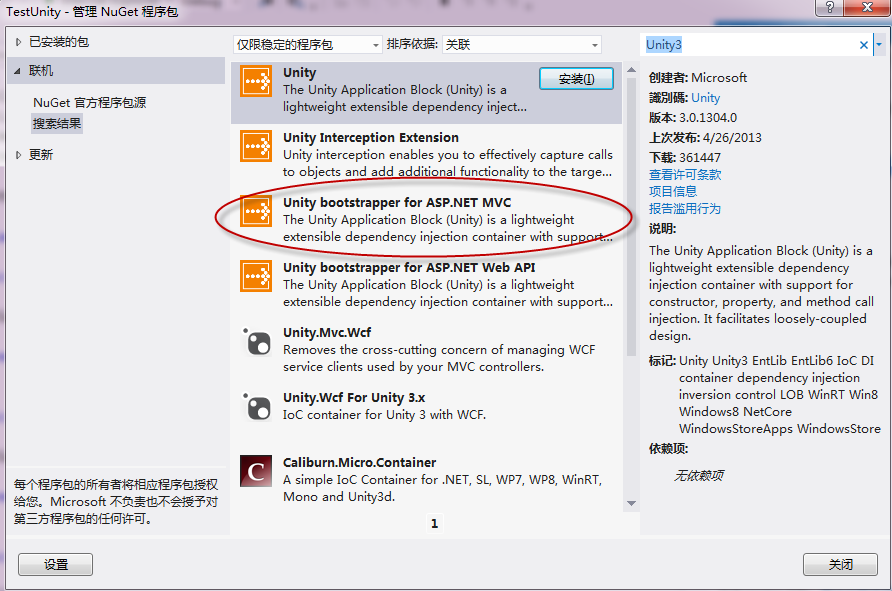
在你的App_Start文件夹里会多出来两个文件

三. 一个小例子
1)创建模型类
using System;

using System.Collections.Generic;

using System.Linq;

using System.Web;

using System.Data.Entity;

using System.ComponentModel.DataAnnotations;

namespace TestUnity.Models

{

    public class Person

    {

        [ScaffoldColumn(false)]

        public int Id { get; set; }

        [Required]

        public string Name { get; set; }

        public int Age { get; set; }

        [Display(Name = "Contact Information")]

        public string ContactInfo { get; set; }

    }

}
2) 建立自己的DbContext
using System;

using System.Collections.Generic;

using System.Linq;

using System.Web;

using System.Data.Entity;

namespace TestUnity.Models

{

    public class MyContext : DbContext

    {

        public MyContext()

            : base("DefaultConnection")

        {

        }

        public DbSet<Person> Persons { get; set; }

    }

}
3) 创建Repository模式类
using System;

using System.Collections.Generic;

using System.Linq;

using System.Text;

using System.Threading.Tasks;

namespace TestUnity.Models

{

    public interface IPersonRepository : IDisposable

    {

        IEnumerable<Person> GetAll();

        void InsertorUpdate(Person contact);

        Person Find(int id);

        bool Delete(int id);

        void Save();

    }

}
using System;

using System.Collections.Generic;

using System.Linq;

using System.Web;

using System.Data;

namespace TestUnity.Models

{

    public class PersonRepository : IPersonRepository

    {

        private MyContext db = new MyContext();

        public IEnumerable<Person> GetAll()

        {

            return db.Persons.ToList();

        }

        public Person Find(int id)

        {

            return db.Persons.Find(id);

        }

        public bool Delete(int id)

        {

            try

            {

                Person person = Find(id);

                db.Persons.Remove(person);

                Save();

                return true;

            }

            catch (Exception)

            {

                return false;

            }

        }

        public void InsertorUpdate(Person person)

        {

            if (person.Id == default(int))

            {

                // New entity

                db.Persons.Add(person);

            }

            else

            {

                // Existing entity

                db.Entry(person).State = EntityState.Modified;

            }

        }

        public void Save()

        {

            db.SaveChanges();

        }

        public void Dispose()

        {

            db.Dispose();

        }

    }

}
4) 创建控制器
using System;

using System.Collections.Generic;

using System.Linq;

using System.Web;

using System.Web.Mvc;

using TestUnity.Models;

namespace TestUnity.Controllers

{

    public class PersonController : Controller

    {

        private readonly IPersonRepository repository;

        public PersonController(IPersonRepository repository)

        {

            this.repository = repository;

        }

        public ActionResult Index()

        {

            var persons = repository.GetAll();

            return View(persons);

        }

        public ActionResult Details(int id)

        {

            var person = repository.Find(id);

            return View(person);

        }

        public ActionResult Create()

        {

            return View();

        }

        [HttpPost]

        public ActionResult Create(Person person)

        {

            try

            {

                repository.InsertorUpdate(person);

                repository.Save();

                return RedirectToAction("Index");

            }

            catch

            {

                return View();

            }

        }

        public ActionResult Edit(int id)

        {

            var person = repository.Find(id);

            return View(person);

        }

        [HttpPost]

        public ActionResult Edit(int id, Person model)

        {

            try

            {

                var person = repository.Find(id);

                repository.InsertorUpdate(person);

                repository.Save();

                return RedirectToAction("Index");

            }

            catch

            {

                return View();

            }

        }

        public ActionResult Delete(int id)

        {

            var person = repository.Find(id);

            return View(person);

        }

        [HttpPost, ActionName("Delete")]

        public ActionResult DeleteConfirmed(int id)

        {

            bool ret = repository.Delete(id);

            if (ret)

                return RedirectToAction("Index");

            return View();

        }

        protected override void Dispose(bool disposing)

        {

            if (disposing)

            {

                repository.Dispose();

            }

            base.Dispose(disposing);

        }

    }

}
5)配置Unity
using System;

using Microsoft.Practices.Unity;

using Microsoft.Practices.Unity.Configuration;

using TestUnity.Models;

namespace TestUnity.App_Start

{

    /// <summary>

    /// Specifies the Unity configuration for the main container.

    /// </summary>

    public class UnityConfig

    {

        #region Unity Container

        private static Lazy<IUnityContainer> container = new Lazy<IUnityContainer>(() =>

        {

            var container = new UnityContainer();

            RegisterTypes(container);

            return container;

        });

        /// <summary>

        /// Gets the configured Unity container.

        /// </summary>

        public static IUnityContainer GetConfiguredContainer()

        {

            return container.Value;

        }

        #endregion

        /// <summary>Registers the type mappings with the Unity container.</summary>

        /// <param name="container">The unity container to configure.</param>

        /// <remarks>There is no need to register concrete types such as controllers or API controllers (unless you want to

        /// change the defaults), as Unity allows resolving a concrete type even if it was not previously registered.</remarks>

        public static void RegisterTypes(IUnityContainer container)

        {

            // NOTE: To load from web.config uncomment the line below. Make sure to add a Microsoft.Practices.Unity.Configuration to the using statements.

            // container.LoadConfiguration();

            // TODO: Register your types here

            // container.RegisterType<IProductRepository, ProductRepository>();

            container.RegisterType<IPersonRepository, PersonRepository>();

        }

    }

}
6) 运行结果


DotNet IOC Framework - Microsoft Unity介绍的更多相关文章
- Microsoft实现的IOC DI之 Unity 、Service Locator、MEF
这几个工具的站点 Microsoft Unity http://unity.codeplex.com Service Locator http://commonservicelocator.code ...
- 使用Microsoft的IoC框架:Unity来对.NET应用进行解耦
1.IoC/DI简介 IoC 即 Inversion of Control,DI 即 Dependency Injection,前一个中文含义为控制反转,后一个译为依赖注入,可以理解成一种编程模式,详 ...
- The specified framework 'Microsoft.NETCore.App', version '1.0.1' was not found 解决办法
环境:Centos 7 已经下载安装.NET Core 1.1 Microsoft .NET Core Shared Framework Host Version : Build : 928f77c4 ...
- .NET Core错误:The specified framework 'Microsoft.NETCore.App', version '1.0.0-rc2-3002702' was not found.
本地Dos命令行中,cd到你的项目目录下,生成, dotnet {U_Project_Name}.dll 发布 dotnet publish ,然后将发布的文件夹中的文件全部拷贝到服务器中,至此,问题 ...
- 使用Microsoft Unity进行日志记录
需要记录日志的地方包括:进入方法的时候,传参的时候,统计执行时间,方法返回参数的时候,退出语句块的时候,出现异常的时候,等等.先来体验不使用Micirosoft Unity进行日志记录. class ...
- ubuntu .net core The specified framework 'Microsoft.NETCore.App', version '1.0.1' was not found
想在ubuntu下试试.net core mvc,按照官方教程走完,然后把在window 下做好的项目想在ubuntu下试试,然后输入了 git clone https://github.com/ka ...
- IoC实践--用Unity实现MVC5.0的IoC控制反转方法
在MVC中,控制器依赖于模型对数据进行处理,也可以说执行业务逻辑.我们可以使用依赖注入(DI)在控制层分离模型层,这边要用到Repository模式,在领域驱动设计(DDD)中,Repository翻 ...
- 深入理解IOC模式及Unity框架
研究了下,有几篇博客确实已经说得很清楚了 1.IoC模式:http://www.cnblogs.com/qqlin/archive/2012/10/09/2707075.html 这篇博客是通过一个 ...
- DUIR Framework 相关技术介绍
开发者在搭建界面自动化测试框架时,又或者在开发界面自动化控制的机器人时,往往需要对界面进行自动化的程序控制.而现在公司内部使用的杜尔自动化框架,就是一个封装了界面自动化控制逻辑的程序框架.基于该框架, ...
随机推荐
- Ubuntu忘记管理员密码
Ubuntu中不小心把管理员密码忘记了,真叫人头大. 现提供一个解决方案: 1.重启 Ubuntu 系统,按 Esc 进入GRUB 菜单界面,如下图: 2.选择recovery mode. (第二个) ...
- Hibernate映射之实体映射<转载>
实体类与数据库之间存在某种映射关系,Hibernate依据这种映射关系完成数据的存取,因此映射关系的配置在Hibernate中是最关键的.Hibernate支持xml配置文件与@注解配置两种方式.xm ...
- asp mvc 路由
public override void RegisterArea(AreaRegistrationContext context) { context.MapRoute( "Workflo ...
- Anti-pattern(反面模式)
转自维基百科 http://zh.wikipedia.org/wiki/%E5%8F%8D%E9%9D%A2%E6%A8%A1%E5%BC%8F 在软件工程中,一个反面模式(anti-pattern或 ...
- bzoj2757
非常神的数位dp,我调了几乎一天首先和bzoj3131类似,乘积是可以预处理出来的,注意这里乘积有一个表示的技巧因为这里质因数只有2,3,5,7,所以我们可以表示成2^a*3^b*5^c*7^d,也就 ...
- 3月下旬剩余poj题解
poj1700 数学推导+简单dp poj2390 水题不说什么了 poj3260 先对找的钱做完全背包,在对能付的钱做多重背包,注意这道题能付的钱数的上界 poj2516 裸的最小费用最大流了没什么 ...
- 我的电脑在用Microsoft Script Editor 调试,关不了?
是不是上网后经常出现错误提示框,那在浏览器的工具选“internet选项”进入“高级”在“禁用脚本调试(internet explor)”和“禁用脚本调试”前勾上.Microsoft Script E ...
- POJ 3683 Priest John's Busiest Day (2-SAT,常规)
题意: 一些人要在同一天进行婚礼,但是牧师只有1个,每一对夫妻都有一个时间范围[s , e]可供牧师选择,且起码要m分钟才主持完毕,但是要么就在 s 就开始,要么就主持到刚好 e 结束.因为人数太多了 ...
- 【转】android新建项目时 出现appcompat_v7工程错误和红色感叹号
原文网址:http://www.cnblogs.com/xiaozhang2014/p/4109856.html 最近初学android,版本是22.6.0的话,每次创建一个项目就会出现一个appco ...
- JPA--联合主键
联合主键的一些知识: 使用@EmbeddedId标示联合主键: 在联合主键类中只是定义确定联合主键的字段即可: * 联合主键类的规则 * 1.必须包含一个无参的构造函数 * 2.必须实现序列化接口 * ...