
Java 操纵XML之创建XML文件
Java 操纵XML之创建XML文件
一、JAVA DOM PARSER
DOM interfaces
The DOM defines several Java interfaces. Here are the most common interfaces:
Node - The base datatype of the DOM.
Element - The vast majority of the objects you'll deal with are Elements.
Attr Represents an attribute of an element.
Text The actual content of an Element or Attr.
Document Represents the entire XML document. A Document object is often referred to as a DOM tree.
Common DOM methods
When you are working with the DOM, there are several methods you'll use often:
Document.getDocumentElement() - Returns the root element of the document.
Node.getFirstChild() - Returns the first child of a given Node.
Node.getLastChild() - Returns the last child of a given Node.
Node.getNextSibling() - These methods return the next sibling of a given Node.
Node.getPreviousSibling() - These methods return the previous sibling of a given Node.
Node.getAttribute(attrName) - For a given Node, returns the attribute with the requested name.
二、源代码:CreateXmlFile.java
 package cn.com.zfc.lesson26.xml;

 import java.io.File;

 import javax.xml.parsers.DocumentBuilder;

 import javax.xml.parsers.DocumentBuilderFactory;

 import javax.xml.transform.Transformer;

 import javax.xml.transform.TransformerFactory;

 import javax.xml.transform.dom.DOMSource;

 import javax.xml.transform.stream.StreamResult;

 import org.w3c.dom.Attr;

 import org.w3c.dom.Document;

 import org.w3c.dom.Element;

 import org.w3c.dom.Text;

 /**

  * 使用JAVA DOM PARSER:创建 XML 文件

  *

  * @author zfc

  * @date 2017年12月7日 下午6:11:27

  */

 public class CreateXmlFile {

     public static void main(String[] args) {

         try {

             // 1、创建 DocumentBuilderFactory 对象

             DocumentBuilderFactory documentBuilderFactory = DocumentBuilderFactory.newInstance();

             // 2、创建 DocumentBuilder 对象

             DocumentBuilder documentBuilder = documentBuilderFactory.newDocumentBuilder();

             // 3、创建 Document 对象

             Document document = documentBuilder.newDocument();

             // 4、创建元素,创建一个根元素

             Element students = document.createElement("students");

             // 5、将根元素添加到文档对象中

             document.appendChild(students);

             // 6、创建第一个学生

             Element student = document.createElement("student");

             // 创建一个属性对象

             Attr attr = document.createAttribute("id");

             // 给属性设值

             attr.setValue("student1");

             // 将属性添加到 student 结点上

             student.setAttributeNode(attr);

             // 创建 name 子结点

             Element name = document.createElement("name");

             // 创建文本结点

             Text nameValue = document.createTextNode("Tom");

             // 将文本结点添加到 name 结点上

             name.appendChild(nameValue);

             // 将 name 结点添加到 student 结点上

             student.appendChild(name);

             // 创建 sex 结点

             Element sex = document.createElement("sex");

             // 创建 文本结点

             Text sexValue = document.createTextNode("Female");

             // 将 sexValue 添加到 sex 结点上

             sex.appendChild(sexValue);

             // 将 sex 结点添加到 student 结点上

             student.appendChild(sex);

             // 将 student 结点添加到 students 结点中

             students.appendChild(student);

             // 7、添加第二个学生

             student = document.createElement("student");

             // 创建一个属性对象

             attr = document.createAttribute("id");

             // 给属性设值

             attr.setValue("student2");

             // 将属性添加到 student 结点上

             student.setAttributeNode(attr);

             // 创建 name 子结点

             name = document.createElement("name");

             // 创建文本结点

             nameValue = document.createTextNode("Lucy");

             // 将文本结点添加到 name 结点上

             name.appendChild(nameValue);

             // 将 name 结点添加到 student 结点上

             student.appendChild(name);

             // 创建 sex 结点

             sex = document.createElement("sex");

             // 创建 文本结点

             sexValue = document.createTextNode("Male");

             // 将 sexValue 添加到 sex 结点上

             sex.appendChild(sexValue);

             // 将 sex 结点添加到 student 结点上

             student.appendChild(sex);

             // 将 student 结点添加到 students 结点中

             students.appendChild(student);

             // 8、创建 TransformerFactory 对象

             TransformerFactory transformerFactory = TransformerFactory.newInstance();

             // 9、创建 Transformer 对象

             Transformer transformer = transformerFactory.newTransformer();

             // 10、创建 DOMSource 对象

             DOMSource domSource = new DOMSource(document);

             // 11、创建 File 对象

             String filePath = "I:\\code_workspace\\JavaSE_workspace\\JavaSE\\src\\cn\\com\\zfc\\lesson26\\xml\\CreateXmlFile.xml";

             File file = new File(filePath);

             // 12、创建 StreamResult 对象

             StreamResult reStreamResult = new StreamResult(file);

             transformer.transform(domSource, reStreamResult);

             // 输出测试结果

             StreamResult consoleResult = new StreamResult(System.out);

             transformer.transform(domSource, consoleResult);

         } catch (Exception e) {

             e.printStackTrace();

         }

     }

 }
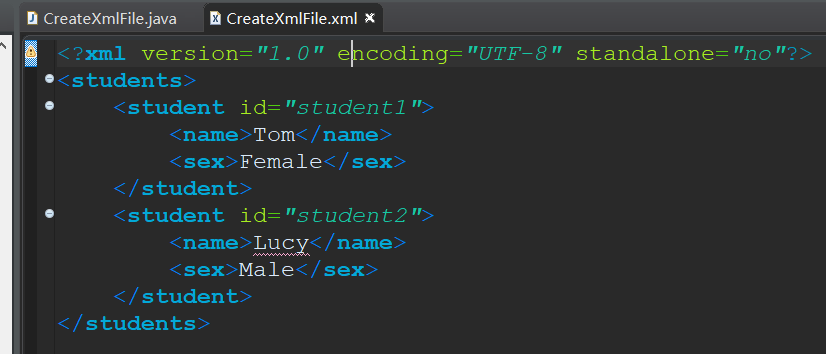
三、运行结果:CreateXmlFile.xml
 <?xml version="1.0" encoding="UTF-8" standalone="no"?>

 <students>

     <student id="student1">

         <name>Tom</name>

         <sex>Female</sex>

     </student>

     <student id="student2">

         <name>Lucy</name>

         <sex>Male</sex>

     </student>

 </students>
Java 操纵XML之创建XML文件的更多相关文章
- C#操作XML存取创建XML
using System.Xml; #region 生成XML文档 /// <summary> /// /// </summary> /// <param name=& ...
- java Ftp上传创建多层文件的代码片段
StringBuilder sBuilder = new StringBuilder(); String[] pah = path.split("/"); ...
- Java根据html模板创建 html文件
1.创建html的java代码 package com.tydic.eshop.util; import java.io.FileInputStream; import java.io.FileOut ...
- 关于Java里面File类创建txt文件重复???
private JButton getOpenButton() { if (openButton == null) { openButton = new JButton(); openButton.s ...
- asp.net创建XML文件方法
方法一:按照XML的结构一步一步的构建XML文档. 通过.Net FrameWork SDK中的命名空间"System.Xml"中封装的各种类来实现的 方法一:按照XML的结 ...
- 利用python 创建XML文件
#coding=utf-8 from xml.etree import ElementTree import pdb def printNodeInfo(node): #node.tag 标签名称 # ...
- .NET 对 XML 进行创建,增加,删除,修改操作整理
前言: 最近做了一个项目,程序A在一个服务器程序B在另一台服务器,然而主程序A需要访问程序B的图片集文件夹下载到本服务器上,为了防止多次对Web Services进行调用,在主程序A中创建一个XML文 ...
- Php 创建XML
Php 创建XML Php 创建XML并保存,学习示比例如以下: <? php try{ //创建DOMDocument 对象 $dom = new DOMDocument("1.0 ...
- java创建TXT文件并进行读、写、修改操作
import java.io.*; /** * * 功能描述:创建TXT文件并进行读.写.修改操作 * * @author <a href="mailto:zha ...
随机推荐
- angularJs的继承
为什么要继承,本来是后端的概念,但是同样适用于前端开发.继承,无疑是将通用的东西抽取出来. 下面介绍的是angular的伪继承,就是说是通过继承scope这个变量来实现的.代码很简单,一行代码就可以. ...
- bzoj千题计划263:bzoj4870: [六省联考2017]组合数问题
http://www.lydsy.com/JudgeOnline/problem.php?id=4870 80分暴力打的好爽 \(^o^)/~ 预处理杨辉三角 令m=n*k 要求满足m&x== ...
- ASP.NET MVC3-Music Store中英文教程 [下载]
翻译原文档名: MVC Music Store版本: ASP.NET MVC3概述Mvc Music Store 是一个为WEB开发人员一步一步介绍和解释如何使用MVC和Visual Web开发的应用 ...
- 20155215 2016-2017-2 《Java程序设计》第8周学习总结
20155215 2016-2017-2 <Java程序设计>第7周学习总结 教材学习内容总结 第十四章 NIO使用频道(Channel)来衔接数据节点.在处理数据时,NIO可以让你设置缓 ...
- [译]使用chage来管理Linux密码过期时间的七个例子
本文译自 7 Examples to Manage Linux Password Expiration and Aging Using chage 本文主要介绍命令chage的使用,译文会对原文内容会 ...
- 使用 jquery-autocomplete插件 完成文本框输入自动填充联想效果 解决兼容IE输入中文问题
项目中有时会用到ajax自动补全查询,就像Google的搜索框中那样,输入汉字或者字母的首个字母,则包含这个汉字或者字母的相关条目会显示出来供用户选择,该插件就是实现这样的功能的.autocomple ...
- keepalived启动不成功,状态一直是inactive(dead) 的解决办法以及keepalived高版本没有rc.d目录,虚拟VIP无法访问问题
安装配置教程我就不说了,网上很多,这里只给出我遇到的两个坑: 1 rc.d目录 ,kp在1.4版本之后rc.d要去解压之后的源码包里去找,make之后的目录里面没有了,我使用的是2.0.13最新版本, ...
- 【干货】Linux内存数据的获取与转存 直捣密码
知识源:Unit 2: Linux/Unix Acquisition 2.1 Linux/Unix Acquistion Memory Acquisition 中的实验demo部分 小白注意,这是网 ...
- 在pycharm和tensorflow环境下运行nmt
目的是在pycharm中调试nmt代码,主要做了如下工作: 配置pycharm编译环境 在File->Settings->Project->Project Interpreter 设 ...
- C#排队处理DEMO
using System; using System.Collections.Generic; using System.Linq; using System.Text; using System.T ...