
a no-risk path to IEEE P1687
You’ve heard all about IJTAG (IEEE P1687) [1,2,3], a new standard for accessing embedded test and debug features that makes it easier to integrate IP blocks and to retarget hierarchical (test) patterns [4,5]. You may also have heard that IJTAG is compatible with JTAG. The question now is what this means for your future test methodology. Can you use IJTAG on designs that use an in-house solution based on IEEE 1149.1 top-level test access and IEEE 1500 compliant cores? Can you try out IJTAG without any hardware changes?
The answer is yes. You can use P1687 on 1149.1/1500 compatible designs, without changing your hardware, and still reap some of the key advantages of IJTAG, such as automated test-pattern generation for any level of your product’s hierarchy. Here’s how.
Start with what you have
Say you have a design with a top-level 1149.1-compliant test access port (TAP) controller and a 1500-compliant wrapper TAP (WTAP) for each core (Figure 1), connected in any valid configuration. Assume that the embedded IP (IP1 through IP6) does not comply with the P1687 standard. This means that you cannot use P1687 to describe patterns directly at the IP level and have them automatically retargeted to the top level.
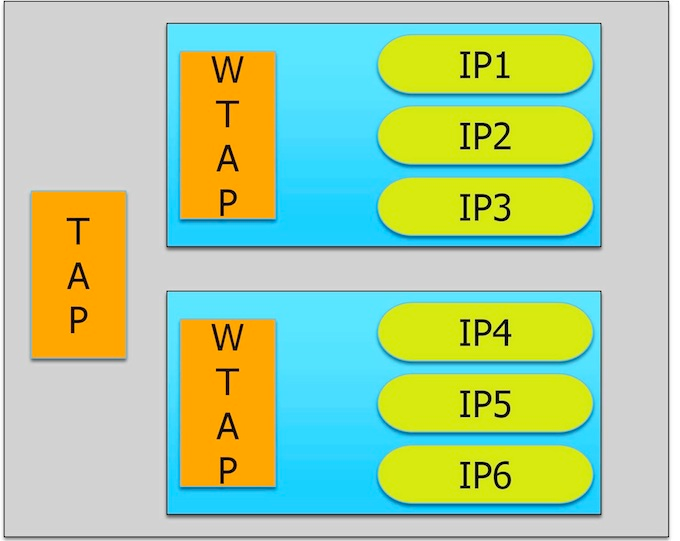
Figure 1
A test access mechanism using an IEEE 1149.1-compliant TAP at the top
level and IEEE 1500 compliant WTAP for core access.
Instead, you can gain access to the IPs by modeling the WTAPs, and the operation of the IP blocks at their boundaries with the WTAP, in P1687. To be able to do this, you describe the TAP and the WTAPs as ‘instruments’, that is, IP with a P1687-compliant interface and behavior (Figure 2).
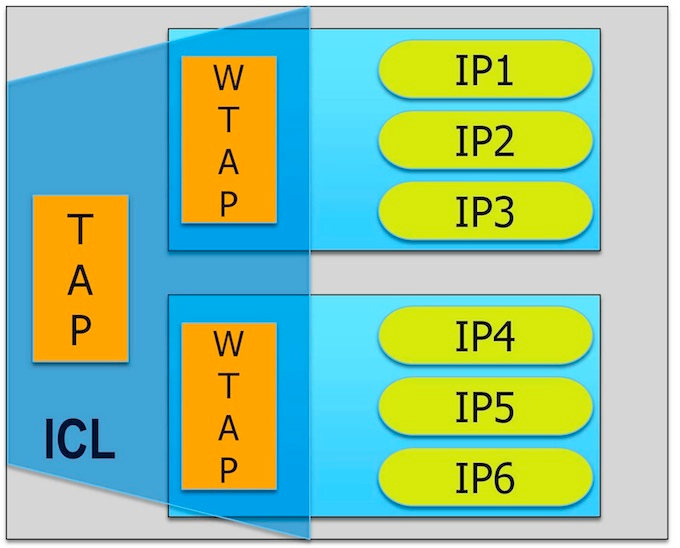
Figure 2
You can get going with IEEE P1687 by describing the TAP, the WTAP, and the connection in ICL. No hardware changes are needed.
The behavior of the TAP and WTAP fulfils the requirements of P1687. [The hardware requirements of P1687 were derived from 1149.1 and 1500, so the TAP and WTAP are compatible with P1687 by definition.]
Describe what you need
P1687 defines two languages. The first, Instrument Connection Language (ICL), uses a set of keywords to describe the (test) input/output interface of instruments. For example, the ICL keyword ‘TMSPort’ says that an input port should be considered a TMS port as defined in IEEE 1149.1. Using these keywords, ICL defines syntaxes for each port, as well as a semantic, and a relative timing of events. The body of the TAP and WTAP ICL module definition is rather generic. The only variations come through the length of the registers, which can be parameterized, or any user-defined bits, ports, or opcodes.
In ICL, you can then define instances of modules and describe their connections, creating an ICL ‘netlist’. The ICL netlist for our example would only include three instances – the two modules and the top level.
One feature of the ICL language is particularly helpful when defining a TAP or WTAP, because it lets you define a string representing a value, for example, using the ‘alias’ keyword:
Alias myUserOpcode1 = 5b’10100
You can also use enumeration tables, which are be bound to the registers for which they are valid:
EnumTable {
Reset = 5b’00000 ;
myUserOpcode1 = 5b’10100 ;
enableIP3 = 5b’01000 ;
…
}
Where is the advantage?
The benefit of aliases and enumeration tables becomes clearer when we consider the second language that P1687 defines: PDL, or Procedural Description Language. PDL is a command language that instructs an application tool how to generate patterns. It does not describe the patterns themselves, which may include control values to gain access to instruments. Instead PDL defines at the instrument level where (either a port or a register) to apply care bit values. The application tool follows the PDL instructions and retargets the care bits through the ICL hierarchy, automatically adding control values as needed. When the top-most ICL level is reached, the final PDL can be translated into any common pattern format, like STIL, WGL, or can be written out as a verification test bench.
Using the example design, here’s how you would enable the IP3 connection to the first WTAP (see Figure 2):
iWrite core1.instWTAP.IR enableIP3

iApply
This tells the application tool to generate a sequence of operations for the TAP and WTAPs that puts the bit-sequence 01000 in the instruction register ‘IR’ of the instance ‘instWTAP’ in ‘core1’. The ‘iApply’ keyword ends the instruction block.
Notice the absence of any user-defined control operations. What needs to be done to get the user-defined care bits ‘enableIP3’ into the specified location ‘core1.instWTAP.IR’ is up to the application tool and doesn’t concern you as the P1687 user.
Let’s move the test one hierarchy level higher. Figure 3 shows two dice in a system.
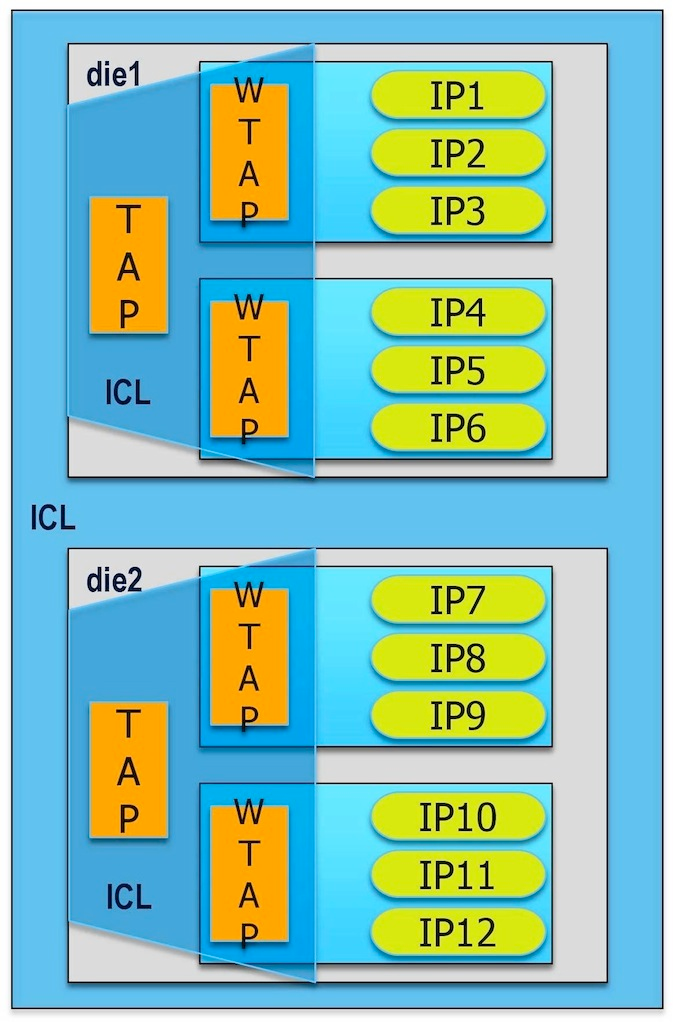
Figure 3
Moving from die level to system level is painless in P1687.
Again, you want to enable IP3. This additional level of hierarchy only slightly changes the actual PDL instruction, which now reads:
iWrite die1.core1.instWTAP.IR enableIP3

iApply
Compare this to the work involved in reusing a die-level validated test at the system level.
Now, what if you want to enable IP3 in parallel to IP12 (assuming the hardware allows this)? In PDL, this is simply:
iWrite die1.core1.instWTAP.IR enableIP3

iWrite die2.core2.instWTAP.IR enableIP12

iApply
With the goal of minimizing the overall scan operation and recognizing that the hardware allows it, the application tool will find a way to apply both opcodes at the same time to the two WTAPs.
Migrate your hardware step by step
In our example, we couldn’t assume that any of the IP blocks complied with P1687. Let us revisit this situation. Because they are controlled by a WTAP and probably receive and send data through the WTAP’s scan port, it is very likely that they are actually P1687 compliant or very close to it. If this is so, you would no longer need to address the IP block at the WTAP boundary but could talk directly to it and easily execute complex tasks such as an MBIST repair, leaving the WTAP operation to the application tool.
Figure 4 shows a situation in which some IPs are already migrated to P1687 and can be directly operated. The others remain proprietary and continue to be operated through PDL at the WTAP level. The figure also shows that all of the P1687 instruments can be added to a single P1687 access network. This network is under the control of the application tool, and allows it to further optimize access time to instruments and to improve the scan data volume. Over time, the entire WTAP may become redundant.
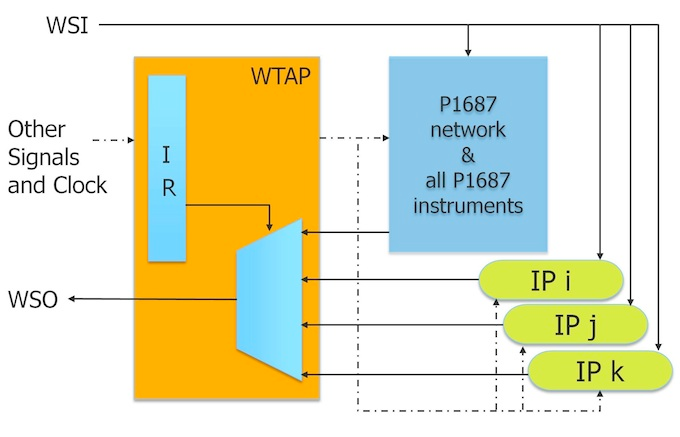
Figure 4
All P1687 components are in a network behind the WTAP, enabled through one WTAP opcode, for optimal P1687 access.
Summary
Adopting P1687 on a design that already uses IEEE 1149.1 and/or IEEE 1500 is easy and doesn’t require hardware changes. The biggest advantages of P1687 in this scenario are the automation of generating tests for different hierarchy levels, and the general ease of use: you only need to define the care bits of the operation. The P1687 application tool applies them at the right time and in the right location, independently of how complex it is to access the IP. You can easily migrate IP to the P1687 standard piece by piece, mixing P1687 instruments and proprietary IP in the same design. P1687 offers a smooth transition from a proprietary in-house solution to an IEEE-standard backed commercial test solution.
References
1. The IEEE P1687 Working Group’s Web site is located at http://grouper.ieee.org/groups/1687/
2. J. Rearick, et al., “IJTAG (Internal JTAG): A Step Toward a DFT Standard,” International Test Conference, 2005.
3. K. Posse, et al., “IEEE P1687: Toward Standardized Access of Embedded Instrumentation,” International Test Conference, 2006.
4. B. Vermeulen, et al., “Overview of Debug Standardization Activities,” IEEE Design & Test of Computers, May/June 2008.
5. F. Ghani Zadegan, et al., “Reusing and Retargeting On-Chip Instrument Access Procedures in IEEE P1687,” to be published in Design & Test of Computers, IEEE.
6. M. Keim, R. Press, “What’s The Difference Between JTAG (IEEE 1149.1) And IJTAG (IEEE P1687)?” Electronic Design, May 16, 2012, http://electronicdesign.com, article ID 73938.
a no-risk path to IEEE P1687的更多相关文章
- EtherType
EtherType is a two-octet field in an Ethernet frame. It is used to indicate which protocol is encaps ...
- ETHERNET帧结构
以太网帧http://blog.csdn.net/guoshaobei/article/details/4768514 Ethernet的帧格式 (转) http://jiangqiaosun.bl ...
- PHP Datatype Conversion Safety Risk、Floating Point Precision、Operator Security Risk、Safety Coding Principle
catalog . 引言 . PHP operator introduction . 算术运算符 . 赋值运算符 . 位运算符 . 执行运算符 . 递增/递减运算符 . 数组运算符 . 类型运算符 . ...
- UVa 567: Risk
这是一道很简单的图论题,只要使用宽度优先搜索(BFS)标记节点间距离即可. 我的解题代码如下: #include <iostream> #include <cstdio> #i ...
- ZOJ1221 && UVA567:Risk(Floyd)
Risk is a board game in which several opposing players attempt to conquer the world. The gameboard c ...
- Risk(最短路)
Risk Time Limit: 1000MS Memory Limit: 10000K Total Submissions: 2915 Accepted: 1352 Description ...
- Node入门教程(8)第六章:path 模块详解
path 模块详解 path 模块提供了一些工具函数,用于处理文件与目录的路径.由于windows和其他系统之间路径不统一,path模块还专门做了相关处理,屏蔽了彼此之间的差异. 可移植操作系统接口( ...
- Exception from System.loadLibrary(smjavaagentapi) java.lang.UnsatisfiedLinkError: no smjavaagentapi in java.library.path
可能原因: 缺少smjavaagentapi.jar文件或者libsjavaagentapi.so缺少相关的依赖包. 解决方法: 1. 检查sso的lib下面是否有smjavaagentapi.jar ...
- ZOJ1221 Risk
Description Risk is a board game in which several opposing players attempt to conquer the world. The ...
随机推荐
- C#.NET WebApi返回各种类型(图片/json数据/字符串),.net图片转二进制流或byte
using System.IO; /// <summary> /// WebApi返回图片 /// </summary> public HttpResponseMessage ...
- 在Windows 8.1中安装必应输入法
鉴于目前Windows 8.1中自带的输入法存在一些Bug以及功能上的不完整性(比如,在Office 2013中删除掉错误的字符后快速输入第一个字母将丢失的问题:在QQ聊天窗口中文输入状态下快速输入省 ...
- 当Windows Phone遇到Windows 8
三年前,Windows Phone系统的发布表示了微软夺回移动市场的决心.一年前,Windows 8的发布,昭示着Windows Phone系统取得的成功——扁平化图标风格.动态磁贴.SkyDrive ...
- Linux (rz、sz命令行)与本地电脑 命令行上传、下载文件
Linux 与本地电脑直接交互, 命令行上传.下载文件. 一.lrzsz命令行安装: 1.rpm安装:(链接: http://pan.baidu.com/s/1cBuTm2 密码: vijf) rpm ...
- php+sqlserver之如何操作sqlserver数据库
https://blog.csdn.net/xia13100004562/article/details/58598872 2016年12月19日 17:15:39 阅读数:6790 前面已经基本配置 ...
- 经过实际验证的C#调用Haskell的方法
[系统环境] Windows Server 2008 R2,Haskell Platform 2013.2.0.0,ghc 7.6.3,cabal 1.16.0 [操作步骤] 1. 安装Windows ...
- css中“~”和“>”是什么意思
p~ul选择器 p之后出现的所有ul. 两种元素必须拥有相同的父元素,但是 ul不必直接紧随 p. css中“>”是: css3特有的选择器,A>B 表示选择A元素的所有子B元素. 与A ...
- WPF自定义TabControl样式
WPF自定义TabControl,TabControl美化 XAML代码: <TabControl x:Class="SunCreate.Common.Controls.TabCont ...
- 3.怎样将ASP.NET MVC应用程序发布到IIS
这一篇,教大家怎么将ASP.NET MVC应用程序发布到本地或者IIS中.打开上一篇创建的ASP.NET MVC 5.0应用程序.[PS:上一篇--->2.第一个ASP.NET MVC 5.0应 ...
- 日期时间类:Date,Calendar,计算类:Math
日期时间类 计算机如何表示时间? 时间戳(timestamp):距离特定时间的时间间隔. 计算机时间戳是指距离历元(1970-01-01 00:00:00:000)的时间间隔(ms). 计算机中时间2 ...