
Rabbitmq基本使用 SpringBoot整合Rabbit SpringCloud Stream+Rabbit
https://blog.csdn.net/m0_37867405/article/details/80793601
四、docker中使用rabbitmq
1. 搭建和启动
使用地址:rabbitmq docker
#1. 拉去rabbitmq的镜像

docker pull hub.c.163.com/library/rabbitmq:3.6.11-management

#2. 由于rabbitmq远程访问是不允许guest的,所以启动时候需要设置一个用户名和密码

docker run -d --hostname my-rabbit --name some-rabbit -e RABBITMQ_DEFAULT_USER=admin -e RABBITMQ_DEFAULT_PASS=admin -p 15672:15672 -p 5672:5672 hub.c.163.com/library/rabbitmq:3.6.11-management

# 提示信息:d525b1c1004f50284ca5bab76e8e5e2fea55462b72d9f923cea0da1a29e9aa9dnetstat- 1
- 2
- 3
- 4
- 5
在浏览器中访问:192.168.186.135:15672然后输入用户名和密码
2. java Hello world
简单的一对一生产消息

1.引入 pom.xml
<dependency>

      <groupId>com.rabbitmq</groupId>

      <artifactId>amqp-client</artifactId>

      <version>5.0.0</version>

</dependency>- 1
- 2
- 3
- 4
- 5
2.消息提供者
package com.itcloud.concurrency.rabbitmq;

import com.rabbitmq.client.Channel;

import com.rabbitmq.client.Connection;

import com.rabbitmq.client.ConnectionFactory;

public class MessageProvider {

    private static final String HOST = "192.168.186.135";

    private static final int PORT = 5672; // rabbitmq端口是5672

    private static final String USERNAME = "admin";

    private static final String PASSWORD = "admin";

    private static final String QUEUE_NAME = "hello";

    public static void main(String[] args) throws Exception {

        ConnectionFactory factory = new ConnectionFactory();

        factory.setHost(HOST);

        factory.setPort(PORT);

        factory.setUsername(USERNAME);

        factory.setPassword(PASSWORD);

        Connection connection = factory.newConnection();

        Channel channel = connection.createChannel();

        channel.queueDeclare(QUEUE_NAME, false, false, false, null);

        String message = "hello world";

        channel.basicPublish("", QUEUE_NAME, null, message.getBytes());

        System.out.println(" 生产消息:'" + message + "'");

    }

}
3.消费端
package com.itcloud.concurrency.rabbitmq;

import java.io.IOException;

import com.rabbitmq.client.Channel;

import com.rabbitmq.client.Connection;

import com.rabbitmq.client.ConnectionFactory;

import com.rabbitmq.client.Consumer;

import com.rabbitmq.client.DefaultConsumer;

import com.rabbitmq.client.Envelope;

import com.rabbitmq.client.AMQP.BasicProperties;

public class MessageConsumer {

    private static final String HOST = "192.168.186.135";

    private static final int PORT = 5672; // rabbitmq端口是5672

    private static final String USERNAME = "admin";

    private static final String PASSWORD = "admin";

    private static final String QUEUE_NAME = "hello";

    public static void main(String[] args) throws Exception {

        ConnectionFactory factory = new ConnectionFactory();

        factory.setHost(HOST);

        factory.setPort(PORT);

        factory.setUsername(USERNAME);

        factory.setPassword(PASSWORD);

        Connection connection = factory.newConnection();

        Channel channel = connection.createChannel();

        channel.queueDeclare(QUEUE_NAME, false, false, false, null);

        Consumer consumer = new DefaultConsumer(channel) {

            @Override

            public void handleDelivery(String consumerTag, Envelope envelope, BasicProperties properties, byte[] body)

                    throws IOException {

                String message = new String(body, "UTF-8");

                System.out.println("消费端接收消息:" + message);

            }

        };

        //true  异步接收消息

        channel.basicConsume(QUEUE_NAME, true, consumer);

    }

}
4.先后启动生产者和消费者
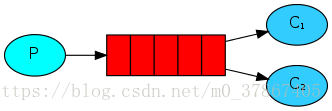
3. 一对多
4. SpringBoot整合RabbitMQ
第一种交换模式:Direct
1.引入依赖
        <dependency>

            <groupId>org.springframework.boot</groupId>

            <artifactId>spring-boot-starter-amqp</artifactId>

        </dependency>
application.yml
spring:

  rabbitmq:

    host: 192.168.186.135

    port: 5672

    username: admin

password: admin2.配置org.springframework.amqp.core.Queue
【MQConfig.java】
@Configuration

public class MQConfig {

    public static final String QUEUE = "queue";

    @Bean

    public Queue queue() {

        return new Queue(QUEUE);

    }

}- 【MQSender.java】消息发送端
@Component

@Slf4j

public class MQSender {

    @Autowired

    private AmqpTemplate amqpTemplate;

    public void sendMsg(String msg) {

        log.info("发送消息:" + msg);

        amqpTemplate.convertAndSend(MQConfig.QUEUE, msg);

    }

}
4.【MQReceiver.java】消息接收端
@Component

@Slf4j

public class MQReceiver {

    //绑定队列名称

    @RabbitListener(queues = { MQConfig.QUEUE })

    public void receive(String message) {

        log.info("springboot rabbitmq recevie message:" + message);

    }
5.简单的controller测试
    @PostMapping("/send")

    public String sendMsg(String msg) {

        mqSender.sendMsg(msg);

        return "success";

    }
第二种交换模式:Topic
:biking_woman:特点:
:ballot_box_with_check: 可以根据routing_key自由的绑定不同的队列
:ballot_box_with_check:发送端不需要知道发送到哪个队列,由routing_key去分发到队列中
2.配置org.springframework.amqp.core.Queue
【MQConfig.java】
    public static final String TOPIC_EXCHANGE = "topic_exchange";

    public static final String QUEUE_HELLO = "topic_hello";

    public static final String QUEUE_WORLD = "topic_world";

    public static final String ROUT_HELLO = "hello_key";

    public static final String ROUT_WORLD = "world_key";

    ...

    //=============定义两个队列========================

    @Bean

    public Queue queueHello() {

        return new Queue(QUEUE_HELLO);

    }

    @Bean

    public Queue queueWorld() {

        return new Queue(QUEUE_WORLD);

    }

    //===================声明topinc交换模式=========================

    @Bean

    public TopicExchange topicExchange() {

        return new TopicExchange(TOPIC_EXCHANGE);

    }

    //队列绑定到交换模式上

    @Bean

    @Autowired

    public Binding bindingHello(Queue queueHello, TopicExchange topicExchange) {

        return BindingBuilder.bind(queueHello).to(topicExchange).with(ROUT_HELLO);

    }

    @Bean

    @Autowired

    public Binding bindingWorld(Queue queueWorld, TopicExchange topicExchange) {

        return BindingBuilder.bind(queueWorld).to(topicExchange).with(ROUT_WORLD);

}- 【MQSender.java】消息发送端
    public void sendHello(String msg) {

        log.info("hello topic send messsgae:" + msg);

        amqpTemplate.convertAndSend(MQConfig.TOPIC_EXCHANGE, MQConfig.ROUT_HELLO, msg);

    }

    public void sendWorld(String msg) {

        log.info("world topic send messsgae:" + msg);

        amqpTemplate.convertAndSend(MQConfig.TOPIC_EXCHANGE, MQConfig.ROUT_WORLD, msg);

    }
4.【MQReceiver.java】消息接收端
    @RabbitListener(queues = MQConfig.QUEUE_HELLO)

    public void receiveHello(String msg) {

        log.info("springboot rabbitmq recevie message topicHello:" + msg);

    }

    @RabbitListener(queues = MQConfig.QUEUE_WORLD)

    public void receiveWorld(String msg) {

        log.info("springboot rabbitmq recevie message topicWorld:" + msg);

    }
5.简单的controller测试
    @PostMapping("/send/topic/hello")

    public String sendHello(String msg) {

        mqSender.sendHello(msg);

        return "success";

    }

    @PostMapping("/send/topic/world")

    public String sendWorld(String msg) {

        mqSender.sendWorld(msg);

        return "success";

    }
第三种交换:Fanout
:biking_woman: 特点:只要绑定该交换机的消费者都可以接受到消息
1.配置org.springframework.amqp.core.Queue
【MQConfig.java】
    public static final String FANOUT_EXCHANGE = "fanout_exchange";

    public static final String QUEUE_FANOUT = "queue_fanout";

    public static final String QUEUE_FANOUT2 = "queue_fanout2";

....

    @Bean

    public FanoutExchange fanoutExchange() {

        return new FanoutExchange(FANOUT_EXCHANGE);

    }

    @Bean

    public Queue queueFanout() {

        return new Queue(QUEUE_FANOUT);

    }

    @Bean

    public Queue queueFanout2() {

        return new Queue(QUEUE_FANOUT2);

    }

    @Bean

    @Autowired

    public Binding bindingFanout(FanoutExchange fanoutExchange, Queue queueFanout) {

        return BindingBuilder.bind(queueFanout).to(fanoutExchange);

    }

    @Bean

    @Autowired

    public Binding bindingFanout2(FanoutExchange fanoutExchange, Queue queueFanout2) {

        return BindingBuilder.bind(queueFanout2).to(fanoutExchange);

    }
2.【MQSender.java】消息发送端
    public void sendFanout(String msg) {

        log.info("fanout send messsgae:" + msg);

        amqpTemplate.convertAndSend(MQConfig.FANOUT_EXCHANGE, "", msg);

        amqpTemplate.convertAndSend(MQConfig.FANOUT_EXCHANGE, "", "自定义消息");

    }
3.【MQReceiver.java】消息接收端
    @RabbitListener(queues = MQConfig.QUEUE_FANOUT)

    public void receiveFanout(String msg) {

        log.info("springboot rabbitmq recevie message fanout:" + msg);

    }

    @RabbitListener(queues = MQConfig.QUEUE_FANOUT2)

    public void receiveFanout2(String msg) {

        log.info("springboot rabbitmq recevie message fanout2:" + msg);

    }
第四种交换模式:Headers
1.【MQConfig.java】
//======================headers交换模式============================

    public static final String HEADERS_EXCHANGE = "headers_exchange";

    public static final String QUEUE_HEADERS = "queue_headers";

    @Bean

    public HeadersExchange headersExchange() {

        return new HeadersExchange(HEADERS_EXCHANGE);

    }

    @Bean

    public Queue headersQueue() {

        return new Queue(QUEUE_HEADERS, true);

    }

    @Bean

    @Autowired

    public Binding headersBind(HeadersExchange headersExchange, Queue headersQueue ) {

        Map<String, Object> headers = new HashMap<>();

        headers.put("key1", "value1");

        headers.put("key2", "value2");

        return BindingBuilder.bind(headersQueue).to(headersExchange).whereAny(headers).match();
2.【MQSender.java】消息发送端
    public void sendHeaders(String msg) {

        log.info("headers send messsgae:" + msg);

        MessageProperties messageProperties = new MessageProperties();

        messageProperties.setHeader("key1", "value1");

        messageProperties.setHeader("key3", "value2");

        Message message = new Message(msg.getBytes(), messageProperties);

        amqpTemplate.convertAndSend(MQConfig.HEADERS_EXCHANGE, "", message);

    }
3.【MQReceiver.java】消息接收端
    @RabbitListener(queues = MQConfig.QUEUE_HEADERS)

    public void receiveHeaders(byte [] bytes) {

        log.info("springboot rabbitmq recevie message headers:" + new String(bytes));

    }
参考博客:
6. SpringCloud Stream
1. 创建生产者和消费者
1. 消息生产者:
新建【stream】springcloud项目
pom.xml
其他依赖略
        <dependency>

            <groupId>org.springframework.cloud</groupId>

            <artifactId>spring-cloud-starter-stream-rabbit</artifactId>

        </dependency>
//注意导包
import org.springframework.beans.factory.annotation.Autowired;
import org.springframework.cloud.stream.annotation.EnableBinding;
import org.springframework.cloud.stream.messaging.Source;
import org.springframework.integration.support.MessageBuilder;
import org.springframework.messaging.MessageChannel;
//消息发送端接口
public interface SendMsg {
public void send(Object obj);
}
//接口实现类
@EnableBinding(Source.class)
public class SendMsgImpl implements SendMsg {
@Autowired
private MessageChannel output;
@Override
public void send(Object obj) {
this.output.send(MessageBuilder.withPayload(obj).build());
}
}【application.yml】文件
server:

  port: 8083

spring:

  cloud:

    stream:

      binders:

        defaultRabbit:

          type: rabbit

          environment: #配置rabbimq连接环境

            spring:

              rabbitmq:

                host: 192.168.186.135

                username: admin

                password: admin

                virtual-host: /

      bindings:

        output:

         destination: myExchange  #exchange名称,交换模式默认是topic

         content-type: application/json

         binder: defaultRabbit
//测试使用的Controller
@RestController
public class SendController {
@Autowired
private SendMsg sendMsg;
@GetMapping("/send")
public String msgSend(String msg) {
this.sendMsg.send(msg);
return "success";
}
}2 .消息消费者
新建**【input】**springlcloud项目
//接口

public interface ReceiveMsg {

    public void receive(Message<Object> message);

}

//实现类

import org.springframework.cloud.stream.annotation.EnableBinding;

import org.springframework.cloud.stream.annotation.StreamListener;

import org.springframework.cloud.stream.messaging.Sink;

import org.springframework.messaging.Message;

import org.springframework.stereotype.Component;

@Component

@EnableBinding(Sink.class)

public class ReceiveMsgImpl implements ReceiveMsg {

    @Override

    @StreamListener(Sink.INPUT)

    public void receive(Message<Object> message) {

        System.out.println("接收消息" + message.getPayload());

    }

}
application.yml
server:

  port: 8085

spring:

  cloud:

    stream:

      binders:

        defaultRabbit:

          type: rabbit

          environment:

            spring:

              rabbitmq:

                host: 192.168.186.135

                username: admin

                password: admin

                virtual-host: /

      bindings:

        input:

         destination: myExchange

         content-type: application/json

         binder: defaultRabbit
Rabbitmq基本使用 SpringBoot整合Rabbit SpringCloud Stream+Rabbit的更多相关文章
- 阶段5 3.微服务项目【学成在线】_day05 消息中间件RabbitMQ_17.RabbitMQ研究-与springboot整合-消费者代码
创建消费者的类 使用@Component把这个类标记成一个Bean 把生产者里面创建的配置文件类复制过来 在原始的消费的方法上面 ,我们是可以拿到channel通道的 message.getBody就 ...
- 阶段5 3.微服务项目【学成在线】_day05 消息中间件RabbitMQ_14.RabbitMQ研究-与springboot整合-搭建环境
我们选择基于Spring-Rabbit去操作RabbitMQ https://github.com/spring-projects/spring-amqp 使用spring-boot-starter- ...
- 阶段5 3.微服务项目【学成在线】_day05 消息中间件RabbitMQ_16.RabbitMQ研究-与springboot整合-生产者代码
springBoot给我们提供了 RarbbitTemplate发送消息 创建测试类,因为我们是基于SpringBoot的来写的测试类.所以要加上@SpringBootTest和@RunWith的注解 ...
- 阶段5 3.微服务项目【学成在线】_day05 消息中间件RabbitMQ_15.RabbitMQ研究-与springboot整合-声明交换机和队列
复制topic的代码 把常量都设置成public方便其他的类引用 ExchangeBuilder里面有4个方法分别对应四个交换机. 声明Email和短信的队列 队列绑定交换机 所以需要把Bean注入到 ...
- Java之RabbitMQ(一)与SpringBoot整合
应用场景:异步处理.应用解耦.流量削峰 参照:https://blog.csdn.net/weixin_38364973/article/details/82834348 开端 RabbitAutoC ...
- SpringBoot28 RabbitMQ知识点、Docker下载RabbitMQ、SpringBoot整合RabbtiMQ
1 RabbitMQ知识点 1.1 整体架构图 消息生产者将消息投递到exchange中,exchange会以某种路由机制将生产者投递的消息路由到queue中,消息消费者再从queue中获取消息进行消 ...
- RabbitMQ与SpringBoot整合
RabbitMQ SpringBoot 一.RabbitMQ的介绍 二.Direct模式 三.Topic转发模式 四.Fanout Exchange形式 原文地址: https://www.cnb ...
- springboot学习笔记-6 springboot整合RabbitMQ
一 RabbitMQ的介绍 RabbitMQ是消息中间件的一种,消息中间件即分布式系统中完成消息的发送和接收的基础软件.这些软件有很多,包括ActiveMQ(apache公司的),RocketMQ(阿 ...
- SpringBoot系列八:SpringBoot整合消息服务(SpringBoot 整合 ActiveMQ、SpringBoot 整合 RabbitMQ、SpringBoot 整合 Kafka)
声明:本文来源于MLDN培训视频的课堂笔记,写在这里只是为了方便查阅. 1.概念:SpringBoot 整合消息服务 2.具体内容 对于异步消息组件在实际的应用之中会有两类: · JMS:代表作就是 ...
随机推荐
- jquery接触初级-----juqery DOM操作 之二
DOm 操作之: 1.1 children(),这个函数只是查找元素的子元素,而不考虑其他后代元素 <body> <p title="请选择你最喜欢的水果"&g ...
- webvtt字幕转srt字幕的python程序(附改名程序)
最近写了两个比较简单的python程序,原有都是由于看公开课感觉比较费劲,一个是下载的视频无用的名字太长,另一个就是下载的vtt字幕播放器不识别,写了一个vtt转换成str字幕格式的文件 vtt to ...
- JAVA_Package
Javaの名前空間の仕組みの1つにパッケージがあります.大規模開発では必須の概念です.また.他人の作ったコードの再利用という観点でも.パッケージを正しく活用する必要があります. ・完全修飾名:パッケー ...
- java.lang.ClassNotFoundException: org.hibernate.engine.SessionFactoryImplementor
Hibernate4.x与spring3.x整合,有关事务的处理,用Junit4测试,出现org.springframework.beans.factory.BeanCreationException ...
- python玩丢手绢问题,出局的顺序
# 丢手绢问题# 游戏规则: 有N个小朋友玩丢手绢游戏,做成一圈,从第一个小朋友开始数数,从一开始数,数到指定数字的小朋友要出列,然后下一个小朋友继续从1开始数,依次类推,算出最后一个留下来的小朋友是 ...
- bat脚本基础教程
bat脚本就是DOS批处理脚本,就是将一系列DOS命令按照一定顺序排列而形成的集合,运行在windows命令行环境上.本文主要介绍bat脚本基础语法,希望完成本文内容学习之后具备基础的bat脚本开发能 ...
- thinkphp的PHPexecl表格样式设置
/** * 以下是使用示例,对于以 //// 开头的行是不同的可选方式,请根据实际需要 * 打开对应行的注释. * 如果使用 Excel5 ,输出的内容应该是GBK编码. */ //require_o ...
- t959 unknown device 解决办法
换机器没用 换数据线没用 最后装了Kies3,好了! -------- 更新 跟数据线也有关系 换一条三星自带的试试
- 【原】linux学习路径
1. <<The Linux Command Line A Complete Introduction>> 2. <<Advanced Programming ...
- 设置DNS 代理
最近烦心事好多啊,坑爹的中介... 公司之前因为断电,导致DNS基础服务故障,很多系统好半天在能使用,所以这次吸取教训,设置备份的DNS server以及使得DNS能够动态迁移,在这种时候就显得格外的 ...