
Win10环境Tensorflow-GPU13.1/JupyterNotebook的安装
参考 :
Anaconda Tensorflow GPU 版本的安装问题
https://blog.csdn.net/u010977034/article/details/62038698
Windows10环境下安装Anaconda和tensorflow-gpu,然后在jupyter notebook上使用
https://blog.csdn.net/qq_37392244/article/details/85003425
利用conda安装指定版本的tensorflow
conda install --channel https://conda.anaconda.org/anaconda tensorflow=1.6.0
Tensorflow-gpu搭建CUDA 10.0与cuDNN等版本问题
https://blog.csdn.net/weixin_42718092/article/details/85001140
查询Tensorflow与CUDA/CuDNN的版本关系
查询官网说明:
https://tensorflow.google.cn/install/source_windows
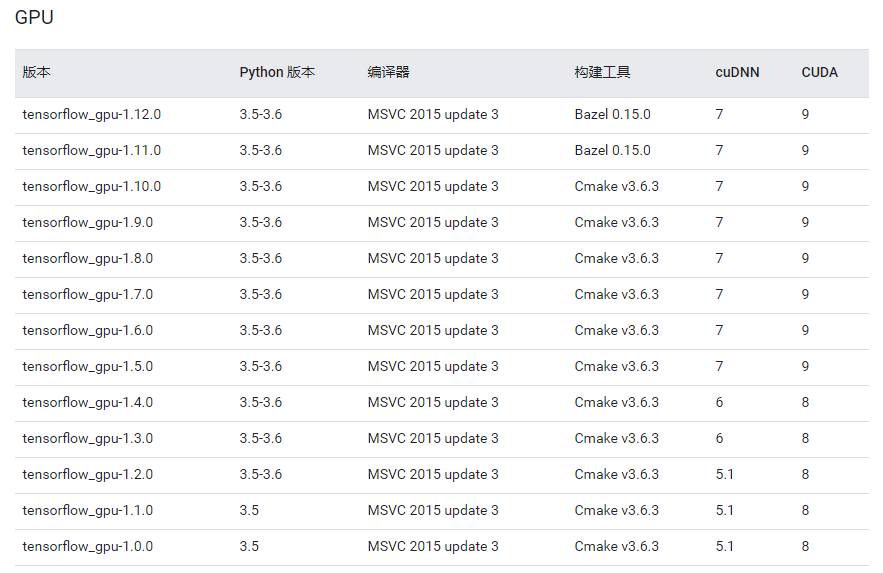
查询CUDA要求的GUP Driver Version
查询官网说明:

确定并安装需要的各个版本
python-3.6
tensorflow-gpu-1.13
cuda-10.0
cudnn-7.5
CUDA下载地址: https://developer.nvidia.com/cuda-toolkit-archive
CuDNN下载地址:https://developer.nvidia.com/rdp/cudnn-download
(下载CuDNN需要注册账号,注册过程比较简单)
说明:本次安装的tensorflow需要与Jupyter notebook集成,所以此处只安装CUDA和CuDNN(安装前确保GPU驱动已经安装且版本一致)。
CUDA是NVIDIA推出的运算平台,CuDNN是专门针对Deep Learning框架设计的一套GPU计算加速方案。在安装之前要查询下最新TensorFLow发行版支持到了哪个版本。另外,也要确认CUDA版本是否支持自己的显卡。
安装好CUDA后,再将下载好的cudnn文件解压缩,得到一个文件夹:
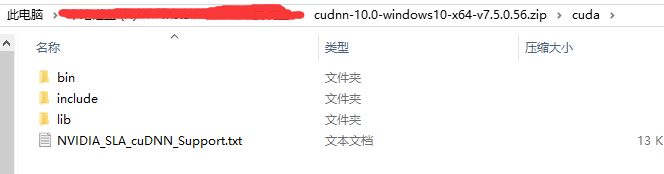
将里面的三个文件夹复制到C:\Program Files\NVIDIA GPU Computing Toolkit\CUDA\v10.0中
Anaconda的下载和安装
安装Anaconda(一个开源的Python发行版本)的最新版本。Anaconda包含了conda、Python等180多个科学包及其依赖项,功能强大。
Anaconda下载地址:https://www.anaconda.com/download/
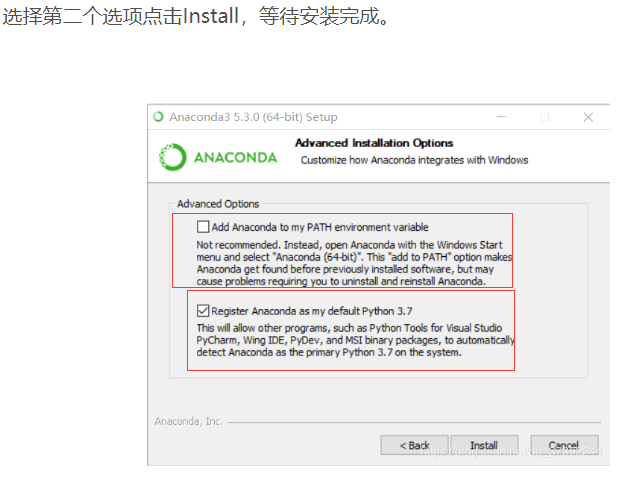
本次安装 的是Anaconda3-2018.12-Windows-x86_64,以下截图来自上述博客,主要用于说明有关的设置:
创建tensorflow环境
1、打开Anaconda Prompt
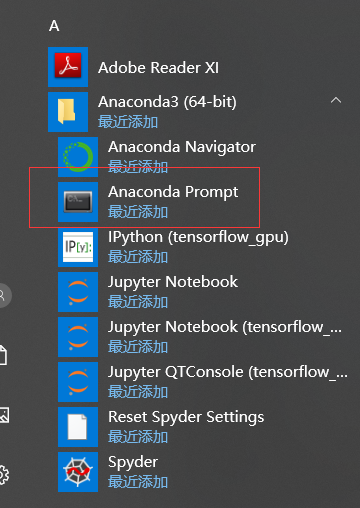
2、建立一个conda环境,命名为tensorflow_gpu
执行:conda create -n tensorflow_gpu python=3.6
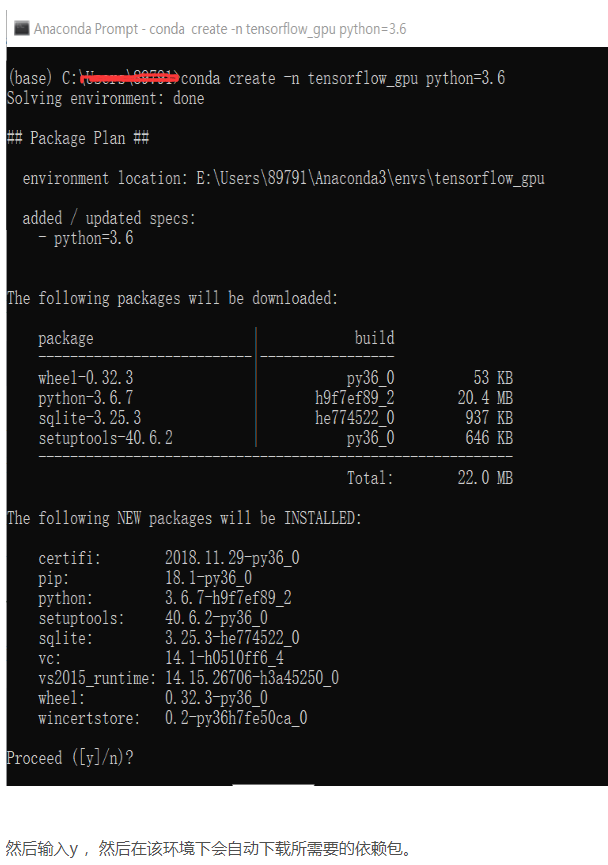
3.进入到tensorflow_gpu环境中,在这个环境下面完成之后tensorflow-gpu的安装。
进入创建好的环境中,执行命令:activate tensorflow_gpu
安装tensorflow-gpu,执行命令:conda install --channel https://conda.anaconda.org/anaconda tensorflow-gpu
(该命令的查询方式,见下附【在Anaconda如何确定要安装的tf-gpu版本】)
查看tensorlfow的版本:

为了后面安装的tensorflow-gpu可以在jupyter notebook中使用 ,需要安装这两个包,用conda命令安装:
- conda install ipython
- conda install jupyter
执行命令:ipython kernelspec install-self --user
看到类似这个结果:Installed kernelspec python3 in C:\Users\XXX\Jupyter\kernels\python3
然后就可以使用jupyter notebook了,使用的时候先用activate tensorflow_gpu命令打开建立的环境,然后再用jupyter notebook命令打开jupyter notebook就可以了。
4、jupyter notebook的使用
打开终端Anaconda Prompt,然后输入activate tensorflow_gpu,进入创建好的环境中,再用jupyter notebook命令打开jupyter notebook即可。
5、修改notebook文件的存放目录
执行命令: jupyter notebook --no-browser --ip=0.0.0.0 --allow-root --NotebookApp.token= --notebook-dir='C:\\Users\\dell\\MyJupyterCode'
在Anaconda如何确定要安装的tf-gpu版本
参考:https://blog.csdn.net/u010977034/article/details/62038698
1、打开终端Anaconda Prompt,执行命令:anaconda search -t conda tensorflow
此指令会查询conda环境中有哪些tensorflow安装包,通过查看版本,选择最高的版本安装。如下图
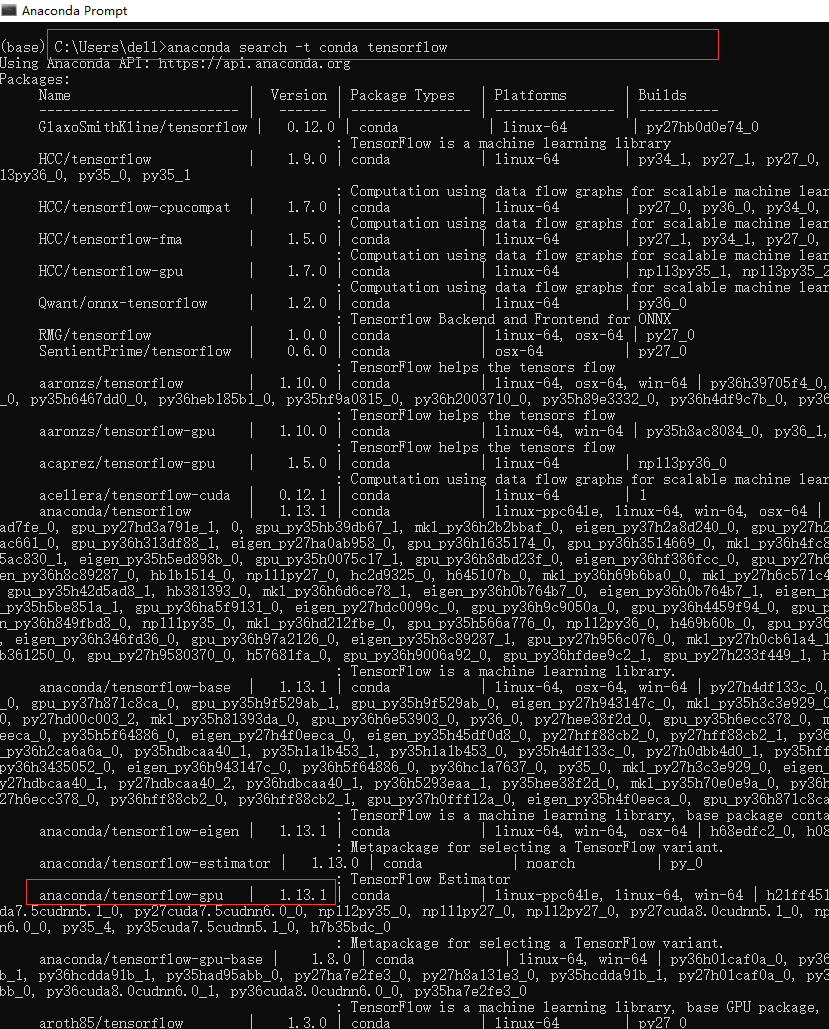
2、此处查询到的最高版本是 anaconda/tensorflow-gpu 1.13.1,则执行命令:anaconda show anaconda/tensorflow-gpu
这个命令令会告诉你怎么安装这个包
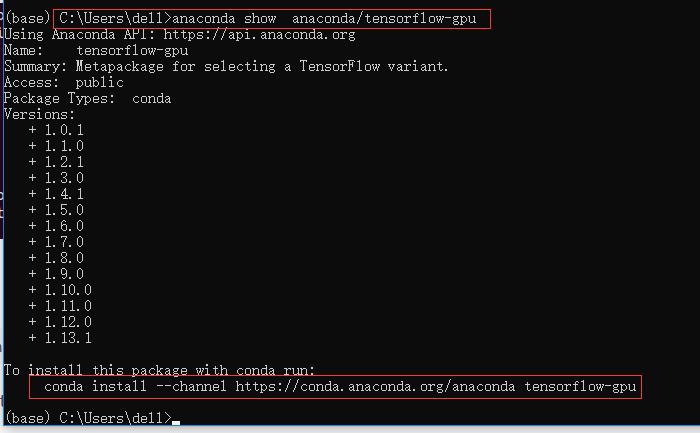
3、根据提示,在终端执行:
conda install --channel https://conda.anaconda.org/anaconda tensorflow-gpu
4、在第1步中可以看到,anaconda/tensorflow-gpu 带着版本号 1.13.1。因此,如果有多个版本,而你想安装一个指定的版本,则应该在命令后面加入版本信息,如:
conda install --channel https://conda.anaconda.org/anaconda tensorflow-gpu=1.13.1
如何删除已经建立 的conda环境

执行命令:
- deactivate tensorflow_gpu
- conda remove -n tensorflow --all
- conda info --envs
遇到的问题
第一次安装后,在jupyter book中运行import tensorflow as tf时,报错。
重要的报错信息是:ImportError: DLL load failed: 找不到指定的模块。ModuleNotFoundError: No module named '_pywrap_tensorflow_internal'
解决方案:
Anaconda中安装 的tensorflow-gpu版本太低,与CUDA/Cudnn不匹配,重新按上述方法选择13.1安装即可。
--------------------详细报错信息如下-------------------------------------------------------
ImportError Traceback (most recent call last)
~\AppData\Local\conda\conda\envs\tensorflow_gpu\lib\site-packages\tensorflow\python\pywrap_tensorflow_internal.py in swig_import_helper()
17 try:
---> 18 return importlib.import_module(mname)
19 except ImportError:
~\AppData\Local\conda\conda\envs\tensorflow_gpu\lib\importlib\__init__.py in import_module(name, package)
125 level += 1
--> 126 return _bootstrap._gcd_import(name[level:], package, level)
127
~\AppData\Local\conda\conda\envs\tensorflow_gpu\lib\importlib\_bootstrap.py in _gcd_import(name, package, level)
~\AppData\Local\conda\conda\envs\tensorflow_gpu\lib\importlib\_bootstrap.py in _find_and_load(name, import_)
~\AppData\Local\conda\conda\envs\tensorflow_gpu\lib\importlib\_bootstrap.py in _find_and_load_unlocked(name, import_)
~\AppData\Local\conda\conda\envs\tensorflow_gpu\lib\importlib\_bootstrap.py in _load_unlocked(spec)
~\AppData\Local\conda\conda\envs\tensorflow_gpu\lib\importlib\_bootstrap.py in module_from_spec(spec)
~\AppData\Local\conda\conda\envs\tensorflow_gpu\lib\importlib\_bootstrap_external.py in create_module(self, spec)
~\AppData\Local\conda\conda\envs\tensorflow_gpu\lib\importlib\_bootstrap.py in _call_with_frames_removed(f, *args, **kwds)
ImportError: DLL load failed: 找不到指定的模块。
During handling of the above exception, another exception occurred:
ModuleNotFoundError Traceback (most recent call last)
~\AppData\Local\conda\conda\envs\tensorflow_gpu\lib\site-packages\tensorflow\python\pywrap_tensorflow.py in <module>()
40 sys.setdlopenflags(_default_dlopen_flags | ctypes.RTLD_GLOBAL)
---> 41 from tensorflow.python.pywrap_tensorflow_internal import *
42 from tensorflow.python.pywrap_tensorflow_internal import __version__
~\AppData\Local\conda\conda\envs\tensorflow_gpu\lib\site-packages\tensorflow\python\pywrap_tensorflow_internal.py in <module>()
20 return importlib.import_module('_pywrap_tensorflow_internal')
---> 21 _pywrap_tensorflow_internal = swig_import_helper()
22 del swig_import_helper
~\AppData\Local\conda\conda\envs\tensorflow_gpu\lib\site-packages\tensorflow\python\pywrap_tensorflow_internal.py in swig_import_helper()
19 except ImportError:
---> 20 return importlib.import_module('_pywrap_tensorflow_internal')
21 _pywrap_tensorflow_internal = swig_import_helper()
~\AppData\Local\conda\conda\envs\tensorflow_gpu\lib\importlib\__init__.py in import_module(name, package)
125 level += 1
--> 126 return _bootstrap._gcd_import(name[level:], package, level)
127
ModuleNotFoundError: No module named '_pywrap_tensorflow_internal'
During handling of the above exception, another exception occurred:
ImportError Traceback (most recent call last)
<ipython-input-1-41389fad42b5> in <module>()
----> 1 import tensorflow as tf
~\AppData\Local\conda\conda\envs\tensorflow_gpu\lib\site-packages\tensorflow\__init__.py in <module>()
22
23 # pylint: disable=wildcard-import
---> 24 from tensorflow.python import *
25 # pylint: enable=wildcard-import
26
~\AppData\Local\conda\conda\envs\tensorflow_gpu\lib\site-packages\tensorflow\python\__init__.py in <module>()
49 import numpy as np
50
---> 51 from tensorflow.python import pywrap_tensorflow
52
53 # Protocol buffers
~\AppData\Local\conda\conda\envs\tensorflow_gpu\lib\site-packages\tensorflow\python\pywrap_tensorflow.py in <module>()
50 for some common reasons and solutions. Include the entire stack trace
51 above this error message when asking for help.""" % traceback.format_exc()
---> 52 raise ImportError(msg)
53
54 # pylint: enable=wildcard-import,g-import-not-at-top,unused-import,line-too-long
ImportError: Traceback (most recent call last):
File "C:\Users\dell\AppData\Local\conda\conda\envs\tensorflow_gpu\lib\site-packages\tensorflow\python\pywrap_tensorflow_internal.py", line 18, in swig_import_helper
return importlib.import_module(mname)
File "C:\Users\dell\AppData\Local\conda\conda\envs\tensorflow_gpu\lib\importlib\__init__.py", line 126, in import_module
return _bootstrap._gcd_import(name[level:], package, level)
File "<frozen importlib._bootstrap>", line 978, in _gcd_import
File "<frozen importlib._bootstrap>", line 961, in _find_and_load
File "<frozen importlib._bootstrap>", line 950, in _find_and_load_unlocked
File "<frozen importlib._bootstrap>", line 648, in _load_unlocked
File "<frozen importlib._bootstrap>", line 560, in module_from_spec
File "<frozen importlib._bootstrap_external>", line 922, in create_module
File "<frozen importlib._bootstrap>", line 205, in _call_with_frames_removed
ImportError: DLL load failed: 找不到指定的模块。
During handling of the above exception, another exception occurred:
Traceback (most recent call last):
File "C:\Users\dell\AppData\Local\conda\conda\envs\tensorflow_gpu\lib\site-packages\tensorflow\python\pywrap_tensorflow.py", line 41, in <module>
from tensorflow.python.pywrap_tensorflow_internal import *
File "C:\Users\dell\AppData\Local\conda\conda\envs\tensorflow_gpu\lib\site-packages\tensorflow\python\pywrap_tensorflow_internal.py", line 21, in <module>
_pywrap_tensorflow_internal = swig_import_helper()
File "C:\Users\dell\AppData\Local\conda\conda\envs\tensorflow_gpu\lib\site-packages\tensorflow\python\pywrap_tensorflow_internal.py", line 20, in swig_import_helper
return importlib.import_module('_pywrap_tensorflow_internal')
File "C:\Users\dell\AppData\Local\conda\conda\envs\tensorflow_gpu\lib\importlib\__init__.py", line 126, in import_module
return _bootstrap._gcd_import(name[level:], package, level)
ModuleNotFoundError: No module named '_pywrap_tensorflow_internal'
Failed to load the native TensorFlow runtime.
See https://www.tensorflow.org/install/install_sources#common_installation_problems
for some common reasons and solutions. Include the entire stack trace
above this error message when asking for help.
Win10环境Tensorflow-GPU13.1/JupyterNotebook的安装的更多相关文章
- 学习笔记24—win10环境下python版libsvm的安装
1.前言 由于毕业设计需要用到libsvm,所以最近专心于配置libsvm,曾经尝试过在matlab中安装,但是没有成功.最终在Python环境中完成安装. 2.LIBSVM介绍 LIBSVM 是台湾 ...
- Tensorflow安装教程-Win10环境下
背景:最新版的Tensoflow已经支持Python3.6 首先,下载并安装Anaconda3 内置Python3.6的版本 https://www.continuum.io/downloads 安装 ...
- Ubuntu 环境 TensorFlow (最新版1.4) 源码编译、安装
Ubuntu 环境 TensorFlow 源码编译安装 基于(Ubuntu 14.04LTS/Ubuntu 16.04LTS/) 一.编译环境 1) 安装 pip sudo apt-get insta ...
- win10环境下Android SDK下载安装及配置教程
最近在配置Android环境时,发现网上许多教程都是在win7版本下进行配置的且存在许多问题,按照流程无法正确配置环境,因此我在收集网上资料及亲自配置成功的情况下,写出此文章.如有无法配置成功的话,欢 ...
- win10环境下安装Ubantu双系统(超详解)
win10环境下安装Ubantu双系统 1.准备工作: 先去ubantu官网(https://www.ubuntu.com/download)去下载ubantu镜像.根据自己的实际情况选择32位的或者 ...
- win10环境下MySql(5.7.21版本)安装过程
windows10上安装mysql(详细步骤) 2016年09月06日 08:09:34 阅读数:60405 环境:windwos 10(1511) 64bit.mysql 5.7.14 时间:201 ...
- C# winform程序免安装.net framework在XP/win7/win10环境运行!(转)
C# winform程序免安装.net framework在XP/win7/win10环境运行! 前文: 首先感谢群里的大神宇内流云 提供的anyexec for windows版本. 经过本人搭 ...
- Win10下Tensorflow的安装
Win10下Tensorflow的安装 1. Tensorflow简介 TensorFlow是谷歌基于DistBelief进行研发的第二代人工智能学习系统,其命名来源于本身的运行原理.Tensor(张 ...
- YApi——手摸手,带你在Win10环境下安装YApi可视化接口管理平台
手摸手,带你在Win10环境下安装YApi可视化接口管理平台 YApi YApi 是高效.易用.功能强大的 api 管理平台,旨在为开发.产品.测试人员提供更优雅的接口管理服务.可以帮助开发者轻松创建 ...
随机推荐
- NavicatForOracle无法连接数据库,报错ORA-28547
因为换了新项目,要用到oracle数据库,但是用Navicat连接oracle不像连接MySql那样简单,连接的时候总是报ORA-28547,最后搜了一下解决方案发现是install client没有 ...
- 聊聊Java内存模型
一.Java内存模型 硬件处理 电脑硬件,我们知道有用于计算的cpu.辅助运算的内存.以及硬盘还有进行数据传输的数据总线.在程序执行中很多都是内存计算,cpu为了更快的进行计算会有高速缓存,最后同步至 ...
- Java开发中常用的设计模式(一)---工厂模式
一. 准备工作 1. 本文参考自 自己理解的工厂模式,希望对大家有所帮助 二. 开始 以汽车工厂为例,首先有个汽车类的接口 Car,里面有个开车的方法 drive(),然后有个宝马车的类 BMW 和 ...
- 封装7z软件实现批量文件或目录压缩
哈哈,作为一个特别懒的运维人来说 兄弟我写了一个批量压缩文件或目录的小工具,用来批量压缩文件目录 弄一下,然后就不用管他了,后天看结果就好了 操作步骤: 1.选择想做压缩处理的根目录 2.选择你要的功 ...
- POJ2186(强连通分量分解)
Popular Cows Time Limit: 2000MS Memory Limit: 65536K Total Submissions: 35035 Accepted: 14278 De ...
- layui table 行号
{type: 'numbers', title: '序号', width: '80'}
- php中0与’0’的区别
首先php中0与'0',转化后值相等,但是类型不同: php是一种弱类型的语句,他的变量.字符定义其实并不十分规范,比如 $a = '4′;我们可以说这个$a是一个字符,但是他又可以直接进行数字的加减 ...
- (二)windows上使用docker
参考文献: 1.下载CentOS7镜像 Docker中使用CentOS7镜像 2.使用docker 在Windows里使用Docker 3.使用docker docker学习笔记(windows/ce ...
- Spring AOP 中@Pointcut的用法
Spring Aop中@pointCut的用法,格式:execution(modifiers-pattern? ret-type-pattern declaring-type-pattern? nam ...
- [WPF 容易忽视的细节] —— Exception in WPF's Converter
前言: 在WPF中,Converter是我们经常要用到的一个工具,因为XAML上绑定的数据不一定是我们需要的数据. 问题: 在Converter中抛出一个异常导致程序崩溃,而且是在对未捕获异常进行集中 ...