
swift 基础小结01 --delegate、Optional、GCD的使用、request请求、网络加载图片并保存到沙箱、闭包以及桥接
本文主要记录swift中delegate的使用、“?!”Optional的概念、GCD的使用、request请求、网络加载图片并保存到沙箱、闭包以及桥接。
一、delegate的使用
swift中delegate的使用和objective-c大同小异,简单记录一下:
step1:声明
@objc protocol testProtocol:NSObjectProtocol{

     @objc optional func testAdd( a:Int, b:Int) -> Int;

}
step2:实例化
class TextFieldViewController: UIViewController ,UITextFieldDelegate{

    var delegate:testProtocol!

}
step3:调用delegate响应(此处没有处理delegate为空的情况,因为使用了“?”,当delegate为nil的时候,后面的testAdd不会被执行)
//        if (self.delegate != nil)&&(self.delegate?.responds(to:#selector(testProtocol.testAdd(a:b:))))!{
//            let result = self.delegate!.testAdd!(a: 2, b: 5)
//            print(result)
//        }
        let result = self.delegate?.testAdd!(a: 3, b: 1)
        print(result ?? "delegate没有响应")
step4:其他类遵循并实现协议
class UIBaseViewController: UIViewController,UITableViewDataSource,UITableViewDelegate,testProtocol{

        func testAdd( a:Int, b:Int) -> Int{

        print(a+b)

        return a+b

        }

        func jump{

           let txtVC = TextFieldViewController()

            txtVC.delegate = self

            self.navigationController?.pushViewController(txtVC, animated: true)

         }

}
二、“? !”的使用和含义
详细深层的理解,请Google,百度,下面简单记录使用时的区别
self.navigationController?.pushViewController(txtVC, animated: true)
上面的“?”处理逻辑是,当navigationController为nil时直接不执行后面的push操作,当navigationController存在时执行后面的push操作。
self.navigationController!.pushViewController(txtVC, animated: true)
上面的“!”对UINavigationController?进行了手动解包,也就是说navigationController绝对存在,否则(navigationController为nil)程序就会直接崩溃。
三、GCD使用
1、同步
    func dispatch_sync(){

        let queue = DispatchQueue(label: "com.test.queuesync")

        queue.sync {

            for i in ...{

                print("sync test --- ",i)

            }

            print("   ---同步执行结束  子线程---")

        }

    }
2、异步
    func dispatch_async(){

        let queue = DispatchQueue(label: "com.test.queueasync")

        queue.async {

            for i in ...{

                print("async test --- ",i)

            }

            print("   ---异步执行结束  子线程---")

        }

    }
3、延时
    func dispatch_delay(){

        let queue = DispatchQueue(label: "com.test.queuedelay")

        queue.asyncAfter(deadline: DispatchTime.now()+DispatchTimeInterval.seconds(), execute: {

            print("   ---延迟执行执行结束  子线程---")

        })

    }
4、回到主线程
    func dispatch_main(){

        let queue = DispatchQueue(label: "com.test.backtomain")

        queue.async{

            DispatchQueue.main.sync {

                print("   ---回到主线程---")

            }

        }

    }
5、全局并发队列
        func dispatch_global(){

        let queue = DispatchQueue.global()

        let workItem = DispatchWorkItem{

            print("调用了workitem")

        }

        queue.async {

            for i in ...{

                print("async test --- ",i)

            }

            workItem.perform();

            print("   ---global异步执行结束  子线程---")

        }

    }
四、request
1、GET请求
    func getRequest(){

        let url = URL.init(string: "https://api.github.com/repos/alibaba/weex")

        let request = NSMutableURLRequest.init(url:url!)

        request.httpMethod = "GET"

        request.timeoutInterval =

//        let params = "type=shentong&postid=3333557693903" as NSString

//        request.setValue("application/x-www-form-urlencoded", forHTTPHeaderField: "Content-Type")

//        request.httpBody = params.data(using: String.Encoding.utf8.rawValue)

        let session = URLSession.shared

        let dataTask = session.dataTask(with: request as URLRequest) { (data, response, error) -> Void in

            if (error != nil) {

                print(error ?? "")

                return

            }else {

                //此处是具体的解析,具体请移步下面

                do{

                    let json = try JSONSerialization.jsonObject(with: data!, options: [])

                    print(json)

//                    let json: Any = try! JSONSerialization.jsonObject(with: data!, options: [])

//                    print(json)

                    JYToast.showInMidWindow(title: NSString.init(format: "data is -- \n %@", json as! CVarArg) as String)

                }catch{

                    print(error.localizedDescription)

                }

            }

        }

        dataTask.resume()

    }
2、POST请求
func postRequest(){

        let url = URL.init(string: "http://www.kuaidi100.com/query")

        let request = NSMutableURLRequest.init(url:url!)

        request.httpMethod = "POST"

        request.timeoutInterval =

        let params = "type=shentong&postid=3333557693903" as NSString

        request.setValue("application/x-www-form-urlencoded", forHTTPHeaderField: "Content-Type")

        request.httpBody = params.data(using: String.Encoding.utf8.rawValue)

        let session = URLSession.shared

        let dataTask = session.dataTask(with: request as URLRequest) { (data, response, error) -> Void in

            if (error != nil) {

                print(error ?? "")

                JYToast.showInMidWindow(title: NSString.init(format: "error is -- \n %@", error! as CVarArg) as String)

                return

            }else {

                do{

                    let json = try JSONSerialization.jsonObject(with: data!, options: [])

                    print(json)

                    JYToast.showInMidWindow(title: NSString.init(format: "data is -- \n %@", json as! CVarArg) as String)

                }catch{

                    print(error.localizedDescription)

                }

            }

        }

        dataTask.resume()

    }
五、加载网络图片并保存到沙箱
let queue = DispatchQueue.global();


queue.async {


    let data = NSData.init(contentsOf: NSURL.init(string: "http://c.hiphotos.baidu.com/image/h%3D300/sign=58adc7aa3c2ac65c78056073cbf3b21d/3b292df5e0fe9925de1b729a3da85edf8cb171e0.jpg")! as URL)
    let image = UIImage.init(data: data! as Data)
    let doc = NSHomeDirectory() as NSString
    doc.appendingPathComponent("Documents/1.jpg")


    do{
        try data?.write(toFile: doc.appendingPathComponent("Documents/1.jpg"), options: NSData.WritingOptions.atomic)
    }catch{
        print(error.localizedDescription)
    }


    let main = DispatchQueue.main
    main.async {
        let imageView = UIImageView.init(frame: CGRect.init(x: , y: , width: , height: ))
        imageView.image = image
        self.view.addSubview(imageView)
    }
}
六、闭包
闭包和block类似,有逃逸闭包和非逃逸闭包之分
//起别名
typealias AlertHandler = (_ action:UIAlertAction) -> ()

class JYShowAlert: NSObject {

    // 作为参数

    class func showAlert(alertTitle:String,message:String,actionTitle:String,handler:@escaping AlertHandler){

        let alertVC = UIAlertController.init(title:alertTitle, message: message, preferredStyle: UIAlertControllerStyle.alert)

        let confirm = UIAlertAction.init(title: actionTitle, style: UIAlertActionStyle.cancel, handler: handler)

        alertVC.addAction(confirm)

        let rootVC = UIApplication.shared.keyWindow?.rootViewController

        if ((rootVC?.presentedViewController) != nil){

            rootVC?.presentedViewController?.present(alertVC, animated: true, completion: nil)

        }else{

            rootVC?.present(alertVC, animated: true, completion: nil)

        }

    }

}
七、桥接文件
1、新建header-file
2、如下图导入
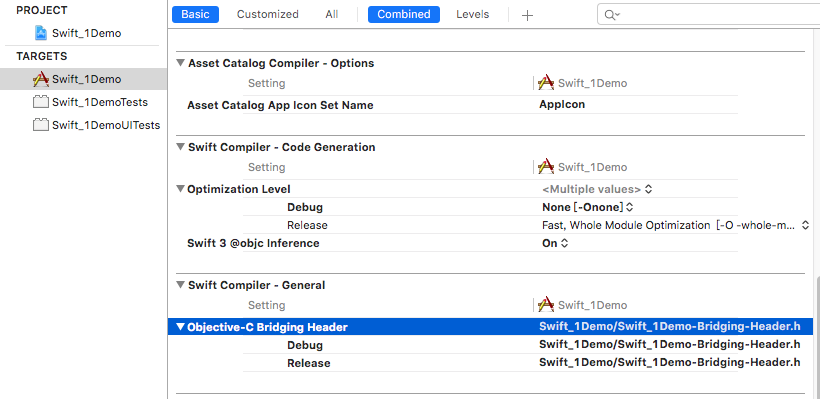
3、在文件中加入需要桥接的objective-c的头文件即可
swift 基础小结01 --delegate、Optional、GCD的使用、request请求、网络加载图片并保存到沙箱、闭包以及桥接的更多相关文章
- android 加载图片oom若干方案小结
本文根据网上提供的一些技术方案加上自己实际开发中遇到的情况小结. 众所周知,每个Android应用程序在运行时都有一定的内存限制,限制大小一般为16MB或24MB(视手机而定).一般我们可以通过获取当 ...
- ios基础篇(二十八)—— UITableView的上拉加载
本文主要展示一个demo实现UITableView的上拉加载数据: 先看看效果图: 接着上拉,加载更多数据: 主要实现的效果是在我们上拉结束拖拽之后,开始加载数据,数据加载的过程中有滚动轮提示用户正在 ...
- Webpack探索【15】--- 基础构建原理详解(模块如何被组建&如何加载)&源码解读
本文主要说明Webpack模块构建和加载的原理,对构建后的源码进行分析. 一 说明 本文以一个简单的示例,通过对构建好的bundle.js源码进行分析,说明Webpack的基础构建原理. 本文使用的W ...
- [Swift通天遁地]一、超级工具-(5)使用UIWebView(网页视图)加载本地页面并调用JavaScript(脚本)代码
★★★★★★★★★★★★★★★★★★★★★★★★★★★★★★★★★★★★★★★★➤微信公众号:山青咏芝(shanqingyongzhi)➤博客园地址:山青咏芝(https://www.cnblogs. ...
- [Swift通天遁地]一、超级工具-(4)使用UIWebView(网页视图)加载HTML和Gif动画
★★★★★★★★★★★★★★★★★★★★★★★★★★★★★★★★★★★★★★★★➤微信公众号:山青咏芝(shanqingyongzhi)➤博客园地址:山青咏芝(https://www.cnblogs. ...
- [Swift通天遁地]一、超级工具-(11)使用EZLoadingActivity制作Loading加载等待动画
★★★★★★★★★★★★★★★★★★★★★★★★★★★★★★★★★★★★★★★★➤微信公众号:山青咏芝(shanqingyongzhi)➤博客园地址:山青咏芝(https://www.cnblogs. ...
- Swift基础小结_2
import Foundation // MARK: - ?和!的区别// ?代表可选类型,实质上是枚举类型,里面有None和Some两种类型,其实nil相当于OPtional.None,如果非nil ...
- Swift基础学习01
相关网站:http://www.cnblogs.com/tt_mc/p/3871295.html 相关辅助操作: 可以在右边直接查看输出值 可能出现的常见问题: 1.凡是=注意左右间距一样 2 ...
- 学习swift从青铜到王者之swift基础部分01
1.1 变量和常量 var 变量名称 = 值(var可以修改) let 常量名称 = 值(let不可以修改) 1.2 基本数据类型 整数类型和小数类型 两种基本数据类型不可以进行隐式转换 var in ...
随机推荐
- Modeless对话框如何响应快捷键
MFC,Modeless对话框不会响应快捷键.解决的方案很多,其中之一是在PreTranslateMessage中地键盘消息进行拦截处理.
- ABP 框架 数据库底层迁移 Mysql 集群
技术交流,请加QQ群:538327407 我的各种github 开源项目和代码:https://github.com/linbin524 背景 笔者 目前架构的IOT 项目是使用abp 框架作为后台, ...
- B/S FastReprot使用
FastReport 交流群 群 号:554714044 前言 由于公司开发新产品,前后端分离.netcore +Angular ,之前C/S项目一直使用FastReport ,考虑到员工切换比较 ...
- Devexpress中Gridcontrol查找分组
private void button1_Click(object sender, EventArgs e) { DataTable dt = new DataTable(); dt.Columns. ...
- UWP 大爆炸你个锤子
今天看到 叫我蓝火火 s的 UWP中实现大爆炸效果(一) ,我也来说一下我的app [小薇自然语言处理]实现的大爆炸技术. 看一下效果先. 我的控件是基于wrappanel的,正如蓝火火说的,这样看 ...
- IPv6 Can't assign requested address
今天试了下 bind IPv6 的地址,报错 Can't assign requested address http://stackoverflow.com/questions/24780404/p ...
- VSTO:C#获取文档控件的值
基础知识准备: VSTO入门 创建Excel解决方案 string[] inputfileNames = { @"C:\1.xls", @"C:\2.xls" ...
- job任务执行流程与分区机制
job任务执行流程 1.run job阶段 ①收集整个job的环境信息(比如通过conf设定的参数,还有mapperClass,reducerClass,以及输出kv类型) ...
- AndroidStudio配置LitePal
配置,许多书上还有教程都忽略了将LitePal下载下来和拷贝的过程,这里写一个详细的课程 首先,前往GitHub,下载LitePal的包. 然后解压,会看到这个 进入download 自己选个版本,然 ...
- asp.net core 系列之用户认证(1)-给项目添加 Identity
对于没有包含认证(authentication),的项目,你可以使用基架(scaffolder)把 Identity的程序集包加入到项目中,并且选择性的添加Identity的代码进行生成. 虽然基架已 ...