
转:ExpressBars中的停靠控件使用
http://www.cnblogs.com/jxsoft/archive/2011/08/25/2152872.html
1 新手上路
1.1 控件简介
Dock panels
Dock panels是建立停靠应用的最主要部分,是在应用内部的windows局部窗口,可以放置其他的VCL控件。当一个Dock panels放在Form上后,它会自动漂浮在Form之上。如果需要停靠到窗体中,需要使用TdxDockSite控件,并且可以设置主题风格。
注意,当要对Dock panels控件进行删除、复制粘贴或者其他一些操作时,务必使用控件的上下文菜单来实现。
Dock panels之间可以互相停靠,停靠的结果有2种类型-tab containers 和side containers,例如,可以将side containers放到一个tab containers中。
Dock Sites
Dock Sites支持放置Dock panels,注意Dock Sites只能接受Dock panels控件;
如果没有Dock Sites上没有控件时,会有一个空白的矩形区域占位,如果不想这样,可以采用以下技巧:
l 用一个Dock Sites填充整个Form,然后在上面放上一个Dock panels;
l 如果将DockSites的autoSize属性设为true,它的大小会自适用所接受的Dock Panel或者container;
Docking Manager
Docking Manager控件可以集中控制所有或者部分的停靠控件。注意,它不是必须的,如果在Application的任何窗体上都没有放置Docking Manager,docking controller会接管停靠控件的管理。但是docking controller只提供默认设置,不允许改变停靠控件的设置。一般情况下都会使用Docking Manager。
1.2 如何定制Dock Panels外观
ExpressDocking提供4种预先设置好显示风格,标准(类似于Delphi)、Visual Studio .Net、office和Windows Xp风格。为了在设计时就能指定风格,需要使用Docking Manager的ViewStyle和LookAndFeel属性。注意LookAndFeel属性设置只能在ViewStyle属性设置为vsUseLookAndFeel时使用。
要指定一个dock panel的caption,使用Caption属性,设置图标使用ImageIndex属性,当然之前要给docking manager提供一个imageList。
1.3 停靠的基本操作
如果要改变dock panel的位置,但是不想在经过dock site上方的时候自动嵌入,可以在拖动的时候按住CTRL。
停靠控件的AllowDockClients属性为接受的控件停靠设定位置,AllowDock为停靠到其他控件设定位置。设置AllowFloating为False,可以禁止停靠控件漂浮,Dockable设置为False,则不允许拖动停靠。
1.4 创建一个Visual Studio .Net风格的界面
l 新建一个应用;
l 在窗体上放置一个TdxDockSite控件,并设置Align属性为alClient;
l 在TdxDockSite上放置一个TdxDockPanel控件,TdxDockPanel会自动充满整个TdxDockSite的区域。设置ShowCaption属性为False,隐藏面板标题栏;
l 在TdxDockPanel上放置一个memo控件,并设置Align为alClient;
l 设置dock panel的AllowDockClients属性,将所有的选项为False,阻止其他dock panel的停靠;
l 将dock site的AllowDockClients属性的dtTop选项设为False,将会阻止其他dock panel停靠到其上方;
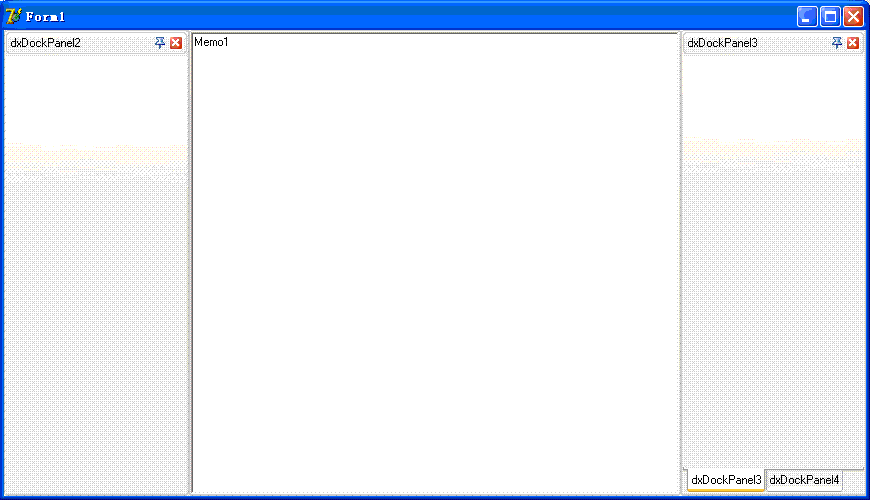
l 至此,所有准备步骤已经就绪。现在可以在窗体上新建一些dock panel,这些dock panel只能被拖放到窗体的边缘,除了上方。当一个dock panel停靠到窗体的左边,设置AutoHide属性,将会自动加入一个side container控件;
l 剩下的事情就要切入主题了,放置一个docking manager控件,设置ViewStyle属性为vsNET,整个应用的界面就会变成VS .NET风格了。

2 运行时的停靠控件
2.1 停靠规则
Dock panel 只能在dock site上该能改变大小。ExpressDocking提供2种停靠点类型:dock sites、layout sites和float sites。Dock sites 是放置在窗体上,用来接受dock panel的停靠;Layout sites是当有停靠操作时,自动创建在dock site上,以提供更灵活的布局定制;Float sites是漂浮dock panel的载体;
当dock panel处于漂浮状态,会自动创建Float sites,一旦dock panel停靠,Float site就会被销毁;
Layout sites 也是自动创建的,在dock panel停靠后发生。Layout site不会占据空间;
2.2 在运行时控制dock panels的停靠
Dock panel 提供DockTo, MakeFloating和UnDock方法来执行停靠操作。
MakeFloating是使dock panel离开Dock site而处于漂浮状态;
UnDock类似于MakFloating,但是会隐藏Dock panel。这个方法很有用处,例如当一个dock panel停靠到另外一个dock panel形成side container,你需要知道目标dock panel是不是在一个tab container中,如果之前所有的dock panel都被UnDock了,那么你就不必担心担心了。
例如将dock panel停靠到左边:
dxDockPanel1.DockTo(dxDockSite1, dtLeft, 0);
例如将一个dock panel充满窗体的下方,另外一个dock panel放置未充满区域的右侧:
dxDockPanel2.DockTo(dxDockSite1, dtBottom, 0); //此步会自动创建一个LayoutDockSite来放置dxDockPanel2;
dxDockPanel3.DockTo(dxDockPanel2.LayoutDockSite, dtRight, 0); //在dxDockPanel2的LayoutDockSite上来布局新dock panel;
docking manager提供一些方法来存储和加载布局,这些方法是SaveLayoutToIntFile, SaveLayoutToRegistry, SaveLayoutToStream, LoadLayoutFromIntFile,LoadLayoutFromRegistry, LoadLayoutFromStream
2.3 创建和管理Container Control
l 调用停靠控件的DockTo方法就会自动一个创建容器;当UnDock发生后,会自动销毁容器空间;
l 调用停靠控件的MakeFloating方法会自动销毁容器控件;
l 调用容器的ActiveChildIndex来查找当前活动dock panel;
l Dock Panel有个DockIndex属性,决定了其在容器中的索引;
l 容器有Children,ChildCount, ValidChildren和ValidChildCount属性,可以用来访问容器的成员dock panel;
l Dock panel的ParentDockControl, TabContainer和SideContainer属性可以用来访问父停靠控件;
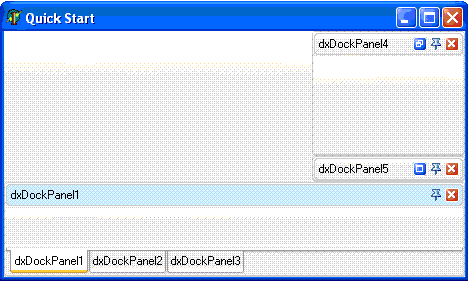
例如下面的代码演示:
// Delphi

var

  ATabContainer: TdxTabContainerDockSite;

  ASideContainer: TdxSideContainerDockSite;

begin

  // create a side container by docking the second panel

  // to the center of the first one

  dxDockPanel2.DockTo(dxDockPanel1, dtClient, 1);

  // obtaining the tab container created

  ATabContainer := dxDockPanel1.TabContainer;

  if ATabContainer = nil then Exit;

  // adding the third panel to the tab container

  dxDockPanel3.DockTo(ATabContainer, dtClient, 2);

  // switching to the first panel (tab)

  ATabContainer.ActiveChildIndex := dxDockPanel1.DockIndex;

  // create a vertical side container

  dxDockPanel4.DockTo(dxDockPanel5, dtTop, 0);

  // obtain the side container created

  ASideContainer := dxDockPanel4.SideContainer;

  if ASideContainer = nil then Exit;

  // expand the top panel within the side container

  ASideContainer.ActiveChildIndex := dxDockPanel4.DockIndex;

  // dock the side container to a site's right edge

  ASideContainer.DockTo(dxDockSite1, dtRight, 0);

  // dock the tab container to a site's bottom edge

  ATabContainer.DockTo(dxDockSite1, dtBottom, 0);

end;
2.4 在运行时动态创建停靠控件
停靠控件依靠Visible属性来设置是否显示。当调用控件的Close方法也会隐藏控件,但要记住,需要将docking manager的doFreeOnClose选项禁用,否则,Close方法会销毁控件;另外一个隐藏控件的方法是使用UnDock。调用Free也是销毁控件。
l 不必手工创建容器控件,因为他们是伴随停靠操作自动创建和销毁的;
l 如果一个控件隐藏,容器还会为它保留位置,当再次显示时,还会出现在同样的位置;
l 如果开启自动隐藏特性,再设置Visible属性为False会无效;因此在隐藏这类控件前,最好先取消自动隐藏特性;
停靠控件提供一些事件来响应这些操作:VisibleChanged, VisibleChaning, OnClose, OnCloseQuery;
l 显示和隐藏停靠控件的示例
  procedure TForm1. Button1Click(Sender: TObject);

begin

  if dxDockPanel1.AutoHide and not dxDockPanel1.Visible then

  begin

    dxDockingController.BeginUpdate;

    try

      // make the panel's client area visible on screen

      dxDockPanel1.Visible := True;

      // hide the panel

      dxDockPanel1.Visible := False;

    finally

      dxDockingController.EndUpdate;

    end;

  end

  else

      dxDockPanel1.Visible := not dxDockPanel1.Visible;

end;
l 动态创建停靠控件
  procedure TForm1.FormCreate(Sender: TObject);

begin

  // specify the open dialog抯 filter

  OpenDialog1.Filter := '*.bmp|*.bmp';

  with dxDockingManager1 do

  begin

    // force dock controls to be destroyed when closed

    Options := dxDockingManager1.Options + [doFreeOnClose];

    // specify the default tabs position and

    // the dock controls paint style

    DefaultTabContainerSiteProperties.TabsPosition := tctpTop;

    ViewStyle := vsNET;

  end;

end;

procedure TForm1.FormKeyDown(Sender: TObject; var Key: Word;

  Shift: TShiftState);

var

  APicture: TPicture;

  APanel: TdxDockPanel;

  AImage: TImage;

  ALastIndex, I: Integer;

begin

  if Key = VK_INSERT then

  begin

    // open the file and create the corresponding image object

    if not OpenDialog1.Execute() then Exit;

    APicture := TPicture.Create();

    APicture.LoadFromFile(OpenDialog1.FileName);

    // create a new panel that will hold the image

    APanel := TdxDockPanel.Create(Self);

    APanel.Caption := ExtractFileName(OpenDialog1.FileName);

    // check whether the dock site already has docked controls

    if dxDockSite1.ChildCount > 0 then

    begin

      // add the panel to the tab container

      ALastIndex := dxDockSite1.Children[1].ChildCount;

      APanel.DockTo(dxDockSite1.Children[1], dtClient, ALastIndex + 1);

    end

    else

      // dock the panel to the dock site

      APanel.DockTo(dxDockSite1, dtClient, 0);

    // create an image control and place it on the panel

    AImage := TImage.Create(Self);

    AImage.Parent := APanel;

    AImage.Align := alClient;

    AImage.Center := True;

    AImage.Picture := APicture;

  end;

  // delete all panels if the DELETE key has been pressed

  if Key = VK_DELETE then

  begin

    for I := 0 to dxDockingController.DockControlCount - 1 do

    begin

      if dxDockingController.DockControls[I] is TdxDockPanel then

        dxDockingController.DockControls[I].Close;

    end;

  end;

end;
转:ExpressBars中的停靠控件使用的更多相关文章
- 在C#中使用Panel控件实现在一个窗体中嵌套另一个窗体
在C#中使用Panel控件实现在一个窗体中嵌套另一个窗体 在C#中使用Panel控件实现在一个窗体中嵌套另一个窗体ShowAllPage sAllPage = new ShowAllPage(); ...
- PyQt5复杂控件(树控件、选项卡控件(滚动条控件、多文档控件、停靠控件)
1.树控件的基本使用方法QTreeWidget'''QTreeWidget树控件的使用方法添加图标,添加表格,添加复选框等'''from PyQt5.QtWidgets import *from Py ...
- 在DevExpress程序中使用SplashScreenManager控件实现启动闪屏和等待信息窗口
在我很早的WInform随笔<WinForm界面开发之"SplashScreen控件">有介绍如何使用闪屏的处理操作,不过那种是普通WInform和DevExpress ...
- 在WPF中使用WinForm控件方法
1. 首先添加对如下两个dll文件的引用:WindowsFormsIntegration.dll,System.Windows.Forms.dll. 2. 在要使用WinForm控 ...
- wpf telerik中的book控件
下载 telerik中的书本控件,仅供学习使用.
- [原创]在Framelayout中放置button控件出现的覆盖问题
android Framelayout(帧布局)是很常用的布局,主要用来处理需要多个view叠加显示的情况. 然而在使用中,我发现Framelayout中的Button控件,会挡住所有其他控件,而不论 ...
- (转)客户端触发Asp.net中服务端控件事件
第一章. Asp.net中服务端控件事件是如何触发的 Asp.net 中在客户端触发服务端事件分为两种情况: 一. WebControls中的Button 和HtmlControls中的Type为su ...
- 在web中使用windows控件,实现摄像头功能
最近做的一个Web版的视频会议项目,需要在网页中播放来自远程摄像头采集的实时视频,我们已经有了播放远程实时视频的使用C#编写的windows控件,如何将其嵌入到网页中去了?这需要使用一种古老的技术,A ...
- WPF中的image控件的Source赋值
WPF中的Image控件Source的设置 1.XAML中 简单的方式(Source="haha.png"); image控件的Source设置为相对路径后(Source=&quo ...
随机推荐
- HDU 5996 dingyeye loves stone ---BestCoder Round #90
题目链接 设根节点的深度为0,将所有深度为奇数的节点的石子数目xor起来,则先手必胜当且仅当这个xor和不为0. 证明同阶梯博弈.对于偶深度的点上的石子,若对手移动它们,则可模仿操作:对于奇深度上的石 ...
- poj 3734 Blocks 快速幂+费马小定理+组合数学
题目链接 题意:有一排砖,可以染红蓝绿黄四种不同的颜色,要求红和绿两种颜色砖的个数都是偶数,问一共有多少种方案,结果对10007取余. 题解:刚看这道题第一感觉是组合数学,正向推了一会还没等推出来队友 ...
- 20145213《Java程序设计学习笔记》第六周学习总结
20145213<Java程序设计学习笔记>第六周学习总结 说在前面的话 上篇博客中娄老师指出我因为数据结构基础薄弱,才导致对第九章内容浅尝遏止地认知.在这里我还要自我批评一下,其实我事后 ...
- SQL常用命令整理
1.增加字段 alter table docdsp add dspcodechar(200)2.删除字段 ALTER TABLE table_NAME DROP COLUMNcolum ...
- JavaScript prototype应用
//JavaScript自定义功能 //1,去除字符串两端空格 String.prototype.trim = function() { var start, end; start = 0; end ...
- 让项目同时支持ARC和非ARC
ttp://code4app.com/snippets/one/禁止某几个文件用ARC模式编译/502344256803fa246d000000#s0 如果你的绝大部分代码需要ARC,那么就设置项目支 ...
- 素数环(dfs+回溯)
题目描述: 输入正整数n,把整数1,2...n组成一个环,使得相邻两个数和为素数.输出时从整数1开始逆时针排列并且不能重复: 例样输入: 6 例样输出: 1 4 3 2 5 6 1 6 5 2 3 4 ...
- DB2应用中嵌入式SQL取值入本地变量
Declare section for host variables in C and C++ embedded SQL applications You must use an SQL declar ...
- 20145206《Java程序设计》实验五Java网络编程及安全
20145206<Java程序设计>实验五 Java网络编程及安全 实验内容 1.掌握Socket程序的编写: 2.掌握密码技术的使用: 3.设计安全传输系统. 实验步骤 我和201451 ...
- UVA 624 CD
主要是打印路径有点麻烦,然后就是用于标记的数组要开大点,不然会狂wa不止,而且还不告诉你re #include <cstdio> #include <iostream> #in ...