
linux基础-第十七单元 Samba服务
Samba的功能
Samba的安装
Samba服务的启动、停止、重启
Samba服务的配置
Samba服务的主配置文件
samba服务器配置实例
Samba客户端设置
windows客户端
Linux客户端
课后作业
【本节内容】
1. 掌握samba的功能: samba是一个网络服务器,用于Linux和Windows之间共享文件。
2. 掌握samba服务的启动、停止、重启
service smb start|stop|restart
3. 掌握samba的主配置文件为:/etc/samba/smb.conf
4. 掌握配置samba服务
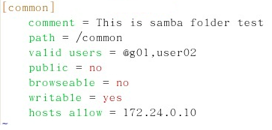
comment = ...... 设置共享注译
path = 设置共享目录的物理路径
valid users = @组名,用户名 设置允许哪些合法组或用户访问
public = yes|no 设置共享资源是否能给游客帐号访问
browseable = yes|no 设置该共享为隐藏共享
writable = yes|no 设置是否允许客户端写入数据
hosts allow = 设置允许访问该共享的合法网段或IP
samba安全认证掌握两种:share (匿名访问)user:用户名密码
添加smb用户和设置密码:smbpasswd –a 用户
Useradd u
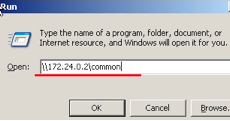
5. 掌握windows客户端的访问方式
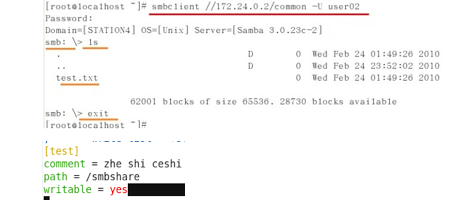
6.掌握Linux客户端的访问方式
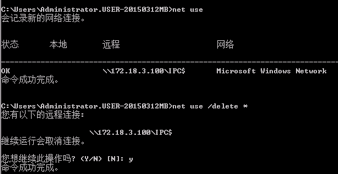
7.课后作业(用时50分钟)
1) Linux服务器上安装Samba服务软件
2) 对Samba的主配置文件进行资源共享设置
3) 在Samba服务器上设置用户登录账号
4) 分别在Linux和Windows客户端进行连接测试
Install samba
一、系统环境
[root@samba ~]# cat /etc/redhat-release
CentOS release 6.7 (Final)
[root@samba ~]# uname -a
Linux samba 2.6.32-573.el6.x86_64 #1 SMP Thu Jul 23 15:44:03 UTC 2015 x86_64 x86_64 x86_64 GNU/Linux
[root@samba ~]# uname -m
x86_64
二、准备环境
1、更改主机名称
hostname samba
sed -i 's#HOSTNAME=template.com#HOSTNAME=samba#g' /etc/sysconfig/network
退出SecureCRT,重新登录
2、关闭iptables 和selinux
关闭iptables
/etc/init.d/iptables stop
关闭开机自启动
chkconfig iptables off
查看iptables状态
[root@samba ~]# chkconfig --list|grep iptables
iptables 0:关闭 1:关闭 2:关闭 3:关闭 4:关闭 5:关闭 6:关闭
#关闭SELINUX
临时生效命令
Setenforce 0
永久生效命令
[root@study ~]# vi /etc/sysconfig/selinux
SELINUX=disabled
保留yum软件包
[root@samba ~]# grep keepcache /etc/yum.conf
keepcache=1
二、部署samba服务
1、安装samba
[root@samba ~]# yum install samba -y
2、创建目录并写入文件测试
[root@samba ~]# mkdir /company
[root@samba ~]# cd /company/
[root@samba company]# touch {a..z}.txt
[root@samba company]# ll
总用量 0
-rw-r--r-- 1 root root 0 11月 19 10:46 a.txt
-rw-r--r-- 1 root root 0 11月 19 10:46 b.txt
-rw-r--r-- 1 root root 0 11月 19 10:46 c.txt
-rw-r--r-- 1 root root 0 11月 19 10:46 d.txt
-rw-r--r-- 1 root root 0 11月 19 10:46 e.txt
-rw-r--r-- 1 root root 0 11月 19 10:46 f.txt
-rw-r--r-- 1 root root 0 11月 19 10:46 g.txt
部分省略.....
3、配置samba
#说明
Samba服务器的安全级别分为5种,分别是user、share、server、domain和ads。在设置不同的级别时,samba服务器还会使用口令服务器和加密口令。
1、user -----客户端访问服务器时需要输入用户名和密码,通过验证后,才能使用服务器的共享资源。此级别使用加密的方式传送密码。
2、share -----客户端连接服务器时不需要输入用户名和密码
3、server -----客户端在访问时同样需要输入用户名和密码,但是,密码验证需要密码验证服务器来负责。
4、domain -----采用域控制器对用户进行身份验证
5、ads -----若samba服务器加入到Windows活动目录中,则使用ads安全级别,ads安全级别也必须指定口令服务器
[root@samba ~]# cd /etc/samba/
[root@samba samba]# ll
总用量 20
-rw-r--r-- 1 root root 20 8月 24 02:58 lmhosts
-rw-r--r-- 1 root root 9778 8月 24 02:58 smb.conf
-rw-r--r-- 1 root root 97 8月 24 02:58 smbusers
#备份配置文件
[root@samba samba]# cp smb.conf smb.conf.backup.2016-11-19
#编辑配置文件
[root@samba ~]# vi smb.conf
93 # ----------------------- Standalone Server Options ------------------------
94 #
95 # Scurity can be set to user, share(deprecated) or server(deprecated)
96 #
97 # Backend to store user information in. New installations should
98 # use either tdbsam or ldapsam. smbpasswd is available for backwards
99 # compatibility. tdbsam requires no further configuration.
100
101 security = share #修改这里为share
102 passdb backend = tdbsam
在结尾添加这几行代码
#Set default shared directories;
[company]
comment=share file
path=/company
public=yes
writable=yes
printable = no
write list = +staff
[root@samba ~]# /etc/init.d/smb restart
关闭 SMB 服务:[确定]
启动 SMB 服务:[确定]
#直接访问samba
\\192.168.1.103\company
#权限:只读,不能写和执行
#在windows上面访问

#对文件夹进行授权:写权限
[root@samba ~]# chmod a+w /company/
[root@samba ~]# ll -d /company/
drwxr-xrwx 2 root root 4096 11月 19 10:46 /company/
或
只设置里面某个文件有写权限
[root@samba ~]# cd /company/
[root@samba company]# chmod o+w a.txt
#在windows中给a.txt写入内容:
11111
#在linux中查看
[root@samba company]# cat a.txt
11111
###################################################################
配置需要用户名和密码才能访问
[root@samba ~]# cd /etc/samba/
[root@samba samba]# ll
总用量 32
-rw-r--r-- 1 root root 20 8月 24 02:58 lmhosts
-rw-r--r-- 1 root root 9925 11月 19 11:29 smb.conf
-rw-r--r-- 1 root root 9925 11月 19 11:31 smb.conf.share.backup
-rw-r--r-- 1 root root 97 8月 24 02:58 smbusers
#配置smb.conf
[root@samba samba]# vi smb.conf
# ----------------------- Standalone Server Options ------------------------
#
# Scurity can be set to user, share(deprecated) or server(deprecated)
#
# Backend to store user information in. New installations should
# use either tdbsam or ldapsam. smbpasswd is available for backwards
# compatibility. tdbsam requires no further configuration.
security = user
passdb backend = tdbsam
#Set default user directories;
[company]
comment=share file
path=/company #如果没有这个目录,请按上面的方法创建并授权o+w权限
public=yes
writable=yes
printable = no
write list = +staff
#创建用户和密码
[root@samba samba]# useradd nulige
[root@samba samba]# smbpasswd -a nulige
New SMB password:
Retype new SMB password:
Added user nulige.
#重启服务
[root@samba samba]# /etc/init.d/smb restart
关闭 SMB 服务:[确定]
启动 SMB 服务:[确定]
#在windows中访问

#解决安全问题
[root@samba samba]# ll -d /home/nulige
drwx------ 2 nulige nulige 4096 11月 19 11:56 /home/nulige
[root@samba samba]# id nulige
uid=500(nulige) gid=500(nulige) 组=500(nulige)
#用户可以登录操作系统
[root@samba samba]# tail -1 /etc/passwd
nulige:x:500:500::/home/nulige:/bin/bash
#做默认共享,我们把他修改为,不能登录操作系统
[root@samba samba]# tail -1 /etc/passwd
nulige:x:500:500::/home/nulige:/sbin/nologin
linux基础-第十七单元 Samba服务的更多相关文章
- 第十七单元 Samba服务
Samba的功能 Samba的安装 Samba服务的启动.停止.重启 Samba服务的配置 Samba服务的主配置文件 samba服务器配置实例 Samba客户端设置 windows客户端 Linux ...
- Linux网络配置 RPM命令 samba服务 Linux目录结构
第一种方法: (1)用root身份登录,运行setup命令进入到 text mode setup utiliy对网络进行配置,这里可以进行ip,子网掩码,默认网关,dns的设置.(2)这时网卡的配置没 ...
- linux基础-第十单元 系统的初始化和服务
第十单元 系统的初始化和服务 Linux系统引导的顺序 Linux系统引导的顺序 BOIS的初始化和引导加载程序 什么是BIOS GRUB程序和grub.conf文件 什么是grub grub配置文件 ...
- linux基础-第二十单元_计划任务crond服务
第二十单元 计划任务crond服务 什么是计划任务:后台运行,到了预定的时间就会自动执行的任务,前提是:事先手动将计划任务设定好.这就用到了crond服务 crond服务相关的软件包[root@MiW ...
- linux基础-第八单元 正文处理命令及tar命令
第八单元 正文处理命令及tar命令 使用cat命令进行文件的纵向合并 两种文件的纵向合并方法 归档文件和归档技术 归档的目的 什么是归档 tar命令的功能 tar命令的常用选项 使用tar命令创建.查 ...
- linux基础-第十三单元 硬盘分区、格式化及文件系统的管理二
第十三单元 硬盘分区.格式化及文件系统的管理二 文件系统的挂载与卸载 什么是挂载 mount命令的功能 mount命令的用法举例 umount命令的功能 umount命令的用法举例 利用/etc/fs ...
- linux基础-第十一单元 系统监控
第十一单元 系统监控 系统监视和进程控制工具-top和free top命令的功能 TOP是一个动态显示过程,即可以通过用户按键来不断刷新当前状态.如果在前台执行该命令,它将独占前台,直到用户终止该程序 ...
- Linux基础命令---smbpasswd管理samba密码
smbpasswd smbpasswd指令可以用来修改samba用户的的密码,该指令不仅可以修改本地samba服务器的用户密码,还可以修改远程samba服务器的用户密码. 此命令的适用范围:RedHa ...
- linux基础-第七单元 用户、群组及权限的深入讨论
怎样查看文件的权限 ls命令详解 root用户及文件的安全控制 什么是root用户 用户分类 文件操作权限 文件操作权限的字符表示 chown chgrp 使用符号表示法设定文件或目录上的权限 chm ...
随机推荐
- POJ 1741 Tree (树的点分治入门)
Tree Time Limit: 1000MS Memory Limit: 30000K Total Submissions: 16172 Accepted: 5272 Descripti ...
- 【转】XPath 示例
XPath 示例 其他版本 本主题回顾整个 XPath 参考中出现的语法示例. 所有示例均基于 XPath 语法的示例 XML 文件 (inventory.xml). 有关在测试文件中使用 X ...
- .Net程序员之Python基础教程学习----函数和异常处理[Fifth Day]
今天主要记录,Python中函数的使用以及异常处理. 一.函数: 1.函数的创建以及调用. def Add(val1,val2): return val1+val2; print Add( ...
- .Net程序员之Python基础教程学习----列表和元组 [First Day]
一. 通用序列操作: 其实对于列表,元组 都属于序列化数据,可以通过下表来访问的.下面就来看看序列的基本操作吧. 1.1 索引: 序列中的所有元素的下标是从0开始递增的. 如果索引的长度的是N,那么所 ...
- iScroll4下表单元素聚焦及键盘的异常问题
本文是zawa同事写的一篇博文,相信很多在webapp开发中的同学使用iscroll4会遇到的该问题,问过zawa兄的建议,在这里分享给大家,希望能帮助到各位~ 原文地址:http://www.zaw ...
- [cocos2d-x]深入--几个代表性的类 (续)
摘要: 此文对cocos2d-x引擎中最具代表性,最能体现框架结构的几个类做了简单的介绍, 包括Director,Application, Renderer, EventDispatcher, Sch ...
- LESS速查
注释 缓存式注释/*注释内容*/ 非缓存式注释//注释内容 变量 @nice-blue: #5B83AD; @light-blue: @nice-blue + #111; #header { col ...
- 如何在CTF中当搅屎棍
论如何在CTF比赛中搅屎 0×00 前言 不能搅屎的CTF不是好CTF,不能搅屎的题目不是好题目. 我很赞成phithon神的一句话,"比赛就是和他人竞争的过程,通过各种手段阻止对手拿分我觉 ...
- 让IE10等支持classList2.0(转)
chrome24+, firesfox26+起支持classList2.0,即让它同时添加或删除多个类名, toggle方法支持第2个参数,用于强制添加或删除 var div = document.c ...
- IE8 HACK介绍
1.‘\9’: eg:.test { color/*\**/: blue\9 }.header {width:300px;} /* 所有浏览器*/.header {width/*\**/:330px\ ...