
Flex入门笔记
Test_01.mxml
<?xml version="1.0" encoding="utf-8"?>

<viewer:BaseWidget xmlns:fx="http://ns.adobe.com/mxml/2009"

				   xmlns:s="library://ns.adobe.com/flex/spark"

				   xmlns:mx="library://ns.adobe.com/flex/mx"

				   xmlns:viewer="com.esri.viewer.*"

				   xmlns:components="com.esri.viewer.components.*"

				   widgetConfigLoaded="init()">

	<fx:Script>

		<![CDATA[

			[Bindable]

			//有了上面这句,text="{helloContent}"才能起作用

			//this function called when the widget's configuration is loaded

			private var helloContent:String;

			private function init():void

			{

				if (configXML) // checking for valid content in the configuration file

				{

					//读取配置文件

					lbl.text = configXML.content || getDefaultString("helloContent");

					helloContent = "你好你好!!!";

//					lbl.text = "Success~~~~~~~~~~";

//					lbl.text = getDefaultString("helloContent");

				}

			}

			protected function label1_clickHandler(event:MouseEvent):void

			{

				// TODO Auto-generated method stub

				if(txt.text == ""){

					txt.text = "God bless you!!";

				}else{

					txt.text = "";

				}

			}

		]]>

	</fx:Script>

	<viewer:WidgetTemplate id="helloWorld"

						   width="557" height="419">

		<viewer:layout>

			<!--

			<s:VerticalLayout horizontalAlign="center" verticalAlign="middle"/>

			-->

			<s:VerticalLayout horizontalAlign="left" verticalAlign="middle"/>

		</viewer:layout>

		<s:Label id="lbl"

				 width="100%"

				 fontSize="18"

				 fontStyle="italic"

				 fontWeight="bold"/>

		<s:Label text="{helloContent}"/>

		<s:Label id="txt"

				 width="100%"

				 fontSize="18"

				 fontStyle="italic"

				 fontWeight="bold"

				 click="label1_clickHandler(event)"/>

	</viewer:WidgetTemplate>

</viewer:BaseWidget>
Test_01.xml
<configuration>

    <content>Hello World ! Successfully works!!!~~~@@@ </content>

</configuration>
运行效果
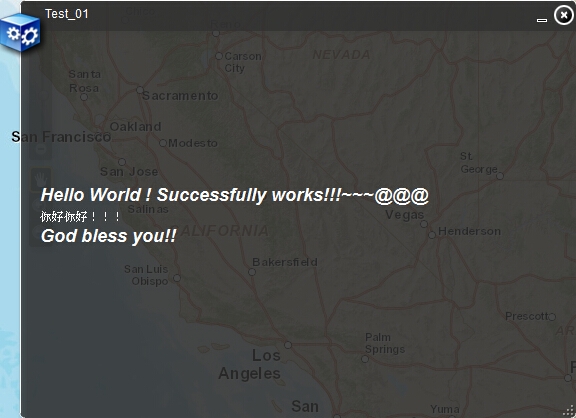 650) this.width=650;" src="http://s3.51cto.com/wyfs02/M00/43/49/wKiom1PZnSCzx7yjAAImLdHLp-g980.jpg" title="QQ截图20140731093316.jpg" alt="wKiom1PZnSCzx7yjAAImLdHLp-g980.jpg" />
垂直布局与Button
	<viewer:WidgetTemplate id="test_02" width="300" height="200">

		<s:Group>

			<s:layout>

				<s:VerticalLayout/>

			</s:layout>

			<s:Button label="1"/>

			<s:Button label="2"/>

			<s:Button label="3"/>

		</s:Group>

	</viewer:WidgetTemplate>
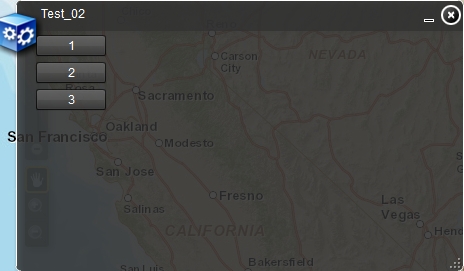 650) this.width=650;" src="http://s3.51cto.com/wyfs02/M00/43/4E/wKioL1PZrOeQP7XAAAEF1H3dhdY998.jpg" title="QQ截图20140731103617.png" alt="wKioL1PZrOeQP7XAAAEF1H3dhdY998.jpg" />
<s:Button label="1"/><!-- Button大写表示Button是实例,label小写表示label是属性 -->
<s:Button>
<s:label>3</s:label>
</s:Button><!-- 与上面的写法等价 -->
滚动内容
		<s:Scroller height="65">

			<s:Group>

				<s:layout>

					<s:VerticalLayout/>

				</s:layout>

				<s:Button label="1"/>

				<s:Button label="2"/>

				<s:Button label="3"/>

			</s:Group>

		</s:Scroller>
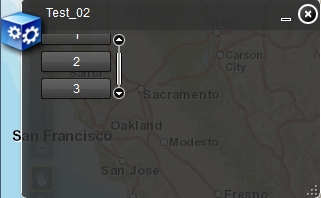 650) this.width=650;" src="http://s3.51cto.com/wyfs02/M02/43/4F/wKioL1PZrqHwh-dCAACaZ0V-cwc439.jpg" title="QQ截图20140731104332.png" alt="wKioL1PZrqHwh-dCAACaZ0V-cwc439.jpg" />
本文出自 “阿凡达” 博客,请务必保留此出处http://shamrock.blog.51cto.com/2079212/1533063
Flex入门笔记的更多相关文章
- 每天成长一点---WEB前端学习入门笔记
WEB前端学习入门笔记 从今天开始,本人就要学习WEB前端了. 经过老师的建议,说到他每天都会记录下来新的知识点,每天都是在围绕着这些问题来度过,很有必要每天抽出半个小时来写一个知识总结,及时对一天工 ...
- ES6入门笔记
ES6入门笔记 02 Let&Const.md 增加了块级作用域. 常量 避免了变量提升 03 变量的解构赋值.md var [a, b, c] = [1, 2, 3]; var [[a,d] ...
- [Java入门笔记] 面向对象编程基础(二):方法详解
什么是方法? 简介 在上一篇的blog中,我们知道了方法是类中的一个组成部分,是类或对象的行为特征的抽象. 无论是从语法和功能上来看,方法都有点类似与函数.但是,方法与传统的函数还是有着不同之处: 在 ...
- React.js入门笔记
# React.js入门笔记 核心提示 这是本人学习react.js的第一篇入门笔记,估计也会是该系列涵盖内容最多的笔记,主要内容来自英文官方文档的快速上手部分和阮一峰博客教程.当然,还有我自己尝试的 ...
- redis入门笔记(2)
redis入门笔记(2) 上篇文章介绍了redis的基本情况和支持的数据类型,本篇文章将介绍redis持久化.主从复制.简单的事务支持及发布订阅功能. 持久化 •redis是一个支持持久化的内存数据库 ...
- redis入门笔记(1)
redis入门笔记(1) 1. Redis 简介 •Redis是一款开源的.高性能的键-值存储(key-value store).它常被称作是一款数据结构服务器(data structure serv ...
- OpenGLES入门笔记四
原文参考地址:http://www.cnblogs.com/zilongshanren/archive/2011/08/08/2131019.html 一.编译Vertex Shaders和Fragm ...
- OpenGLES入门笔记三
在入门笔记一中比较详细的介绍了顶点着色器和片面着色器. 在入门笔记二中讲解了简单的创建OpenGL场景流程的实现,但是如果在场景中渲染任何一种几何图形,还是需要入门笔记一中的知识:Vertex Sha ...
- unity入门笔记
我于2010年4月1日硕士毕业加入完美时空, 至今5年整.刚刚从一家公司的微端(就是端游技术+页游思想, 具体点就是c++开发, directX渲染, 资源采取所需才会下载)项目的前端主程职位离职, ...
随机推荐
- 查看mysql语句运行时间
show profiles 之类的语句来查看 mysql> show profiles; Empty set mysql> show variables like "%pro%& ...
- block的使用
转载自:http://mobile.51cto.com/hot-403897.htm 一.概述 Block是C级别的语法和运行时特性.Block比较类似C函数,但是Block比之C函数,其灵活性体现在 ...
- Python 素数判断;以及默尼森数
1. 素数/质数 只能被2或者本身整除的正整数. 2. 默尼森数 P是素数且M也是素数,并且满足等式M=2^P-1,则称M为默尼森数. 编程小要求: 输出前5个默尼森数 1)最外层循环找素数 中间层循 ...
- break 的一个“高级用法”(转)
转载:http://blog.csdn.net/lovelan1748/article/details/5321558 本小节不是很适于没有多少实际编程经历的初学者,所以初学者可以跳过,以后再回头阅读 ...
- BZOJ 1112: [POI2008]砖块Klo
1112: [POI2008]砖块Klo Time Limit: 10 Sec Memory Limit: 162 MBSubmit: 1736 Solved: 606[Submit][Statu ...
- Leetcode 134 Gas Station
There are N gas stations along a circular route, where the amount of gas at station i is gas[i]. You ...
- 【BZOJ-3337】ORZJRY I 块状链表
3337: ORZJRY I Time Limit: 30 Sec Memory Limit: 512 MBSubmit: 190 Solved: 50[Submit][Status][Discu ...
- bzoj1801[AHOI2009]CHESS中国象棋
题意:在棋盘上放一些炮使得它们不互相攻击.其实就是一行/一列最多放两个. 50分的数据中n,m至少有一个不超过8,比较直接的想法是对n/m中较小的一维做状态压缩,状态f[i][S1][S2]表示在前i ...
- ESPCMS /adminsoft/control/citylist.php Int SQLInjection Vul
catalog . 漏洞描述 . 漏洞触发条件 . 漏洞影响范围 . 漏洞代码分析 . 防御方法 . 攻防思考 1. 漏洞描述 Relevant Link:2. 漏洞触发条件 0x1: POC htt ...
- Cloud Design Patterns Book Reading(undone)
目录 . the most common problem areas in cloud application development ) Availability ) Data Management ...