
SpringMvc中初始化参数绑定
初始化参数绑定与类型转换很类似,初始化绑定时,主要是参数类型
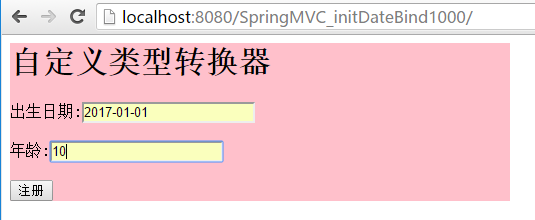
---单日期
在处理器类中配置绑定方法 使用@InitBinder注解
在这里首先注册一个用户编辑器 参数一为目标类型 propertyEditor为属性编辑器,此处我们选用 CustomDateEditor属性编辑器,
参数一为想转换的日期格式,参数二表示是否允许为空

package cn.controller;

import java.text.DateFormat;
import java.text.SimpleDateFormat;
import java.util.Date;
import org.springframework.beans.propertyeditors.CustomDateEditor;
import org.springframework.stereotype.Controller;
import org.springframework.web.bind.WebDataBinder;
import org.springframework.web.bind.annotation.InitBinder;
import org.springframework.web.bind.annotation.RequestMapping;

/**
 *
 * @author 景佩佩
 *
 */
@Controller
public class MyController{
     //处理器方法
    @RequestMapping(value="/first.do")
    public String doFirst(Date birthday,int age) {
        System.out.println("3333");
        return "/welcome.jsp";
    }

    //自定义一个方法
    @InitBinder
    public void initBinder(WebDataBinder binder){
        DateFormat df=new SimpleDateFormat("yyyy-MM-dd");
        binder.registerCustomEditor(Date.class, new CustomDateEditor(df, true));
    }

}
只需在applicationContext.xml配置一个包扫描器就行
<?xml version="1.0" encoding="UTF-8"?>
<beans xmlns="http://www.springframework.org/schema/beans"
    xmlns:xsi="http://www.w3.org/2001/XMLSchema-instance"
    xmlns:context="http://www.springframework.org/schema/context"
    xmlns:aop="http://www.springframework.org/schema/aop"
    xmlns:tx="http://www.springframework.org/schema/tx"
    xmlns:mvc="http://www.springframework.org/schema/mvc"
     xsi:schemaLocation="
        http://www.springframework.org/schema/beans http://www.springframework.org/schema/beans/spring-beans.xsd
        http://www.springframework.org/schema/context http://www.springframework.org/schema/context/spring-context.xsd
        http://www.springframework.org/schema/aop http://www.springframework.org/schema/aop/spring-aop.xsd
        http://www.springframework.org/schema/tx http://www.springframework.org/schema/tx/spring-tx.xsd
        http://www.springframework.org/schema/mvc http://www.springframework.org/schema/mvc/spring-mvc.xsd
        ">

     <!-- 包扫描器 -->
     <context:component-scan base-package="cn.controller"></context:component-scan>

</beans>
index.jsp
<%@ page language="java" import="java.util.*" pageEncoding="utf-8"%>
<%
String path = request.getContextPath();
String basePath = request.getScheme()+"://"+request.getServerName()+":"+request.getServerPort()+path+"/";
%>

<!DOCTYPE HTML PUBLIC "-//W3C//DTD HTML 4.01 Transitional//EN">
<html>
  <head>
    <base href="<%=basePath%>">
    <style type="text/css">
       form{
        background-color:pink;
         width:500px;
       }
    </style>
    <title></title>
  </head>

  <body>
    ${ex.message }
    <form action="${pageContext.request.contextPath }/first.do" method="post">
    <h1>自定义类型转换器</h1>
                 出生日期:<input name="birthday" value="${birthday }"/>${birthdayerror }<br/><br/>
                 年龄:<input name="age" value="${age }"/>${ageerror }<br/><br/>
       <input type="submit" value="注册"/>
    </form>
  </body>
</html>
welcome.jsp
<%@ page language="java" import="java.util.*" pageEncoding="utf-8"%>
<%
String path = request.getContextPath();
String basePath = request.getScheme()+"://"+request.getServerName()+":"+request.getServerPort()+path+"/";
%>

<!DOCTYPE HTML PUBLIC "-//W3C//DTD HTML 4.01 Transitional//EN">
<html>
  <head>
    <base href="<%=basePath%>">

    <title>欢迎页面</title>

  </head>

  <body>
     <h1>欢迎访问${uname }${param.uage }</h1>
  </body>
</html>
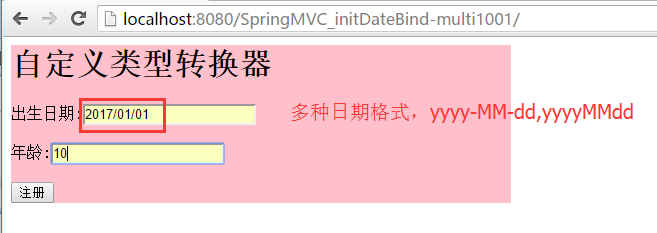
---多日期格式
配置步骤:
在处理器类中使用我们自定的属性编辑器
MyController.java
package cn.controller;

import java.util.Date;
import org.springframework.stereotype.Controller;
import org.springframework.web.bind.WebDataBinder;
import org.springframework.web.bind.annotation.InitBinder;
import org.springframework.web.bind.annotation.RequestMapping;

@Controller
public class MyController{
     //处理器方法
    @RequestMapping(value="/first.do")
    public String doFirst(Date birthday,int age) {
        System.out.println("3333");
        return "/welcome.jsp";
    }

    //自定义一个方法
    @InitBinder
    public void initBinder(WebDataBinder binder){
        System.out.println("==========");
        binder.registerCustomEditor(Date.class, new MyDateEditor());
    }

}
属性编辑器
此时我们需要考虑使用哪个属性编辑器,需要定义自己的属性编辑器
大致的配置方式如单日期相似,只需要更换属性编辑即可
自定义的属性编辑器,需要我们继承PropertiesEditor,重写里面的setAsText方法,使用setValue方法赋值
MyDateEditor.java
package cn.controller;

import java.text.ParseException;
import java.text.SimpleDateFormat;
import java.util.Date;
import java.util.regex.Pattern;

import org.springframework.beans.TypeMismatchException;
import org.springframework.beans.propertyeditors.PropertiesEditor;
/**
 *
 * @author 景佩佩
 *
 */
public class MyDateEditor extends PropertiesEditor{

    /**
     * source:字符串型的日期
     */
    @Override
    public void setAsText(String source) throws IllegalArgumentException {
        //一旦报错,自动调度到异常处理器
        SimpleDateFormat sdf=getDateFormat(source);

        try {
             Date date = sdf.parse(source);

             setValue(date);
        } catch (ParseException e) {
            e.printStackTrace();
        }
    }

    private SimpleDateFormat getDateFormat(String source){

        SimpleDateFormat sdf=new SimpleDateFormat();
        if (Pattern.matches("^\\d{4}-\\d{2}-\\d{2}$", source)) {
            sdf=new SimpleDateFormat("yyyy-MM-dd");
        }else if (Pattern.matches("^\\d{4}/\\d{2}/\\d{2}$", source)) {
            sdf=new SimpleDateFormat("yyyy/MM/dd");
        }else if (Pattern.matches("^\\d{4}\\d{2}\\d{2}$", source)) {
            sdf=new SimpleDateFormat("yyyyMMdd");
        }else {
            throw new TypeMismatchException("",Date.class);
        }
        return sdf;
    }
}
SpringMvc中初始化参数绑定的更多相关文章
- springmvc的初始化参数绑定
一.springmvc的初始化参数绑定 此种和我们之前说的类型转换非常相似,可以看作是一种类型转换 在初始化参数绑定时 重要的是参数类型 -------------------单日期的绑定 二. 配 ...
- SpringMVC中的参数绑定总结
众所周知,springmvc是用来处理页面的一些请求,然后将数据再通过视图返回给用户的,前面的几篇博文中使用的都是静态数据,为了能快速入门springmvc,在这一篇博文中,我将总结一下springm ...
- 【SpringMVC学习05】SpringMVC中的参数绑定总结——较乱后期准备加入 同一篇幅他人的参数绑定
众所周知,springmvc是用来处理页面的一些请求,然后将数据再通过视图返回给用户的,前面的几篇博文中使用的都是静态数据,为了能快速入门springmvc,在这一篇博文中,我将总结一下springm ...
- SpringMVC中的参数绑定
SpringMVC中的参数绑定 参数绑定的定义 所谓参数绑定,简单来说就是客户端发送请求,而请求中包含一些数据,那么这些数据怎么到达 Controller.从客户端请求key/value数据(比如ge ...
- SpringMVC 的初始化参数绑定
初始化参数绑定:日期格式 一:首先我们先做一种日期格式的绑定,配置初始化参数绑定和自定义类型转换有着异曲同工之妙 配置步骤如下: 1.我们首先配置applicationContext.xml,进行扫描 ...
- SpringMVC初始化参数绑定--日期格式
一.初始化参数绑定[一种日期格式] 配置步骤: ①:在applicationcontext.xml中只需要配置一个包扫描器即可 <!-- 包扫描器 --> <context:comp ...
- Spring MVC初始化参数绑定
初始化参数绑定与类型转换很类似,初始化绑定时,主要是参数类型 ---单日期 在处理器类中配置绑定方法 使用@InitBinder注解 在这里首先注册一个用户编辑器 参数一为目标类型 proper ...
- [Spring MVC] - SpringMVC的各种参数绑定方式
SpringMVC的各种参数绑定方式 1. 基本数据类型(以int为例,其他类似):Controller代码: @RequestMapping("saysth.do") publi ...
- SpringMVC的各种参数绑定方式
1. 基本数据类型(以int为例,其他类似):2. 包装类型(以Integer为例,其他类似):3. 自定义对象类型:4. 自定义复合对象类型:5. List绑定:6. Set绑定:7. Map绑定: ...
随机推荐
- 01.SQLServer性能优化之---水平分库扩展
汇总篇:http://www.cnblogs.com/dunitian/p/4822808.html#tsql 第一次引入文件组的概念:http://www.cnblogs.com/dunitian/ ...
- 谈谈如何使用Netty开发实现高性能的RPC服务器
RPC(Remote Procedure Call Protocol)远程过程调用协议,它是一种通过网络,从远程计算机程序上请求服务,而不必了解底层网络技术的协议.说的再直白一点,就是客户端在不必知道 ...
- C语言 · 乘法表
问题描述 输出九九乘法表. 输出格式 输出格式见下面的样例.乘号用"*"表示. 样例输出 下面给出输出的前几行:1*1=12*1=2 2*2=43*1=3 3*2=6 3*3=94 ...
- 问题记录:EntityFramework 一对一关系映射
EntityFramework 一对一关系映射有很多种,比如主键作为关联,配置比较简单,示例代码: public class Teacher { public int Id { get; set; } ...
- ASP.NET中画图形验证码
context.Response.ContentType = "image/jpeg"; //生成随机的中文验证码 string yzm = "人口手大小多少上中下男女天 ...
- C++整数转字符串的一种方法
#include <sstream> //ostringstream, ostringstream::str() ostringstream stream; stream << ...
- Android 开发一定要看的15个实战项目
前言: 虽说网上有太多的Android课程,但是大多都是视频,有Android在线开发环境的几乎没有,但是对于学习Android的人来说拥有在线的Android开发环境是非常好的,可以随时动手操作学习 ...
- 海鑫智圣:物联网漫谈之MQTT协议
什么是MQTT协议 MQTT(消息队列遥测传输协议)是IBM在1999年专门针对物联网等应用场景来制订的轻量级双向消息传输协议,它主要是为了解决物联网上使用到的设备的互相通信的问题,以及这些设备与后端 ...
- JS案例之3——倒计时
利用简单的数字累加循环模拟倒计时的效果,逻辑比较简单.如果大牛们有更好的办法欢迎补充. 这种效果经常用于在规定的时间做某件事.比如在1分钟之后重新发送验证码等. 案例演示: 源代码如下: <!D ...
- mono中发送邮件并保存本次收件人的地址
在ios端mono开发中,发送邮件可以选择调用ios原生email程序.有两种方式实现这种功能,一是程序跳转到ipad中email程序,另外一种是将发送邮件的界面在自己应用里弹出. 首先第一种方式的代 ...