
ExtJS中layout的12种布局风格
总览
extjs的容器组件都可以设置它的显示风格,它的有效值有 1. absolute,2. accordion, 3. anchor, 4. border, 5. card, 6. column, 7. fit,8. form 9.table. 一共9种。
另外几种见: http://www.sencha.com/deploy/dev/examples/layout-browser/layout-browser.html 里面有详细的例子。
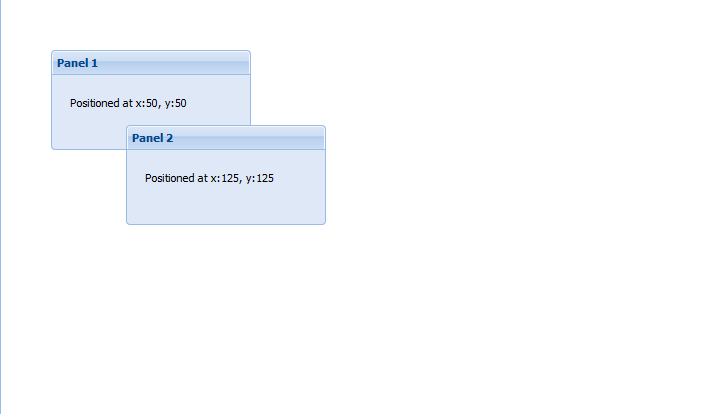
1. absolute 顾名思义,在容器内部,根据指定的坐标定位显示
This is a simple layout style that allows you to position items within a container using CSS-style absolute positioning via XY coordinates.
Sample Config:

layout: 'absolute',

items:[{

    title: 'Panel 1',

    x: 50,

    y: 50,

    html: 'Positioned at x:50, y:50'

}]
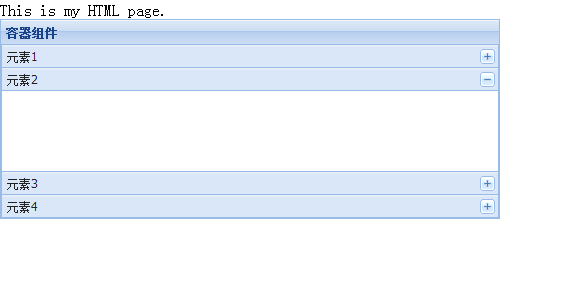
2. accordion 这个是最容易记的,手风琴效果
Displays one panel at a time in a stacked layout. No special config properties are required other than the layout — all panels added to the container will be converted to accordion panels.
<!DOCTYPE html>

<html>

  <head>

    <title>hello-extjs</title>

    <meta http-equiv="keywords" content="keyword1,keyword2,keyword3">

    <meta http-equiv="description" content="this is my page">

    <meta http-equiv="content-type" content="text/html; charset=UTF-8">

    <!--<link rel="stylesheet" type="text/css" href="./styles.css">-->

    <!-- 引入extjs样式文件 -->

    <link rel="stylesheet" type="text/css" href="ext-3.4.1/resources/css/ext-all.css" />

    <!-- 引入extjs库文件,底层驱动 -->

    <script type="text/javascript" src="ext-3.4.1/adapter/ext/ext-base.js"></script>

    <!-- 引入extjs-all -->

    <script type="text/javascript" src="ext-3.4.1/ext-all.js"></script>

    <!-- <script type="text/javascript" src="extjs/ext-lang-zh_CN.js" charset="utf-8"></script> -->

    <script type="text/javascript">

        Ext.onReady(function(){

            var panel=new Ext.Panel(//Ext.formPanel 就是Panel中用了form布局

                  {

                   renderTo:'paneldiv',

                   title:'容器组件',

                   layout:'accordion',

                   width:500,

                   height:200,

                   layoutConfig:{animate:false},

                   items:[

                    {title:'元素1',html:''},

                    {title:'元素2',html:''},

                    {title:'元素3',html:''},

                    {title:'元素4',html:''}

                   ]

                  }

                 );

            });

    </script>

  </head>

  <body>

    This is my HTML page. <br>

     <div id="paneldiv"></div>

  </body>

</html>
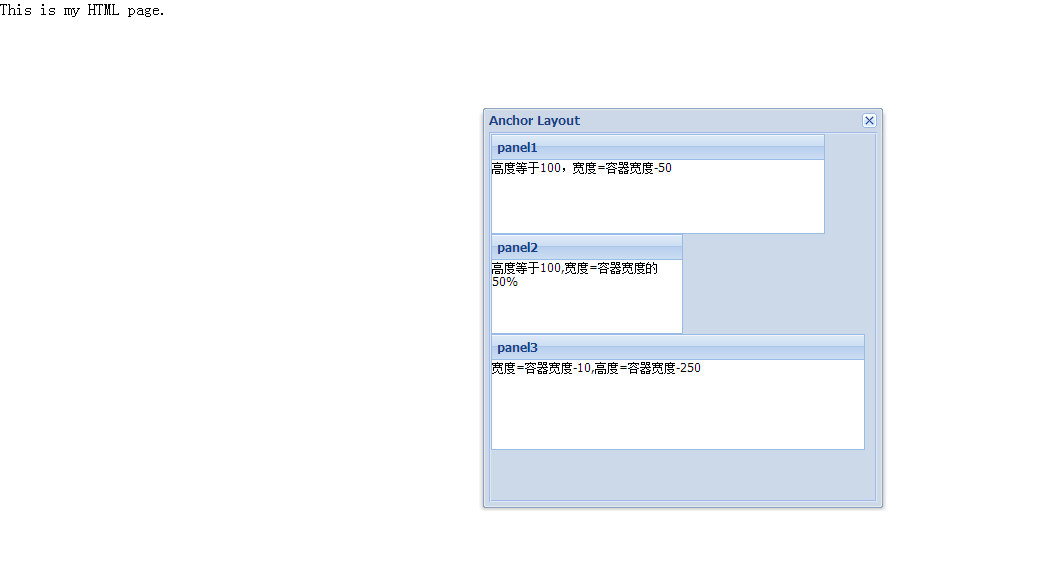
3. anchor 这个效果具体还不知道有什么用,就是知道注意一下
1.容器内的组件要么指定宽度,要么在anchor中同时指定高/宽,
2.anchor值通常只能为负值(指非百分比值),正值没有意义,
3.anchor必须为字符串值
Provides anchoring of contained items to the container's edges. This type of layout is most commonly seen within FormPanels (or any container with a FormLayout) where fields are sized relative to the container without hard-coding their dimensions.
In this example, panels are anchored for example purposes so that you can easily see the effect. If you resize the browser window, the anchored panels will automatically resize to maintain the same relative dimensions.
<!DOCTYPE html>

<html>

  <head>

    <title>hello-extjs</title>

    <meta http-equiv="keywords" content="keyword1,keyword2,keyword3">

    <meta http-equiv="description" content="this is my page">

    <meta http-equiv="content-type" content="text/html; charset=UTF-8">

    <!--<link rel="stylesheet" type="text/css" href="./styles.css">-->

    <!-- 引入extjs样式文件 -->

    <link rel="stylesheet" type="text/css" href="ext-3.4.1/resources/css/ext-all.css" />

    <!-- 引入extjs库文件,底层驱动 -->

    <script type="text/javascript" src="ext-3.4.1/adapter/ext/ext-base.js"></script>

    <!-- 引入extjs-all -->

    <script type="text/javascript" src="ext-3.4.1/ext-all.js"></script>

    <!-- <script type="text/javascript" src="extjs/ext-lang-zh_CN.js" charset="utf-8"></script> -->

    <script type="text/javascript">

        Ext.onReady(function() {

        var panel1 = new Ext.Panel({

             title: "panel1",

             height: 100,

            anchor: '-50',

            html: "高度等于100,宽度=容器宽度-50"

        });

        var panel2 = new Ext.Panel({

             title: "panel2",

             height: 100,

             anchor: '50%',

             html: "高度等于100,宽度=容器宽度的50%"

        });

        var panel3 = new Ext.Panel({

            title: "panel3",

            anchor: '-10, -250',

            html: "宽度=容器宽度-10,高度=容器宽度-250"

        });

         var win = new Ext.Window({

             title: "Anchor Layout",

             height: 400,

             width: 400,

             plain: true,

             layout: 'anchor',

             items: [panel1, panel2,panel3]

         });

         win.show();

             });

    </script>

  </head>

  <body>

    This is my HTML page. <br>

     <div id="paneldiv"></div>

  </body>

</html>
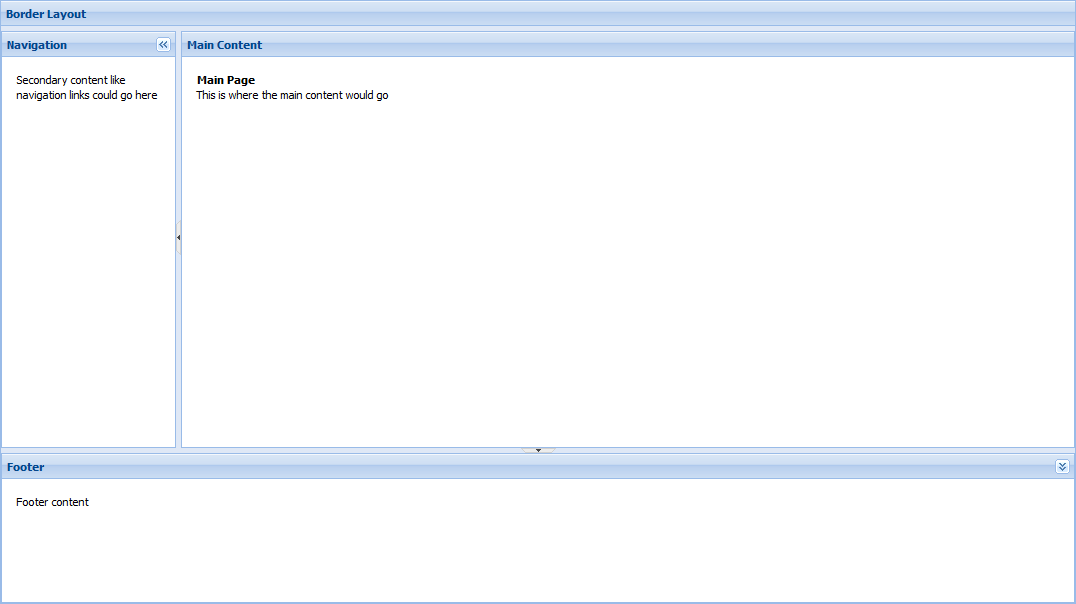
4. border 将容器分为五个区域:east,south,west,north,center
This Layout Browser page is already a border layout, and this example shows a separate border layout nested within a region of the page's border layout. Border layouts can be nested with just about any level of complexity that you might need.
Every border layout must at least have a center region. All other regions are optional.
Sample Config:
layout:'border',

defaults: {

    collapsible: true,

    split: true,

    bodyStyle: 'padding:15px'

},

items: [{

    title: 'Footer',

    region: 'south',

    height: 150,

    minSize: 75,

    maxSize: 250,

    cmargins: '5 0 0 0'

},{

    title: 'Navigation',

    region:'west',

    margins: '5 0 0 0',

    cmargins: '5 5 0 0',

    width: 175,

    minSize: 100,

    maxSize: 250

},{

    title: 'Main Content',

    collapsible: false,

    region:'center',

    margins: '5 0 0 0'

}]
5. card (TabPanel)
<!DOCTYPE html>

<html>

  <head>

    <title>hello-extjs</title>

    <meta http-equiv="keywords" content="keyword1,keyword2,keyword3">

    <meta http-equiv="description" content="this is my page">

    <meta http-equiv="content-type" content="text/html; charset=UTF-8">

    <!--<link rel="stylesheet" type="text/css" href="./styles.css">-->

    <!-- 引入extjs样式文件 -->

    <link rel="stylesheet" type="text/css" href="ext-3.4.1/resources/css/ext-all.css" />

    <!-- 引入extjs库文件,底层驱动 -->

    <script type="text/javascript" src="ext-3.4.1/adapter/ext/ext-base.js"></script>

    <!-- 引入extjs-all -->

    <script type="text/javascript" src="ext-3.4.1/ext-all.js"></script>

    <!-- <script type="text/javascript" src="extjs/ext-lang-zh_CN.js" charset="utf-8"></script> -->

    <script type="text/javascript">

        Ext.onReady(function() {

        var button = Ext.get('show-btn');

        var win;

         button.on('click', function() {

            //创建TabPanel

            var tabs = new Ext.TabPanel({

                 region: 'center', //border 布局,将页面分成东,南,西,北,中五部分,这里表示TabPanel放在中间

                 margins: '3 3 3 0',

                 activeTab: 0,

                 defaults: {

                    autoScroll: true

                 },

                 items: [{

                     title: 'Bogus Tab',

                     html: "第一个Tab的内容."

                 }, {

                     title: 'Another Tab',

                     html: "我是另一个Tab"

                 }, {

                     title: 'Closable Tab',

                     html: "这是一个可以关闭的Tab",

                     closable: true

                    }]

            });

                 //定义一个Panel

                var nav = new Ext.Panel({

                    title: 'Navigation',

                     region: 'west', //放在西边,即左侧

                     split: true,

                     width: 200,

                     collapsible: true, //允许伸缩

                     margins: '3 0 3 3',

                     cmargins: '3 3 3 3'

                 });

                 //如果窗口第一次被打开时才创建

                 if (!win) {

                     win = new Ext.Window({

                         title: 'Layout Window',

                         closable: true,

                         width: 600,

                         height: 350,

                         border : false,

                         plain: true,

                         layout: 'border',

                         closeAction:'hide',

                         items: [nav, tabs]//把上面创建的panel和TabPanel放在window中,并采用border方式布局

                     });

                 }

                 win.show(button);

         });

        });

    </script>

  </head>

  <body>

    This is my HTML page. <br>

     <button id="show-btn">button</button>

  </body>

</html>

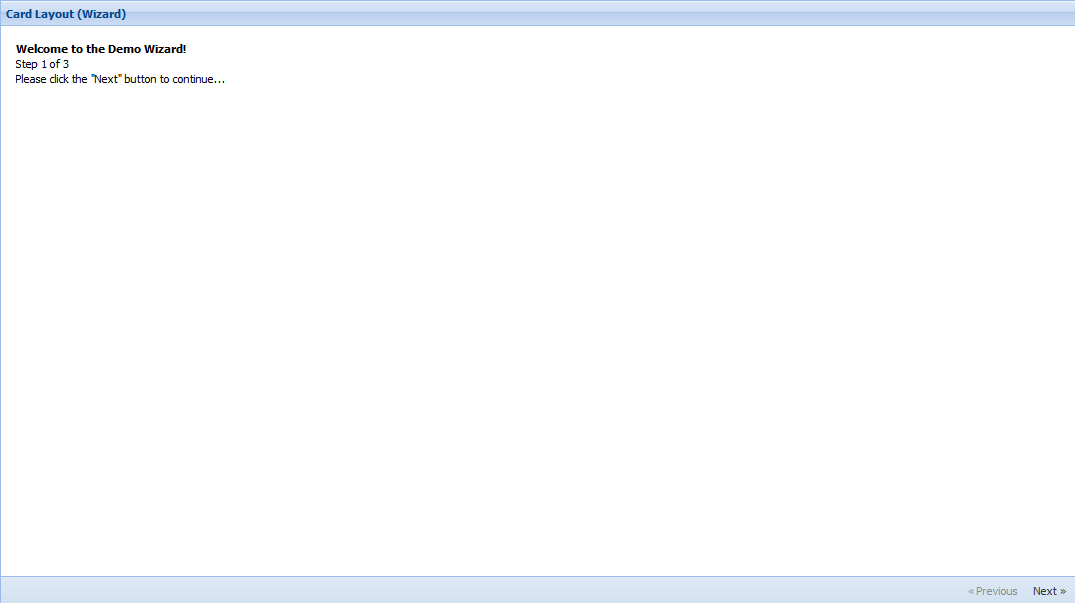
· card (Wizard)
You can use a Card layout to create your own custom wizard-style screen. The layout is a standard CardLayout with a Toolbar at the bottom, and the developer must supply the navigation function that implements the wizard's business logic (see the code in basic.js for details).
Sample Config:
layout:'card',

activeItem: 0, // index or id

bbar: ['->', {

    id: 'card-prev',

    text: '« Previous'

},{

    id: 'card-next',

    text: 'Next »'

}],

items: [{

    id: 'card-0',

    html: 'Step 1'

},{

    id: 'card-1',

    html: 'Step 2'

},{

    id: 'card-2',

    html: 'Step 3'

}]
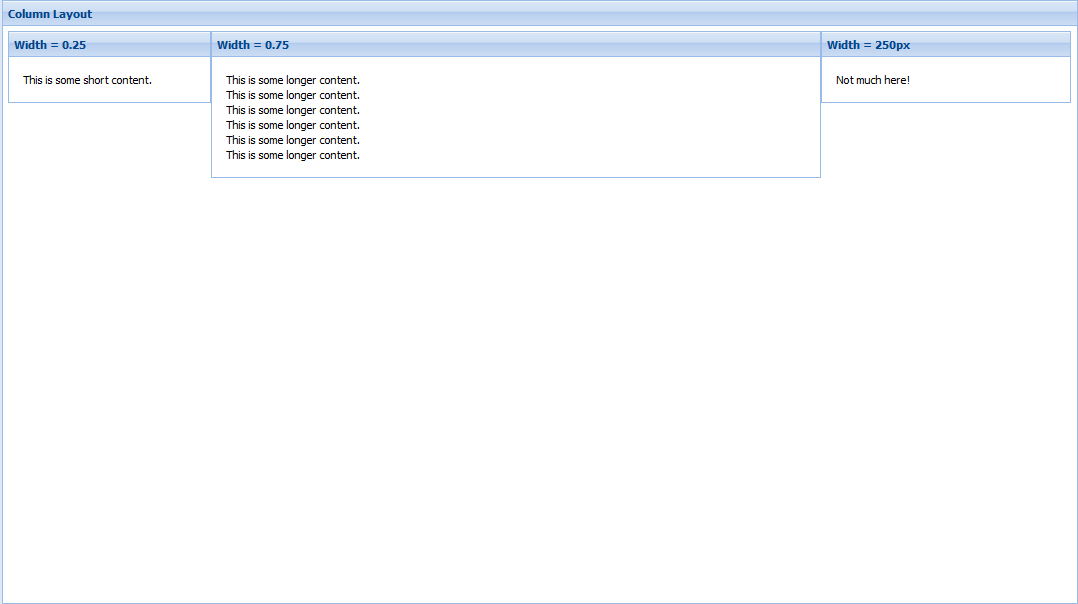
6.column 把整个容器看成一列,然后向容器放入子元素时
This is a useful layout style when you need multiple columns that can have varying content height. Any fixed-width column widths are calculated first, then any percentage-width columns specified using the columnWidth config will be calculated based on remaining container width. Percentages should add up to 1 (100%) in order to fill the container.
Sample Config:
layout:'column',

items: [{

    title: 'Width = 25%',

    columnWidth: .25,

    html: 'Content'

},{

    title: 'Width = 75%',

    columnWidth: .75,

    html: 'Content'

},{

    title: 'Width = 250px',

    width: 250,

    html: 'Content'

}]
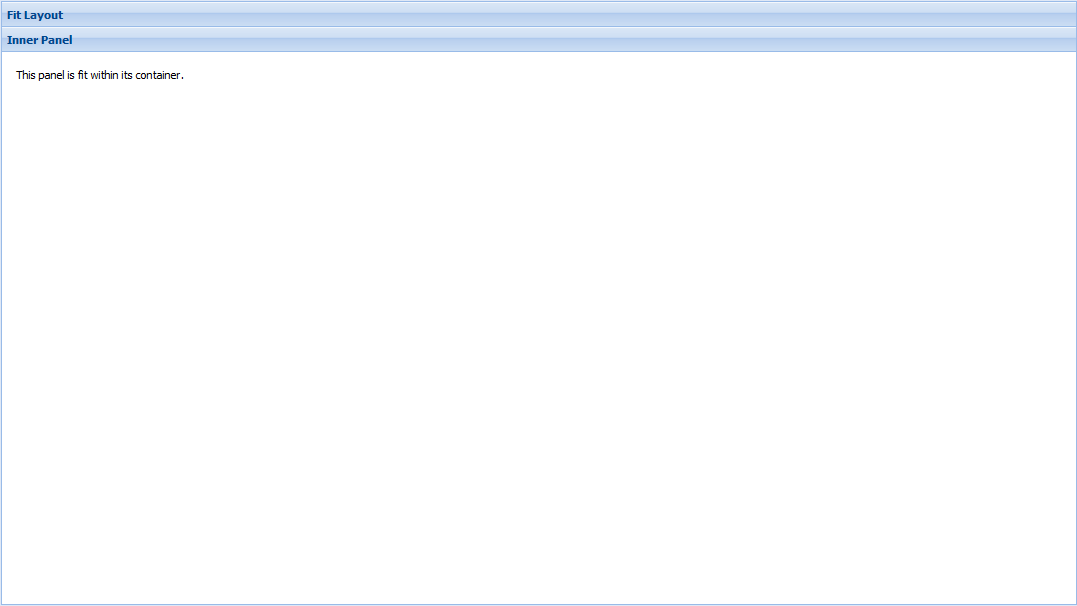
7. fit 一个子元素将充满整个容器(如果多个子元素则只有一个元素充满整个容器)
A very simple layout that simply fills the container with a single panel. This is usually the best default layout choice when you have no other specific layout requirements.
Sample Config:
layout:'fit',

items: {

    title: 'Fit Panel',

    html: 'Content',

    border: false

}
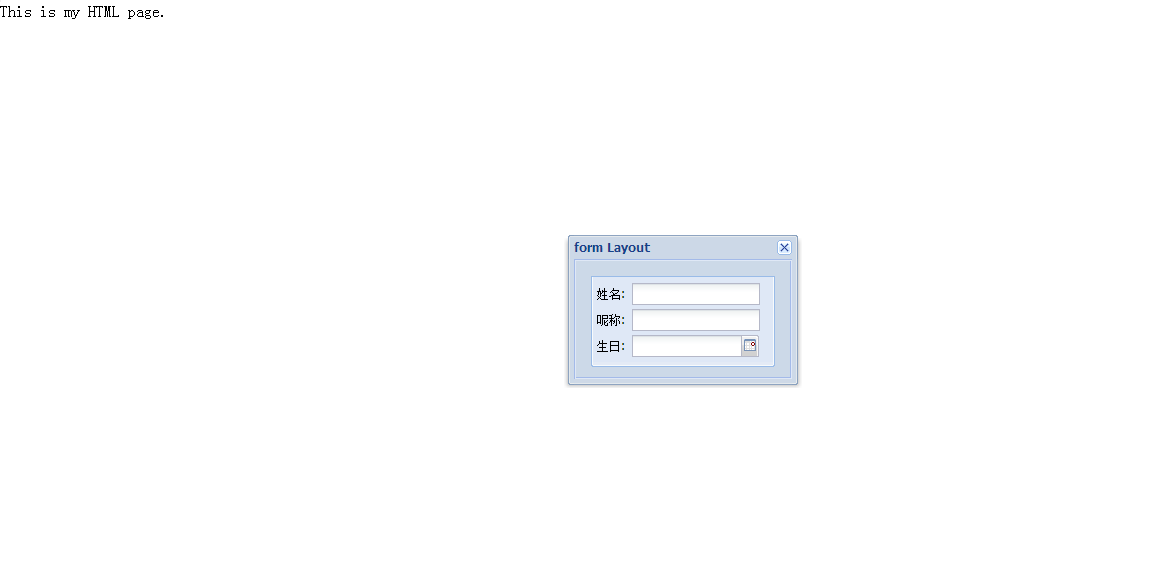
8. form 是一种专门用于管理表单中输入字段的布局
<!DOCTYPE html>

<html>

  <head>

    <title>hello-extjs</title>

    <meta http-equiv="keywords" content="keyword1,keyword2,keyword3">

    <meta http-equiv="description" content="this is my page">

    <meta http-equiv="content-type" content="text/html; charset=UTF-8">

    <!--<link rel="stylesheet" type="text/css" href="./styles.css">-->

    <!-- 引入extjs样式文件 -->

    <link rel="stylesheet" type="text/css" href="ext-3.4.1/resources/css/ext-all.css" />

    <!-- 引入extjs库文件,底层驱动 -->

    <script type="text/javascript" src="ext-3.4.1/adapter/ext/ext-base.js"></script>

    <!-- 引入extjs-all -->

    <script type="text/javascript" src="ext-3.4.1/ext-all.js"></script>

    <!-- <script type="text/javascript" src="extjs/ext-lang-zh_CN.js" charset="utf-8"></script> -->

    <script type="text/javascript">

        Ext.onReady(function() {

          var win = new Ext.Window({

              title: "form Layout",

             height: 150,

             width: 230,

              plain: true,

             bodyStyle: 'padding:15px',

             items:

              {

                 xtype: "form",

                 labelWidth: 30,

                 defaultType: "textfield",

                 frame:true,

                 items:

                 [

                     {

                         fieldLabel:"姓名",

                         name:"username",

                         allowBlank:false

                     },

                     {

                         fieldLabel:"呢称",

                         name:"nickname"

                     },

                     {

                         fieldLabel: "生日",

                         xtype:'datefield',

                         name: "birthday",

                         width:127

                     }

                 ]

             }

         });

         win.show();

     });

    </script>

  </head>

  <body>

    This is my HTML page. <br>

  </body>

</html>
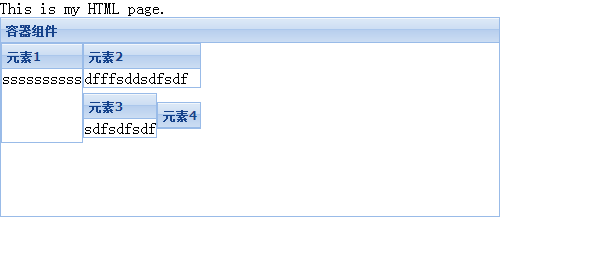
9.table 按照普通表格的方法布局子元素
用layoutConfig:{columns:3},//将父容器分成3列
<!DOCTYPE html>

<html>

  <head>

    <title>hello-extjs</title>

    <meta http-equiv="keywords" content="keyword1,keyword2,keyword3">

    <meta http-equiv="description" content="this is my page">

    <meta http-equiv="content-type" content="text/html; charset=UTF-8">

    <!--<link rel="stylesheet" type="text/css" href="./styles.css">-->

    <!-- 引入extjs样式文件 -->

    <link rel="stylesheet" type="text/css" href="ext-3.4.1/resources/css/ext-all.css" />

    <!-- 引入extjs库文件,底层驱动 -->

    <script type="text/javascript" src="ext-3.4.1/adapter/ext/ext-base.js"></script>

    <!-- 引入extjs-all -->

    <script type="text/javascript" src="ext-3.4.1/ext-all.js"></script>

    <!-- <script type="text/javascript" src="extjs/ext-lang-zh_CN.js" charset="utf-8"></script> -->

    <script type="text/javascript">

        Ext.onReady(function(){

                var panel=new Ext.Panel(

                  {

                   renderTo:'paneldiv',

                   title:'容器组件',

                   layout:'table',

                   width:500,

                   height:200,

                   layoutConfig:{columns:3},//将父容器分成3列

                   items:[

                    {title:'元素1',html:'ssssssssss',rowspan:2,height:100},

                   {title:'元素2',html:'dfffsddsdfsdf',colspan:2},

                    {title:'元素3',html:'sdfsdfsdf'},

                    {title:'元素4',html:''}

                      ]

                  });

            });

    </script>

  </head>

  <body>

    This is my HTML page. <br>

    <div id="paneldiv"><div>

  </body>

</html>
VBox
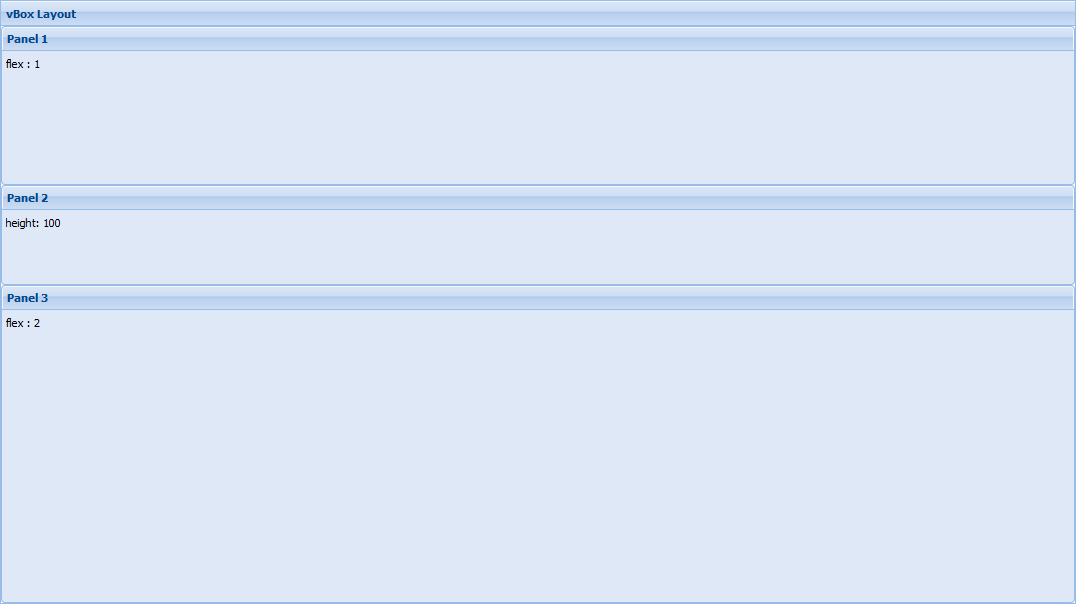
A layout that allows for the vertical and horizontal stretching of child items, much like the container layout with size management.
Sample Config:
layout: {

    type: 'vbox'

    align : 'stretch',

    pack  : 'start',

},

items: [

    {html:'panel 1', flex:1},

    {html:'panel 2', height:150},

    {html:'panel 3', flex:2}

]
HBox
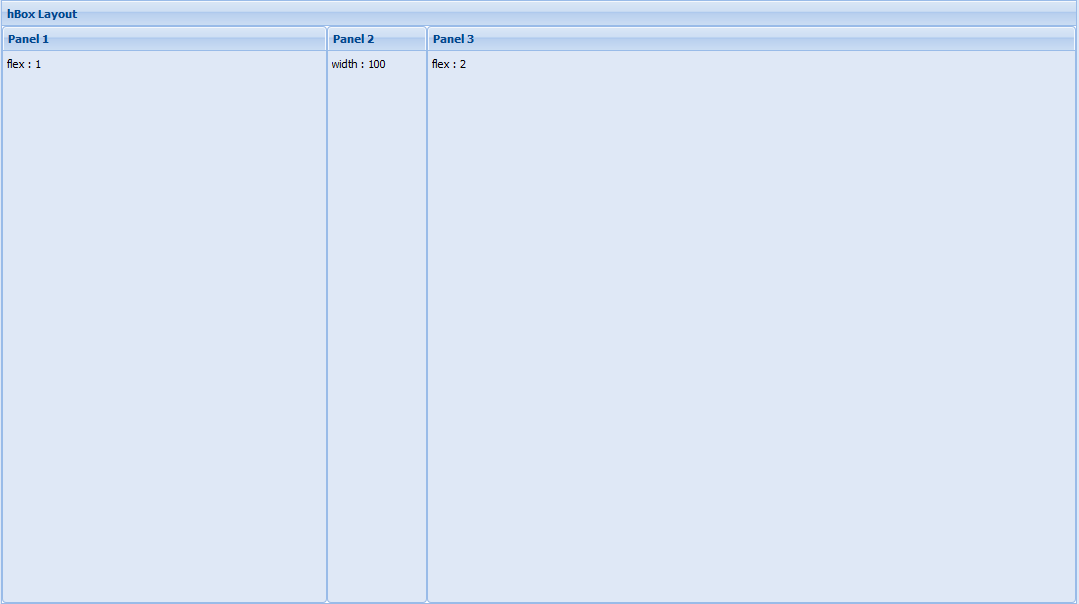
A layout that allows for the vertical and horizontal stretching of child items, much like the column layout but can stretch items vertically.
Sample Config:
layout: {

    type: 'hbox',

    pack: 'start',

    align: 'stretch'

},

items: [

    {html:'panel 1', flex:1},

    {html:'panel 2', width:150},

    {html:'panel 3', flex:2}

]
转自:https://www.cnblogs.com/mingforyou
ExtJS中layout的12种布局风格的更多相关文章
- 【转载】Python编程中常用的12种基础知识总结
Python编程中常用的12种基础知识总结:正则表达式替换,遍历目录方法,列表按列排序.去重,字典排序,字典.列表.字符串互转,时间对象操作,命令行参数解析(getopt),print 格式化输出,进 ...
- Python编程中常用的12种基础知识总结
原地址:http://blog.jobbole.com/48541/ Python编程中常用的12种基础知识总结:正则表达式替换,遍历目录方法,列表按列排序.去重,字典排序,字典.列表.字符串互转,时 ...
- JavaScript 中的常用12种循环遍历(数组或对象)的方法
1.for 循环 let arr = [1,2,3]; for (let i=0; i<arr.length; i++){ console.log(i,arr[i]) } // 0 1 // 1 ...
- Android 常用UI控件之TabHost(1)TabHost的两种布局方式
TabHost是Android中的tab组件. TabHost布局文件的基本结构 TabHost下有个layout,这个layout中有TabWidget与FrameLayout.TabWidget是 ...
- android五种布局模式
Android布局是应用界面开发的重要一环,在Android中,共有五种布局方式,分别是:LinearLayout (线性布局),FrameLayout(框架布局),AbsoluteLayout(绝对 ...
- Android学习笔记_3_四种布局
Android布局是应用界面开发的重要一环,在Android中,共有四种布局方式, 分别是:FrameLayout( 帧布局 ).LinearLayout (线性布局).TableLayout(表格布 ...
- 无废话ExtJs 入门教程十六[页面布局:Layout]
无废话ExtJs 入门教程十六[页面布局:Layout] extjs技术交流,欢迎加群(201926085) 首先解释什么是布局: 来自百度词典的官方解释:◎ 布局 bùjú: [distributi ...
- html5中的几种布局简单比较
html中的布局主要由静态布局.自适应布局.流式布局以及响应式布局几类,简单比较以下这几种布局的区别和特点. 一 静态布局(Static Layout) 表现:在传统web设计中,不管浏览器尺寸具体大 ...
- JavaScript 中的12种循环遍历方法
原文:JavaScript 中的12种循环遍历方法 题目:请介绍 JavaScript 中有哪些循环和遍历的方法,说说它们的应用场景和优缺点? 1.for 循环 let arr = [1,2,3];f ...
随机推荐
- Spring boot @EnableScheduling 和 @Scheduled 注解使用例子
前言 Spring Boot提供了@EnableScheduling和@Scheduled注解,用于支持定时任务的执行,那么接下来就让我们学习下如何使用吧: 假设我们需要每隔10秒执行一个任务,那么我 ...
- 禁用feign retryer
为什么要禁用retryer?其实主要是为了Debug,禁用feign retryer有两面性,如果接口做好幂等性,retry不影响,但是总有一些意外发生,比如:有一个实例发生了故障而该情况还没有被服务 ...
- 基于vue与vux做的可滑动tab组件(附源码)
背景 前不久,刚完成了一个商品列表+购物车功能的页面,因为一级商品分类在顶部tab中显示,可滑动,间距可定制,如下图所示: 定制的tab需求如下: 1. 每个tab-item的间距是相同的,可定制 2 ...
- 02_python是一种什么语言?
python是一种什么语言? 1.低级语言与高级语言 最初的计算机程序都是用0和1的序列表示的,程序员直接使用的是机器指令,无需翻译,从纸带打孔输入即可执行得到结果.后来为了方便记忆,就将用0.1序列 ...
- 华为路由器 IPSec 与 GRE 结合实验
二者结合的目的 GRE 支持单播.组播.广播,IPSec 仅支持单播.GRE 不支持对于数据完整性以及身份认证的验证功能,并且也不具备数据加密保护.而 IPSec 恰恰拥有强大的安全机制.达到了互补的 ...
- 分布式系统监视zabbix讲解五之web监控--技术流ken
Web 监控 概况 你可以使用 Zabbix 检查几个网站可用性方面. 如果要使用 Web 检测功能,必须在 编译Zabbix 的时候加入 cURL(libcurl) 的支持. 要使用 Web 监控, ...
- ls 指令的介绍
每个文件在linux下面都会记录许多的时间参数, 其实是有三个主要的变动时间,那么三个时间的意义是什么呢? modification time (mtime) : 当该文件的“内容数据”变更时,就会更 ...
- TFS自动记住用户名密码
在使用Team Foundation Server(以下简称TFS) 的时候,先在安装Team Foundation 的机器中新建一个与客户机中的同名的用户名,这样,在Visual Studio 20 ...
- mysql分页存储过程一步一步实现
1. CREATE DEFINER=`root`@`localhost` PROCEDURE `P_HoverTreePages`( ), ) , ), ), ), IN `SortType` INT ...
- Laravel 数据库操作 Eloquent ORM
laravel 操作数据库一般都使用它的Eloquent ORM才操作 建立模型 <?php namespace App; use Illuminate\Database\Eloquent\Mo ...