
shiro初识
shiro 可以做认证、授权、加密、会话管理、与web集成、缓存。
在本文中,主要使用认证和授权这两个功能。
在shiro框架中,有些很重要的概念:
Subject 很多人把它理解为当前用户,这只是subject的概念的一部分。官方文档上是这么说的,Security specific user ‘view’ of an application user. It can be a human being, a third-party process, a server connecting to you application application, or even a cron job. Basically, it is anything or anyone communicating with your application.就是想要与你的应用的通信的任何事务或者任何人。
Principals 一个subject 的标识,例如用户名、身份证
Credentials 通常用来验证一个subject的私密的数据,例如密码
Realms shiro 需要从realm中获取安全数据(用户、角色、权限)来验证用户是否合法。
1.搭建环境(web.xml和spring-shiro.xml)
在web.xml中需要配置shiro的过滤器。
<!-- shiro的filter -->
<filter>
  <filter-name>shiroFilter</filter-name>
  <filter-class>org.springframework.web.filter.DelegatingFilterProxy</filter-class>
  <init-param>
    <param-name>targetFilterLifecycle</param-name>
    <param-value>true</param-value>
  </init-param>
  <init-param>
    <param-name>targetBeanName</param-name>
    <param-value>shiroFilter</param-value>
  </init-param>
</filter>
<filter-mapping>
  <filter-name>shiroFilter</filter-name>
  <url-pattern>/*</url-pattern>
</filter-mapping>
在spring-shiro.xml中的配置如下:
<!-- 自定义域realm -->
<bean id="custom_Realm" class="com.test.realm.CustomRealm"></bean>
<!-- 安全管理器  ref对象-->
<bean id="securityManager" class="org.apache.shiro.web.mgt.DefaultWebSecurityManager">
    <property name="realm" ref="custom_Realm"/>
</bean>
<!-- shiro filter -->
<bean id="shiroFilter" class="org.apache.shiro.spring.web.ShiroFilterFactoryBean">
    <!-- 安全管理器必须的 -->
    <property name="securityManager" ref="securityManager"/>
    <!-- 身份认证失败   认证提交的地址 -->
    <property name="loginUrl" value="/index.jsp"/>
    <!-- 权限认证失败    没有权限认证提交的地址 -->
    <property name="unauthorizedUrl" value="/unauthorized.jsp"/>
    <!-- Shiro连接约束配置,即过滤链的定义 -->
    <property name="filterChainDefinitions">
        <value>
            <!-- 对静态资源设置匿名访问 -->
            /login = anon
            <!-- /** = authc 所有url都必须认证通过才可以访问 -->
            /admin* = authc
        </value>
    </property>
</bean>
<!-- Shiro生命周期处理器 -->
<bean id="lifecycleBeanPostProcessor" class="org.apache.shiro.spring.LifecycleBeanPostProcessor"></bean>
<bean class="org.apache.shiro.spring.security.interceptor.AuthorizationAttributeSourceAdvisor">
    <property name="securityManager" ref="securityManager"/>
</bean>

2.编写自定义的Realm类
public class CustomRealm extends AuthorizingRealm {
    @Resource
    private UserService  userService;
    private static final Logger logger = LoggerFactory.getLogger(CustomRealm.class);
    @Override
    protected AuthorizationInfo doGetAuthorizationInfo(PrincipalCollection principals) {
        logger.info("======用户授权认证======");
        String userName = principals.getPrimaryPrincipal().toString();
        SimpleAuthorizationInfo simpleAuthorizationInfo = new SimpleAuthorizationInfo();
        simpleAuthorizationInfo.setRoles(userService.queryRolesByName(userName));
        simpleAuthorizationInfo.setStringPermissions(userService.queryPermissonByName(userName));
        return simpleAuthorizationInfo;
    }

    @Override
    protected AuthenticationInfo doGetAuthenticationInfo(AuthenticationToken token) throws AuthenticationException {
        logger.info("======用户登陆认证======");
        String userName = token.getPrincipal().toString();
        User user = userService.findUserByUsername(userName);
        //System.out.println(user.getUsername());
        if (user!=null) {
            AuthenticationInfo authenticationInfo = new SimpleAuthenticationInfo(user.getUsername(), user.getPassword(), "test");
            return authenticationInfo;
        }
        return null;
    }
}
CustomRealm 类需要继承AuthorizingRealm类,并重写两个方法。
doGetAuthorizationInfo() 设置subject的授权和认可。
doGetAuthenticationInfo() 对subject进行认证。

3.编写登录方法
@RequestMapping("/login")
public  String Login(User user , Model model){
    Subject subject = SecurityUtils.getSubject();
    Session session = subject.getSession();
    UsernamePasswordToken usernamePasswordToken = new UsernamePasswordToken(user.getUsername(),user.getPassword());
    try{
        subject.login(usernamePasswordToken);
        if (subject.hasRole("admin")){
            return "admin";
        }else if(subject.hasRole("普通用户")){
            return "user";
        }
    }catch(Exception e){
       e.printStackTrace();
       return "index";
    }
    return "index";
}

4.进行测试

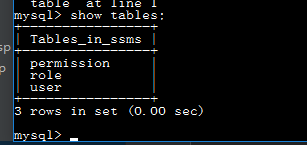
数据库;
在登录页面,输入不同角色的人,就会跳转到不同的页面。
5.shiro对jsp的支持
在jsp页面需要引入标签库
<%@ taglib prefix="shiro" uri="http://shiro.apache.org/tags" %>

在jsp页面,就可以使用shiro的标签。例如:
<shiro:hasRole name="普通用户"> 用户角色
</shiro:hasRole>
<shiro:principal></shiro:principal> 当前用户
<shiro:hasPermission name="user:create"> 用户权限
</shiro:hasPermission>
shiro初识的更多相关文章
- Shiro初识与总结
1.1简介 Apache Shiro是一个强大且易用的Java安全框架,执行身份验证.授权.密码学和会话管理.使用Shiro的易于理解的API,您可以快速.轻松地获得任何应用程序,从最小的移动应用程序 ...
- Apache Shiro——初识
Shrio是什么? Shrio是一个用Java开发的安全框架,用来保证系统或系统数据安全的.他可以用在大多数程序上,比如移动应用程序.Web程序或者大型的企业应用程序等. Shrio能干什么? 能用来 ...
- ehcache的使用 Shiro与Ehcache的结合(附:EhcacheUtils)
ehcache 缓存的使用 合理的使用缓存会极大的提高程序的运行效率.切记:缓存请勿滥用. 配置ehcache与Shiro shiro初识请查看该文章 https://blog.csdn.net/py ...
- 第一章 初识shiro
shiro学习教程来自开涛大神的博客:http://jinnianshilongnian.iteye.com/blog/2018936 第一章 初识shiro 简单了解shiro主要记住三张图即可. ...
- Apache Shiro系列一,概述 —— 初识
一.什么是Shiro Apache Shiro是一个强大.灵活.开源的安全框架,它支持用户认证.权限控制.企业会话管理以及加密等. Apache Shiro的第一个也是最重要的一个目标就是易于使用和理 ...
- 【shiro】shiro学习笔记1 - 初识shiro
[TOC] 认证流程 st=>start: Start e=>end: End op1=>operation: 构造SecurityManager环境 op2=>operati ...
- 初识Shiro
Shiro是Apache基金会下的一个开源安全框架,提供了身份验证.授权.密码学和会话管理等功能,Shiro框架不仅直观易用,而且也能提供健壮的安全性,另外一点值得说的是Shiro的前身是一个始于20 ...
- shiro学习总结(一)----初识shiro
本系列内容大多总结自官网和张开涛的<跟我学Shiro> 一.shiro简介 1.1.shiro有什么用? shiro是一个功能强大使用简单的java安全框架,主要提供了五大功能: 1.认证 ...
- Apache Shiro(一)-登录认证和权限管理初识
What is Apache Shiro? Apache Shiro是一个功能强大.灵活的,开源的安全框架.它可以干净利落地处理身份验证.授权.企业会话管理和加密. Apache Shiro的首要目标 ...
随机推荐
- [Java Web学习]Tomcat启动时报war exploded: Error during artifact deployment
报错:Artifact FirstWeb:war exploded: Error during artifact deployment. See server log for details. SEV ...
- the status bar issue of react-native Modal on Android ( RN v0.57.0)
Problem: When use Modal in react-native, the status bar is not included if you make a full-screen ma ...
- LibreOffice字体问题解决;从window复制到Ubuntu
拷贝或下载windows系统的Fonts字体集到对应的linux系统下;以ubuntu16.04系统为例. 1.进入windows系统,到C:WindowsFonts目录,复制拷贝自己需要的字体(也可 ...
- 【java高级编程】JDK和CGLIB动态代理区别
转载:https://blog.csdn.net/yhl_jxy/article/details/80635012 前言 JDK动态代理实现原理(jdk8):https://blog.csdn.net ...
- Missile Command 导弹指令
发售年份 1980 平台 街机 开发商 雅达利(Atari) 类型 射击 https://www.youtube.com/watch?v=nokIGklnBGY
- jQuery汇总
closest() 方法返回被选元素的第一个祖先元素. $("span").closest("ul")返回 <span> 的第一个祖先元素,是一个 ...
- eclipse+gradle
一.gradle 下载与安装 下载地址:http://services.gradle.org/distributions/ 下载后,放到:D:\gradle-4.6 在系统环境变量path,中加:D: ...
- Linux内核中常用的数据结构和算法(转)
知乎链接:https://zhuanlan.zhihu.com/p/58087261 Linux内核代码中广泛使用了数据结构和算法,其中最常用的两个是链表和红黑树. 链表 Linux内核代码大量使用了 ...
- [mybatis]Example的用法-转
转自:https://blog.csdn.net/zhemeban/article/details/71901759 Example类是什么? Example类指定如何构建一个动态的where子句. ...
- windows下使用caffe测试mnist数据集
在win10机子上装了caffe,感谢大神们的帖子,要入坑caffe-windows的朋友们看这里,还有这里,安装下来基本没什么问题. 好了,本博文写一下使用caffe测试mnist数据集的步骤. 1 ...