
springboot+jpa+mysql+swagger整合
 Springboot+jpa+MySQL+swagger整合
创建一个springboot web项目
<dependencies>
<dependency>
<groupId>org.springframework.boot</groupId>
<artifactId>spring-boot-starter-web</artifactId>
</dependency>
<!-- 下面两个引入为了操作数据库 -->
<dependency>
<groupId>org.springframework.boot</groupId>
<artifactId>spring-boot-starter-data-jpa</artifactId>
</dependency>
<dependency>
<groupId>mysql</groupId>
<artifactId>mysql-connector-java</artifactId>
</dependency>
<dependency>
<groupId>org.springframework.boot</groupId>
<artifactId>spring-boot-starter-tomcat</artifactId>
<scope>provided</scope>
</dependency>
<!-- 只需引入spring-boot-devtools 即可实现热部署 -->
<dependency>
<groupId>org.springframework.boot</groupId>
<artifactId>spring-boot-devtools</artifactId>
</dependency>
<!-- Json包 -->
<dependency>
<groupId>com.alibaba</groupId>
<artifactId>fastjson</artifactId>
<version>1.2.16</version>
</dependency>
<!-- 为了监控数据库 -->
<dependency>
<groupId>com.alibaba</groupId>
<artifactId>druid</artifactId>
<version>1.0.25</version>
</dependency>
<dependency>
<groupId>org.apache.poi</groupId>
<artifactId>poi</artifactId>
<version>3.14</version>
</dependency>
<dependency>
<groupId>org.springframework.boot</groupId>
<artifactId>spring-boot-starter-test</artifactId>
<scope>test</scope>
</dependency>
<!-- swagger2 -->
<dependency>
<groupId>io.springfox</groupId>
<artifactId>springfox-swagger2</artifactId>
<version>2.8.0</version>
</dependency>
<dependency>
<groupId>io.springfox</groupId>
<artifactId>springfox-swagger-ui</artifactId>
<version>2.8.0</version>
</dependency>
<dependency>
<groupId>io.swagger</groupId>
<artifactId>swagger-annotations</artifactId>
<version>1.5.14</version>
</dependency>
<dependency>
<groupId>org.springframework.boot</groupId>
<artifactId>spring-boot-starter-tomcat</artifactId>
</dependency>
<dependency>
<groupId>com.google.code.gson</groupId>
<artifactId>gson</artifactId>
<version>2.8.2</version>
</dependency>
<dependency>
<groupId>org.projectlombok</groupId>
<artifactId>lombok</artifactId>
</dependency>
</dependencies>
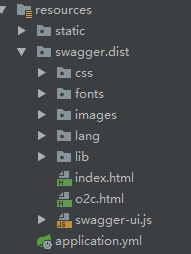
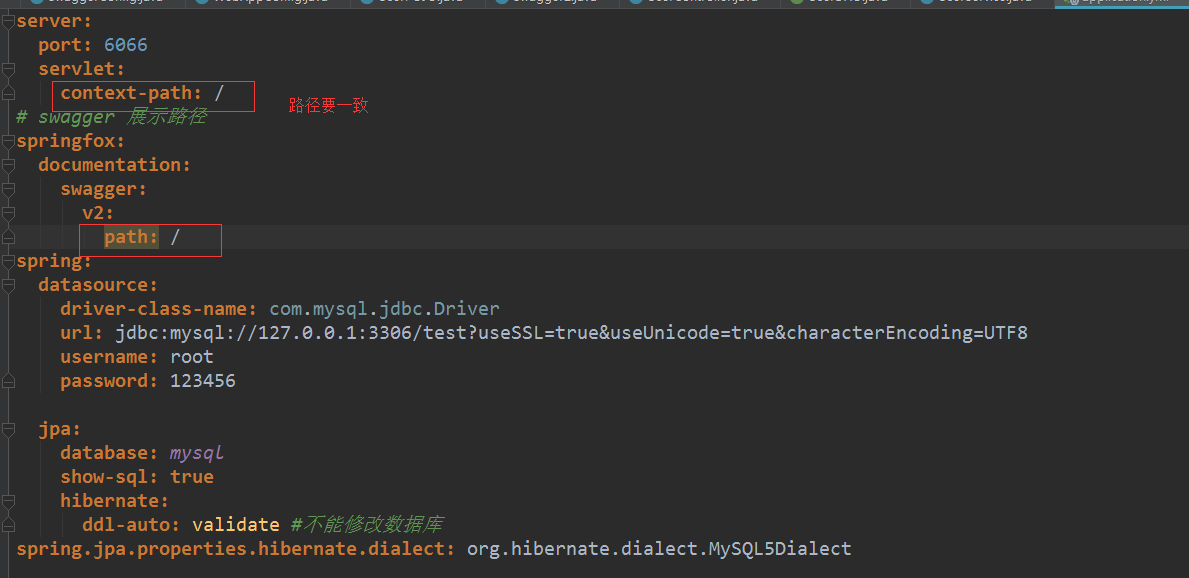
二、添加swagger的资源文件,配置application.yml文件
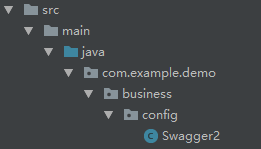
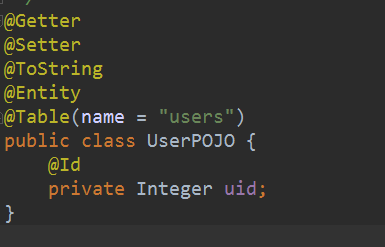
三、配置swagger


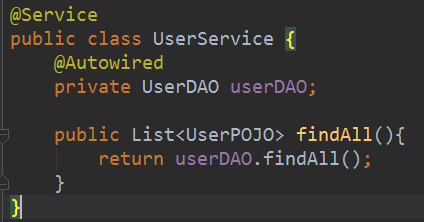

Swagger访问的路径:

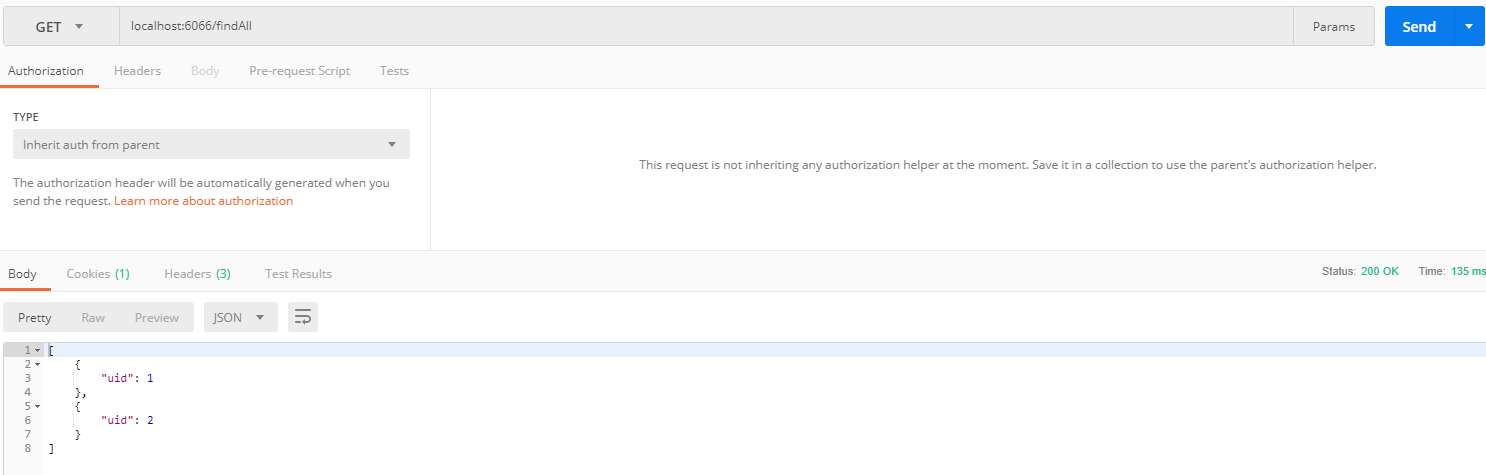
Postman访问的路径:
springboot+jpa+mysql+swagger整合的更多相关文章
- springboot+jpa+mysql+redis+swagger整合步骤
springboot+jpa+MySQL+swagger框架搭建好之上再整合redis: 在电脑上先安装redis: 一.在pom.xml中引入redis 二.在application.yml里配置r ...
- spring-boot jpa mysql emoji utfmb4 异常处理
spring-boot jpa mysql utf8mb4 emoji 写入失败 mysql database,table,column 默认为utf8mb4 Caused by: java.sql. ...
- IDEA SpringBoot+JPA+MySql+Redis+RabbitMQ 秒杀系统
先放上github地址:spike-system,可以直接下载完整项目运行测试 SpringBoot+JPA+MySql+Redis+RabbitMQ 秒杀系统 技术栈:SpringBoot, MyS ...
- Springboot Jpa: [mysql] java.sql.SQLException: Duplicate entry 'XXX' for key 'PRIMARY'
前言 1.问题背景 偶尔会出现登录请求出错的情况,一旦失败就会短时间内再也登录不上,更换浏览器或者刷新可能会暂时解决这个问题. 项目运行日志如下: 2022-07-21 09:43:40.946 DE ...
- SpringBoot+Jpa+MySql学习
上一篇介绍了springboot简单整合mybatis的教程.这一篇是介绍springboot简单整合jpa的教程. 由于jpa的功能强大,后续会继续写关于jpa的介绍已经使用,本文只是简单介绍一下它 ...
- springboot JPA mysql
官方文档 https://docs.spring.io/spring-data/jpa/docs/1.11.10.RELEASE/reference/html/ 常用关键字 通常,JPA的查询创建机制 ...
- spring-boot + mybatis + mysql+shiro 整合
参考地址 https://blog.csdn.net/clj198606061111/article/details/82948757 https://blog.csdn.net/ityouknow/ ...
- 带着新人学springboot的应用08(springboot+jpa的整合)
这一节的内容比较简单,是springboot和jpa的简单整合,jpa默认使用hibernate,所以本质就是springboot和hibernate的整合. 说实话,听别人都说spring data ...
- Springboot+Atomikos+Jpa+Mysql实现JTA分布式事务
1 前言 之前整理了一个spring+jotm实现的分布式事务实现,但是听说spring3.X后不再支持jotm了,jotm也有好几年没更新了,所以今天整理springboot+Atomikos+jp ...
随机推荐
- jenkins使用2----基本实例
一.配置 1.点击新建,选择构建自由风格 2.剩下的都不动,来到构建步骤,新增一个输出hell world 3.保存后点击立即构建 二.查看日志 4.点击构建历史,再点击控制台输出 5.第三行显示 临 ...
- hadoop学习笔记贰 --HDFS及YARN的启动
1.初始化HDFS :hadoop namenode -format 看到如下字样,说明初始化成功. 启动HDFS,start-dfs.sh 终于启动成功了,原来是core-site.xml 中配置 ...
- 在Java中,将ExecutorService转为守护程序
问题描述 我正在Java 1.6中使用一个ExecutoreService,简单地开始 ExecutorService pool = Executors.newFixedThreadPool(THRE ...
- Spring和SpringMvc详细讲解
转载自:https://www.cnblogs.com/doudouxiaoye/p/5693399.html 1. 为什么使用Spring ? 1). 方便解耦,简化开发 通过Spring提供的Io ...
- Netty学习问题总结
目录 一.HTTP协议分包 二.WebSocket协议分包 三.HTTP和WebSocket协议共用一个端口的问题 四.TIME WAIT状态占用了什么资源 五.关于 本篇记录了Netty学习过程中想 ...
- Mysql MHA高可用集群架构
** 记得之前发过一篇文章,名字叫<浅析MySQL高可用架构>,之后一直有很多小伙伴在公众号后台或其它渠道问我,何时有相关的深入配置管理文章出来,因此,民工哥,也将对前面的各类架构逐一进行 ...
- 实现可调整宽高的DIV(左右拖动和上下拖动)
前言 本例是在React中实现,不过改一改通过原生js也很好实现,另外兼容性也做到了IE9.(IE8讲道理也是可以的). 首先看一下需要实现的需求: 要拖动图中的白色横条调整绿色和蓝色区域的高度,要拖 ...
- Jmeter(三十八)while控制器实现ssh三次重连
在jmeter中,可以使用SSH协议连接主机进行相关操作, 步骤如下 首先添加一个ssh command 我们的测试交流群:317765580 在command中填写远程连接的必要信息 结果树中可以 ...
- babel-polyfill使用与性能优化
文章首发于笔者的个人博客 文章概览 本文主要内容包括:什么是babel-polyfill,如何使用,如何通过按需加载进行性能优化. 本文所有例子可以在 笔者的github 找到. 什么是babel-p ...
- 在spring中实现quartz2.2.1的动态调度(开始、暂停、停止等)
参考原文地址: https://blog.csdn.net/fantasic_van/article/details/74942062 一.新建job1 package com.cvicse.ump. ...