
FTP文件上传 支持断点续传 并 打印下载进度(二) —— 单线程实现
这个就看代码,哈哈哈哈哈 需要用到的jar包是:
    <dependency>

            <groupId>commons-net</groupId>

            <artifactId>commons-net</artifactId>

            <version>3.3</version>

        </dependency>
一:定义我们可能会返回的状态值。两个枚举类 一个异常类
public enum  UploadStatus {

    Create_Directory_Fail,      //远程服务器相应目录创建失败

    Create_Directory_Success,   //远程服务器闯将目录成功

    Upload_New_File_Success,    //上传新文件成功

    Upload_New_File_Failed,     //上传新文件失败

    File_Exits,                 //文件已经存在

    Remote_Bigger_Local,        //远程文件大于本地文件

    Upload_From_Break_Success,  //断点续传成功

    Upload_From_Break_Failed,   //断点续传失败

    Delete_Remote_Faild;        //删除远程文件失败

}
public enum  DownloadStatus {

    Remote_File_Noexist, //远程文件不存在

    Local_Bigger_Remote, //本地文件大于远程文件

    Download_From_Break_Success, //断点下载文件成功

    Download_From_Break_Failed, //断点下载文件失败

    Download_New_Success, //全新下载文件成功

    Download_New_Failed; //全新下载文件失败

}
//用于记录创建时候的异常
public class CreateException extends Exception{

    private static Logger log = LoggerFactory.getLogger(CreateException.class);

    private static final long serialVersionUID = 1L;

    private Integer errCode;

    private String errMessage;

    public CreateException(Throwable cause, Integer errCode, String errMessage) {

        super(cause);

        this.errCode = errCode;

        this.errMessage = errMessage;

    }

    public CreateException(Integer errCode, String errMessage) {

        this.errCode = errCode;

        this.errMessage = errMessage;

    }

    public CreateException(Integer errCode, UploadStatus uploadStatus) {

        this.errCode = errCode;

        this.errMessage = uploadStatus.toString();

    }

    public Integer getErrCode() {

        return errCode;

    }

    public String getErrMessage() {

        return errMessage;

    }

}
二:创建连接ftp服务器的类
package com.utils.study.ftpCenter;

import com.coocaa.core.generation.service.CreateBeanService;

import org.apache.commons.net.PrintCommandListener;

import org.apache.commons.net.ftp.FTP;

import org.apache.commons.net.ftp.FTPClient;

import org.apache.commons.net.ftp.FTPReply;

import org.slf4j.Logger;

import org.slf4j.LoggerFactory;

import java.io.IOException;

import java.io.PrintWriter;

/**

 * Created by yugaofeng on 2017/9/5.

 */

public class ContinueFTP {

    private static Logger logger = LoggerFactory.getLogger(CreateBeanService.class);

    //定义一个客户端

    private static FTPClient ftpClient ;

    //单例模式

    public  FTPClient getFtpClient(){

        if(ftpClient == null){

            ftpClient = new FTPClient();

        }

        return ftpClient;

    }

    public ContinueFTP(){

        getFtpClient().addProtocolCommandListener(new PrintCommandListener(

                new PrintWriter(System.out)));

    }

    /**

     * 连接到FTP服务器

     * @param hostname  主机名

     * @param port 端口

     * @param username 用户名

     * @param password 密码

     * @return 是否连接成功

     * @throws IOException

     */

    public boolean connect(String hostname, int port, String username, String password) throws IOException {

        getFtpClient().connect(hostname, port);

        if (FTPReply.isPositiveCompletion(getFtpClient().getReplyCode())) {

            if (getFtpClient().login(username, password)) {

                getFtpClient().enterLocalPassiveMode();

                getFtpClient().setFileType(FTP.BINARY_FILE_TYPE);

                return true;

            }

        }

        disconnect();

        return false;

    }

    /**

     * 断开与服务器的连接

     * @throws IOException

     */

    public void disconnect() throws IOException {

        if (getFtpClient().isConnected()) {

            getFtpClient().disconnect();

            System.out.println("ftp is disconnect!");

        }

    }

}
这个时候 先测试一下 你能不能连接到服务器
    public static void main(String[] args) throws IOException {

        ContinueFTP ftp = new ContinueFTP();

        System.out.println("<<<<<<<<<<<<<<<<<1"+ftp.getFtpClient().isConnected());

        ftp.connect("172.20.139.217", 21, "ftp01", "ftp111");

        System.out.println("<<<<<<<<<<<<<<<<<3"+ftp.getFtpClient().isConnected());

        ftp.getFtpClient().disconnect();

    }
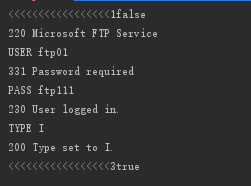 表示连接成功
三:实现文件上传 和断点续传
由于设置了观察者 在观察当前上传的进度变化 ,本次代码中 没有添加观察者模式的代码,所以这个地方 可能需要先注释掉观察者
package com.utils.study.ftpCenter;

import com.utils.study.CreateException;

import com.utils.study.enums.UploadStatus;

import com.utils.study.observerModel.FileObserverAble;

import com.utils.study.observerModel.FilePercentObserver;

import org.apache.commons.net.ftp.FTPClient;

import org.apache.commons.net.ftp.FTPFile;

import java.io.*;

/**

 * Created by yugaofeng on 2017/9/5.

 */

public class FileOperateByFtp {

    private FTPClient ftpClient;

    FileObserverAble fileObserverAble;

    public FileOperateByFtp(FTPClient ftpClient) {

        //添加观察者对象

        fileObserverAble = new FileObserverAble();

        FilePercentObserver filePercentObserver = new FilePercentObserver(fileObserverAble);

        this.ftpClient = ftpClient;

    }

    /**

     * 上传文件到FTP服务器,支持断点续传 并返回上传文件进度

     * @param local 本地文件名称,绝对路径

     * @param remote 远程文件路径,使用/home/directory1/subdirectory/file.ext

     *               按照Linux上的路径指定方式,支持多级目录嵌套,支持递归创建不存在的目录结构

     * @return 上传结果

     * @throws IOException

     */

    public UploadStatus upload(String local, String remote) throws Exception{

        try {

            if (!ftpClient.isConnected()) {

                throw new CreateException(-1, "远程服务器相应目录创建失败");

            }

            UploadStatus result;

            // 对远程目录的处理  并返回文件的名称

            String remoteFileName = createDirectory(remote, ftpClient);

            // 检查远程是否存在文件

            FTPFile[] files = ftpClient.listFiles(remoteFileName);

            File localFile = new File(local);

            if(localFile.length() <=0){

                throw new CreateException(-1,"本地文件不存在");

            }

            if (files.length == 1) {

                //判断文件是否存在

                long remoteSize = files[0].getSize();

                long localSize = localFile.length();

                if(remoteSize==localSize){

                    return UploadStatus.File_Exits;

                }else if(remoteSize > localSize){

                    return UploadStatus.Remote_Bigger_Local;

                }

                result = this.writeByUnit(remoteFileName,localFile,ftpClient,remoteSize,localFile.length());

            } else {

                result = this.writeByUnit(remoteFileName,localFile,ftpClient,0,localFile.length());

            }

            return result;

        }catch (CreateException e){

            throw e;

        }finally {

            //上传完成之后 切回到根目录

            ftpClient.changeWorkingDirectory("/");

        }

    }

    /**

     * 判断目录

     * @param remoteFilePath 远程服务器上面的 文件目录

     * @param ftpClient ftp客户端

     * @return

     * @throws Exception

     */

    private String createDirectory(String remoteFilePath,FTPClient ftpClient) throws Exception {

        if(ftpClient == null){

            throw new CreateException(-1,"FTP客户端为空,请先连接到客户端");

        }

        String fileName = remoteFilePath;

        if(remoteFilePath.contains("/")){

            fileName = remoteFilePath.substring(remoteFilePath.lastIndexOf("/") + 1);

            String directory = remoteFilePath.substring(0, remoteFilePath.lastIndexOf("/") + 1);

            if(directory.startsWith("/")){

                directory = directory.substring(1);

            }

            while (true){

                if(!directory.contains("/")){

                    break;

                }

                String subDirectory = directory.substring(0, directory.indexOf("/"));

                directory = directory.substring(directory.indexOf("/")+1);

                if (!ftpClient.changeWorkingDirectory(subDirectory)) {

                    if (ftpClient.makeDirectory(subDirectory)) {

                        ftpClient.changeWorkingDirectory(subDirectory);

                    } else {

                        throw new CreateException(-1,"创建目录失败");

                    }

                }

            }

        }

        return fileName;

    }

    /**

     * 上传文件到服务器,新上传和断点续传

     * @param remoteFile 远程文件名,在上传之前已经将服务器工作目录做了改变

     * @param localFile 本地文件File句柄,绝对路径

     * @param ftpClient FTPClient引用 beginSize是指文件长传开始指针位置  endSize是结束的位置 为多线程上传下载提供接口 不过该方法还需要修改

     * @return

     * @throws IOException

     */

    private  UploadStatus writeByUnit(String remoteFile,File localFile,FTPClient ftpClient,long beginSize,long endSize) throws Exception {

        long localSize = localFile.length();

        if(endSize > localSize){

            endSize = localSize;

        }

        if(beginSize < 0){

            beginSize = 0;

        }

        //等待写入的文件大小

        long writeSize = endSize - beginSize;

        if(writeSize <= 0){

            throw new CreateException(1,"文件指针参数出错");

        }

        //获取百分单位是 1-100

        RandomAccessFile raf = new RandomAccessFile(localFile,"r");

        OutputStream out = ftpClient.appendFileStream(new String(remoteFile.getBytes("GBK"),"iso-8859-1"));

        //把文件指针移动到 开始位置

        ftpClient.setRestartOffset(beginSize);

        raf.seek(beginSize);

        //定义最小移动单位是 1024字节 也就是1kb

        byte[] bytes = new byte[1024];

        int c;

        double finishSize = 0;

        double finishPercent = 0;

        //存在一个bug 当分布移动的时候  可能会出现下载重复的问题 后期需要修改

        while ((c = raf.read(bytes)) != -1) {

            out.write(bytes, 0, c);

            finishSize += c;

            if(finishSize > writeSize){

                finishPercent = 1;

                //System.out.println(">>>>>完成进度:" + finishPercent);

                fileObserverAble.setKeyValue(localFile.getName(),finishPercent,"upload");

                break;

            }

            if ((finishSize / writeSize) - finishPercent > 0.01) {

                finishPercent = finishSize / writeSize;

                //System.out.println(">>>>>完成进度:" + finishPercent);

                fileObserverAble.setKeyValue(localFile.getName(),finishPercent,"upload");

            }

        }

        out.flush();

        raf.close();

        out.close();

        boolean result =ftpClient.completePendingCommand();

        return  result?UploadStatus.Upload_From_Break_Success:UploadStatus.Upload_From_Break_Failed;

    }

    /**

     * 从FTP服务器上下载文件

     * @param remote 远程文件路径

     * @param local 本地文件路径

     * @return 是否成功

     * @throws IOException

     */

    public boolean download(String remote,String local) throws Exception{

        FTPFile[] files = ftpClient.listFiles(remote);

        if(files == null || files.length < 0){

            throw new CreateException(-1,"远程文件不存在");

        }

        if(files.length != 1){

            throw new CreateException(-1,"远程文件不唯一");

        }

        File localFile = new File(local);

        if(localFile.exists()){

            long localBeginSize = localFile.length();

            if(localBeginSize == files[0].getSize()){

                throw new CreateException(-1,"文件已经存在");

            }else if(localBeginSize > files[0].getSize()){

                throw new CreateException(-1,"下载文件出错");

            }

            return downloadByUnit(remote,local,localBeginSize,files[0].getSize());

        }else {

            return downloadByUnit(remote,local,0,files[0].getSize());

        }

    }

    private Boolean downloadByUnit(String remote,String local,long beginSize,long endSize) throws Exception {

        File localFile = new File(local);

        long waitSize = endSize - beginSize;

        //进行断点续传,并记录状态

        FileOutputStream out = new FileOutputStream(localFile,true);

        //把文件指针移动到 开始位置

        ftpClient.setRestartOffset(beginSize);

        InputStream in = ftpClient.retrieveFileStream(new String(remote.getBytes("GBK"),"iso-8859-1"));

        byte[] bytes = new byte[1024];

        int c;

        double finishSize =0;

        double finishPercent = 0;

        while((c = in.read(bytes))!= -1){

            out.write(bytes,0,c);

            finishSize += c;

            if(finishSize > waitSize){

                //System.out.println(">>>>>完成进度:" + 1);

                fileObserverAble.setKeyValue(localFile.getName(),1,"download");

            }

            if ((finishSize / waitSize) - finishPercent > 0.01) {

                finishPercent = finishSize / waitSize;

                //System.out.println(">>>>>完成进度:" + finishPercent);

                fileObserverAble.setKeyValue(localFile.getName(),finishPercent,"download");

            }

        }

        in.close();

        out.close();

        return ftpClient.completePendingCommand();

    }

}
测试上传 并在控制台打印出 上传百分百
public static void main(String[] args) {

        ContinueFTP ftp = new ContinueFTP();

        try {

            ftp.connect("172.20.139.217", 21, "ftp01", "ftp111");

            FileOperateByFtp fileOperateByFtp = new FileOperateByFtp(ftp.getFtpClient());

            fileOperateByFtp.upload("F:\\upload7.temp","/upload2/f3/upload7.temp");

            fileOperateByFtp.upload("F:\\upload6.temp","/upload2/f3/upload6.temp");

           /* fileOperateByFtp.download("/upload2/f3/upload7.temp","F:\\upload6.temp");

            fileOperateByFtp.download("//upload2/f3/upload6.temp","F:\\upload7.temp");*/

            if(ftp.getFtpClient() != null){

                ftp.getFtpClient().disconnect();

            }

        } catch (Exception e) {

            if(e instanceof CreateException){

                System.out.println(((CreateException) e).getErrMessage());

            }

        }

    }
上传结果:

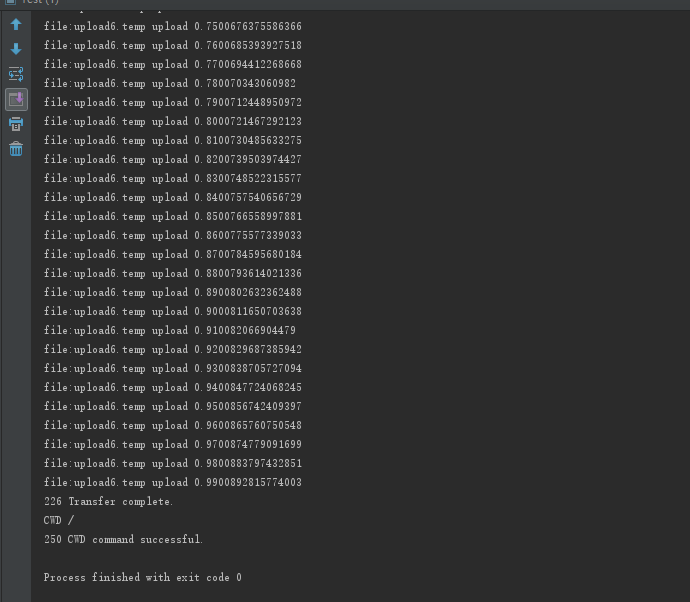
下载就不做演示
四:总结
ftp文件长传其实很简单,,实现断点续传也不能
ftp里面提供了一个 ftpClient.setRestartOffset(beginSize); 方法 实现了文件指针移动的开始位置 为后面的 分布式断点 多点上传 提供了 基础 .
另外关于文件显示进度比例,在这里实现也不能,但要是与前端进度条进行实时数据交互式不现实的。。。后来通过查阅资料发现有些还很有道理的。
比如我们服务器一般也会限制文件上传的大小,所以一般显示进度条是在前端做的,通过比较浏览器发送出去的数据量 和带上传的文件大小 进行比较来显示 进度条,但这种方法还没有测试成功,后面会进行验证。
FTP文件上传 支持断点续传 并 打印下载进度(二) —— 单线程实现的更多相关文章
- 【SFTP】使用Jsch实现Sftp文件上传-支持断点续传和进程监控
JSch是Java Secure Channel的缩写.JSch是一个SSH2的纯Java实现.它允许你连接到一个SSH服务器,并且可以使用端口转发,X11转发,文件传输等,当然你也可以集成它的功能到 ...
- FTP文件上传并支持断点续传(一)—— win10 本地环境 ftp站点构建
由于之前项目开发是采用是采用的FTP文件上传,就一直想学习,但由于FTP服务器是公司的,为了方便就像把本地变成ftp站点,其实很简单,但也有很多坑 这里简单介绍一下自己遇到的坑 一:开通本地的ftp权 ...
- Python 基于Python实现Ftp文件上传,下载
基于Python实现Ftp文件上传,下载 by:授客 QQ:1033553122 测试环境: Ftp客户端:Windows平台 Ftp服务器:Linux平台 Python版本:Python 2.7 ...
- 4GB以上超大文件上传和断点续传服务器的实现
随着视频网站和大数据应用的普及,特别是高清视频和4K视频应用的到来,超大文件上传已经成为了日常的基础应用需求. 但是在很多情况下,平台运营方并没有大文件上传和断点续传的开发经验,往往在网上找一些简单的 ...
- Java实现FTP文件上传与下载
实现FTP文件上传与下载可以通过以下两种种方式实现(不知道还有没有其他方式),分别为:1.通过JDK自带的API实现:2.通过Apache提供的API是实现. 第一种方式 package com.cl ...
- skymvc文件上传支持多文件上传
skymvc文件上传支持多文件上传 支持单文件.多文件上传 可以设定 文件大小.存储目录.文件类型 //上传的文件目录 $this->upload->uploaddir="att ...
- java/struts/Servlet文件下载与ftp文件上传下载
1.前端代码 使用超链接到Struts的Action或Servlet <a target="_blank" href="ftpFileAction!download ...
- .net core版 文件上传/ 支持批量上传,拖拽以及预览,bootstrap fileinput上传文件
asp.net mvc请移步 mvc文件上传支持批量上传,拖拽以及预览,文件内容校验 本篇内容主要解决.net core中文件上传的问题 开发环境:ubuntu+vscode 1.导入所需要的包:n ...
- Java使用comms-net jar包完成ftp文件上传进度的检测功能
本文章只讲述大致的思路与本次功能对应的一些开发环境,具体实现请结合自己的开发情况,仅供参考,如果有不对的地方,欢迎大家指出! 准备环境:JDK1.7 OR 1.8.eclipse.ftp服务器(可自行 ...
随机推荐
- android WebView技术笔记(存储技术)
作为刚刚开始工作的新手程序猿,各种知识还不算熟练,所以将学习到的知识记录一下以免以后忘记. WebView加载h5的知识现在可以说非常的常用,通过加载h5的网页可以在不更新app的情况下来更新app的 ...
- Python-函数小结
原文出处,如有侵权,请联系删除. 用户自定义.py文件 如果你已经把my_abs()的函数定义保存为abstest.py文件了,那么,可以在该文件的当前目录下启动Python解释器,用from abs ...
- STL源码剖析-vector
STL(Standard Template Library) C++标准模板库,acm选手一定对它不陌生,除了算法,那几乎是“吃饭的家伙了”.我们使用库函数非常方便,且非常高效(相对于自己实现来说). ...
- 工具资源系列之给虚拟机装个windows
前面我们介绍了如何在 mac 宿主机安装 VMware 虚拟机软件,本节我们将继续介绍如何给虚拟机安装镜像,切换不同的操作系统. VMware 软件是容器,镜像是内核,这里的镜像指的是操作系统. 下载 ...
- 【Linux】【MySQL】CentOS7安装最新版MySQL8.0.13(最新版MySQL从安装到运行)
1.前言 框框博客在线报时:2018-11-07 19:31:06 当前MySQL最新版本:8.0.13 (听说比5.7快2倍) 官方之前表示:MySQL 8.0 正式版 8.0.11 已发布,MyS ...
- [20190419]shared latch spin count 2.txt
[20190419]shared latch spin count 2.txt --//上午测试shared latch XX模式的情况,链接:http://blog.itpub.net/267265 ...
- 搭建 structs2 环境
前言 环境: window 10 ,JDK 1.8 ,Tomcat 7 ,MyEclipse 2014 pro 搭建 SSH 环境的步骤 创建 JavaWeb 项目 导入 structs2 的jar包 ...
- Linux Mint chrome浏览器提示“需要安装adobe flash player”
出现这种情况,是因为系统没有安装flash 插件造成的,用以下的命令安装: sudo apt-get install adobe-flashplugin 安装完成后,重启浏览器. 如果chrome浏览 ...
- 对ES6的yield示例分析
近期ES6标准如火如荼的发展,其中主要还是各大浏览器的支持,最重要厂商支付宝,微信的支持,使得国内的发展也很迅猛. 这里主要是对yield关键字的,yield实际上可以看作是一种新的中断机制,大家都知 ...
- 数据库【mysql篇】学习笔记
Windows服务 -- 启动MySQL net start mysql-- 创建Windows服务 sc create mysql binPath= mysqld_bin_path(注意 ...