
java基础之-I/O流和File类解析
在日常的java开发中少不了文件的读取和 写入,这就涉及到文件的I/O操作,今天就来总结下文件的IO操作,顺便文件的IO操作也需要File了的帮助,所以一起总结了。
以下图片为我根据其他博客所总结的内容进行了相应的总结和IO流的类结构图,类结构图中还少了几个类
简单描述下:
IO分为字节和字符流2中方式,字节流以byte为单位,字符流以字符为单位,1个字节8byte 0·255,字节流的抽象类为inputstream和outputstream,他们无法实例化,所以需要
其子类来实现。字符流通常按2个字节来表示则为16byte,字符流的抽象类为reader和writer。
字符流通常是需要将文件读取到内存才能进行操作的,而字节流则是直接操作文件的。

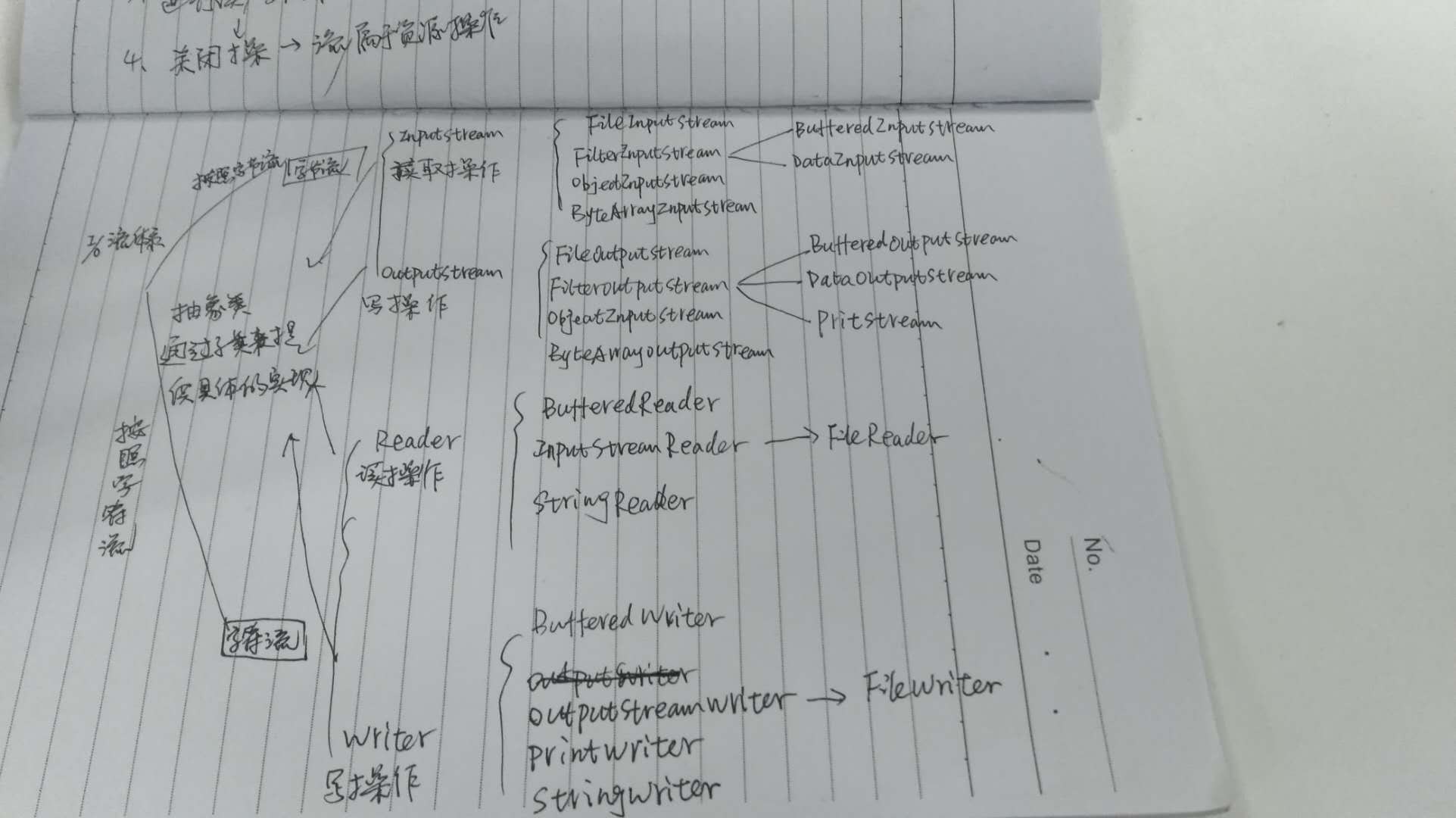
还是通过具体的例子来说明吧。
@Test
public void testFileReader() throws IOException {
    File file = new File("D:/train/train.txt");
    FileInputStream fs = new FileInputStream(file);
    InputStreamReader reader = new InputStreamReader(fs,"utf8");
    BufferedReader bufferedReader = new BufferedReader(reader);
    System.out.println(bufferedReader.readLine());
// 关闭文件流
bufferedReader.flush();

bufferedReader.close();
reader.close();
fs.close();
}

@Test
public void testFileOut() throws IOException {
    File file = new File("D:/train/train.txt");
    FileOutputStream out = new FileOutputStream(file);
    String str = "hello world";
    out.write(str.getBytes("utf8"));
out.close();
}
上面的代码包含了文件的读取和文件的写入,包含字符集设置,读取操作其实可以包含了IO中绝大多数的操作了。需要注意的是不管是字节流,还是字符流他们的read()方法返回的结果都是int类型,需要将其转换成char类型。具体的源码可以根据类的结构树去查看。
一上为简单总结了IO流,下面是File类的总结:


File -> FileSystem -> WinNTFileSystem
操作文件其实通过操作系统的文件功能来实现的,不同的系统如windows和UNIX其实是不同的,新建的File通过getFileSystem()方法获取系统操作文件的权限,每个新建的文件都包含2个重要参数path和prefixLength
 /**

     * This abstract pathname's normalized pathname string. A normalized

     * pathname string uses the default name-separator character and does not

     * contain any duplicate or redundant separators.

     * 这个抽象路径的正常路径名称,"d:/program file/train"这种格式

     * @serial

     */

    private final String path;

 /**

     * The length of this abstract pathname's prefix, or zero if it has no

     * prefix. 抽象路径的前缀长度,不存在则为0

     */

    private final transient int prefixLength;
文件系统的操作其实很多都是通过这个前缀来创建文件的。
通过看源码可以发现,File类其实有点像接口,而WinNTFileSystem类则像实现接口。
看下File的构造函数,其中通过uri的构造函数没有贴出,有需要可以自己去查阅
/**

     * Creates a new <code>File</code> instance by converting the given

     * pathname string into an abstract pathname.  If the given string is

     * the empty string, then the result is the empty abstract pathname.

     *

     * @param   pathname  A pathname string

     * @throws  NullPointerException

     *          If the <code>pathname</code> argument is <code>null</code> 最通用给构造函数,通过文件路径来创建文件

     */

    public File(String pathname) {

        if (pathname == null) {

            throw new NullPointerException();

        }

        this.path = fs.normalize(pathname);

        this.prefixLength = fs.prefixLength(this.path);

    }

 /**

     * Creates a new <code>File</code> instance from a parent pathname string

     * and a child pathname string.

     *

     * <p> If <code>parent</code> is <code>null</code> then the new

     * <code>File</code> instance is created as if by invoking the

     * single-argument <code>File</code> constructor on the given

     * <code>child</code> pathname string.

     *

     * <p> Otherwise the <code>parent</code> pathname string is taken to denote

     * a directory, and the <code>child</code> pathname string is taken to

     * denote either a directory or a file.  If the <code>child</code> pathname

     * string is absolute then it is converted into a relative pathname in a

     * system-dependent way.  If <code>parent</code> is the empty string then

     * the new <code>File</code> instance is created by converting

     * <code>child</code> into an abstract pathname and resolving the result

     * against a system-dependent default directory.  Otherwise each pathname

     * string is converted into an abstract pathname and the child abstract

     * pathname is resolved against the parent.

     * 通过父路径和子路径来创建文件

     * @param   parent  The parent pathname string

     * @param   child   The child pathname string

     * @throws  NullPointerException

     *          If <code>child</code> is <code>null</code>

     */

    public File(String parent, String child) {

        if (child == null) {

            throw new NullPointerException();

        }

        if (parent != null) {

            if (parent.equals("")) {

                this.path = fs.resolve(fs.getDefaultParent(), -->"/"

                                       fs.normalize(child));

            } else {

                this.path = fs.resolve(fs.normalize(parent),

                                       fs.normalize(child));

            }

        } else {

            this.path = fs.normalize(child);

        }

        this.prefixLength = fs.prefixLength(this.path);

    }

 /** 通过父文件和子路径来创建文件

     * Creates a new <code>File</code> instance from a parent abstract

     * pathname and a child pathname string.

     *

     * <p> If <code>parent</code> is <code>null</code> then the new

     * <code>File</code> instance is created as if by invoking the

     * single-argument <code>File</code> constructor on the given

     * <code>child</code> pathname string.

     *

     * <p> Otherwise the <code>parent</code> abstract pathname is taken to

     * denote a directory, and the <code>child</code> pathname string is taken

     * to denote either a directory or a file.  If the <code>child</code>

     * pathname string is absolute then it is converted into a relative

     * pathname in a system-dependent way.  If <code>parent</code> is the empty

     * abstract pathname then the new <code>File</code> instance is created by

     * converting <code>child</code> into an abstract pathname and resolving

     * the result against a system-dependent default directory.  Otherwise each

     * pathname string is converted into an abstract pathname and the child

     * abstract pathname is resolved against the parent.

     *

     * @param   parent  The parent abstract pathname

     * @param   child   The child pathname string

     * @throws  NullPointerException

     *          If <code>child</code> is <code>null</code>

     */

    public File(File parent, String child) {

        if (child == null) {

            throw new NullPointerException();

        }

        if (parent != null) {

            if (parent.path.equals("")) {

                this.path = fs.resolve(fs.getDefaultParent(),

                                       fs.normalize(child));

            } else {

                this.path = fs.resolve(parent.path,   --> 将父文件转换成路径,然后和子路径拼接

                                       fs.normalize(child));

            }

        } else {

            this.path = fs.normalize(child);

        }

        this.prefixLength = fs.prefixLength(this.path);

    }
其他的一些方法如创建新文件,creatNewFile(),创建文件夹mkdir(),mkdirs()等方法,相信看下源码就能很清楚了。
java基础之-I/O流和File类解析的更多相关文章
- java基础9(IO流)-File类
File类 File:文件和目录路径名的抽象表示形式.即java中把文件或者目录都封装成File对象 代码练习1 import java.io.File; public class FileDemo1 ...
- 【Java基础】【19异常&IO(File类)】
19.01_异常(异常的概述和分类) A:异常的概述 异常就是Java程序在运行过程中出现的错误. B:异常的分类 通过API查看Throwable Error 服务器宕机,数据库崩溃等 Except ...
- IO流,File类的测试........课堂加总结
package liu0926; import java.io.File; import java.io.IOException; public class Text01 { public stati ...
- Java基础系列2:深入理解String类
Java基础系列2:深入理解String类 String是Java中最为常用的数据类型之一,也是面试中比较常被问到的基础知识点,本篇就聊聊Java中的String.主要包括如下的五个内容: Strin ...
- java基础——IO流之File类
1.File类的构造方法: File(String pathName):通过一个指定的字符串类型路径来创建一个文件对象 File (String parent,String child):通过指定 ...
- Java基础系列8——IO流超详细总结
该系列博文会告诉你如何从入门到进阶,一步步地学习Java基础知识,并上手进行实战,接着了解每个Java知识点背后的实现原理,更完整地了解整个Java技术体系,形成自己的知识框架. 在初学Java时,I ...
- Java基础之详谈IO流
Java基础知识.IO流详细讲解.你所要的IO这里都有
- Java笔记(二十七)……IO流中 File文件对象与Properties类
File类 用来将文件或目录封装成对象 方便对文件或目录信息进行处理 File对象可以作为参数传递给流进行操作 File类常用方法 创建 booleancreateNewFile():创建新文件,如果 ...
- -1-4 java io java流 常用流 分类 File类 文件 字节流 字符流 缓冲流 内存操作流 合并序列流
File类 •文件和目录路径名的抽象表示形式 构造方法 •public File(String pathname) •public File(String parent,Stringchild) ...
随机推荐
- SQL - Order By如何处理NULL
问题来了.执行SQL语句 SELECT * FROM tbl ORDER BY x, y 如果用来排序的列x.y当中有NULL值,那么它们的顺序是怎样的呢? 不同的数据库有不同的答案,目前的主流数据库 ...
- 第四周LINUX 学习笔记
内核编译丶sed丶awk Linux:单内核 模块化:动态 /lib/modules lsmod,modinfo,modprobe,insmod,,modprobe -r , ...
- SQLServer之修改用户自定义数据库用户
修改用户自定义数据库用户注意事项 默认架构将是服务器为此数据库用户解析对象名时将搜索的第一个架构. 除非另外指定,否则默认架构将是此数据库用户创建的对象所属的架构. 如果用户具有默认架构,则将使用默认 ...
- r.js合并实践
项目中用到require.js做生产时模块开发,但上线要合并压缩,幸好它配套有r.js.下面就其用法说明一下. 首先建一个目录,里面的结构如下: require.js可以到r.js项目下载 r.js可 ...
- 我是如何拿到蚂蚁金服 offer 的 ?
阅读本文大概需要 5.6 分钟. 作者:翟洪毅 一.梦想和被拒 二.积累 三.结语 首先介绍一下投稿作者 翟洪毅,16年华理计算机本科毕业.在年前拿到了蚂蚁金服Java开发的offer,P6. 工 ...
- Google File System 见解 (作业)
Google File System ——见解 近年来,大街小巷都传遍的大数据,引起了社会的一阵学习大数据狂热,造成任何公司在招聘人员的时候都会注上一条,会大数据的优先考虑:但是,从另一方面来说,这狂 ...
- 三种方式实现观察者模式 及 Spring中的事件编程模型
观察者模式可以说是众多设计模式中,最容易理解的设计模式之一了,观察者模式在Spring中也随处可见,面试的时候,面试官可能会问,嘿,你既然读过Spring源码,那你说说Spring中运用的设计模式吧, ...
- cassandra读源码---Streaming
前言 cassandra的很多过程需要网络传输模块,需要在各个节点直接发送文件.包括加入节点,删除节点引起的不同节点的负责ring环的key值发生了变化,导致sstable需要在各个节点中移动. 整体 ...
- numpy操作
python中使用了numpy的一些操作,特此记录下来: 生成矩阵,替换值 import numpy as np # 生成一行10列的矩阵 dataset = np.zeros((1, 10)) # ...
- 将svg文件化成字体图标的步骤
一 前提摘要 有一个活就是按照需求在现有的项目中新增几个项目和修改几个项目,是很简单的,但当中遇到了一个小问题,就是tabs中图标选中和被选中的颜色问题,如果是新开发的,目前掌握的有两种办法 ...