
使用poi导出数据到excel
一、首先是导入poi所需要的jar包,我是用的是maven,添加jar包依赖
<dependency>

      <groupId>org.apache.poi</groupId>

      <artifactId>poi</artifactId>

      <version>3.11</version>

</dependency>

<dependency>

      <groupId>org.apache.poi</groupId>

      <artifactId>poi-ooxml</artifactId>

      <version>3.11</version>

</dependency>
二、导出excel工具类代码编写
package com.cccuu.project.myUtils;

import org.apache.poi.hssf.usermodel.*;

import org.apache.poi.hssf.util.HSSFColor;

import org.apache.poi.ss.util.CellRangeAddress;

import javax.servlet.http.HttpServletResponse;

import java.io.IOException;

import java.io.OutputStream;

import java.util.List;

/*******************************************

 *

 * @Package com.cccuu.project.myUtils

 * @Author duan

 * @Date 2018/3/29 9:12

 * @Version V1.0

 *******************************************/

public class ExcelUtil {

    /**

     * 导出excel

     * @param title  导出表的标题

     * @param rowsName 导出表的列名

     * @param dataList  需要导出的数据

     * @param fileName  生成excel文件的文件名

     * @param response

     */

    public void exportExcel(String title,String[] rowsName,List<Object[]> dataList,String fileName,HttpServletResponse response) throws Exception{

        OutputStream output = response.getOutputStream();

        response.reset();

        response.setHeader("Content-disposition",

                "attachment; filename="+fileName);

        response.setContentType("application/msexcel");

        this.export(title,rowsName,dataList,fileName,output);

        this.close(output);

    }

    /*

     * 导出数据

     */

    private void export(String title,String[] rowName,List<Object[]> dataList,String fileName,OutputStream out) throws Exception {

        try {

            HSSFWorkbook workbook = new HSSFWorkbook(); // 创建工作簿对象

            HSSFSheet sheet = workbook.createSheet(title); // 创建工作表

            HSSFRow rowm = sheet.createRow(0);  // 产生表格标题行

            HSSFCell cellTiltle = rowm.createCell(0);   //创建表格标题列

            // sheet样式定义;    getColumnTopStyle();    getStyle()均为自定义方法 --在下面,可扩展

            HSSFCellStyle columnTopStyle = this.getColumnTopStyle(workbook);// 获取列头样式对象

            HSSFCellStyle style = this.getStyle(workbook); // 获取单元格样式对象

            //合并表格标题行,合并列数为列名的长度,第一个0为起始行号,第二个1为终止行号,第三个0为起始列好,第四个参数为终止列号

            sheet.addMergedRegion(new CellRangeAddress(0, 1, 0, (rowName.length - 1)));

            cellTiltle.setCellStyle(columnTopStyle);    //设置标题行样式

            cellTiltle.setCellValue(title);     //设置标题行值

            int columnNum = rowName.length;     // 定义所需列数

            HSSFRow rowRowName = sheet.createRow(2); // 在索引2的位置创建行(最顶端的行开始的第二行)

            // 将列头设置到sheet的单元格中

            for (int n = 0; n < columnNum; n++) {

                HSSFCell cellRowName = rowRowName.createCell(n); // 创建列头对应个数的单元格

                cellRowName.setCellType(HSSFCell.CELL_TYPE_STRING); // 设置列头单元格的数据类型

                HSSFRichTextString text = new HSSFRichTextString(rowName[n]);

                cellRowName.setCellValue(text); // 设置列头单元格的值

                cellRowName.setCellStyle(columnTopStyle); // 设置列头单元格样式

            }

            // 将查询出的数据设置到sheet对应的单元格中

            for (int i = 0; i < dataList.size(); i++) {

                Object[] obj = dataList.get(i);   // 遍历每个对象

                HSSFRow row = sheet.createRow(i + 3);   // 创建所需的行数

                for (int j = 0; j < obj.length; j++) {

                    HSSFCell cell = null;   // 设置单元格的数据类型

                    if (j == 0) {

                        cell = row.createCell(j, HSSFCell.CELL_TYPE_NUMERIC);

                        cell.setCellValue(i + 1);

                    } else {

                        cell = row.createCell(j, HSSFCell.CELL_TYPE_STRING);

                        if (!"".equals(obj[j]) && obj[j] != null) {

                            cell.setCellValue(obj[j].toString()); // 设置单元格的值

                        }

                    }

                    cell.setCellStyle(style); // 设置单元格样式

                }

            }

            // 让列宽随着导出的列长自动适应

            for (int colNum = 0; colNum < columnNum; colNum++) {

                int columnWidth = sheet.getColumnWidth(colNum) / 256;

                for (int rowNum = 0; rowNum < sheet.getLastRowNum(); rowNum++) {

                    HSSFRow currentRow;

                    // 当前行未被使用过

                    if (sheet.getRow(rowNum) == null) {

                        currentRow = sheet.createRow(rowNum);

                    } else {

                        currentRow = sheet.getRow(rowNum);

                    }

                    if (currentRow.getCell(colNum) != null) {

                        HSSFCell currentCell = currentRow.getCell(colNum);

                        if (currentCell.getCellType() == HSSFCell.CELL_TYPE_STRING) {

                            int length = currentCell.getStringCellValue()

                                    .getBytes().length;

                            if (columnWidth < length) {

                                columnWidth = length;

                            }

                        }

                    }

                }

                if (colNum == 0) {

                    sheet.setColumnWidth(colNum, (columnWidth - 2) * 256);

                } else {

                    sheet.setColumnWidth(colNum, (columnWidth + 4) * 256);

                }

            }

            workbook.write(out);

        } catch (Exception e) {

            e.printStackTrace();

        }

    }

    /*

     * 列头单元格样式

     */

    private HSSFCellStyle getColumnTopStyle(HSSFWorkbook workbook) {

        // 设置字体

        HSSFFont font = workbook.createFont();

        // 设置字体大小

        font.setFontHeightInPoints((short) 11);

        // 字体加粗

        font.setBoldweight(HSSFFont.BOLDWEIGHT_BOLD);

        // 设置字体名字

        font.setFontName("Courier New");

        // 设置样式;

        HSSFCellStyle style = workbook.createCellStyle();

        // 设置底边框;

        style.setBorderBottom(HSSFCellStyle.BORDER_THIN);

        // 设置底边框颜色;

        style.setBottomBorderColor(HSSFColor.BLACK.index);

        // 设置左边框;

        style.setBorderLeft(HSSFCellStyle.BORDER_THIN);

        // 设置左边框颜色;

        style.setLeftBorderColor(HSSFColor.BLACK.index);

        // 设置右边框;

        style.setBorderRight(HSSFCellStyle.BORDER_THIN);

        // 设置右边框颜色;

        style.setRightBorderColor(HSSFColor.BLACK.index);

        // 设置顶边框;

        style.setBorderTop(HSSFCellStyle.BORDER_THIN);

        // 设置顶边框颜色;

        style.setTopBorderColor(HSSFColor.BLACK.index);

        // 在样式用应用设置的字体;

        style.setFont(font);

        // 设置自动换行;

        style.setWrapText(false);

        // 设置水平对齐的样式为居中对齐;

        style.setAlignment(HSSFCellStyle.ALIGN_CENTER);

        // 设置垂直对齐的样式为居中对齐;

        style.setVerticalAlignment(HSSFCellStyle.VERTICAL_CENTER);

        return style;

    }

    /*

     * 列数据信息单元格样式

     */

    private HSSFCellStyle getStyle(HSSFWorkbook workbook) {

        // 设置字体

        HSSFFont font = workbook.createFont();

        // 设置字体大小

        // font.setFontHeightInPoints((short)10);

        // 字体加粗

        // font.setBoldweight(HSSFFont.BOLDWEIGHT_BOLD);

        // 设置字体名字

        font.setFontName("Courier New");

        // 设置样式;

        HSSFCellStyle style = workbook.createCellStyle();

        // 设置底边框;

        style.setBorderBottom(HSSFCellStyle.BORDER_THIN);

        // 设置底边框颜色;

        style.setBottomBorderColor(HSSFColor.BLACK.index);

        // 设置左边框;

        style.setBorderLeft(HSSFCellStyle.BORDER_THIN);

        // 设置左边框颜色;

        style.setLeftBorderColor(HSSFColor.BLACK.index);

        // 设置右边框;

        style.setBorderRight(HSSFCellStyle.BORDER_THIN);

        // 设置右边框颜色;

        style.setRightBorderColor(HSSFColor.BLACK.index);

        // 设置顶边框;

        style.setBorderTop(HSSFCellStyle.BORDER_THIN);

        // 设置顶边框颜色;

        style.setTopBorderColor(HSSFColor.BLACK.index);

        // 在样式用应用设置的字体;

        style.setFont(font);

        // 设置自动换行;

        style.setWrapText(false);

        // 设置水平对齐的样式为居中对齐;

        style.setAlignment(HSSFCellStyle.ALIGN_CENTER);

        // 设置垂直对齐的样式为居中对齐;

        style.setVerticalAlignment(HSSFCellStyle.VERTICAL_CENTER);

        return style;

    }

    /**

     * 关闭输出流

     * @param os

     */

    private void close(OutputStream os) {

        if (os != null) {

            try {

                os.close();

            } catch (IOException e) {

                e.printStackTrace();

            }

        }

    }

}
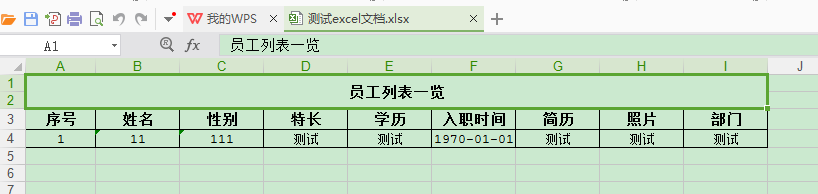
三、测试,框架使用的是ssm
@RequestMapping("exportWordData")

    public void exportExcelData(HttpServletRequest request,HttpServletResponse response){

        // 定义表的标题

        String title = "员工列表一览";

        //定义表的列名

        String[] rowsName = new String[] { "序号", "姓名", "性别", "特长", "学历", "入职时间", "简历", "照片", "部门" };

        //定义表的内容

        List<Object[]> dataList = new ArrayList<Object[]>();

        Object[] objs = new Object[9];

        objs[0] = "测试";

        objs[1] = 11;

        objs[2] = "111";

        objs[3] = "测试";

        objs[4] = "测试";

        SimpleDateFormat df = new SimpleDateFormat("yyyy-MM-dd");

        String date = df.format(2018-12-24);

        objs[5] = date;

        objs[6] = "测试";

        objs[7] = "测试";

        objs[8] = "测试";

        dataList.add(objs);

        // 创建ExportExcel对象

        ExcelUtil excelUtil = new ExcelUtil();

        try{

            String fileName= new String("测试excel文档.xlsx".getBytes("UTF-8"),"iso-8859-1");    //生成word文件的文件名

            excelUtil.exportExcel(title,rowsName,dataList,fileName,response);

            returnInfo.setResult(true);

        }catch(Exception e){

            e.printStackTrace();

        }

    }
使用poi导出数据到excel的更多相关文章
- java利用poi导出数据到excel
背景: 上一篇写到利用jtds连接数据库获取对应的数据,本篇写怎样用poi将数据到处到excel中,此程序为Application 正文: 第三方poi jar包:poi驱动包下载 代码片段: /** ...
- springboot2.1.8使用poi导出数据生成excel(.xlsx)文件
前言:在实际开发中经常需要将数据库的数据导出成excel文件,poi方式则是其中一种较为常用的导出框架.简单读取excel文件在之前的一篇有说明 本项目实现需求:user发出一个导出student信息 ...
- spring boot 使用POI导出数据到Excel表格
在spring boot 的项目经常碰到将数据导出到Excel表格的需求,而POI技术则对于java操作Excel表格提供了API,POI中对于多种类型的文档都提供了操作的接口,但是其对于Excel表 ...
- Java导出数据为EXCEL的两种方式JXL和POI
JXL和POI导出数据方式的比较 POI支持excel2003和2007,而jxl只支持excel2003. 下面为测试代码: public class TestCondition { /** * 生 ...
- 从数据库导出数据到excel之POI操作
项目说明: 1:数据库中有两张表,主键关联 2:根据条件查询数据 3:处理为需要的数据封装类型,然后传到导出excel的方法中 <--框架部署就不详谈了,用的spring框架--> 补充: ...
- NPOI导出数据到Excel
NPOI导出数据到Excel 前言 Asp.net操作Excel已经是老生长谈的事情了,可下面我说的这个NPOI操作Excel,应该是最好的方案了,没有之一,使用NPOI能够帮助开发者在没有安装微 ...
- 一个方便且通用的导出数据到 Excel 的类库
一个方便且通用的导出数据到 Excel 的类库 起源: 之前在做一个项目时,客户提出了许多的导出数据的需求: 导出用户信息 导出业务实体信息 各种查询都要能导出 导出的数据要和界面上看到的一致 可以分 ...
- 从数据库导出数据到excel之List<List<Object>>导出
说明:有时候数据处理为List<List<Object>>更方便 姊妹篇:从数据库导出数据到excel之List<Map<>>导出 兄弟篇:从数据库导出 ...
- java代码导出数据到Excel、js导出数据到Excel(三)
jsp内容忽略,仅写个出发按钮: <button style="width: 100px" onclick="expertExcel()&quo ...
随机推荐
- 用C#开发的一个通用的地铁换乘查询工具
日常生活中,上班下班坐地铁已经是常事,每当我想去某一个远一点的地方,如果有地铁首选就是地铁,因为方便嘛!每次坐地铁,我们都是凭肉眼去得出我们心中最佳的换乘方案,但是,如果对于线路较少的城市来说,这个方 ...
- 数据库 --> SQL Server 和 Oracle 以及 MySQL 区别
SQL Server 和 Oracle 以及 MySQL 区别 三者是目前市场占有率最高(依安装量而非收入)的关系数据库,而且很有代表性.排行第四的DB2(属IBM公司),与Oracle的定位和架构非 ...
- 数据库数据带&符号 导入有问题的处理办法
在sql文件头部加个: set feedback off set define off 我们在plsql里面将一条语句导出时会出现以下结果(测试表t_test): prompt Importing ...
- JSP、Servlet、JDBC学习笔记
WEB的学习 * 服务器 * 网络的架构(面试题) * C/S client/server 客户端/服务器端 例子:QQ 快播 暴风影音 * 优点:交互性好,服务器压力小. * 缺点:客户端更新了,下 ...
- Win7(64Bit旗舰版) 安装 PL/SQL Developer图解说明
Win7逐渐成为现行主流的windows操作系统,其32和64位系统平分秋色.然而当下还没有64位的PL/SQL Developer问世,直接用32位的PL/SQL Developer连接Win7(6 ...
- 使用SecureCRTP 连接生产环境的web服务器和数据库服务器
一.使用SecureCRTP 连接生产环境的web服务器 首先,需要知道以下参数信息: 1.web服务器的ip地址 2.服务器的端口号 3.会话连接的用户名和密码 4.服务器的用户名 ...
- Xen Server虚拟机数据恢复的方法和数据恢复过程
在服务器运行过程中如果出现意外情况突然断电很容易引起服务器故障,服务器中的硬件设备损坏可以修复或者购买,但是服务器中的数据一旦发生故障丢失,对于企业来说将是不可估量的损失.那么服务器数据一旦丢失就除了 ...
- HDFS的7个设计特点
1.Block的放置:默认不配置.一个Block会有三份备份,一份放在NameNode指定的DataNode,另一份放在与指定DataNode非同一Rack上的DataNode,最后一份放在与指定Da ...
- 消除ExtJS6的extjs-trila字样
- [2]十道算法题【Java实现】
前言 清明不小心就拖了两天没更了-- 这是十道算法题的第二篇了-上一篇回顾:十道简单算法题 最近在回顾以前使用C写过的数据结构和算法的东西,发现自己的算法和数据结构是真的薄弱,现在用Java改写一下, ...