
springboot2.1.8使用poi导出数据生成excel(.xlsx)文件
前言:在实际开发中经常需要将数据库的数据导出成excel文件,poi方式则是其中一种较为常用的导出框架。简单读取excel文件在之前的一篇有说明
本项目实现需求:user发出一个导出student信息的请求,直接下载包含所有student信息的excel文件到本机。只贴出关键代码,未贴出的很简单,自行脑补
整体流程(服务器端):接收请求------>取出数据库数据------>将数据存成excel临时文件------>通过响应头让浏览器下载此临时文件------>删除临时文件
项目结构:
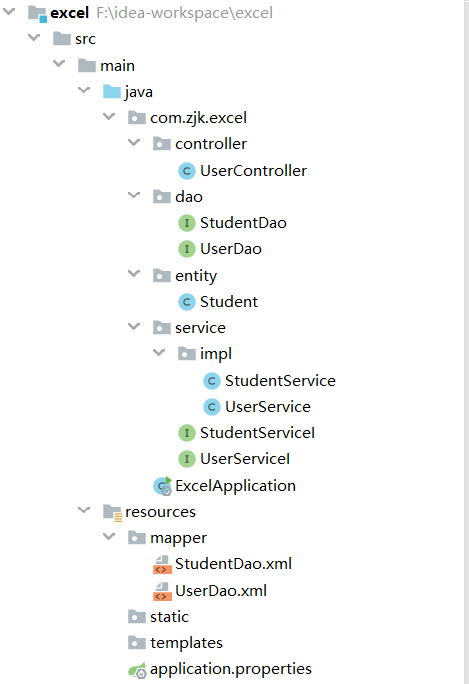
1.导入依赖
<!--poi-->

<dependency>

    <groupId>org.apache.poi</groupId>

    <artifactId>poi</artifactId>

    <version>4.1.0</version>

</dependency>

<dependency>

    <groupId>org.apache.poi</groupId>

    <artifactId>poi-ooxml</artifactId>

    <version>4.1.0</version>

</dependency>
2.controller
package com.zjk.excel.controller;

import com.zjk.excel.service.UserServiceI;

import org.springframework.beans.factory.annotation.Autowired;

import org.springframework.stereotype.Controller;

import org.springframework.web.bind.annotation.RequestMapping;

import javax.servlet.http.HttpServletResponse;

import java.io.*;

/**

 * @Auther: zjk

 * @Date: 2019/9/16

 * @Description:

 */

@Controller

@RequestMapping("/user")

public class UserController {

    @Autowired

    UserServiceI userServiceI;

    @RequestMapping("/export")

    public void exportStu(HttpServletResponse response){

        //设置默认的下载文件名

        String name = "学生信息表.xlsx";

        try {

            //避免文件名中文乱码,将UTF8打散重组成ISO-8859-1编码方式

            name = new String (name.getBytes("UTF8"),"ISO-8859-1");

        } catch (UnsupportedEncodingException e) {

            e.printStackTrace();

        }

        //设置响应头的类型

        response.setContentType("application/vnd.openxmlformats-officedocument.spreadsheetml.sheet");

        //让浏览器下载文件,name是上述默认文件下载名

        response.addHeader("Content-Disposition","attachment;filename=\"" + name + "\"");

        InputStream inputStream=null;

        OutputStream outputStream=null;

        //在service层中已经将数据存成了excel临时文件,并返回了临时文件的路径

        String downloadPath = userServiceI.exportStu();

        //根据临时文件的路径创建File对象,FileInputStream读取时需要使用

        File file = new File(downloadPath);

        try {

            //通过FileInputStream读临时文件,ServletOutputStream将临时文件写给浏览器

            inputStream = new FileInputStream(file);

            outputStream = response.getOutputStream();

            int len = -1;

            byte[] b = new byte[1024];

            while((len = inputStream.read(b)) != -1){

                outputStream.write(b);

            }

            //刷新

            outputStream.flush();

         } catch (Exception e) {

            e.printStackTrace();

        } finally {

            //关闭输入输出流

            try {

                if(inputStream != null) {

                    inputStream.close();

                }

            } catch (IOException e) {

                e.printStackTrace();

            }

            try {

                if(outputStream != null) {

                    outputStream.close();

                }

            } catch (IOException e) {

                e.printStackTrace();

            }

        }

        //最后才能,删除临时文件,如果流在使用临时文件,file.delete()是删除不了的

        file.delete();

    }

}
3.service
package com.zjk.excel.service.impl;

import com.zjk.excel.dao.StudentDao;

import com.zjk.excel.dao.UserDao;

import com.zjk.excel.entity.Student;

import com.zjk.excel.service.UserServiceI;

import org.apache.poi.xssf.usermodel.XSSFCell;

import org.apache.poi.xssf.usermodel.XSSFRow;

import org.apache.poi.xssf.usermodel.XSSFSheet;

import org.apache.poi.xssf.usermodel.XSSFWorkbook;

import org.springframework.beans.factory.annotation.Autowired;

import org.springframework.stereotype.Service;

import java.io.*;

import java.util.List;

import java.util.UUID;

/**

 * @Auther: zjk

 * @Date: 2019/9/16

 * @Description:

 */

@Service

public class UserService implements UserServiceI {

  //创建临时文件存放的路径

    private String temp="d:\\temp\\excel\\";

    @Autowired

    UserDao userDao;

    @Autowired

    StudentDao studentDao;

    @Override

    public String exportStu() {

        List<Student> list = studentDao.queryAllStu();

        //创建工作簿

        XSSFWorkbook xssfWorkbook = new XSSFWorkbook();

        //创建工作表

        XSSFSheet sheet = xssfWorkbook.createSheet();

        xssfWorkbook.setSheetName(0,"学生信息表");

        //创建表头

        XSSFRow head = sheet.createRow(0);

        String[] heads = {"编号","姓名","年龄","性别","手机号"};

        for(int i = 0;i < 5;i++){

            XSSFCell cell = head.createCell(i);

            cell.setCellValue(heads[i]);

        }

        for (int i = 1;i <= 4;i++) {

            Student student = list.get(i - 1);

            //创建行,从第二行开始,所以for循环的i从1开始取

            XSSFRow row = sheet.createRow(i);

            //创建单元格,并填充数据

            XSSFCell cell = row.createCell(0);

            cell.setCellValue(student.getS_id());

            cell = row.createCell(1);

            cell.setCellValue(student.getS_name());

            cell = row.createCell(2);

            cell.setCellValue(student.getS_age());

            cell = row.createCell(3);

            cell.setCellValue("男".equals(student.getS_gender().trim())?"男":"女");

            cell = row.createCell(4);

            cell.setCellValue(student.getS_tel());

        }

        //创建临时文件的目录

        File file = new File(temp);

        if(!file.exists()){

            file.mkdirs();

        }

        //临时文件路径/文件名

        String downloadPath = file + "\\"  +System.currentTimeMillis() + UUID.randomUUID();

        OutputStream outputStream = null;

        try {
       //使用FileOutputStream将内存中的数据写到本地,生成临时文件

            outputStream = new FileOutputStream(downloadPath);

            xssfWorkbook.write(outputStream);

            outputStream.flush();

        } catch (Exception e) {

            e.printStackTrace();

        } finally {

            try {

                if(outputStream != null) {

                    outputStream.close();

                }

            } catch (IOException e) {

                e.printStackTrace();

            }

        }

        return downloadPath;

    }

}
4.效果
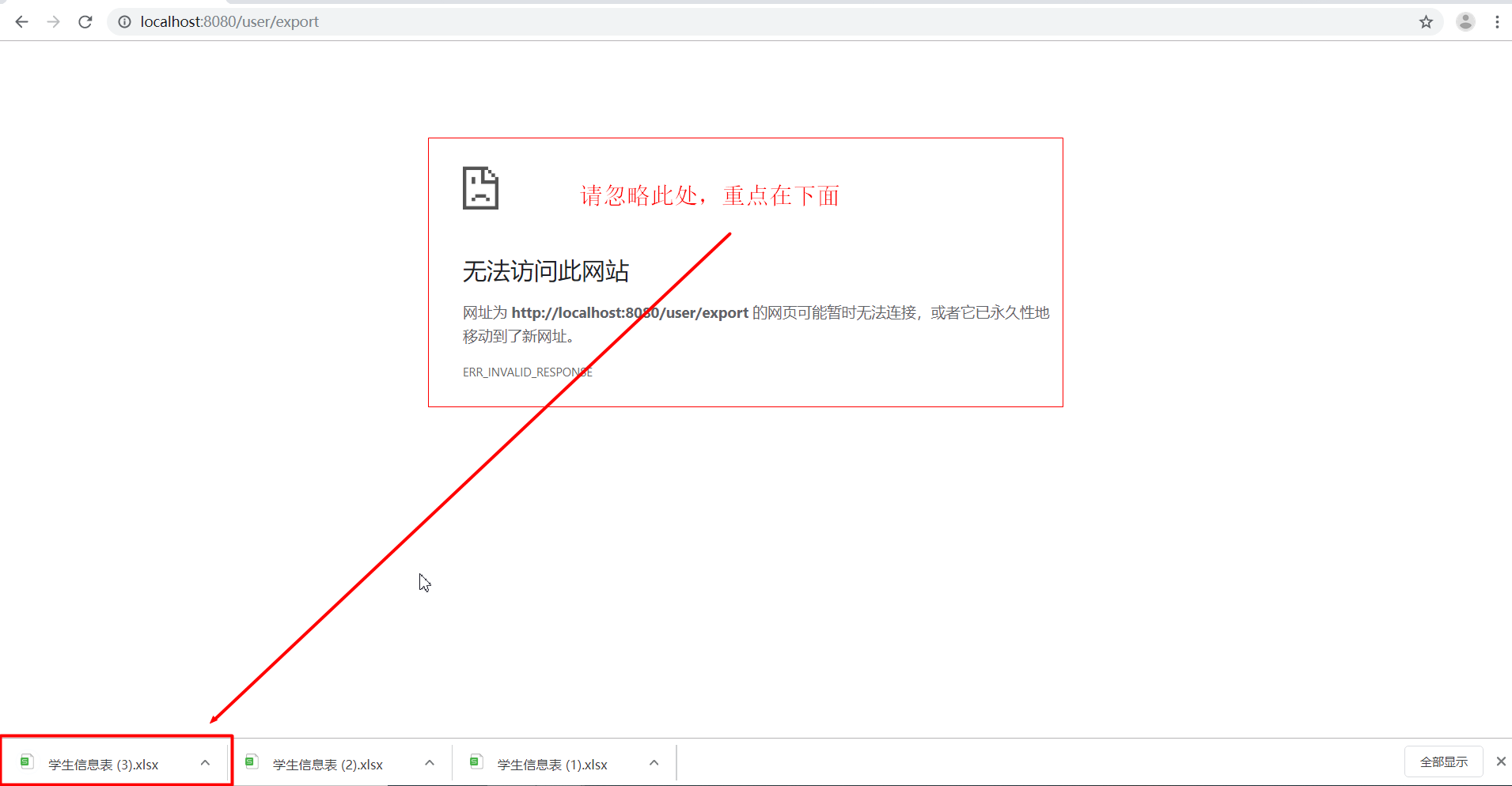
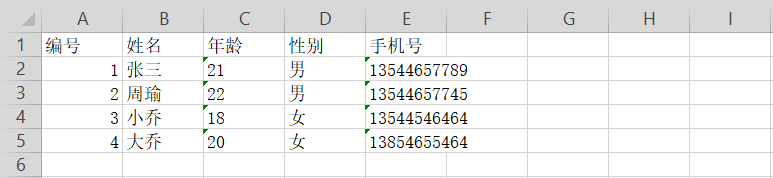
WPS打开后:可以说是非常的丑陋了,接下来优化一下
在service中增加如下代码:总体而言还是很麻烦的,创建CellStyle,还要在你想改变样式的cell进行cell.setCellStyle(style1)才可以
*博主用的版本比较新,所以很多地方较旧版本有区别
        //创建styleHead

        CellStyle styleHead = xssfWorkbook.createCellStyle();

        styleHead.setFillForegroundColor(IndexedColors.SKY_BLUE.getIndex());//背景色

        styleHead.setFillPattern(FillPatternType.SOLID_FOREGROUND);

        styleHead.setAlignment(HorizontalAlignment.CENTER);//水平居中

        XSSFFont font = xssfWorkbook.createFont();

        font.setBold(true);//加粗

        font.setFontHeight((short)240);//字体大小

        styleHead.setFont(font);

        //创建style1

        CellStyle style1 = xssfWorkbook.createCellStyle();

        style1.setFillForegroundColor(IndexedColors.LEMON_CHIFFON.getIndex());//背景色

        style1.setFillPattern(FillPatternType.SOLID_FOREGROUND);

        style1.setAlignment(HorizontalAlignment.CENTER);//水平居中

        //创建style2

        CellStyle style2 = xssfWorkbook.createCellStyle();

        style2.setFillForegroundColor(IndexedColors.LIGHT_TURQUOISE.getIndex());//背景色

        style2.setFillPattern(FillPatternType.SOLID_FOREGROUND);

        style2.setAlignment(HorizontalAlignment.CENTER);//水平居中
     sheet.setColumnWidth(4,3500);//给第5列设置宽度(tel栏)
优化后:
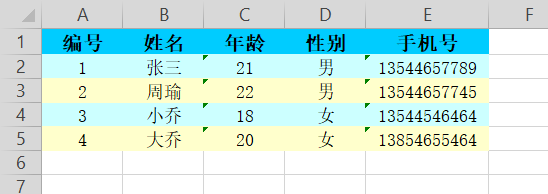
总结一下:
poi的简单使用还是不难的,说白了就数据库一个表对应一个sheet,表的一行对应一个row,表某一行的一个数据对应一个cell,嗯,就是这么简单。
说到调样式就非常头疼了,而且新版本的较之前改动比较大,百度出来的东西很多都没法用,勉强捣鼓了一些出来。
最后给自己打打气-——世上无难事,只要肯登攀!
注意事项:
不要使用post请求,应该用get请求
最后推荐一个中文poi文档:
https://www.cnblogs.com/fqfanqi/p/6172223.html
springboot2.1.8使用poi导出数据生成excel(.xlsx)文件的更多相关文章
- Java操作Jxl实现导出数据生成Excel表格数据文件
实现:前台用的框架是Easyui+Bootstrap结合使用,需要引入相应的Js.Css文件.页面:Jsp.拦截请求:Servlet.逻辑处理:ClassBean.数据库:SQLserver. 注意: ...
- 使用poi导出数据到excel
一.首先是导入poi所需要的jar包,我是用的是maven,添加jar包依赖 <dependency> <groupId>org.apache.poi</groupId& ...
- java利用poi导出数据到excel
背景: 上一篇写到利用jtds连接数据库获取对应的数据,本篇写怎样用poi将数据到处到excel中,此程序为Application 正文: 第三方poi jar包:poi驱动包下载 代码片段: /** ...
- 导出数据生成Excel(MVC)
/// <summary> /// 生成Excel /// </summary> /// <returns></returns> public File ...
- 生成Excel.xlsx文件 iOS
使用到的三方库 https://github.com/jmcnamara/libxlsxwriter cocoapods导入 pod 'libxlsxwriter', '~> 0.8.3' 1. ...
- Java导出数据生成Excel表格
事先准备: 工具类: package com.wazn.learn.util.export; import java.sql.Connection; import java.sql.DriverMan ...
- spring boot 使用POI导出数据到Excel表格
在spring boot 的项目经常碰到将数据导出到Excel表格的需求,而POI技术则对于java操作Excel表格提供了API,POI中对于多种类型的文档都提供了操作的接口,但是其对于Excel表 ...
- Python导出数据生成excel报表
#_*_coding:utf-8_*_ import MySQLdb import xlwt from datetime import datetime def get_data(sql): # 创建 ...
- Java导出数据为EXCEL的两种方式JXL和POI
JXL和POI导出数据方式的比较 POI支持excel2003和2007,而jxl只支持excel2003. 下面为测试代码: public class TestCondition { /** * 生 ...
随机推荐
- 2019-2020-1 20199302《Linux内核原理与分析》第九周作业
一.进程调度的时机 硬中断和软中断 中断:程序执行过程中的强制性转移到操作系统内核相应的处理程序,起到切出指令流的作用. 中断处理程序:与进程无关的内核指令流. 进程切换:切换两个进程的内核堆栈. 硬 ...
- elasticsearch安装和部署
1.可以在官网上下载不同版本的es,官网地址为:https://www.elastic.co/cn/downloads/past-releases#elasticsearch 2.解压elastics ...
- S1_搭建分布式OpenStack集群_03 Mysql、MQ、Memcached、ETCD安装配置
一.安装mysql(contorller)controller ~]# yum -y install mariadb mariadb-server python2-PyMySQL 配置my.cnf文件 ...
- “OKR播种机”JOHN DOERR–目标是对抗纷乱思绪的一针疫苗
OKR培养出疯狂的想法,再加上对的人,奇迹就会出现 约翰·杜尔是美国最有影响力.最具创意.最不拘传统的冒险资本投资家之一.在短短10年内创造了高达1,000亿美元的经济价值.迄今为止,他已向 250家 ...
- WinDbg常用命令系列---.write_cmd_hist (写命令历史记录)
.write_cmd_hist 简介 .write_cmd_hist命令将调试器命令窗口的整个历史记录写入文件. 使用形式 .write_cmd_hist Filename 参数 Filename指定 ...
- telegraf 学习二 几个概念
telegraf 自身包好了自己处理metrics 的数据模型,以及出炉方法 metrics Telegraf指标是用于在处理期间对数据建模的内部表示.这些指标完全基于InfluxDB的数据模型,包含 ...
- Python 06 Geany的基本使用2
原文:https://www.cnblogs.com/denny402/p/5096001.html 功能:打开图片 1.下载库 pip install matplotlib 2.编写代码,将代码粘贴 ...
- vue-cli3整体迁移至服务端渲染nuxtjs
vue项目与nuxt.js实在有着太多的不同,例如项目结构变化很大,router.js没了,vuex store写法有变化,router钩子没了等等.老项目毕竟也有一些体量,这么折腾我可接受不了,不过 ...
- 在Matlab中画图输出
在Matlab中画图后,可能会调整格式.输出存储时,格式会忽然消失. 可以修改右下边Export setup,将Font size设置成auto. 这样就保留了编辑效果.
- 使用RestTemplate请求报出HttpClientErrorException异常并获取不到返回body数据
描述: 使用RestTemplate请求url,由于Token等验证信息参数失效,报出 401 HttpClientErrorException异常.并且获取不到body消息体的错误信息.然而post ...