
postgres 数据库的安装
环境:Linux version 2.6.32-642.el6.x86_64 软件版本:postgresql-9.6.8.tar.gz
新项目要上线测试,要求安装一个PG 的数据库
我们进行的是源码包的安装
1:下载源码包
2:安装数据库需要的依赖包
yum install -y perl-ExtUtils-Embed readline-devel zlib-devel pam-devel libxml2-devel libxslt-devel openldap-devel python-devel gcc-c++ openssl-devel cmake
3:解压源码包
[root@oracle soft]# tar -xvf postgresql-9.6.8.tar.gz
4:创建 需要的目录
[root@oracle soft]# mkdir postgres
[root@oracle soft]# mkdir pgsql
5:进入解压后的目录
[root@oracle soft]# cd postgresql-9.6.8

6:开始编译安装PostgreSQL 数据库
[root@oracle postgresql-9.6.8]# ./configure --prefix=/data/soft/postgres
7:执行gmake
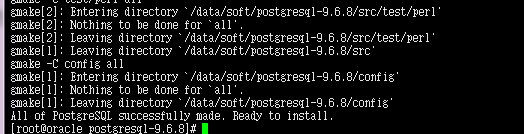
8:执行gmake install

9:创建postgresql 的数据目录
[root@oracle soft]# mkdir pgsql
[root@oracle ~]# groupadd postgres
[root@oracle ~]# useradd -g postgres postgres
[root@oracle soft]# chown postgres:postgres /data/soft/postgres -R
[root@oracle soft]# chown postgres:postgres /data/soft/pgsql -R
[root@oracle soft]# chmod 700 /data/soft/pgsql -R
10:配置环境变量
[postgres@oracle ~]$ cat .bash_profile
# .bash_profile
# Get the aliases and functions
if [ -f ~/.bashrc ]; then
. ~/.bashrc
fi
# User specific environment and startup programs
PATH=$PATH:$HOME/bin
export PATH
export PATH=/data/soft/postgresql/bin:$PATH
export PGDATA=/data/soft/pgsql
11:初始化数据库 指定数据目录
[postgres@oracle ~]$ /data/soft/postgres/bin/initdb -D /data/soft/pgsql/
The files belonging to this database system will be owned by user "postgres".
This user must also own the server process.
The database cluster will be initialized with locale "en_US.UTF-8".
The default database encoding has accordingly been set to "UTF8".
The default text search configuration will be set to "english".
Data page checksums are disabled.
fixing permissions on existing directory /data/soft/pgsql ... ok
creating subdirectories ... ok
selecting default max_connections ... 100
selecting default shared_buffers ... 128MB
selecting dynamic shared memory implementation ... posix
creating configuration files ... ok
running bootstrap script ... ok
performing post-bootstrap initialization ... ok
syncing data to disk ... ok
WARNING: enabling "trust" authentication for local connections
You can change this by editing pg_hba.conf or using the option -A, or
--auth-local and --auth-host, the next time you run initdb.
Success. You can now start the database server using:
/data/soft/postgres/bin/pg_ctl -D /data/soft/pgsql/ -l logfile start
12:启动数数据库
[postgres@oracle ~]$ /data/soft/postgres/bin/pg_ctl start
server starting
[postgres@oracle ~]$ LOG: database system was shut down at 2018-05-22 15:11:11 CST
LOG: MultiXact member wraparound protections are now enabled
LOG: database system is ready to accept connections
LOG: autovacuum launcher started
13:创建数据库
[postgres@oracle ~]$ psql
-bash: psql: command not found
如果报上面的错误说明你的你的程序的路径不在path变量中,用绝对路径调用下你的psql看看

postgres=# create user lhh with login password 'm2i3sc@newnet';
^
postgres=# grant all privileges on database nntlds to lhh;
到这一个postgresql 数据库就算搭建完成了。
postgres 数据库的安装的更多相关文章
- 以windows服务方式快速部署免安装版Postgres数据库
目录 以windows服务方式快速部署免安装版Postgres数据库 1.下载Postgresql数据库免安装包 2.安装环境准备及验证 解压文件 测试环境依赖 3.创建并初始化数据目录 创建数据目录 ...
- pgadmin(IDE)工具连接postgres数据库
1. 下载软件 软件地址:http://www.pgadmin.org/download/pgagent.php 2.安装软件 安装过程:略 打开软件64位会出现 “无 ...
- Postgres绿色版本安装 windows
虽然PostgreSQL是为类UNIX平台开发的,但它却是可以移植的.从7.1版本开始,PostgreSQL可以编译安装和作为一个PostgreSQL服务器运行在Windows NT 4,2000,X ...
- 配置postgres9.3间的fdw——实现不同postgres数据库间的互访问
下面是安装.配置.使用fdw实现postgres数据库间互访问的方法,转载注明出处: 1.源码安装fdw支持(要求数据库源码安装) cd /usr/local/postgresql-9.3.2/con ...
- PostgreSQL数据库的安装
1 总体规划 操作系统 CentOS Linux release 7.5.1804 处理器 1 内存 4G 硬盘 38G 主机名称 chenzx IP地址 192.168.56.8 1.1 用户组和用 ...
- PostgreSQL数据库的安装与配置
项目中要用PostgreSQL,所以专门学习了一下如何安装和调试postgresql,此博文用来记录自己的安装和调试过程,安装环境是centos7. 首先尝试了yum安装,因为毕竟yum安装简单粗暴, ...
- postgres数据库小记
因为工作中需要查询其他部门数据库,刚好是postgres数据库,用python链接的话,可以用psycopg2库,具体用法其实和MysqlDB是一样的,就是安装的时候遇到点问题. 安装的时候,提示: ...
- linux服务器自动备份与删除postgres数据库数据
1.先创一个back.sh 文件,授权,然后在下面这个文件添加脚本 export PGPASSWORD='123456' #这是登录服务器密码cur_time=`date +%Y%m%d ...
- 在ef core中使用postgres数据库的全文检索功能实战之中文支持
前言 有关通用的postgres数据库全文检索在ef core中的使用方法,参见我的上一篇文章. 本文实践了zhparser中文插件进行全文检索. 准备工作 安装插件,最方便的方法是直接使用安装好插件 ...
随机推荐
- SharePoint 调用WebService操作List小记
简述:在SharePoint的使用中,经常需要进行系统集成这样的操作,我们作为SharePoint开发,就需要给其他系统提供接口,而SharePoint提供的WebService就很好的提供了这样的功 ...
- Sencha touch 2 入门 -------- DataView 显示服务器端JSON文件数据
今天学习了下DataView如何显示JSON文件数据,废话不多说,直接贴代码: 首先看下文件目录: 然后看下我们要处理的JSON文件,bookInfo.json. { "success&qu ...
- 恶补web之二:css知识(1)
css指层叠样式表(Cascading Style Sheets) 样式定义如何显示html元素,样式通常存储在样式表里.把样式添加到html4.0中,是为了解决内容与表现分离的问题.外部样式 ...
- 解决Visual Studio 2017隐藏“高级保存选项”命令
Visual Studio提供高级保存选项功能,它能指定特定代码文件的编码规范和行尾所使用的换行符.在Visual Studio 2017中,该命令没有默认显示在“文件”菜单中.用户需要手工设置,才能 ...
- IOS空数据页面,网络加载失败以及重新登陆View的封装(不需要继承)
一.问题 对于B2C和B2B项目的开发者,可能会有一个订单列表为空,或者其他收藏页面为空,用户token失效,判断用户要重新登陆,以及后台服务错误等提示.本篇课文,看完大约10分钟. 原本自己不想写空 ...
- 搭建spring cloud config
很久没更新了,因为不是专职研究spring cloud,因此更新速度得看工作强度大不大,每天能抽出的时间不多,如果更新太慢了,并且有小伙伴看的话,请见谅了. Spring Cloud简介 Spring ...
- post请求参数Json字符串包含数组的校验和处理 -工作随记-备查工具
package com.xxxx.live.webapp.selvert; import java.io.BufferedReader; import java.io.IOException; imp ...
- oracle 导入/导出遇到的 问题总结
0925: 解决oracle 11g空数据 exp 少表的问题 1:生成处理语句 Select 'alter table '||table_name||' allocate extent;' from ...
- Struts优缺点
跟Tomcat.Turbine等诸多Apache项目一样,是开源软件,这是它的一大优点.使开发者能更深入的了解其内部实现机制. Struts开放源码框架的创建是为了使开发者在构建基于Java Serv ...
- FFMpeg编译之路
为了编译这个东西,快折腾了一个星期了.期间经历了很多痛苦的过程,今天我把整个过程,以及在这个过程的感悟写下来,以备日后查看,也希望能帮到一些像我一样的兄弟姐妹. 在这一个星期里前前后后加起来总共使用了 ...