
MQTT事件回调流程
TLS 如下强调:
1、每个IOT设备应该有一对独有的公钥/私钥
2、SERVER的认证通过SERVER的"root certificate"

SSL产生过程:
$ openssl genrsa -out deviceCertOne.key

$ openssl req -new -key deviceCertOne.key -out deviceCertOne.csr

$ openssl x509 -req -in deviceCertOne.csr -CA sampleCACertificateOne.pem -Cakey sampleCACertificateOne.key -CAcreateserial -out deviceCertOne.crt -days  -sha256
数据区分配:


程序架构:
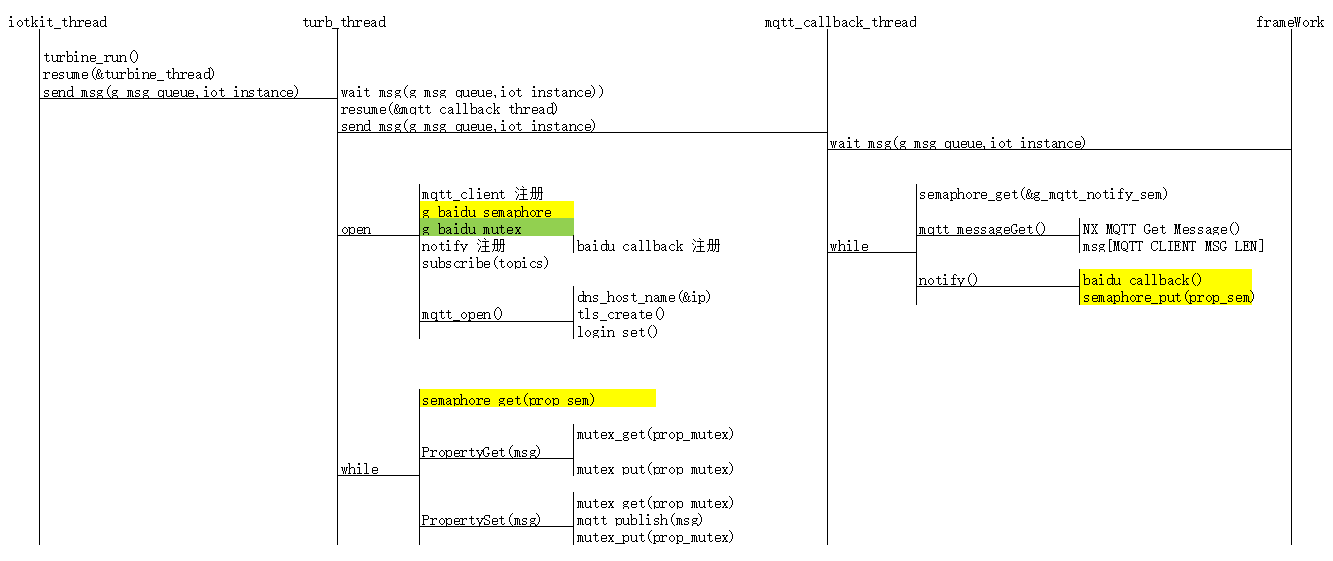
关键数据封装:
/** Protocol definitions */

typedef enum e_iot_service_protocol {

    IOT_SERVICE_PROTO_MQTT,         ///< MQTT protocol

} iot_service_protocol_t;

/** IoT Service configuration structure  */

typedef struct st_iot_service_cfg {

    const char              *p_name;

    iot_service_protocol_t  protocol;

    mqtt_client_instance_t  *p_mqtt_client;

} iot_service_cfg_t;

/** IoT Service control structure */

typedef struct st_iot_service_ctrl_t {

    mqtt_client_instance_t  * p_mqtt_client;

    TX_SEMAPHORE         prop_sem;

    TX_MUTEX                prop_mutex;

    int                     debug;

} iot_service_ctrl_t;

static iot_service_ctrl_t baidu_iot_ctrl;

mqtt_client_instance_t g_mqtt_client = {

     .p_cfg     = &g_mqtt_cfg,

     .p_ctrl    = &g_mqtt_ctrl,

     .p_api     = &nx_mqtt_api,

};

static iot_service_cfg_t baidu_iot_cfg = {

     .p_name        = "BAIDU",

     .protocol      = IOT_SERVICE_PROTO_MQTT,

     .p_mqtt_client = &g_mqtt_client,

};

static iot_service_instance_t baidu_iot = {

     .p_cfg         = &baidu_iot_cfg,

     .p_ctrl        = &baidu_iot_ctrl,

     .p_api         = &baidu_iot_api,

};

static ssp_err_t BAIDU_Open(iot_service_ctrl_t * p_ctrl, iot_service_cfg_t const * const p_cfg)

{

    ssp_err_t status;

    mqtt_client_api_t *p_api;

    mqtt_client_ctrl_t *p_mqtt_ctrl;

    p_ctrl->p_mqtt_client = p_cfg->p_mqtt_client;

    p_api = p_ctrl->p_mqtt_client->p_api;

    p_mqtt_ctrl = p_ctrl->p_mqtt_client->p_ctrl;

    p_mqtt_ctrl->p_iot_service_ctrl = (void *)p_ctrl;

    p_mqtt_ctrl->notify = baidu_callback;

    p_ctrl->prop_sem = g_baidu_semaphore;

    p_ctrl->prop_mutex = g_baidu_mutex;

}

void turbine_main(ULONG data)

{

    ULONG i = , freq_ms = CLOUD_UPDATE_FREQ_MS;

    ULONG ticks;

    struct sensors old, new;

    iot_service_instance_t *p_iots;

    const iot_service_api_t *p_api;

    ssp_err_t status;

    UINT retry_count = SECT_UPDATE_RETRY_COUNT;

    p_iots = (iot_service_instance_t *)data;

    p_api = p_iots->p_api;

    /* Send a pointer to the IoT Service instance via the message

     * queue. This will be picked up by the MQTT Notifier Thread

     */

    tx_queue_send(&g_msg_queue, &p_iots, TX_WAIT_FOREVER);

    tx_thread_resume(&mqtt_callback_thread);

    status = p_api->open(p_iots->p_ctrl, p_iots->p_cfg);

}
MQTT相关API:
#define nxd_mqtt_client_create                _nxde_mqtt_client_create

#define nxd_mqtt_client_login_set             _nxde_mqtt_client_login_set

#define nxd_mqtt_client_will_message_set      _nxde_mqtt_client_will_message_set

#define nxd_mqtt_client_delete                _nxde_mqtt_client_delete

#define nxd_mqtt_client_connect               _nxde_mqtt_client_connect

#define nxd_mqtt_client_secure_connect        _nxde_mqtt_client_secure_connect

#define nxd_mqtt_client_publish               _nxde_mqtt_client_publish

#define nxd_mqtt_client_subscribe             _nxde_mqtt_client_subscribe

#define nxd_mqtt_client_unsubscribe           _nxde_mqtt_client_unsubscribe

#define nxd_mqtt_client_disconnect            _nxde_mqtt_client_disconnect

#define nxd_mqtt_client_receive_notify_set    _nxde_mqtt_client_receive_notify_set

#define nxd_mqtt_client_message_get           _nxde_mqtt_client_message_get

#define nxd_mqtt_client_disconnect_notify_set _nxde_mqtt_client_disconnect_notify_set

//Client Id是客户端到服务器唯一的标识,必须是在客户端到服务器唯一的ID,是处理QoS级别1和2消息ID的关键

//一般使用设备的Unique ID,配置ClientID回调:

mqtt_client_id_callback()

//设备Unique ID

g_fmi.p_api->uniqueIdGet(&uid)//SERVER获取MQTT数据:

nxd_mqtt_client_message_get

//MQTT反控设备事件回调:

nxd_mqtt_client_receive_notify_set->NX_MQTT_notify_callback->aws_callback->AWS_PropertyGet

//MQTT主动上报数据

turbine_main->update_iot_service->

//信号量用于MQTT事件同步:

g_mqtt_notify_sem

//MQTT AWS地址&认证

g_mqtt_cfg.p_root_ca = (uint8_t *) aws_ca_cert_der;

#define AWS_SERVER_ADDRESS      "iotmoonraker.us-west-2.prod.iot.us-west-2.amazonaws.com"
综上:MQTT要注意两个回调,一个是配置获取Client ID的回调,如上:
另一个为配置获取订阅消息的回调,如下:
status = nxd_mqtt_client_receive_notify_set(p_ctrl->p_secure_client, NX_MQTT_notify_callback);

if(status)

{

    nxd_mqtt_client_unsubscribe(p_ctrl->p_secure_client, (CHAR *)p_name, strlen(p_name));

    NX_MQTT_log_msg(p_ctrl, "Could not set notify function (0x%02x)\r\n", status);

    return SSP_ERR_ABORTED;

}
回调:信号量的方式通知可以接受MQTT服务器推送的消息,即客户端订阅的消息
static void NX_MQTT_notify_callback(NXD_MQTT_CLIENT * p_client, UINT number_of_messages)

{

    mqtt_client_ctrl_t *p_ctrl;

    p_ctrl = g_mqtt_client.p_ctrl;

    p_ctrl->num_messages += number_of_messages;

    tx_semaphore_put(&g_mqtt_notify_sem);

}
MQTT接收事件处理线程:
void mqtt_callback_thread_entry(void) {

    UINT tstatus;

    mqtt_client_ctrl_t *p_ctrl;

    mqtt_client_instance_t *p_mqtt_client;

    iot_service_instance_t *p_iots;

    /* Get the IoT cloud provider via the message queue */

    tx_queue_receive(&g_msg_queue, &p_iots, TX_WAIT_FOREVER);

    while () {

        /* This thread will be woken up by the MQTT notify function when

         * a message is received on the subscribed topic.

         */

        tstatus = tx_semaphore_get(&g_mqtt_notify_sem, TX_WAIT_FOREVER);

        if (tstatus != TX_SUCCESS)

            continue;

        /* Get the selected IoT service and MQTT client and call the notify callback */

        p_mqtt_client = p_iots->p_ctrl->p_mqtt_client;

        p_ctrl = p_mqtt_client->p_ctrl;

        while (p_ctrl->num_messages > ) {

            p_mqtt_client->p_api->messageGet(p_ctrl);

            if (p_ctrl->notify)

                p_ctrl->notify(p_iots->p_ctrl);

            p_ctrl->num_messages--;

        }

    }

}
static ssp_err_t NX_MQTT_Subscribe(mqtt_client_ctrl_t * p_ctrl, char const * p_name,

                                    mqtt_client_qos_t qos)

{

    UINT status;

    status = nxd_mqtt_client_subscribe(p_ctrl->p_secure_client, (CHAR *)p_name, strlen(p_name), qos);

    if(status) {

        NX_MQTT_log_msg(p_ctrl, "Could not subscribe to MQTT topic %s (0x%02x)\r\n", p_name, status);

        return SSP_ERR_ABORTED;

    }

    status = nxd_mqtt_client_receive_notify_set(p_ctrl->p_secure_client, NX_MQTT_notify_callback);

    if(status) {

        nxd_mqtt_client_unsubscribe(p_ctrl->p_secure_client, (CHAR *)p_name, strlen(p_name));

        NX_MQTT_log_msg(p_ctrl, "Could not set notify function (0x%02x)\r\n", status);

        return SSP_ERR_ABORTED;

    }

    return SSP_SUCCESS;

}

static void NX_MQTT_notify_callback(NXD_MQTT_CLIENT * p_client, UINT number_of_messages)

{

    mqtt_client_ctrl_t *p_ctrl;

    SSP_PARAMETER_NOT_USED (p_client);

    p_ctrl = g_mqtt_client.p_ctrl;

    p_ctrl->num_messages += number_of_messages;

    tx_semaphore_put(&g_mqtt_notify_sem);

}

void mqtt_callback_thread_entry(void) {

    UINT tstatus;

    mqtt_client_ctrl_t *p_ctrl;

    mqtt_client_instance_t *p_mqtt_client;

    iot_service_instance_t *p_iots;

    /* Get the IoT cloud provider via the message queue */

    tx_queue_receive(&g_msg_queue, &p_iots, TX_WAIT_FOREVER);

    while () {

        /* This thread will be woken up by the MQTT notify function when

         * a message is received on the subscribed topic.

         */

        tstatus = tx_semaphore_get(&g_mqtt_notify_sem, TX_WAIT_FOREVER);

        if (tstatus != TX_SUCCESS)

            continue;

        /* Get the selected IoT service and MQTT client and call the notify callback */

        p_mqtt_client = p_iots->p_ctrl->p_mqtt_client;

        p_ctrl = p_mqtt_client->p_ctrl;

        while (p_ctrl->num_messages > ) {

            p_mqtt_client->p_api->messageGet(p_ctrl);

            if (p_ctrl->notify)

                p_ctrl->notify(p_iots->p_ctrl);

            p_ctrl->num_messages--;

        }

    }

}

static void aws_callback(void *p_context)

{

    iot_service_ctrl_t *p_ctrl = (iot_service_ctrl_t *)p_context;

    tx_semaphore_put(&p_ctrl->prop_sem);

}

static ssp_err_t AWS_Open(iot_service_ctrl_t * p_ctrl, iot_service_cfg_t const * const p_cfg)

{

    ssp_err_t status;

    mqtt_client_api_t *p_api;

    mqtt_client_ctrl_t *p_mqtt_ctrl;

    p_ctrl->p_mqtt_client = p_cfg->p_mqtt_client;

    p_api = p_ctrl->p_mqtt_client->p_api;

    p_mqtt_ctrl = p_ctrl->p_mqtt_client->p_ctrl;

    p_mqtt_ctrl->p_iot_service_ctrl = (void *)p_ctrl;

    p_mqtt_ctrl->notify = aws_callback;

    p_ctrl->prop_sem = g_aws_semaphore;

    p_ctrl->prop_mutex = g_aws_mutex;

}

static ssp_err_t AWS_PropertyGet(iot_service_ctrl_t const * p_ctrl, char const * p_name[], char *p_value[], uint32_t valLen, uint32_t num)

{

    ssp_err_t status;

    UINT tstatus;

    mqtt_client_api_t *p_api;

    mqtt_client_ctrl_t *p_mqtt_ctrl;

    UCHAR *msg, *buf, *q;

    unsigned int i;

    p_api = p_ctrl->p_mqtt_client->p_api;

    p_mqtt_ctrl = p_ctrl->p_mqtt_client->p_ctrl;

    msg = p_mqtt_ctrl->msg;

    status = tx_mutex_get((TX_MUTEX *)&p_ctrl->prop_mutex, TX_WAIT_FOREVER);

    //snprintf(p_mqtt_ctrl->msg, sizeof(p_mqtt_ctrl->msg), "");

    status = p_api->publish(p_mqtt_ctrl, aws_topics[AWS_IOT_TOPIC_GET], NULL, , MQTT_QOS_0);

    if (status != SSP_SUCCESS) {

        tx_mutex_put((TX_MUTEX *)&p_ctrl->prop_mutex);

        return status;

    }

    tstatus = tx_semaphore_get((TX_SEMAPHORE *)&p_ctrl->prop_sem, );

    if (tstatus != TX_SUCCESS)

    {

        tx_mutex_put((TX_MUTEX *)&p_ctrl->prop_mutex);

        return SSP_ERR_ABORTED;

    }

    /* Check if get was accepted */

    status = SSP_ERR_INTERNAL;

    if (strcmp((char *)p_mqtt_ctrl->topic, aws_topics[AWS_IOT_TOPIC_GET_ACCEPTED]) == ) {

        /* Get values */

        msg = p_mqtt_ctrl->msg;

        for (i = ; i < num; i++) {

            memset(p_value[i], , valLen);

            buf = (UCHAR *)strstr((const char *)msg, "desired");

            if (buf == NULL)

                break;

            buf += strlen("desired");

            buf = (UCHAR *)strstr((const char *)buf, p_name[i]);

            if (buf == NULL)

                continue;

            buf += strlen(p_name[i]);

            buf = (UCHAR *)strstr((const char *)buf, ":");

            if (buf == NULL)

                continue;

            buf += ;

            buf = (UCHAR *)strstr((const char *)buf, "\"");

            buf += ;

            q = (UCHAR *)strstr((const char *)buf, "\"");

            if (q == NULL)

                continue;

            strncpy(p_value[i], (const char *)buf, MIN(valLen, (size_t)(q - buf)));

            status = SSP_SUCCESS;

        }

    }

    tx_mutex_put((TX_MUTEX *)&p_ctrl->prop_mutex);

    return status;

}
MQTT事件回调流程的更多相关文章
- Red5 项目的流事件回调流程和注意事项
回调流程 参考:Red5的一般客户端连接各个事件的触发顺序,经验证实际过程如下: 程序开始(在RED5启动的时候会自动去启动APP,从而触发以上事件) Start:MyChatRoomappStart ...
- Android Multimedia框架总结(十二)CodeC部分之OMXCodec与OMX事件回调流程
转载请把头部出处链接和尾部二维码一起转载,本文出自逆流的鱼yuiop:http://blog.csdn.net/hejjunlin/article/details/52629449 前言:上篇文中分析 ...
- Android按键事件传递流程(二)
5 应用层如何从Framework层接收按键事件 由3.2和4.5.4节可知,当InputDispatcher通过服务端管道向socket文件描述符发送消息后,epoll机制监听到了I/O事件, ...
- 用block做事件回调来简化代码,提高开发效率
我们在自定义view的时候,通常要考虑view的封装复用,所以如何把view的事件回调给Controller就是个需要好好考虑的问题, 一般来说,可选的方式主要有target-action和de ...
- backbone collection add 事件回调参数
this.listenTo(this.collection, 'add', this.renderBook); renderBook: function (item) { var bookView = ...
- OSG事件回调
OSG中的节点主要使用回调(CallBack)来完成用户临时.需要每帧执行的工作.根据回调功能被调用的时机划分为更新回调(Update CallBack)和人机交互时间回调(Event CallBac ...
- java工作流引擎Jflow流程事件和流程节点事件设置
流程实例的引入和设置 关键词: 开源工作流引擎 Java工作流开发 .net开源工作流引擎 流程事件 工作流节点事件 应用场景: 在一些复杂的业务逻辑流程中需要在某个节点或者是流程结束后做一些 ...
- 细说javascripe事件传播流程
当我们使用js时,经常会遇到事件传播流程的问题,下面我说一下我的观点. 在js触发某个事件时会相应生成一个事件对象,而这个事件对象则会根据DOM事件流的方向进传递,而传递的顺序如下图所示: 事件对象会 ...
- Guava 源码分析(Cache 原理 对象引用、事件回调)
前言 在上文「Guava 源码分析(Cache 原理)」中分析了 Guava Cache 的相关原理. 文末提到了回收机制.移除时间通知等内容,许多朋友也挺感兴趣,这次就这两个内容再来分析分析. 在开 ...
随机推荐
- Java Junit5 Annotations
@BeforeEach 在方法上注解,在每个测试方法运行之前执行 @AfterEach 在方法上注解,在每个测试方法运行之后执行 @BeforeAll 该注解方法会在所有测试方法之前运行,该方法必须是 ...
- CCNA 课程 五
VLSM (可变长子网掩码)也就是子网的划分过程 子网掩码和ip地址相与得到的是IP地址的网络地址(0&1 == 0 : 1&1 == 1) 简单来说就是 IP地址 和 子网掩码 上下 ...
- kafka原理学习好文
摘自:http://blog.csdn.net/suifeng3051/article/details/48053965 http://blog.csdn.net/ychenfeng/article/ ...
- SGU 106 The equation 扩展欧几里德
106. The equation time limit per test: 0.25 sec. memory limit per test: 4096 KB There is an equation ...
- Python运行的17个时新手常见错误小结
1)忘记在if , elif , else , for , while , class ,def 声明末尾添加 :(导致“SyntaxError :invalid syntax”) 该错误将发生在类似 ...
- neutron 虚拟机网络问题调试
1. Security Group全部打开,这是最基本的,但是很多人容易忘记 2. 通过界面查看虚拟机的log,也可以在compute节点上查看console.log文件,看看里面是否有DHCP获取I ...
- SQL SERVER 集合
死锁和堵塞一直是性能测试执行中关注的重点. 下面是我整理的监控sql server数据库,在性能测试过程中是否出现死锁.堵塞的SQL语句,还算比较准备,留下来备用. --每秒死锁数量 SELECT * ...
- POJ - 2195 最小费用最大流
题意:每个人到每个房子一一对应,费用为曼哈顿距离,求最小的费用 题解:单源点汇点最小费用最大流,每个人和房子对于建边 #include<map> #include<set> # ...
- MySQL 基础知识(基本架构、存储引擎差异)
前言: // MySQL 并发.异步IO.进程劫持 最近在看高性能 MySQL,记录写学习笔记: 高性能 MySQL 学习笔记(一) 架构与历史 笔记核心内容:MySQL 服务器基础架构.各种存储引擎 ...
- Hello Swift
第一个Swift作品,HelloSwift,呵呵.你会把原来的项目用swift改写吗?