
Tensorflow学习(练习)—使用inception做图像识别
import os
import tensorflow as tf
import numpy as np
import re
from PIL import Image
import matplotlib.pyplot as plt
print("hello")
class NodeLookup(object):
def __init__(self):
label_lookup_path = "F:\Tensorflow Project\inception-2015-12-05\imagenet_2012_challenge_label_map_proto.pbtxt"
uid_lookup_path="F:\Tensorflow Project\inception-2015-12-05\imagenet_synset_to_human_label_map.txt"
self.node_lookup=self.load(label_lookup_path,uid_lookup_path)
def load(self,label_lookup_path,uid_lookup_path):
#加载分类字符串
proto_as_ascii_lines = tf.gfile.GFile(uid_lookup_path).readlines()
uid_to_human = {}
#读取数据
for line in proto_as_ascii_lines:
#去掉换行符
line = line.strip('\n')
#根据'/t'分割
parsed_items = line.split('\t')
#获取分类编号
uid = parsed_items[0]
#获取分类名称
human_string = parsed_items[1]
#保存编号
uid_to_human[uid] = human_string
#加载分类字符串
proto_as_ascii = tf.gfile.GFile(label_lookup_path).readlines()
node_id_to_uid = {}
for line in proto_as_ascii:
if line.startswith(' target_class:'):
#获取分类编号
#target_class = int(line.split(': ')[1])
target_class = int(line.split(': ')[1])
if line.startswith(' target_class_string:'):
#获取编号字符串
target_class_string = line.split(': ')[1]
#保存分类编号
node_id_to_uid[target_class] = target_class_string[1:-2]
#建立分类编号
node_id_to_name = {}
for key,val in node_id_to_uid.items():
#获取分类名称
name = uid_to_human[val]
#建立分类编号
node_id_to_name[key] = name
return node_id_to_name
#传入分类器编号返回分类名称
def id_to_string(self,node_id):
if node_id not in self.node_lookup:
return ''
return self.node_lookup[node_id]
#创建一个图用来存储训练好的模型
with tf.gfile.FastGFile('F:\Tensorflow Project\inception-2015-12-05\classify_image_graph_def.pb','rb') as f:
graph_def = tf.GraphDef()
graph_def.ParseFromString(f.read())
tf.import_graph_def(graph_def,name="")
with tf.Session() as sess:
softmax_tensor = sess.graph.get_tensor_by_name("softmax:0")
#遍历目录
for root,dirs,files in os.walk('F:\Tensorflow Project\images0815'):
for file in files:
#Tensorflow载入图片
image_data = tf.gfile.FastGFile(os.path.join(root,file),'rb').read()
#执行函数,传入jpg格式图片计算并得到结果
predictions = sess.run(softmax_tensor,{'DecodeJpeg/contents:0':image_data})
#把得到的结果转成一维
predictions = np.squeeze(predictions)
#打印图片路径及名称
image_path = os.path.join(root,file)
print(image_path)
#显示图片
img = Image.open(image_path)
plt.imshow(img)
plt.axis('off')
plt.show()
#排序
top_k = predictions.argsort()[-5:][::-1]
node_lookup = NodeLookup()
for node_id in top_k:
#获取分类名称
human_string = node_lookup.id_to_string(node_id)
#获取分类的置信度
score = predictions[node_id]
print("%s (score = %.5f)"%(human_string,score))
print()
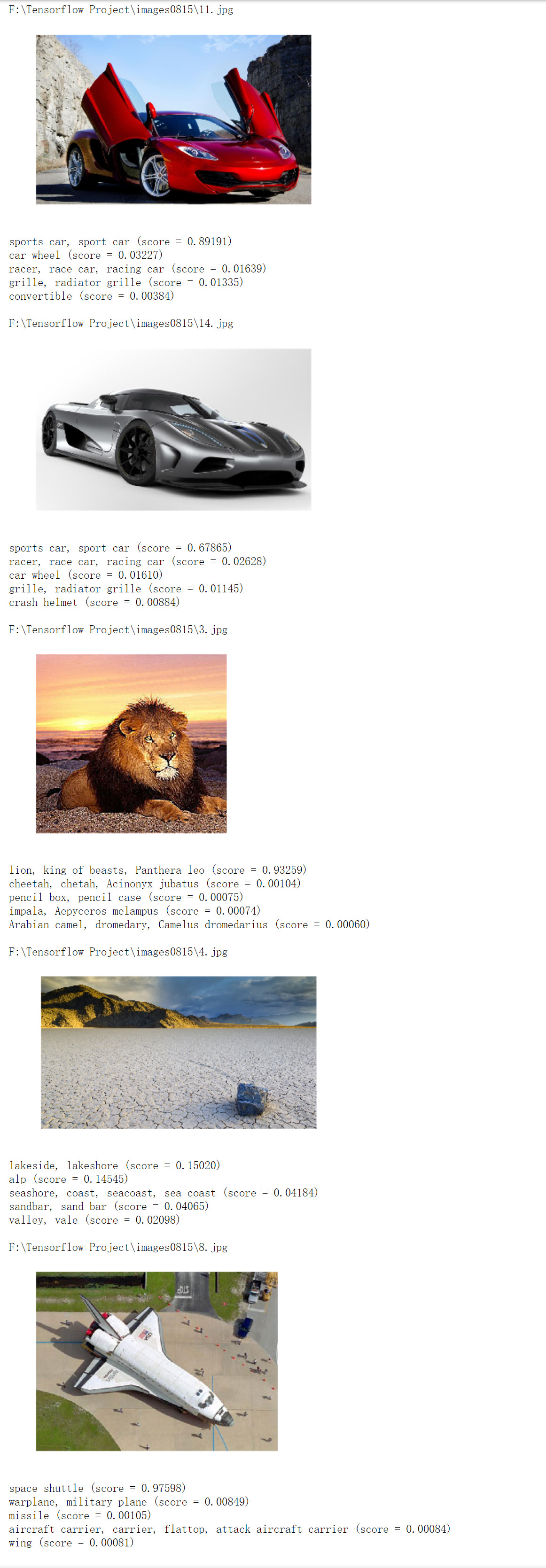
运行效果
Tensorflow学习(练习)—使用inception做图像识别的更多相关文章
- TensorFlow学习笔记(四)图像识别与卷积神经网络
一.卷积神经网络简介 卷积神经网络(Convolutional Neural Network,CNN)是一种前馈神经网络,它的人工神经元可以响应一部分覆盖范围内的周围单元,对于大型图像处理有出色表现. ...
- TensorFlow学习路径【转】
作者:黄璞链接:https://www.zhihu.com/question/41667903/answer/109611087来源:知乎著作权归作者所有.商业转载请联系作者获得授权,非商业转载请注明 ...
- TensorFlow学习线路
如何高效的学习 TensorFlow 代码? 或者如何掌握TensorFlow,应用到任何领域? 作者:黄璞链接:https://www.zhihu.com/question/41667903/ans ...
- tensorflow学习笔记——自编码器及多层感知器
1,自编码器简介 传统机器学习任务很大程度上依赖于好的特征工程,比如对数值型,日期时间型,种类型等特征的提取.特征工程往往是非常耗时耗力的,在图像,语音和视频中提取到有效的特征就更难了,工程师必须在这 ...
- TensorFlow学习笔记——LeNet-5(训练自己的数据集)
在之前的TensorFlow学习笔记——图像识别与卷积神经网络(链接:请点击我)中了解了一下经典的卷积神经网络模型LeNet模型.那其实之前学习了别人的代码实现了LeNet网络对MNIST数据集的训练 ...
- tensorflow学习笔记——VGGNet
2014年,牛津大学计算机视觉组(Visual Geometry Group)和 Google DeepMind 公司的研究员一起研发了新的深度卷积神经网络:VGGNet ,并取得了ILSVRC201 ...
- 用tensorflow学习贝叶斯个性化排序(BPR)
在贝叶斯个性化排序(BPR)算法小结中,我们对贝叶斯个性化排序(Bayesian Personalized Ranking, 以下简称BPR)的原理做了讨论,本文我们将从实践的角度来使用BPR做一个简 ...
- TensorFlow学习笔记之--[compute_gradients和apply_gradients原理浅析]
I optimizer.minimize(loss, var_list) 我们都知道,TensorFlow为我们提供了丰富的优化函数,例如GradientDescentOptimizer.这个方法会自 ...
- 深度学习-tensorflow学习笔记(1)-MNIST手写字体识别预备知识
深度学习-tensorflow学习笔记(1)-MNIST手写字体识别预备知识 在tf第一个例子的时候需要很多预备知识. tf基本知识 香农熵 交叉熵代价函数cross-entropy 卷积神经网络 s ...
随机推荐
- 抽象类,接口类,封装,property,classmetod,statimethod
抽象类,接口类,封装,property,classmetod,statimethod(类方法,静态方法) 一丶抽象类和接口类 接口类(不崇尚用) 接口类:是规范子类的一个模板,只要接口类中定义的,就应 ...
- 【MFC】MFC中窗口重绘
MFC中窗口重绘 摘自:http://blog.csdn.net/shuilan0066/article/details/5859057 在刷新窗口时经常要调用重绘函数 MFC提供了三个函数用于窗口重 ...
- 【解题报告】[动态规划]RQNOJ - PID82 / 又上锁妖塔
原题地址:http://www.rqnoj.cn/problem/82 解题思路: 简单的动态规划 状态表示:DP[i][0]表示当前在第i层,且当前跳跃状态不可用,此时消耗的最短时间. DP[i ...
- 使用JspSmart文件上传
index.html [html] view plaincopy <!DOCTYPE HTML PUBLIC "-//W3C//DTD HTML 4.01 Transition ...
- vuecli3修改项目启动端口
工作中可能存在启动多个项目的时候,默认端口号会被占,导致启动错误,这种情况下只要把要启动的项目的端口号换掉启动未用的端口就可以了,具体实现如下: vuecli3中的端口文件存放目录为:node_mod ...
- css3作3D旋转视频展示
代码如下: <!doctype html> <html lang="en"> <head> <meta charset="UTF ...
- 关于在windows server 2008 上部署wampserver2.5部署的问题
1.关闭windows自带防火墙 2.httpd.conf文件权限 apache 2.4.9 外网访问的问题参考此文: http://blog.csdn.net/lysc_forever/articl ...
- grep 命令使用指南
grep 命令 grep参数: -E:等同于egrep -o:只匹配你想要的内容,下面是示例: [root@localhost ~]# cat /data/game/config/server_con ...
- 读取zip文件,不解压缩直接解析,支持文件名中文,解决内容乱码
使用ant.jar进行文件zip压缩 import java.io.BufferedInputStream; import java.io.BufferedOutputStream; import j ...
- Java并发--CountDownLatch CyclicBarrier ReentrantLock
CountDownLatch CountDownLatch是一个同步工具类,它允许一个或多个线程一直等待,直到其他线程的操作执行完后再执行.CountDownLatch使用一个数字count初始化,使 ...