
Bokeh 学习
这段时间由于在做K-means对文本进行处理,需要进行绘图,实验室编程大哥向我介绍了Bokeh来进行绘图,一直是根据自己的需求来进行对其探索,今儿个看到一篇博文,对Bokeh进行了详细的解说,做个笔记。
博文非常适合Bokeh的初级学者,原文链接如下:https://cloud.tencent.com/developer/article/1134383
Bokeh是一个专门针对Web浏览器的呈现功能的交互式可视化Python库。这是Bokeh与其它可视化库最核心的区别。正如下图所示,它说明了Bokeh如何将数据展示到一个Web浏览器上的流程。
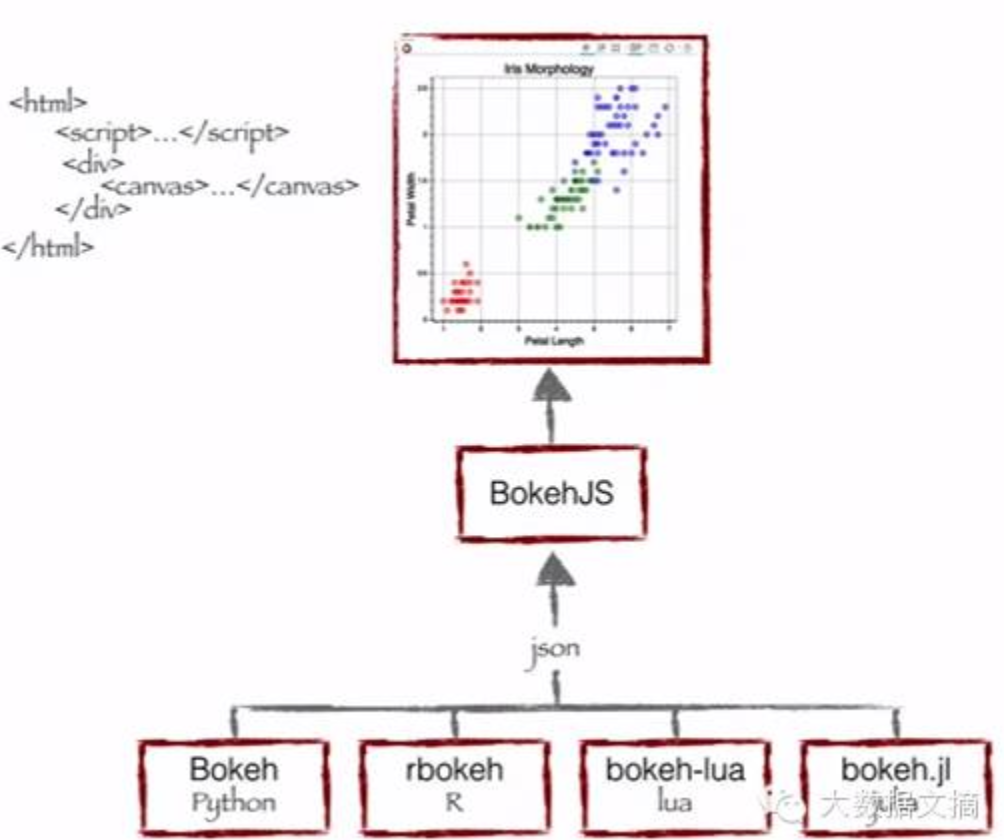
Bokeh的优势:
- Bokeh允许你通过简单的指令就可以快速创建复杂的统计图,
- Bokeh提供到各种媒体,如HTML,Notebook文档和服务器的输出
- ·我们也可以将Bokeh可视化嵌入flask和django程序
- Bokeh可以转换写在其它库(如matplotlib, seaborn和ggplot)中的可视化
- ·Bokeh能灵活地将交互式应用、布局和不同样式选择用于可视化
用Bokeh实现可视化
Bokeh提供了强大而灵活的功能,使其操作简单并高度定制化。它为用户提供了多个可视化界面,如下图所示
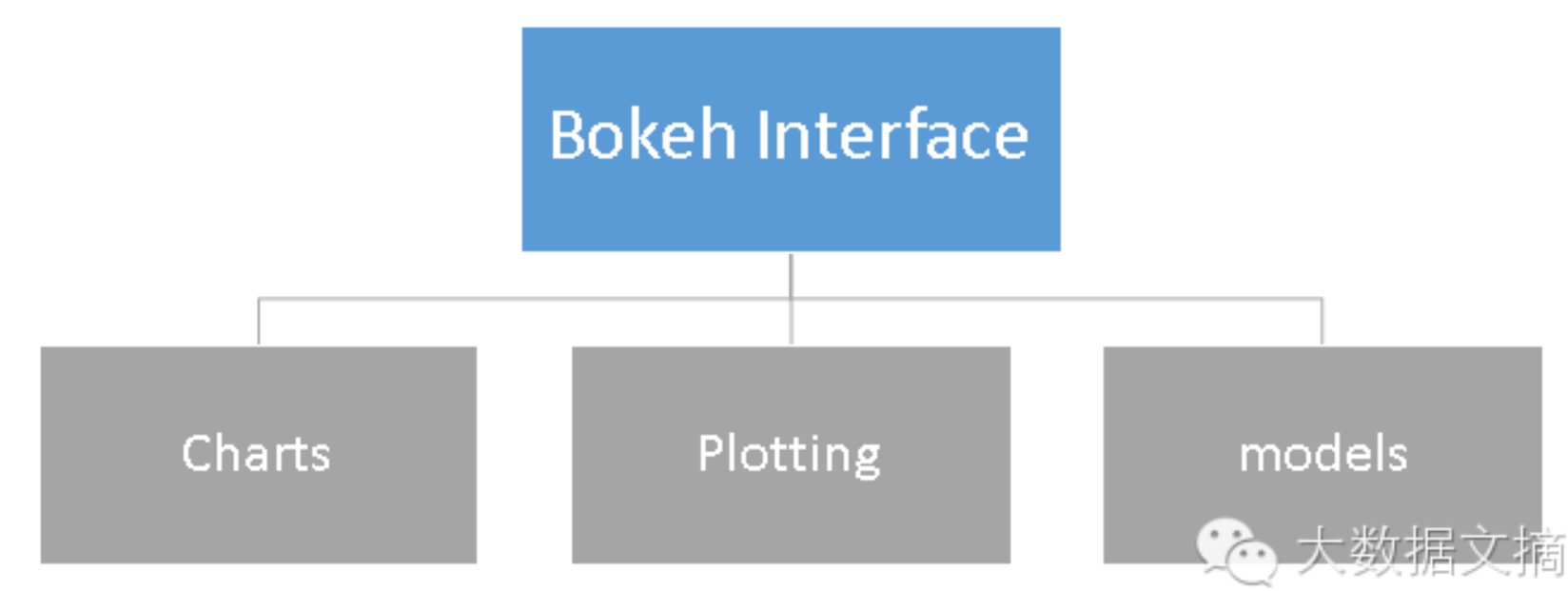
- 图表(Charts):一个高级接口(high-level interface),用以简单快速地建立复杂的统计图表。
- 绘图(Plotting):一个中级接口(intermediate-level interface),以构建各种视觉符号为核心。
- 模块(Models):一个低级接口(low-level interface),为应用程序开发人员提供最大的灵活性。
The full list of sections for all the modules in Bokeh is accessible from the sidebar to the left. Listed below are a few selected sections that may be especially useful.
- bokeh.models
- Everything that comprises a Bokeh plot or application—tools, controls, glyphs, data sources—is a Bokeh Model. Bokeh models are configured by setting values their various properties. This large section has a reference for every Bokeh model, including information about every property of each model.
- bokeh.plotting
- The
bokeh.plottingAPI is centered around thefigure()command, and the associated glyph functions such ascircle(),wedge(), etc. This section has detailed information on these elements. - bokeh.layouts
- The simplest way to combine multiple Bokeh plots and controls in a single document is to use the layout functions such as
row(),column(), etc. from thebokeh.layoutsmodule. - bokeh.io
- Functions for controlling where and how Bokeh documents are saved or shown, such as
output_file(),output_notebook(), and others are in this module. - bokeh.palettes
- This section provides visual representations of all the palettes built into Bokeh.
- bokeh.settings
- All Bokeh-related environment variables, which can be used to control things like resources, minification, and log levels, are documented here.
Bokeh 学习的更多相关文章
- 学习笔记之Bokeh
Welcome to Bokeh — Bokeh 0.12.16 documentation https://bokeh.pydata.org/en/latest/ Bokeh is an inter ...
- 学习笔记之Bokeh Data Visualization | DataCamp
Bokeh Data Visualization | DataCamp https://www.datacamp.com/courses/interactive-data-visualization- ...
- 吴裕雄--天生自然python学习笔记:python用 Bokeh 模块绘制我国 GDP 数据统计图
现在我们把我国 1990 年到 2017 年的 GDP 数据抓取出 来,井用 Bokeh 绘 出散点统计图 . 由网页爬取所需数据,并用 Bokeh 绘制散点图 . import requests # ...
- 吴裕雄--天生自然python学习笔记:python的Bokeh 基本绘图
使用 Bokeh 绘图时,其大部分绘图功能是由 bokeh plotting 完成的,所以我们一 般至少要导入自gure 及 show 这两个函数 : Bokeh 绘制的图形是在浏览器中显示的, 创建 ...
- Matplotlib 学习笔记
注:该文是上了开智学堂数据科学基础班的课后做的笔记,主讲人是肖凯老师. 数据绘图 数据可视化的原则 为什么要做数据可视化? 为什么要做数据可视化?因为可视化后获取信息的效率高.为什么可视化后获取信息的 ...
- 简易 bokeh 图像散景效果算法实现
bokeh百度百科的解释 摄影镜头光圈大小和拍摄距离决定了拍摄时的景深,相对于焦点位置,焦点前与焦点后的被拍摄物体会显得模糊,这个模糊区域被称为焦外.焦外具体的模糊程度还受到镜头中镜片单体和组合的物理 ...
- 学习笔记之Data Visualization
Data visualization - Wikipedia https://en.wikipedia.org/wiki/Data_visualization Data visualization o ...
- 学习笔记之Data Science
Data science - Wikipedia https://en.wikipedia.org/wiki/Data_science Data science, also known as data ...
- 干货: 可视化项目实战经验分享,轻松玩转 Bokeh (建议收藏)
作者 | Will Koehrsen 翻译 | Lemon 译文出品 | Python数据之道 (ID:PyDataRoad) 本文通过一个项目案例,详细的介绍了如何从 Bokeh 基础到构建 Bok ...
随机推荐
- ModelSim使用教程
参考[百度文库]
- 引导篇之web结构组件
web结构组件有如下几种: 代理 HTTP代理服务器,是Web安全.应用集成以及性能优化的重要组成模块.代理位于客户端和服务器之间,接收所有客户端的HTTP请求,并将这些请求转发给服务器(可能会对请求 ...
- 控制台之console
控制台中的用法有很多,比如常用的console.log(),还有不常用的 console.warn(). console.error()等,下面对控制台中主要的console方法做一个简单的介绍. 1 ...
- TOJ 2733 棋盘游戏
Description 小 希和Gardon在玩一个游戏:对一个N*M的棋盘,在格子里放尽量多的一些国际象棋里面的“车”,并且使得他们不能互相攻击,这当然很简单,但是 Gardon限制了只有某些格子才 ...
- POJ 2570 Fiber Network
Description Several startup companies have decided to build a better Internet, called the "Fibe ...
- web部署启动或者运行报错查看日志寻找问题方法
今天运行一个项目,启动报错,查看日志,只看到了前半段错误日志,根据前半段错误日志差查找原因,找了两个小时,也没有解决掉,最后根据后半段错误日志十分钟定位错误,给解决了,以后出现问题不能急躁,查看完成的 ...
- spring开发中commons-logging.jar包的功能
删除后程序会报错 Java.lang.NoClassDefFoundError 记录日志,通常和 log4j.jar共同使用 原因: 在 sun 开发 logger 前,apache 项目已经开发了 ...
- Android模拟器访问本机服务器
Android模拟器访问本机服务器,用127.0.0.1访问不到,因为127.0.0.1已经被映射到模拟器了. 可以用以下两种方式访问 1. 用 10.0.2.2 2. 直接用 本机的IP地址,如:1 ...
- 面试题 数据库sql
一.建表的结构和数据,在sqlserver直接用就行了 USE [test] GO /****** Object: Table [dbo].[TEACHER] Script Date: 05/16/2 ...
- Js常用的设计模式(1)——单例模式
<Practical Common Lisp>的作者 Peter Seibel 曾说,如果你需要一种模式,那一定是哪里出了问题.他所说的问题是指因为语言的天生缺陷,不得不去寻求和总结一种通 ...