
Fragment嵌套Fragment实现的Tab导航
要实现的效果就是底部导航,具体到每一个Fragment又在上部设置一个导航条,分成两个Fragment实现。效果图是:
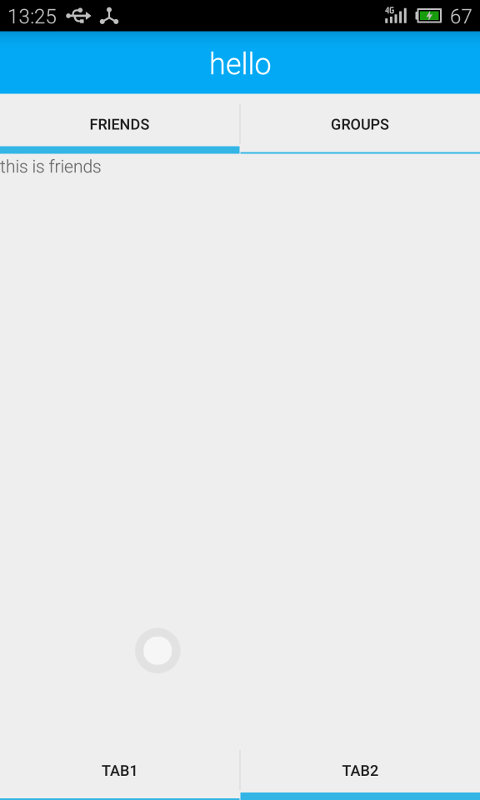
首先给出activity的layout:
<android.support.v4.app.FragmentTabHost xmlns:android="http://schemas.android.com/apk/res/android"

    xmlns:tools="http://schemas.android.com/tools"

    android:id="@android:id/tabhost"

    android:layout_width="match_parent"

    android:layout_height="match_parent"

    tools:context=".MainActivity">

    <LinearLayout

        android:layout_width="match_parent"

        android:layout_height="match_parent"

        android:orientation="vertical">

        <FrameLayout

            android:id="@android:id/tabcontent"

            android:layout_width="fill_parent"

            android:layout_height="0dp"

            android:layout_weight="1" />

        <TabWidget

            android:id="@android:id/tabs"

            android:layout_width="fill_parent"

            android:layout_height="wrap_content"

            android:layout_gravity="bottom" />

    </LinearLayout>

</android.support.v4.app.FragmentTabHost>
然后是main activity的代码:
package com.example.xxx.myapplication;

import android.os.Bundle;

import android.support.v4.app.FragmentActivity;

import android.support.v4.app.FragmentTabHost;

import android.view.Menu;

import android.view.MenuItem;

public class MainActivity extends FragmentActivity {

    private FragmentTabHost mTabHost;

    @Override

    protected void onCreate(Bundle savedInstanceState) {

        super.onCreate(savedInstanceState);

        setContentView(R.layout.activity_main);

        mTabHost = (FragmentTabHost) findViewById(android.R.id.tabhost);

        mTabHost.setup(this, getSupportFragmentManager(), android.R.id.tabcontent);

        mTabHost.addTab(mTabHost.newTabSpec("Tab1").setIndicator("TAB1", null), Fragment1.class, null);

        mTabHost.addTab(mTabHost.newTabSpec("Tab2").setIndicator("TAB2", null), Fragment2.class,

                null);

    }

}
我在Fragment2中嵌套两个fragment,这个layout比较重要,容易出问题的地方就是这里。
<?xml version="1.0" encoding="utf-8"?>

<android.support.v4.app.FragmentTabHost

    android:id="@android:id/tabhost"

    xmlns:android="http://schemas.android.com/apk/res/android"

    xmlns:tools="http://schemas.android.com/tools"

    android:layout_width="match_parent"

    android:layout_height="match_parent"

    tools:context=".MainActivity">

    <LinearLayout

        android:layout_width="match_parent"

        android:layout_height="match_parent"

        android:orientation="vertical">

        <TextView

            android:layout_width="match_parent"

            android:layout_height="50dp"

            android:background="@color/bg_color"

            android:textColor="@android:color/white"

            android:textSize="24sp"

            android:gravity="center_horizontal|center_vertical"

            android:text="hello"/>

        <TabWidget

            android:id="@android:id/tabs"

            android:layout_width="fill_parent"

            android:layout_height="wrap_content"

            android:layout_gravity="bottom"/>

        <FrameLayout

            android:id="@android:id/tabcontent"

            android:layout_width="fill_parent"

            android:layout_height="0dp"

            android:layout_weight="1"/>

    </LinearLayout>

</android.support.v4.app.FragmentTabHost>
fragment2的代码实现
public class Fragment2 extends Fragment {

    private FragmentTabHost tabHost;

    @Nullable

    @Override

    public View onCreateView(LayoutInflater inflater, ViewGroup container, Bundle savedInstanceState) {

        View view  = inflater.inflate(R.layout.fragment_test, null);

        tabHost = (FragmentTabHost) view.findViewById(android.R.id.tabhost);

        tabHost.setup(getActivity(),getChildFragmentManager(), android.R.id.tabcontent);

        tabHost.addTab(tabHost.newTabSpec("friends").setIndicator("friends", null), FriendsFragment

                .class, null);

        tabHost.addTab(tabHost.newTabSpec("groups").setIndicator("groups", null), GroupFragment

                        .class,

                null);

        tabHost.setCurrentTab(0);

        return view;

    }

}
Fragment嵌套Fragment实现的Tab导航的更多相关文章
- android fragment嵌套fragment出现的问题:no activity
package com.example.fragmentNavigation2.fragment; import android.content.Context; import android.os. ...
- Android 中关于Fragment嵌套Fragment的问题
转载请注明出处:http://www.cnblogs.com/Joanna-Yan/p/5802146.html 问题描述: 在项目中Activity A中嵌套Fragment B,Fragment ...
- Fragment 嵌套Fragment注意事项
最近项目新功能需要在垂直方方向可以循环滚动,并且水平方向也可以水平循环滚动,并且可以定位到指定item上.很自然的想到了ViewPager和 VerticalViewPager来解决项目需求,UI的大 ...
- Fragment嵌套Fragment时候。子类fragment调用父容器Fragment方法
业务场景:有的时候我们的页面可能是Activity 嵌套多个Fragment ..其中某个Fragment 又嵌套多个Fragment. 其中某个子Fragment 定义为 NewsFragmen ...
- Fragment嵌套Fragment时遇到的那些坑
由于项目要改成MVP模式,自然会用到了Fragment,有时候可能会需要一个Fragment里面嵌套多个Fragment,并且add完成后需要立即刷新子Fragment的View,那么这个时候就会抛出 ...
- 关于Fragment里面嵌套fragment
今天看到一篇好文章 https://www.2cto.com/kf/201609/545979.html 转载过来记录一下,往后需要的时候可以随时查看: 接下来进入正题: 动态fragment的使用 ...
- 浅谈Android Fragment嵌套使用存在的一些BUG以及解决方法
时间 2014-03-18 18:00:55 eoe博客 原文 http://my.eoe.cn/916054/archive/24053.html 主题 安卓开发 自从Android3.0引入了F ...
- Fragment嵌套
当我们从一个Activity启动了一个Fragment,然后在这个Fragment中又去实例化了一些子Fragment,在子Fragment中去有返回的启动了另外一个Activity,即通过start ...
- Fragment(一)--Fragment用法常见问题
fragment notes fragment相关内容包括 基本定义与使用 回退栈内部实现 fragment通信(与activity 与fragment) DialogFragment VP + Fr ...
随机推荐
- Instant Run 的操作影响到了代码,导致Android App启动闪退的问题
转自yuhc163原文android启动应用java.lang.NoClassDefFoundError: Class not found using the boot class loader; n ...
- IIS 日志
查看工具: Log Parser + Log Parser Studio http://www.microsoft.com/en-us/download/details.aspx?displaylan ...
- mac下更新自带的PHP版本到5.6或7.0
下载和安装PHP 5.6 打开终端并且运行如下命令: curl -s http://php-osx.liip.ch/install.sh | bash -s 5.6 然后,PHP 5.6的版本会被安装 ...
- Docker时间和宿主同步
通过date命令查看时间 查看主机时间 [root@localhost ~]# date 2016年 07月 27日 星期三 22:42:44 CST 查看容器时间 root@b43340ecf5ef ...
- openstack如何设置cpu和内存的超配比例
默认OpenStack的CPU超配比例是1:16,内存超配比例是1:1.5.下面配置的就是这个比例,你可以自己算一下,cat /proc/cpuinfo里面的逻辑核数,再x16就是你能够分配给虚拟机的 ...
- WebGL可视化地球和地图引擎:Cesium.js
http://www.open-open.com/lib/view/open1427341416418.html Cesium 是一个JavaScript 库用于在Web浏览器创建 3D 地球和 ...
- hdu3415 Max Sum of Max-K-sub-sequence 单调队列
//hdu3415 Max Sum of Max-K-sub-sequence //单调队列 //首先想到了预处理出前缀和利用s[i] - s[j]表示(j,i]段的和 //之后的问题就转换成了求一个 ...
- SpringBoot学习小结
基于Spring,简化Spring应用开发的框架,整个Spring技术栈的大整合,J2EE开发的一站式解决方案 优点: 快速创建独立运行的Spring项目以及集成主流框架 使用嵌入式的Servlet容 ...
- 在 .NET 4.0 下编写扩展代码以支持 async 异步编程
微软在C# 5中引入了async.await这两个异步编程的关键字,要使用这两个关键字需要你的IDE支持C#5.0语法,也就意味着你需要使用VS 2012版本以上IDE,或者在Vs2010卸载其编译器 ...
- Apache Rewrite 规则详解
在开篇之前: 我想说这篇文章其实是我刚刚接触Rewrite的时候学习的文档,应属转载,但是在这里我不想写明原地址,原因是文章中大多数给出的配置命令经实验都是错误的.需要原文的可以在谷歌上搜索一下&qu ...