
[Eclipse]--Error:The superclass "javax.servlet.http.HttpServlet" was not found on the Java Build Path.
一段时间没用eclipse后,再去打开以前的项目,发现一打开前线标红。查看错误的时候,如下图所示:

Error:The superclass "javax.servlet.http.HttpServlet" was not found on the Java Build Path
原来是“在Java构建路径上没有找到超'javax servlet .http.httpservlet'”
所以直接在原来报错的①项目右键>>Build Path>>Configure Build Path,进行项目的配置生成路径。如图:

②Add Library---->>Server Runtime (配置要运行的服务器)
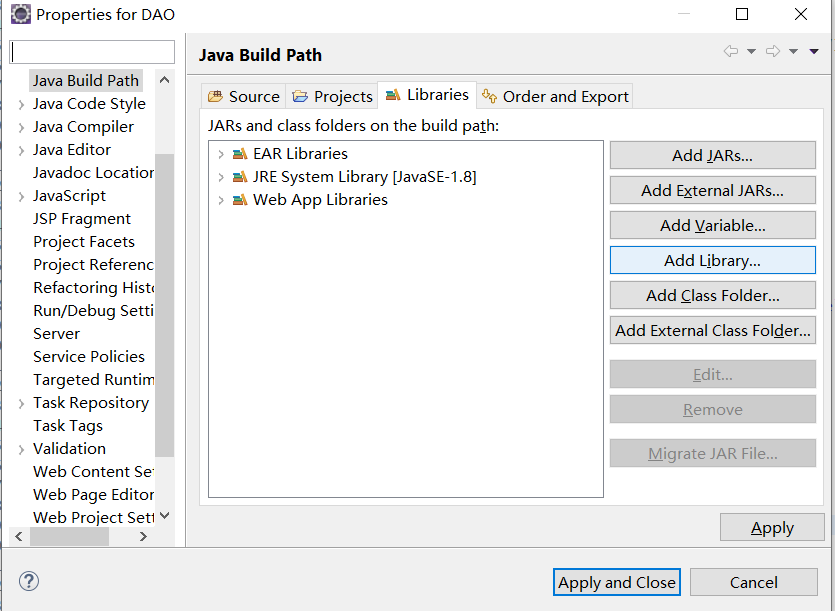
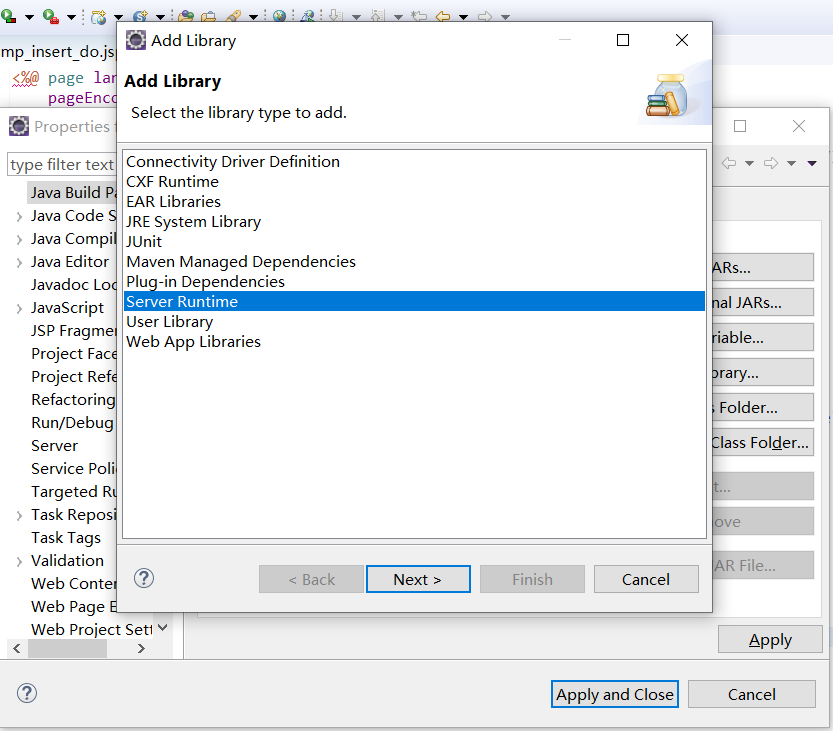

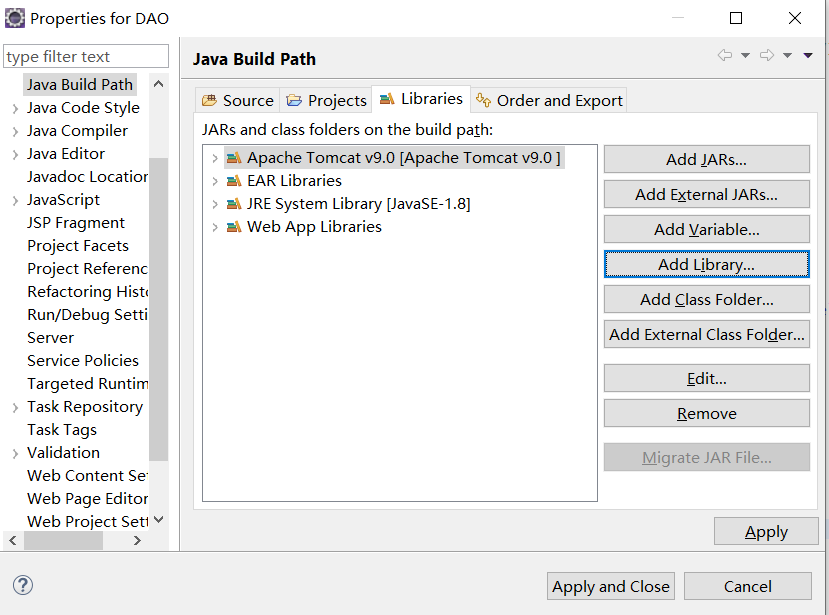
酱紫,就完成了项目部署了你要运行的服务器!但还没有解决问题!
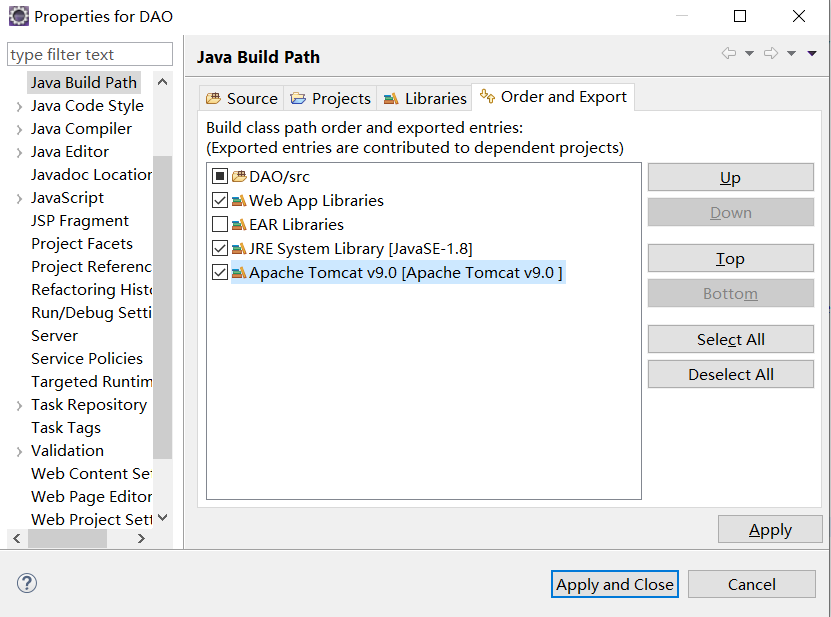
你还得需要③部署JRE(Java Runtime Environment)运行环境和一些相关的lib.。。。最后Apply and Close就行了。如图:
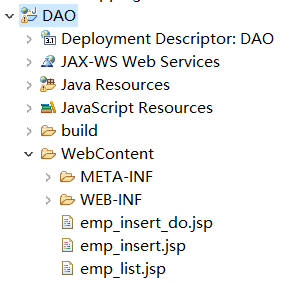
这样就解决了那些红彤彤的Error!
[Eclipse]--Error:The superclass "javax.servlet.http.HttpServlet" was not found on the Java Build Path.的更多相关文章
- java eclipse maven The superclass "javax.servlet.http.HttpServlet" was not found on the Java Build Path 解决方法
在eclipse 中使用maven 创建java web项目,启动服务器遇到提示:The superclass "javax.servlet.http.HttpServlet" w ...
- Eclipse:The superclass javax.servlet.http.HttpServlet was not found on the Java Build Path
我们在用Eclipse进行Java web开发时,可能会出现这样的错误:The superclass javax.servlet.http.HttpServlet was not found on t ...
- ubuntu下eclipse遇到The superclass "javax.servlet.http.HttpServlet" was not found on the Java Build Path
JSP页面顶端出现“红色”的报错信息:The superclass "javax.servlet.http.HttpServlet" was not found on the Ja ...
- java开发eclipse常见问题(一)The superclass "javax.servlet.http.HttpServlet" was not found on the Java Build Path
最近刚开始用Eclipse开发,刚开始都是按教程一步一步的新建web工程也没出现什么问题. 今天选了一个新的workspace,建了个web工程发现最简单的jsp页面都报错:The superclas ...
- eclipse:报错信息The superclass "javax.servlet.http.HttpServlet" was not found on the Java Build Path
JavaWeb: 报错信息The superclass "javax.servlet.http.HttpServlet" was not found on the Java Bui ...
- 新建maven指定jdk版本-eclipse新建maven项目报错The superclass "javax.servlet.http.HttpServlet" was not found on the Java Build Path的解决方案
具体表现为: 使用Eclipse+Maven建立了一个Javaweb工程,JSP页面顶端出现“红色”的报错信息:The superclass "javax.servlet.http.Http ...
- eclipse:报错信息The superclass “javax.servlet.http.HttpServlet” was not found on the Java Build Path
JavaWeb: 报错信息The superclass "javax.servlet.http.HttpServlet" was not found on the Java Bui ...
- eclipse中web工程新建jsp文件报错:The superclass "javax.servlet.http.HttpServlet" was not found on the Java Build Path
web工程中新建jsp文件提示:The superclass "javax.servlet.http.HttpServlet" was not found on the Java ...
- Eclipse导入JavaWeb项目报错:The superclass "javax.servlet.http.HttpServlet" was not found on the Java Build Path
JavaWeb项目中写的JSP页面需要Web容器解析处理成HTML才能展示到前端浏览器,解析JSP需要Web容器.JSP页面顶端出现“红色”的报错信息:The superclass "jav ...
随机推荐
- spring中@PropertySource注解的使用
概述: The @PropertySource annotation provides a convenient and declarative mechanism for adding aPrope ...
- 用实例工厂的方法实例化bean
在实例化bean时,除了setter,constructor方法外,还有实例工厂方法,和静态工厂方法. 看代码: People类的代码如下: package com.timo.domain; publ ...
- 上传代码到github上
初始化 git init 添加远程仓库 git remote add origin[仓库名] 仓库地址 添加文件 git add . 本地提交 git commit -m 'message' 拉去远程 ...
- 自旋锁spin_lock和raw_spin_lock【转】
转自:http://blog.csdn.net/droidphone/article/details/7395983 版权声明:本文为博主原创文章,未经博主允许不得转载. 目录(?)[-] 临界区Cr ...
- ubuntu16.04搭建个人简易DLP
前言 最近一朋友让我帮忙搭建一台服务器,用做公司的服务器,但是该服务器需要满足一些安全要求,于是乎就有了下面的解决过程^_^ 需求 期望普通用户和管理员都能ssh登陆服务器,但禁止scp或者其他方式下 ...
- Basic-Paxos协议日志同步应用
使用Basic-Paxos协议的日志同步与恢复 传统数据库保持服务持续可用通常采用1主N备, 既采取两种日志同步模式: Maximum Availability和Maximum Protection. ...
- python 微博评论获取的时候日期格式化
# -*- coding: utf-8 -*- # @Time : 2018/03/05 10:57 # @Author : cxa # @File : testDataTime.py # @Soft ...
- golang中的反射
反射操作普通变量 package main import ( "fmt" "reflect" ) func main(){ a := 1 //reflect.T ...
- Mark : Bootstrap fileInput控制预览页面上传、删除、详情按钮
Bootstrap fileInput默认预览上传效果: 而我们可能想要的结果是: 这时候可以通过初始参数layoutTemplates来控制:
- 《Java编程思想》笔记 第十七章 容器深入研究
1 容器分类 容器分为Collection集合类,和Map键值对类2种 使用最多的就是第三层的容器类,其实在第三层之上还有一层Abstract 抽象类,如果要实现自己的集合类,可以继承Abstract ...